Gdevelop: 144Hz monitor : serious issues with preview and exported games
Describe the bug
Recently, i upgraded my PC with a new GPU Radeon VEGA 56. With this new GPU, i started to experience some troubles, wich are now partially solved since a new driver came out (19.3.3). No more BSOD :) But sometimes visual at glitchs at 60Hz ( black line and fps drop), only in preview mode.
To have full benefits of my new GPU, i decided to bought a new 144Hz freesync monitor : model is AOC C27G1. The monitor and the 144Hz are really enjoyable (and true, since you tried 144hz for few hours, hard to imagine rolling back to 60hz : everything is so smooth)... Then i opened Gdevelop (entertainment : OFF, let's get back to work) :
Both in preview and exported games (windows exe), my games (or examples) are totally "broken", everything is speeded up (animation, forces, physics, etc.). Looking at the fps counter (ToString(round(1/TimeDelta()))), my games are running at 144fps (instead of "normal" 60fps frame limit). I suspect Gdevelop is applying a vertical sync wich could overide the 60 fps limit ?
Having 144fps is great, but the fact is, in development or in "finished product", it's a total mess with GD5 games.
I have a work around on my own : i just disable 144hz and set the monitor to 60Hz, but in the case of a commercial product made with Gdevelop, this might be an issue for 144Hz monitor owners.
i've tried several things : disabling some options in Adrenalin (the AMD Radeon driver), disabling freesync, create a profile wich disable the 144hz for Gdevelop or exported game, but none of this had an effect.
If there is a limitation on preview mode, i have no problem to switch my setup to 60Hz to work with Gdevelop, but exported game should work without difference on any refresh rate for exported games. If it's hard coded, then at least we should have some options like in GD4 so set a framelimit in the project options, and some actions to change this settings, allow th user to select the proper refresh rate wanted in an ingame UI.
I tested my old GD4 (native) projects : no issue, game run smooth, no change in the speed of the game.
To Reproduce
Steps to reproduce the behavior:
- Buy a 144hz monitor
- try Gdevelop !
Other details
Windows 10 - Amd Vega 56 - AOC c27g1 monitor
 KinkGD
All 36 comments
I absolutely confirm this problem, my secondary PC has a 72Hz monitor and when previewing my projects there they have completely unworking physics and behaviours, since they're running at 72 fps instead of 60. It's a trouble definitely tied to the monitor resfresh rate
 MercurioC
on 30 Mar 2019
MercurioC
on 30 Mar 2019
The game loop is being run here:
This is using requestAnimationFrame, which give responsibility to the browser to call the game loop every 60/72/144 frames per second, with the appropriate time which is used to compute the "time delta", the time passed since the previous frame.
This time is then used everywhere in the game engine to make the game independent of the framerate.
As you're reporting this, it seems that the browser might be "lying" about the current time.
A solution would be to switch to performance.now (or Date.now if performance.now is not available - but performance.now should really be used in priority) to be sure to have a timing that is not faked by the browser..
 4ian
on 1 Apr 2019
4ian
on 1 Apr 2019
This time is then used everywhere in the game engine to make the game independent of the framerate.
As you're reporting this, it seems that the browser might be "lying" about the current time.A solution would be to switch to
performance.now(orDate.nowifperformance.nowis not available - butperformance.nowshould really be used in priority) to be sure to have a timing that is not faked by the browser..
@4ian i' would be really happy to help on this since i'm very concerned by the issue, but unfortunately, your explanations are out of my skills.
I can't find what do you refer to with "performance.now" or "date.now", i find nothing about this on gdevelop repo or in pixi.js documentation.
KinkGD
on 1 Apr 2019
 zatsme
on 1 Apr 2019
zatsme
on 1 Apr 2019
@zatsme Thanks, i've learned something :) But this is still out of skills to handle.
KinkGD
on 1 Apr 2019
I've made a try at a fix here: https://github.com/4ian/GDevelop/commit/18a99c664be386349ca13498f1e6f0b9693e4cb3
@KinkGD Would you be able to get latest version from the repository and try with it?
4ian
on 1 Apr 2019
@4ian ! i'd like to, i was also about to take a look on issue #978 but unfortunately i get error on npm start command. I get errors about "babel-loader". I posted the full error message on discord staff channel.
KinkGD
on 1 Apr 2019
@KinkGD I've compiled on my W10, you can try
https://send.firefox.com/download/04525525e662677f/#BxWBh0Vf0HnqLIQWA8OW_g
 Bouh
on 1 Apr 2019
Bouh
on 1 Apr 2019
@4ian Unfortunately, i've tried the compiled version thaht Bouh provided, the issue is still here.
KinkGD
on 1 Apr 2019
@4ian Bouh helped me investigating the issue, most of the html5 games i've tried have the same issue. But we found some webgl example who runs like a charm on three.js : https://threejs.org/examples/#webgl_animation_skinning_blending
On this example, on my left screen (60Hz), the fps counter is 60fps, on my right screen5(144hz), the fps counter is 144 => BUT : animation have constant timing, there is no acceleration on 144hz, just more fps.
KinkGD
on 1 Apr 2019
I'm very surprised because the Three engine is using getDelta on a class THREE.Clock, and the source looks almost exactly the same as GD:
So not sure how to fix this..
4ian
on 1 Apr 2019
Gd use WEBGL ?
Bouh
on 1 Apr 2019
It's using Pixi which is using WebGL. But this is a problem of timing, that should not have any relation to the rendering engine.
4ian
on 1 Apr 2019
Maybe this docs / explain can help ?
I don't understand very well, but it's look interesting
https://isaacsukin.com/news/2015/01/detailed-explanation-javascript-game-loops-and-timing
Bouh
on 1 Apr 2019
Explanations are interesting, but nothing related to issues with monitor with higher refresh rates. Most of what is explained is more or less already in GD :/
4ian
on 2 Apr 2019
Starting to wonder if it's a browser issue. Can you try exported games with latest Chrome and Firefox?
4ian
on 2 Apr 2019
Is this relevant?
zatsme
on 2 Apr 2019
Starting to wonder if it's a browser issue. Can you try exported games with latest Chrome and Firefox?
Nothing more...
EDIT : @4ian strange but on Edge, it's "the less worst" situation : fps are lock to 72/73 (v-sync ? half of 144hz), so the game are playable... Still an issue then, but it's really weird.
EDIT2 : More (with gd5 b70, not the build by bouh) test, in fact 144hz provides even more trouble on Gdevelop and browsers :
- Both Firefox/Chrome 144Hz : i have a dialog system in my game, it's trigger normally on some interaction within the game, but the values of varialbes containg the texts aren't read and return 0 !
- Both Firefox/Chrome, 60Hz : Dialog system works perfectly, variables for dialog nodes are called and display as there are supposed to do.
- Edge 144Hz ("capped" to 72fps) : dialog system works perfectly.
144Hz not only disturbes the speed of everything, it seems to have an impact on variable access.
@4ian is it possible to just have a frame limiter maybe ? In GD4 (native at least), we were able to fix minimum adn maximum FPS in project preperties :
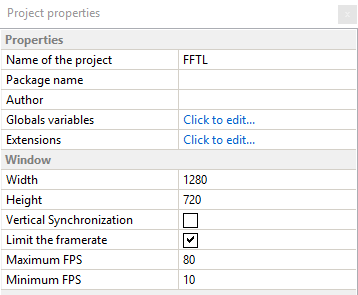
KinkGD
on 2 Apr 2019
I never encountered this problem. I have two screens on my computer, one refreshing at 144Hz and another at 60Hz. When I move the game window from a monitor to another, the fps fits the screen refreshing speed and my game run the exactly same at 144fps and 60fps.
I tested it on native game (windows exe), html5 game (chrome v73) and GDevelop preview.
Everytime you add a movement to an object (with physic engine or object movement), you must multiply the force you are applying by the scene TimeDelta(). If you don't do that you're movements speed will be different for each fps you have.
 timotheeficat
on 3 Apr 2019
timotheeficat
on 3 Apr 2019
When I move the game window from a monitor to another, the fps fits the screen refreshing speed and my game run the exactly same at 144fps and 60fps.
=> same behavior : the fps change to fit the vertical refresh rate when moving form one screen to another, unless game speed is 2.4x faster with normal usage of Gdevelop. A force of 1000px per second is transformed into 2400px/s.
Everytime you add a movement to an object (with physic engine or object movement), you must multiply the force you are applying by the scene TimeDelta(). If you don't do that you're movements speed will be different for each fps you have.
=> So you mean don't have any issue because from the start you use a kind of workaround (by multiplying *TimeDelta() any force values ?) Not sure to understand, an example would be helpful (especially on instant/permanent force movement).
KinkGD
on 3 Apr 2019
Forces are already using TimeDelta inside the game engine.
TimeDelta is only needed when you're doing movement/continuous update to variables by yourself. See the last section here: http://wiki.compilgames.net/doku.php/gdevelop5/tutorials/basic-game-making-concepts
4ian
on 3 Apr 2019
Well, for my example, I have a spaceship which will thrust forward if the up key is pressed. But, at each frame you test if the up key is pressed and add a force to the spaceship. So, if your game is 60fps fast, you will add 60 times the force per second, and so on with 144fps. To prevent this I multiply the force I had with TimeDelta().
TimeDelta is only needed when you're doing movement/continuous update to variables by yourself
4ian is right as in this case I add a force at each frame so I'm forced to use the TimeDelta(). You don't have to use it for instant movement application like a jump or other impulses. But for a continious application of forces you must use it.
timotheeficat
on 3 Apr 2019
@timotheeficat i've tried your workaround, and it works at some point on force for example :
with an initial permanent force of 20px, i use the formula "20TimeDelta()60", the 144Hz display a smooth animation like designed in 60Hz (in preview, i dont know why, i get 72/73 fps on the 60Hz monitor today!). But this not perfect, and it might work only with permanent force. All my other animations are like crazy: I'm using lot Scale on X and Y Axis to simulate depth, a lot of fading in/out animation on opacity, color changing on some text (or blend/gloabl color of sprites) on each RGB color...
And not mentioning i use (and abuse) of particles emitters with lot of properties change : it's probably the biggest mess on properties value change (increment/decrement on each frame).
I have taken a look at this issue over the web in some games and other game development softwares :
- In games, almost every topics i've found provides workaround to limit frames to 60fps max on 144hz monitors.
- In the GameMaker 2 forums and reddit, i've found some mention for this issue related to V-Sync.. Not sure if it's usefull, but i've found this in documentation : https://docs2.yoyogames.com/source/_build/3_scripting/4_gml_reference/cameras%20and%20display/display/display_set_timing_method.html ; they talk about using specific timing method on Html5 render
- (interesting) In RPGMaker : https://forums.rpgmakerweb.com/index.php?threads/tips-and-tricks-tutorial-ver.97011/ i quote :
> My game runs at 120FPS! (Works only in RMMV 1.6.1) Go and open your project folder/package.json
Make it look like this:
{
    "name": "",
    "main": "index.html",
    "js-flags": "--expose-gc ",
    "window": {
        "title": "",
        "toolbar": false,
        "width": 816,
        "height": 624,
        "icon": "icon/icon.png"
    },
    "chromium-args": "--limit-fps=60"
}
@4ian, does this _"chromium-args": "--limit-fps=60"_ can be used for electron builds for windows/linux/mac packaged games ?
Is it possible to have a global "limit framerate" option like in GD4 native platforms ?
KinkGD
on 3 Apr 2019
So, if your game is 60fps fast, you will add 60 times the force per second, and so on with 144fps. To prevent this I multiply the force I had with TimeDelta().
If you're using an instant force, you should not need this hack.
Instant force are already multiplied by TimeDelta. If you're adding continuously permanent force, that's probably a bad idea because your object will end up with hundreds of forces, reducing a lot performance.
Can you try this game?
Archive.zip
The two objects should leave the screen after 4 seconds. If not, either:
- GDevelop is bugged
- The browser is bugged
- The monitor/graphics card is bugged (for example, it reports 60 frame per seconds to the browser while it's running at 144)
- The driver is bugged (for example, same, it reports 60 frame per seconds to the browser while it's running at 144)
on properties value change (increment/decrement on each frame).
If you're doing this without using TimeDelta, your game will indeed be depend on framerate which is dangerous.
4ian
on 3 Apr 2019
The two objects leave the screen after 4 seconds, on both screen, in previews, and in browsers (firefox/chrome + adaptative view 800x600).
KinkGD
on 4 Apr 2019
Nice! 😄
So this means that there is no bug in GDevelop nor in the browser.
But this means that you've made your game events in a way that they are dependent on the speed at which events are executed.
So sure you could limit the framerate. We could also run the events at 60 frame per seconds and allow the rendering to be faster. And/or add an option in GDevelop to limit the framerate if it's going too fast.
But it's still a good idea for you to go through you game and check events, and change them to stop being dependent on the number of times they are launched. Instead of doing:
(no conditions) Do +5 to the variable Life
do:
(no conditions) Do +100*TimeDelta() to the varaible Life
Think to TimeDelta() as "per second". 100*TimeDelta() means 100 unit per seconds.
4ian
on 4 Apr 2019
Ok, i have no problem with that, it's an "all terrain" solution.
But i'm sure it's not really friendly then for users in coding less app, and a bit out of gd philosophy ? I mean i use GD for 5 years now, i'm used to manipulate some values with TimeDelta(), but i've never had to take in count this "side effect" of high refresh rates. And 'im not the only one, if you take a look on examples provided with Gdevelop, almost every values are manipulated with integer, not with TimeDelta() multipliers.
i always coded lot of stuffs with basic values (depending on number of time they are played). On GD4, there was a frame limiter, so right now if i open my old GD4 project, they work exactly the same than when i created them in the past, 60Hz or 144Hz.
Since i use GD5, i always was on 60Hz displays for computers, and android export target 60fps so.. Never had to take in count on my side the fact that events can be launched more than 60 times per second.
i'll correct my current projects in the way you showed to me :) Thanks, but it will be a lot of work, and i think this "behavior" in the render will annoy (or worst) a lot of uninformed users.
KinkGD
on 4 Apr 2019
It's true that some examples might contain bad usage of this. And that this concept might also be hard to grasp if you're not used to this.
I can add some logic/option to cap framerate so that it's safer for beginners.
4ian
on 4 Apr 2019
Well I said "beginners" in the last message but don't feel offended, it will also be useful for seasoned GDevelop users ;)
So the way it's gonna work is that:
- There was already a maximum FPS (conveniently put at 60 fps by default) setting in GD4, in still in GD5 but not shown/used. I'll add it back to the interface.
- The browser will still continue to refresh the game at a rate of 60/72/144 fps according to the refresh rate, but the game logic and rendering will be capped to the maximum number of FPS.
- If the game is too resource intensive and can't run at 60fps, it will run with less FPS, but if coded properly it should still run at normal speed.
- I might also add later a setting to have a "fixed timedelta" (which mean that both the maximum and minimum number of FPS will be exactly 60). Might be interesting for games where it's important that events are executed exactly 60 frame per second (and not less) (which is possible currently if the computer slow down).
- If the game is too resource intensive and can't run at 60fps, the player will see it "slowing down".
4ian
on 4 Apr 2019
Don't worry, i'm not offended :) i think what you propose is perfect, it's flexible.
It is not a gdevelop bug but a misunderstanding of how works higher refresh rate "environement" for me, and for the first time i discover a bit of the game loop and logic. I really was thinking gd5 was capped on game logic to max 60 event launch/sec.
This remind me few month ago bethesda had the same issue on their fallout 76, and even on all their previous games, and lot of people were calling them "noob game developpers" :grinning:. You can't anticipe and take care of that issue unless you are facing it.
KinkGD
on 4 Apr 2019
I've added minimum/maximum FPS handling to next version.
https://github.com/4ian/GDevelop/commit/b7b94a18fb5bd986dd1d00618052e7ed468fb3d5
Note that by default games have:
- 20 as the minimum number of FPS. It's useful so that if there is a slow down in the number of FPS, then the game is also slowed down but have a guarantee of 20 fps, to avoid weird behaviors (bullet missing obstacles, etc...) which could happen if the number of FPS was really too low (meaning that the time between two frame would be high).
- 60 as the maximum number of FPS but, as the way this is enforced is by skipping frames if things are too fast, there is a safety margin of 7 fps. This means that if my monitor is ~60 fps and my computer is able to render them, I'll get a framerate of ~60fps. This can be slightly more or less, for example 62 fps. In this case, I don't want to skip a frame, otherwise this means that I'll have to wait for the next frame to render, and then because the next one will be too fast (less than 16ms), then it will be skipped again. So in short, the game will be rendered at 30 fps.
For a 144 fps monitor, capping at 60 is fine, because the monitor is able to render twice the frames (60). I'm not sure about 72, but the result won't be pretty I think. Better use a 60 fps monitor or something that is more than the double, (i.e: 144), otherwise you'll get lots of frame skipped to have the game stay at ~60.
The other solution is: remove the maximum number of FPS (you'll be able to do it in GDevelop by setting 0 as the maximum FPS number) and be sure that you're game can adapt to more frames per second ;)
4ian
on 7 Apr 2019
@4ian , if you have time a bit of time for some explanations... I'm making some test with Physic 2 engine (wich is a big part in my "space" game project), and i encounter weird (or unespected!) behaviors, since i'm trying to avoid to be framerate dependant.
In your example using basic forces, i agree that moving an object with a force and a constant value take the same amount of time on both 60 and 144hz, but it seems to be different with Physic engine 2.0.
Does the Physic engine 2.0 works (or is supposed to) like common forces : based on timedelta in the game engine itself ?
Here is a gif of the little test protocol i used :

And here is the project i used to test and record the values below: archive.zip
Here are the values i recorded on both 60 and 144Hz :
Action "apply polar force":

- On 60Hz, it takes 2.91 seconds for the two objects to collide.
- On 144Hz, it takes 1.93 seconds for the two objects to collide.
Action "apply polar impulse":

- On 60Hz, it takes 0.46 seconds for the two objects to collide.
- On 144Hz, it takes 0.40 seconds for the two objects to collide.
Action "apply impulse":

- On 60Hz, it takes 0.44 seconds for the two objects to collide.
- On 144Hz, it takes 0.38 seconds for the two objects to collide.
Action "apply force":

- On 60Hz, it takes 2.89 seconds for the two objects to collide.
- On 144Hz, it takes 2.00 seconds for the two objects to collide.
The action "apply polar force" is the action i used in my "space" game for object movement, and switching from 60hz to 144hz is painful : that's what i reported in my first post on this topic, all objects moved with polar forces are like crazy, and my little test here shows it : for the same setting (a force of "1"), we have 2.91sec vs 1.93sec from 144 to 60hz.
KinkGD
on 10 Apr 2019
My first guess is that impulse is changing the velocity of the object immediately (think like you're hitting the object so hard, it start immediately) so changes are fairly small, while forces are depend on the number of times they are applied on the object.
Have to confirm this.
4ian
on 11 Apr 2019
@4ian i'm only testing the new feature to limit frames. What i'm noticing :
At project opening, by default, values are 10 for minimum fps and 60 for maximum fps. A disclaimer shows that the minimum value should never be less than 20... So maybe the minimum fps should be always 20 ? If user don't take care, they could experience the trouble listed in the disclaimer.
I've put the limit of minimum 20 and maximum 60 fps : on 144hz display, the game runs at 48fps, wich make the game a bit "laggy", and even slow on physics objects. There is really something weird with physic engine 2.0 and 144hz.
I've tested different limit:
- from 60 to 65 fps limit : the game runs at 48 fps
- if i set the max limit to 66fps or more : 72 fps
In both case, it's weird, it's too slow or too fast for physic based movements, and i can't find a "good" value to force 60fps (+2 or -2), and it's only my computer, i suppose it might be different on every computer?
The only workaround remains outside Gdevelop, by setting the display at 60hz on windows panel.... So maybe:
- framelimit isn't the best solution
- physic engine 2.0 is weird, with or without framelimit on 144hz
I really don't know what to do... Even if forces are ok on both refresh rates, some interactions, even with TimeDelta() steps (instead of integer), are also impacted like is physic engine...
Any ideas, from Gdevelop users perspective, or players settings ?
KinkGD
on 24 Apr 2019
So seems that we won't be able to fix FPS to a precise value in any case.
Have you tried using impulse instead of forces? The key is making sure the physics forces are not added continuously, that would make them dependent on the framerate. Impulse are instant and should be able to be applied continously?
4ian
on 7 May 2019
I'm obtaining "good" results with impulses, i have to test forward, but using a formula _length*TimeDelta()_ seems to make the same speed of movement similar on both 144hz and 60hz.. The only limitation is that it doesn't support "high value" for length.
I tested with my example posted previously and mesured the time before the two objects collides:
Formula 30*TimeDelta():
- On 60Hz, it takes 0.4999 seconds for the two objects to collide.
- On 144Hz, it takes 0.4958 seconds for the two objects to collide.
Formula 300*TimeDelta():
- On 60Hz, it takes 0.18 seconds for the two objects to collide.
- On 144Hz, object considered like a bullet: it takes 0.16 seconds ; but if the physic property "bullet" isn't checked, the objects don't collide at all, the collision is skipped.
KinkGD
on 12 May 2019
Related issues
 BWPanda
·
4Comments
BWPanda
·
4Comments
 blurymind
·
5Comments
blurymind
·
5Comments
 Wend1go
·
3Comments
Wend1go
·
5Comments
Wend1go
·
3Comments
Wend1go
·
5Comments
 PascalLadalle
·
3Comments
PascalLadalle
·
3Comments
Most helpful comment
I've added minimum/maximum FPS handling to next version.
https://github.com/4ian/GDevelop/commit/b7b94a18fb5bd986dd1d00618052e7ed468fb3d5
Note that by default games have:
For a 144 fps monitor, capping at 60 is fine, because the monitor is able to render twice the frames (60). I'm not sure about 72, but the result won't be pretty I think. Better use a 60 fps monitor or something that is more than the double, (i.e: 144), otherwise you'll get lots of frame skipped to have the game stay at ~60.
The other solution is: remove the maximum number of FPS (you'll be able to do it in GDevelop by setting 0 as the maximum FPS number) and be sure that you're game can adapt to more frames per second ;)