Gdevelop: Subtraction being treated as addition when using 2 functions/variables in a "Create Object" event X/Y position field.
Describe the bug
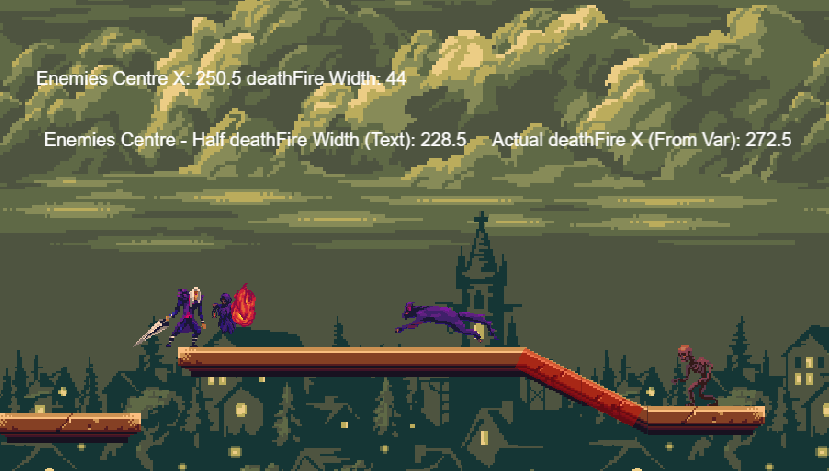
When using the "Create Object" event, if I do something like Object.PointX("Centre") - (Object2.Width()/2), it treats it like addition, instead of subtraction.
To Reproduce
e.g. Object 1 has a Center ("Centre") X point at 250 x. Object 2 has a width of 44.
Create a new event.
Set some kind of condition.
Add the "Create Object" event.
Select Object2 as the object you want to create.
Set the X to: (Object1.PointX("Centre")) - (Object2.Width()/2)
Save the event.
Preview the game.
With the numbers above, the correct position should be 228. (250-22)
Object 2 will instead be created at 272 (250+22)
This behavior does not seem to occur by putting the exact same formula into a text variable or any other event. This also does not occur if I manually type the number.
e.g. Changing the X position to the below works fine:
(Object1.PointX("Centre")) - 22
Please include a link to a game if possible!
CastlePlat.zipIf applicable, add screenshots to help explain your problem.

Other details
Windows 10 64 Bit
Chrome
I've also tried making the formula (0-seconditem) and (Second item *-1) but those don't work either.
 Silver-Streak
All 17 comments
It would be a lot easier if you made a very small example instead of lots of code 😄 Also most of the GFX are missing.
However, I tried to reproduce:-

It appears to be working fine!
I must be missing something 🤔
 zatsme
on 4 Mar 2019
zatsme
on 4 Mar 2019
Thanks @zatsme for checking :) @Silver-Streak try to progressively reduce your example to see what could be wrong :)
 4ian
on 4 Mar 2019
4ian
on 4 Mar 2019
@zatsme @4ian
Thanks for the input. I'll try to get a new project made that can separately confirm the issue later today.
As a test, I real quickly launched the web instance of GD5: https://editor.gdevelop-app.com/ and launched a new project with the platformer example. I'm able to reproduce this issue here.
- I accessed the events tab, then opened the "Object Management" external event link.
- Within the "The Opacity of Coin = 0" condition/event, I added an event _above_ the Delete object "Create Object Cloud at position "Coin.PointX("Centre") - (Cloud.Width()/2)";"Coin.PointY("Centre") - (Cloud.Height()/2)"".

- I preview the platformer and jump on a coin. The cloud is spawned as if it the numbers were additive, instead of subtracted.


Silver-Streak
on 4 Mar 2019
At work right now so guessing... You're not getting origin (defaults to top left of sprite) and center mixed up here? Objects spawn at the origin, not centre?
zatsme
on 4 Mar 2019
@zatsme
Thanks for the check. I was worried about that originally, but that is why the X/Y coordinates are set to spawn at the first object's Center PointX/PointY, then subtract 1/2 the width/height for x/y to get the center of the new object..
Instead of subtracting 1/2 the width/height, it's acting like it is adding 1/2 the width/height.
Silver-Streak
on 4 Mar 2019
I'm so not getting this, just did exactly the same to the platformer and it's working correctly to me, spawning where you ask it to..... 🤔
Where would you expect the cloud to spawn if not where it does?
zatsme
on 4 Mar 2019
I just noticed one thing... in your code snippets above you are using "Centre" as the point, unless you have created this yourself the spelling is wrong, GD5 uses "Center" for the spelling.... So this might be skewing your results?
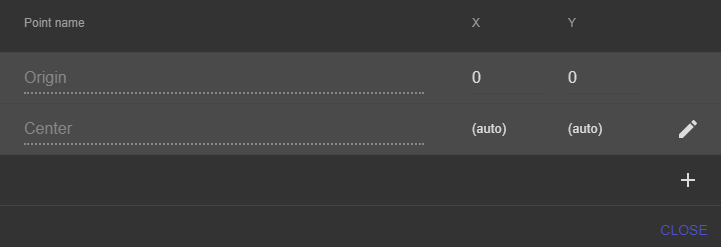
I believe we should change the default point to be "Centre" as this is the correct English/French spelling, "Center" is American...
zatsme
on 4 Mar 2019
@zatsme
For the Center/Centre thing: This is actually a different bug I reported in the other translation thread. Center doesn't actually work right, Centre does.
So, in the platformer demo:
The coin is 36 wide by 36 tall, so the center would be 18 pixels in from each side.
The cloud is 128 wide by 71 tall, so the center would be 64 pixels from the sides, and 35.5 from the top or bottom.
The platformer demo has the first coin at 210x 420y. The center x/y should be 228x 438y.
The code I mention above/have in screenshots _should_ make the cloud's spawned center (1/2 height, 1/2 width) _also_ be created at 228x 438y, so the X/Y Origin should be 164x 402.5y.
You can test this by creating a cloud and putting it at that coordinates (164x402.5y) and it will be exactly in the center of the Coin.
The spawned cloud will be much more to the right.
Silver-Streak
on 4 Mar 2019
ok, now I think I got it 😄
In your example....
Create a new event.
Set some kind of condition.
Add the "Create Object" event.
Select Object2 as the object you want to create.
Set the X to: (Object1.PointX("Centre")) - (Object2.Width()/2)
Save the event.
Preview the game.
So... Object 2 is to be created, but does not exist before creation, so how would GD work out it's width when it doesn't exist?!
zatsme
on 4 Mar 2019
@zatsme So I would think that too, except when I was testing in my demo it was able to properly update the Text object even if I don't have the create in there.
If this is by design, do you know of a better way to do this?
Silver-Streak
on 4 Mar 2019
Confirmed by adding a pick for the cloud!

Obviously this will not work in your game if another object doesn't already exist, although you could spawn one offscreen for this purpose 🤔
zatsme
on 4 Mar 2019
Why don't you just move the origin of deathfire to the centre point?
zatsme
on 4 Mar 2019
Would it move fast enough to not look like it's moving to the player? or would it appear to flash?
Better question: Is there a way to pull the main object width/height even if there isn't an instance in the scene?
Silver-Streak
on 4 Mar 2019
From your original post you seem to want to spawn a deathfire to appear at the exact middle of the enemy?
If this is the case then set the deathfire origin to be the center of it's sprite and spawn at the center point of the enemy (which does exist)... or do I still not get it 🤣
zatsme
on 4 Mar 2019
@zatsme No wait, that makes sense.
You're saying update the deathfire "Origin" point on the object to be the exact same values as the center of the sprite? That could totally work.
I guess my question: Should what I'm expecting to work actually work? If not, your solution would absolutely fix this for me.
Silver-Streak
on 4 Mar 2019
As I said above, if an instance does not exist then it appears to have no width or height, so what you were doing will not work, this way is one solution and probably the easiest to implement 😄
zatsme
on 4 Mar 2019
Thanks @zatsme ! That helps tremendously. I appreciate your time on this.
Silver-Streak
on 4 Mar 2019
Related issues
Silver-Streak
·
4Comments
 KinkGD
·
5Comments
KinkGD
·
5Comments
 Bouh
·
3Comments
Bouh
·
3Comments
 RyanNerd
·
4Comments
RyanNerd
·
4Comments
 Phenomena3
·
5Comments
Phenomena3
·
5Comments