Gdevelop: Offset tiled sprites become extremely pixelated and drop in frames over time.
Describe the bug
Tiled sprites that are offset to appear like they're moving become pixelated only after minutes, this doesn't occur in the preview, but happens on mobile exports and WiFi preview.
Here's a video showcasing the issue https://streamable.com/ol45y I have sped up the video to show the issue, but the actual recording was only 3 minutes long and I've just shortened it to 30 seconds.
This can get to the point where the sprite becomes one single large pixel and runs at about a single frame a second.
I'm using this to create an infinite parallax background that automatically moves without the player needing to move.
To Reproduce
Steps to reproduce the behavior:
- Create a tiled sprite
- Offset it by any amount and make the condition "always" (or leave blank)
- Watch as overtime the sprite gets more and more pixelated and more jittery
Other details
Latest version of GDevelop 5 at the time of writing this, issue doesn't seem to happen in preview mode on macOS High Sierra, 8GB Ram, Intel Iris Plus Graphics 630, but happens on export on Android and WiFi preview for IOS/Android from what I've tested.
Unfortunately this issue is halting the finishing of my game, so I'm really hoping someone can look into this and get it fixed. Thank you.
 SomeWeirdo
All 12 comments
Can you can post a zip file with a small example with sprites?
 zatsme
on 21 Feb 2019
zatsme
on 21 Feb 2019
This might be related to a floating point rounding issue in the graphics cards. To avoid this, you can try to store the offset in a variable, apply a modulo to it (with the width/height of the texture: mod(Variable(MyOffset), 1000)) before applying to the offset?
 4ian
on 21 Feb 2019
4ian
on 21 Feb 2019
The same problem happens to me.
Try not to stretch the sprite so much and duplicate it. It worked for me.
 Marichalazo
on 22 Feb 2019
Marichalazo
on 22 Feb 2019
@4ian Never done anything like that before, I'm not sure how I would be able to store an offset and then use it later.
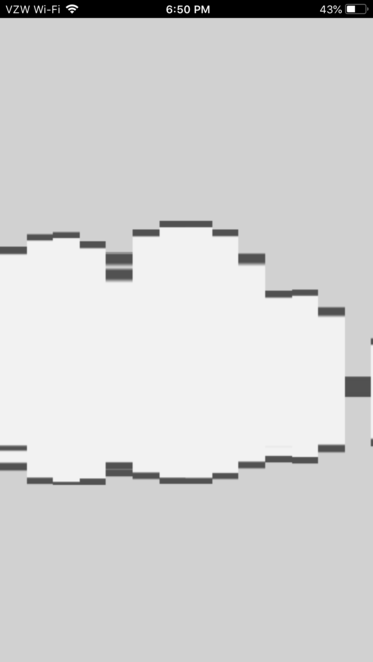
Also @zatsme I've attached a file. The cloud in my example looks like this in only 2 minutes or so when running on WiFi Preview or export. Going to need a bit of help for a workaround in the meantime I suppose.
 SomeWeirdo
on 23 Feb 2019
SomeWeirdo
on 23 Feb 2019
Not much time to test this but found that the problem only occurs on my android devices not on Windows 10. Tried Firefox, chrome, opera and all same results on android, but fine on desktop and preview. 🤔
zatsme
on 23 Feb 2019
Played some more:
The problem seems to happen when the Offset gets too large so I just added a 'hack!'
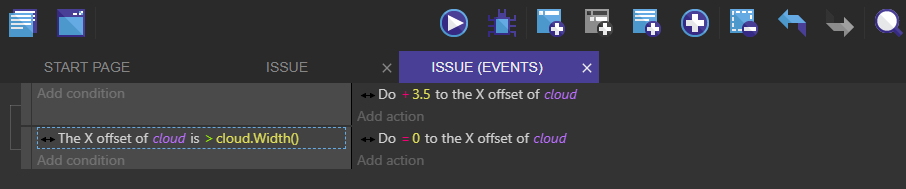
This 'fixes' the problem.
zatsme
on 23 Feb 2019
Aha! That works and is a solution. Thanks.
SomeWeirdo
on 23 Feb 2019
In case the offset moves very fast it would be better to subtract cloud.Width() to the offset instead set back to 0 :)
 Lizard-13
on 24 Feb 2019
Lizard-13
on 24 Feb 2019
Yeah sorry if it was not clear, the modulo function would be doing this for any arbitrary large number, by passing the width as the second parameter. You solution works too :)
4ian
on 24 Feb 2019
I'll see if we can do this simplification of the offset directly in the Pixie.js renderer (or if anyone want to try, you're welcome to do so!)
4ian
on 24 Feb 2019
Was already looking into this as I believed it was a bug and found that we appear to be using deprecated code....
 var texture = runtimeScene.getGame().getImageManager().getPIXITexture(textureName);
    if ( this._tiledSprite === undefined ) {
        this._tiledSprite = **_new PIXI.extras.TilingSprite(texture, 1024, 1024);_**
    } else {
        this._tiledSprite.texture = texture;
    }
As documented here...
http://pixijs.download/dev/docs/PIXI.extras.TilingSprite.html
So if we are to update then I think we go for new PIXI.TilingSprite (texture, width, height)
What do you think @4ian
zatsme
on 24 Feb 2019
Just noticed that the TilingSprite has an alpha property that is currently not exposed. Would be nice to have this available since alpha can currently only be changed on Sprites.
http://pixijs.download/dev/docs/PIXI.TilingSprite.html#alpha
 Wend1go
on 24 Feb 2019
Wend1go
on 24 Feb 2019
Related issues
 shadow00dev
·
4Comments
shadow00dev
·
4Comments
 Bouh
·
3Comments
Bouh
·
3Comments
 BWPanda
·
4Comments
BWPanda
·
4Comments
 PascalLadalle
·
3Comments
Bouh
·
4Comments
PascalLadalle
·
3Comments
Bouh
·
4Comments
Most helpful comment
Played some more:
The problem seems to happen when the Offset gets too large so I just added a 'hack!'
This 'fixes' the problem.