Gdevelop: Rope game example + shape painter visibility bug
A rope game example.
I will add a start and finish scene and some kind of scoring, but have shared it early as sometimes the rope does not render and I can't work out why. Perhaps one of you can work out why?!
I'd like to submit a new example to be added to GDevelop.
Here is the link to download it: Rope.zip
I confirm that any assets can be used freely by anybody, including for commercial usage.
 zatsme
All 20 comments
So this is because of an improper optimization made by the game engine. When an object is far from the camera, it is not rendered (for performance reasons). This is an issue in your game because the Shape Painter "Rope" is not moving and can sometime be too far from the camera.
To work around this for now, you can always set the position of your object "Rope" to the position of the "MainChar". This won't change anything because you drawing shapes using absolute coordinates.
To fix this, I have to avoid the optimization (disabling the rendering) for Shape Painters that are drawing using absolute coordinates. Potentially also give the possibility to set the virtual width/height of the shape painter.
 4ian
on 17 Nov 2018
4ian
on 17 Nov 2018
As for the example, it's fun :) A couple of notes:
- Can you reduce the screen size to something like 800*600? Lots of people are using laptops that don't have the big resolution that you entered.
- Why choosing the right click as the button to create a rope? I was a bit confused when first trying the example and would have given up if I was not looking at the events.
- Also, you could maybe add a text "Touch to create a rope" to let player know. And/or also have the Space bar to do the same as clicking :)
I'll add your example after if you can make the changes ;)
4ian
on 17 Nov 2018
Thanks for the explanation, it makes sense now.
It's not finished yet so will add some things so thanks for the suggestions.
Interesting thing about right mouse button is the touch does not work on android, I changed it to left mouse button and the touch now works. I wonder if its a bug?
Zat.
zatsme
on 17 Nov 2018
I'm going mad I think, I cannot move the Rope item in code?! Either it cannot be moved or I'm having a Breakdown! If I drag it to a different location on the scene before running then it works as you said and renders the rope perfectly on the nearby objects, but it wont move in code?!
zatsme
on 17 Nov 2018
Indeed, I've tried and there is an issue, the hitboxes/bounding box is not updated for Shape Painter objects when it's moved (so it's still considered out of the camera when the camera moves to far from its initial position).
4ian
on 17 Nov 2018
Fixed this. For now, you can fix it manually by replacing gdjs.ShapePainterRuntimeObject.prototype.setX and gdjs.ShapePainterRuntimeObject.prototype.setY like done here: https://github.com/4ian/GDevelop/commit/09eab9eb46d67e5f3a303f59f3499e898b123e3a
Or wait for next version (tomorrow/next week). You still need to put the shape painter near the camera - I have to make another fix for this.
4ian
on 17 Nov 2018
Yes, that works great!
I also remembered something I forgot to mention a few weeks ago...
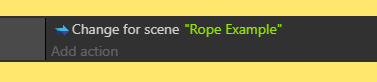
This should say, "Change to scene"
Here is the updated zip Rope Example.zip with your suggestions 👍
zatsme
on 17 Nov 2018
@zatsme well done bro... but the second updated example have an issue with the rope visibility when the game start... in the first swing box the rope go invisible for some reason
 oussama-HA
on 17 Nov 2018
oussama-HA
on 17 Nov 2018
Yes, it's a known issue, will be fixed in next beta! I have fixed it locally and it works good :) See 4ians comment above!
zatsme
on 17 Nov 2018
Works great bro .. thank you so much @zatsme
oussama-HA
on 17 Nov 2018
Part of the fix is in beta 57. You still need to set your shape painter object near the camera for now.
4ian
on 20 Nov 2018
Interesting thing about right mouse button is the touch does not work on android, I changed it to left mouse button and the touch now works. I wonder if its a bug?
Indeed only the Left button is considered as a touch. This is because the touch on the screen actually simulate a Left click by default.
I should have the fix for the next version to always display the shapes painted by the Shape Painter object when it's using Absolute coordinates, even if it's far from camera :)
4ian
on 21 Nov 2018
Reopen to remember to add the example :)
4ian
on 21 Nov 2018
In the IDE we should note to the user that when using the event 'touch or mouse button' on a touch screen you have to specify left mouse button or have I misunderstood you 4ian?
zatsme
on 21 Nov 2018
Waiting for next version to give you the updated zip without the workaround...
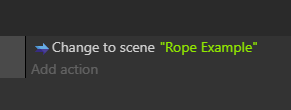
In the meantime I thank you for the Scene change fix!
zatsme
on 21 Nov 2018
No worries ✌️
In the IDE we should note to the user that when using the event 'touch or mouse button' on a touch screen you have to specify left mouse button or have I misunderstood you 4ian?
Yeah it's not clear at all, I think the condition sentence should be adapted to remove "or touch" when it's not "Left" that is chosen. Ideally this should work the other way around: conditions for testing touch, and the mouse is "just" emulating a touch.
4ian
on 21 Nov 2018
Rope example zip ready for next release I think 🤔
zatsme
on 29 Nov 2018
Thanks, added this to my todo list! :)
4ian
on 29 Nov 2018
It's all good now so will close.
zatsme
on 14 Jan 2019
Thanks for the follow up! :)
4ian
on 14 Jan 2019
Related issues
 BWPanda
·
4Comments
BWPanda
·
4Comments
 Jose-Moreno
·
5Comments
Jose-Moreno
·
5Comments
 ddabrahim
·
4Comments
ddabrahim
·
4Comments
 blurymind
·
5Comments
blurymind
·
5Comments
 Wend1go
·
3Comments
Wend1go
·
3Comments