Gdevelop: Idea: Context sensitive r.click menu in the sceneEditor - Add instance of [object] under cursor command
Description
I've been playing with the idea of making the scene editor menu more context sensitive. Instead of greying out commands that can not be used, it can instead not show them at all and use that space for other commands.
A great example of that design idea in action is making the 'Edit Object' menu item - it is not required when no instance is selected.
I made a small alteration in my local branch to make that entry dissapear when no instances are selected and in it's place a new command appears- 'Add instance of [selected object]'
If no objects have been selected that option does not appear at all
What's great about having that command in the menu is that it makes it really easy and fast to add many instances on the screen of what ever object is selected in the list - with minimal mouse cursor travel distance. In contrast drag and drop requires repetitive mouse travel
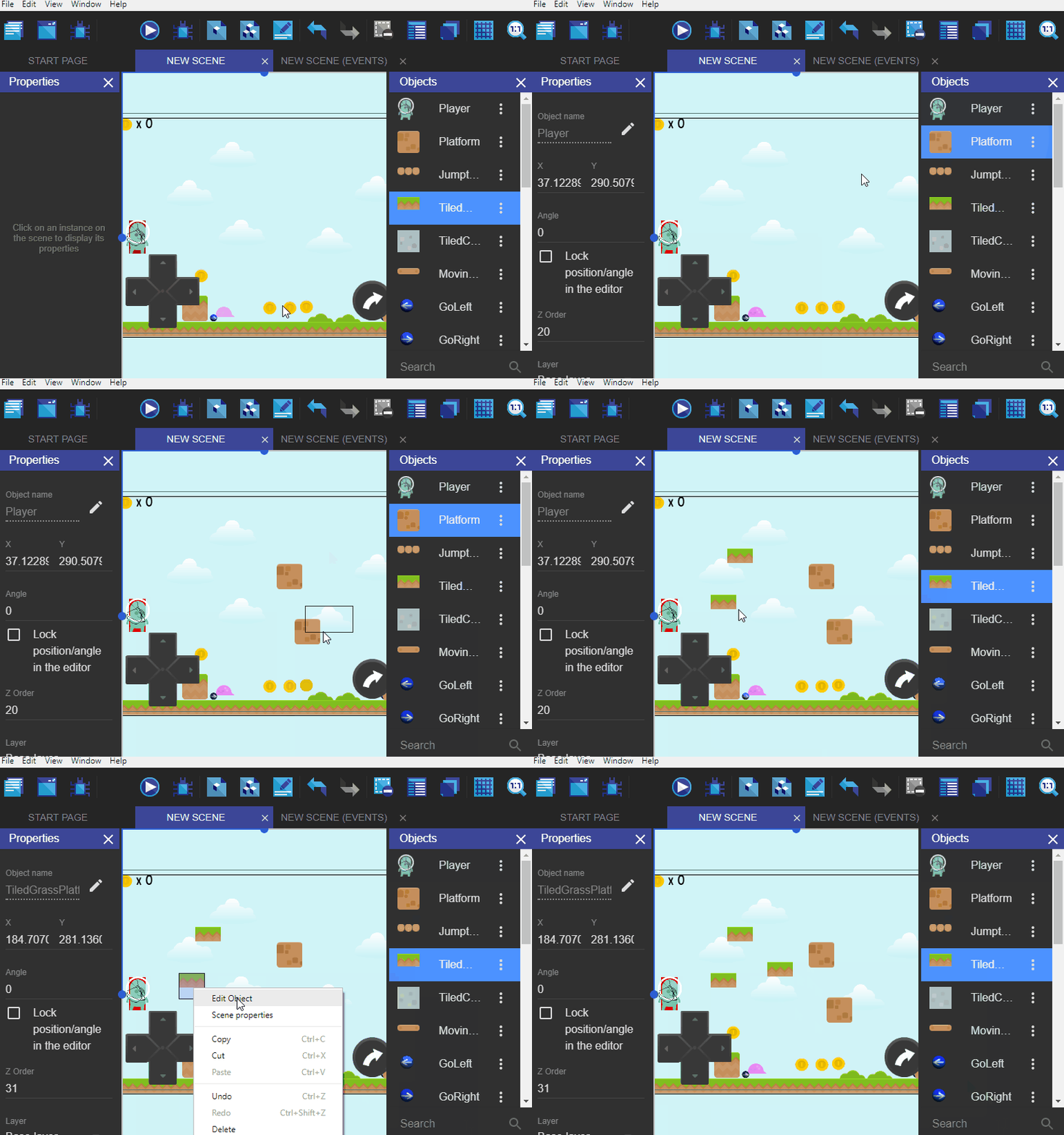
In any case just posting this idea here to see what you think :)
If you like it I can make a pull tonight
 blurymind
All 16 comments
For menus, rule of thumb is (I'm not a UX expert though):
- As long as the menu is not too long, it's better to gray out option as it's good for discoverability (user will see that if they select something, these options will become available).
- If menu is too long or if the purpose of the two menus are really different, then it's ok to make too different menus.
As for your suggestion, this looks a good idea in case people don't discover the drag'n'drop.
You can submit a pull request, but be sure to read more because it's getting complicated and we have to cover all the use cases to keep a consistent user interface:
- Menu item should be grayed or not shown when nothing is selected.
- Menu item should be shown when an object is selected.
- Menu item should be grayed when multiple objects are selected.
And if we allow this, this means that we also need to have that clicking on an item in the objects list should select it (because otherwise, you're forced to drag'n'drop something on the scene before selecting it and being able to right click to add it - weird? ant not useful if you're starting a new scene and you don't know how to add objects because you're not aware of drag'n'drop and you can't select anything in the list).
1) Solution 1: We allow the selection of instances to not always match the selected objects in the list. Example: you select 3 instances, the associated objects get selected in the object list, then you click on any object in the list, the selection stays in the instances editor but the objects list now show only the clicked object as selected.
OR
2) Solution 2: The other option is that selection in objects list must always be the same as the selection of instances. This means that when we select an object in the object list, we update the selection in the instances editor (=> presumably we select all instances of the object)
Solution 2 needs a bit more work, but is also more consistent from the UX side I think.
With both solutions, the "Add instance of [xxx]" only work when there is one object selected.
I like it because writing "Add instance of [xxx]" will help people understand the difference between objects and instances.
 4ian
on 20 Sep 2018
4ian
on 20 Sep 2018
- As long as the menu is not too long, it's better to gray out option as it's good for discoverability (user will see that if they select something, these options will become available).
- If menu is too long or if the purpose of the two menus are really different, then it's ok to make too different menus.
I can add a check to see if the name is too long and shorten it like this:
Add instance of veryLongNameOfaGameObject --> Add instance of veryLong...
Do you want me always show the option? I think it will be better if the option switches between adding and editing, depending if an object in the listed is selected or an instance in the scene is selected.
- Menu item should be grayed or not shown when nothing is selected.
- Menu item should be shown when an object is selected.
- Menu item should be grayed when multiple objects are selected.
Yes indeed, that is actually how it works at the moment, except for the last point. Instead of being greyed out, it uses the first selected as reference. I prefer to do that, because sometimes the user might multiselect by mistake and wonder why its greyed.
Btw one thing I can also do is add to the pull is having the shortened object name also in the 'Edit object' , so it says 'Edit Player' or whatever is selected in the object list :)
blurymind
on 20 Sep 2018
I can add a check to see if the name is too long and shorten it like this:
Add instance of veryLongNameOfaGameObject --> Add instance of veryLongNa...
Yes, you might want to create an utility function :) You can put it into newIDE/app/src/Utils/SomeFile.js and that will be able to be reused. Something like makeEllipsis(str: string, maxCharacter: number) = () => { ... }.
Do you want me always show the option? I think it will be better if the option switches between adding and editing, depending if an object in the listed is selected or an instance in the scene is selected.
Go for what is simpler for you for now :)
I prefer to do that, because sometimes the user might multiselect by mistake and wonder why its greyed.
I think it's not consistent. And on the contrary someone could multiselect by mistake objects [xxx] and [yyy] and wonder why the menu is "Insert instance of [xxx]" while he/she selected [yyy].
You can gray out the menu and have the label be "(Select a single object to insert an instance of it)". Or just remove the option.
Anyway, multiselection won't happen easily - the only way to do it is to select multiple instances. If the user clicks in the objects list, he will only get one object selected - no problem then :)
Btw one thing I can also do is add to the pull is having the shortened object name also in the 'Edit object' , so it says 'Edit Player' or whatever is selected in the object list :)
Well in this case I think it's not necessary because the user just right clicked on the object? If you're doing it be sure to use makeEllipsis function with a number of characters not too high (10, maybe 15) to avoid the context menu width to be too large (especially on web).
4ian
on 20 Sep 2018
@4ian I guess it could be confusing if the user decides to box select instead of click-select
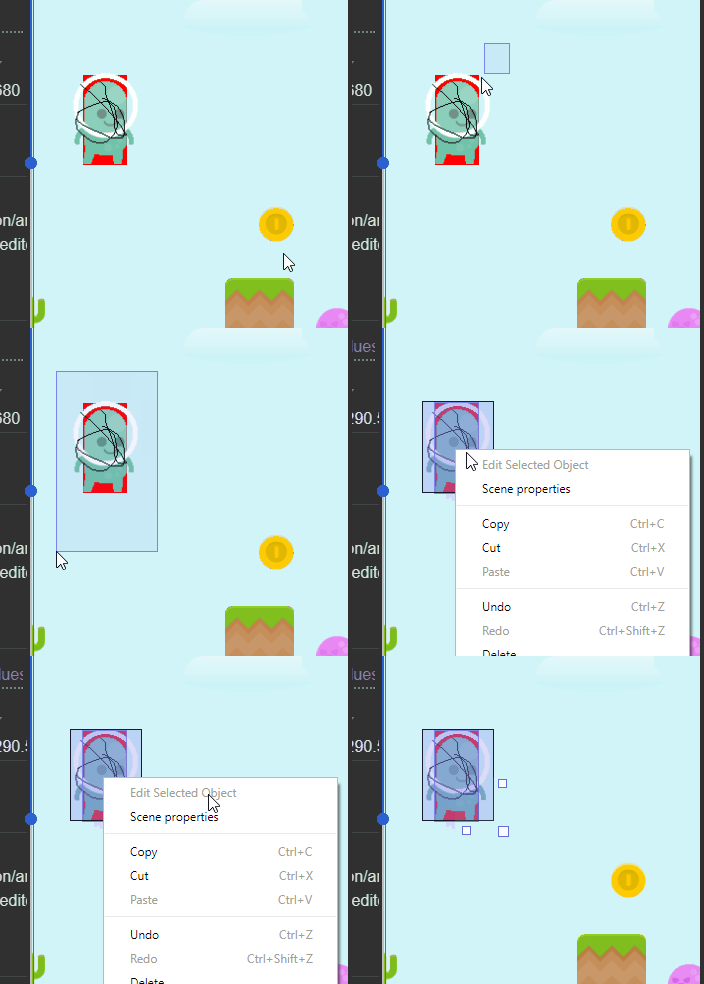
blurymind
on 20 Sep 2018
Ok in this case let's hide it!
4ian
on 20 Sep 2018
So "Edit object" is visible only when one instance has been selected.
"Add instance of ..." is only visible when an object has been highlighted in the object list.
What if multiple objects are highlighted (if multiselection is a possibility)? Do we hide it as well, or add all selected?
:)
blurymind
on 20 Sep 2018
What if multiple objects are highlighted (if multiselection is a possibility)? Do we hide it as well, or add all selected?
As you wish, as I said earlier:
"You can gray out the menu and have the label be "(Select a single object to insert an instance of it)". Or just remove the option."
So either we hide, or gray out the option, or even add all the selected objects. That looks strange to me though to add more than one object - could confuse user again and I doubt this use case will be useful at all.
So let's hide it or gray it (pick the one that make the more sense to you).
4ian
on 20 Sep 2018
Yeah I think adding multiple could also mess up the menu item :)
How about showing the name of and adding only the last selected? It will give the command a constrain, while also keeping it more visible to the user
blurymind
on 20 Sep 2018
We can try this, but it may be a bit more complicated to properly keep in the state the last selected object. Be sure to always have it in sync with the selected object names (i.e: when instances are selected, when they are unselected, when they are removed).
Also, what should be the "name of the last selected" when you select multiple instances at the same time ? (by drawing a selection rectangle)
4ian
on 20 Sep 2018
Why not just simply 'Edit' no real need for the name or type of thing we're editing?
 zatsme
on 20 Sep 2018
zatsme
on 20 Sep 2018
Well, both Edit or Edit "xxx" are fine to me. The real question is what object should be even edited when you've selected simultaneously instances of different objects - or should we then even show the button in this case.
4ian
on 20 Sep 2018
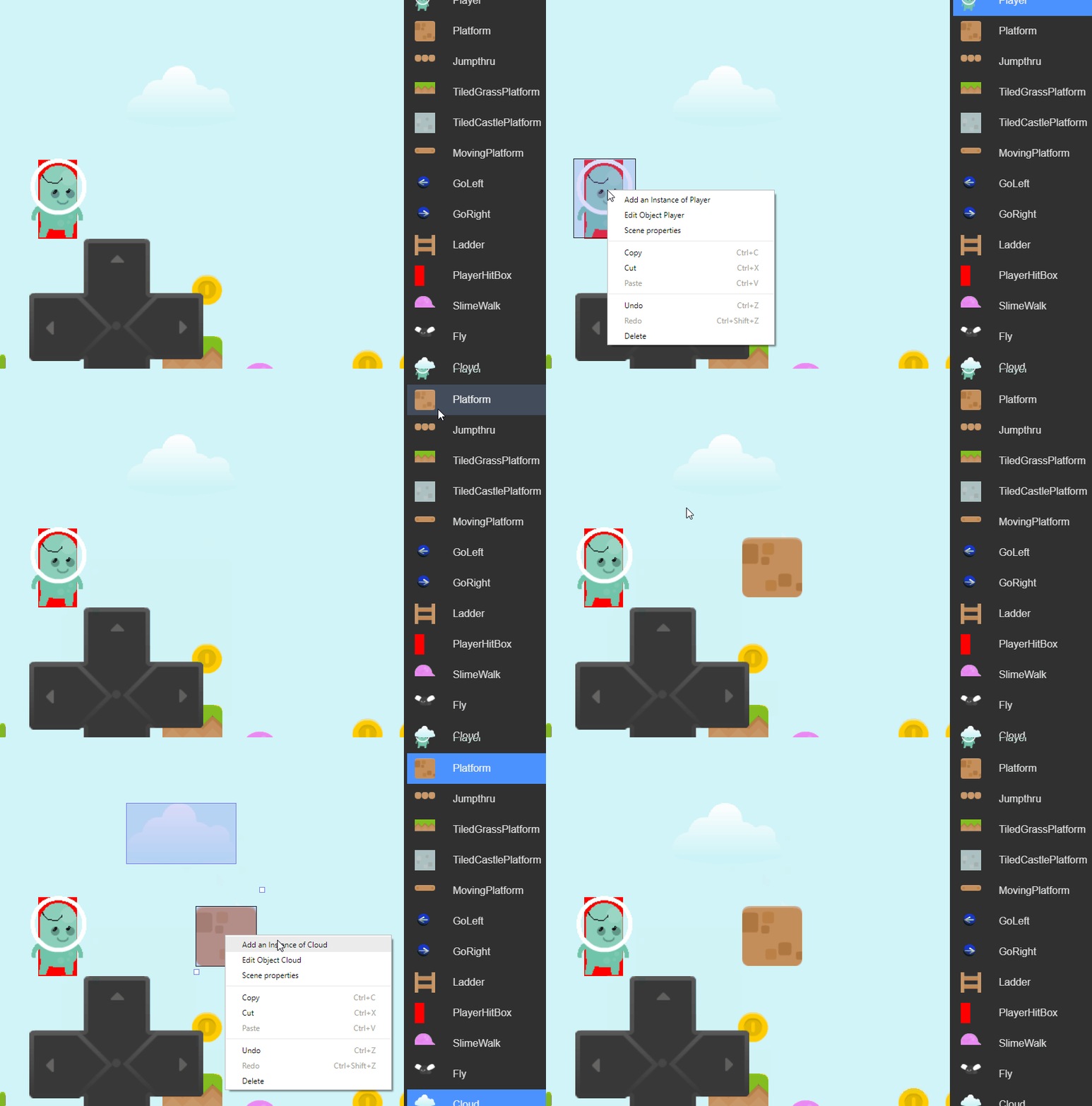
ah damn, this will take more time to do. @4ian did you in your latest commit actually remove the ability to select an object from the list? Objects can now only be dragged and dropped :o
Without being able to select an object from the list, my pull wont make much sense.
You can't do the very first thing that is presented in the gif any more
Was this somehow required to make drag and drop work? Is this something we can bring back? I see it as a serious regression and kind of counter intuitive to not be able to highlight objects in the list, by simply clicking on the list.
Will you be ok to bring it back for this pull? I managed to do that, but will need to test if it has regressions
blurymind
on 20 Sep 2018

 blurymind
on 20 Sep 2018
blurymind
on 20 Sep 2018
Check my comments on your pull request :)
Is this something we can bring back?
Yes. I removed this because as only drag'n'drop was possible to add an object, it was not making sense to be able to select something in the list and then being able to do nothing with it ("Great I selected an object in the list! Now I can do... nothing??" 😄) It was important to keep the software in a consistent state.
Now that you've added a second option to insert objects (i.e: right click > Add Instance of xxx), it makes sense to bring back the ability to select an object.
4ian
on 21 Sep 2018
@4ian I applied the review feedback and will submit the push tonight after work :)
Thank you for taking the time to review. This works great btw. Adding instances is so easy and fast now
The selection will come in handy for other things in the future, I am happy to have it back
blurymind
on 21 Sep 2018
This is merged now, so I can close the discussion here. If you have any suggestions please feel free to continue :)
blurymind
on 22 Sep 2018
Related issues
 giusreds
·
4Comments
giusreds
·
4Comments
 BWPanda
·
4Comments
BWPanda
·
4Comments
 Wend1go
·
3Comments
Wend1go
·
3Comments
 PascalLadalle
·
3Comments
PascalLadalle
·
3Comments
 Phenomena3
·
5Comments
Phenomena3
·
5Comments