Gdevelop: GD5: Add the option to set an object name in the add new object dialog
The current way of creating new objects is a little cumbersome since they are all automatically named "NewObject" and the "Edit object" dialogue immediately shows up before one can give it a proper name.
Having to right click on the object, choose Rename and overwrite the old name disturbs the work flow a bit.
It would be nice to have an input box (mandatory) for the object name directly inside either the "add a new object" dialogue or the "Edit object" dialogue that gets opened right after creating the object.
That way one wouldn't have to rename every single object after creation and it would also benefit the piskel editor because a proper object name for the image folder would already be available when it gets launched.
 Wend1go
All 20 comments
@Wend1go I found this with my personal electron project - electron doesnt actually support having a prompt with text entry for some reason - unlike web browsers. There are workarounds of course, but they are not great. I can add it right now in the web app version of gdevelop , but it wont work in electron.
We need to create a new prompt gui class to make this happen.. or use an npm package- which is not great.
https://www.npmjs.com/package/electron-prompt
I wonder how to best address this
 blurymind
on 27 Jun 2018
blurymind
on 27 Jun 2018
Prompt does not sound like a great user experience anyway - they are modal things and force the user to make a choice now while they can want to go back to it faster.
Can you think of an alternative solution that wouldn't require it?
 4ian
on 28 Jun 2018
4ian
on 28 Jun 2018
@4ian one thing that would be nice and will help here is have the object list (on the right) automatically select the object that is selected in the editor and even scroll to it.
If it scrolls to it and even has the name input steal focus on newly created objects- that would even be better. Perhaps to some it wont be obvious enough though
I was actually wondering whether to give this a try :)
blurymind
on 28 Jun 2018
I wasn't actually talking about a prompt but a mere text box instead. Something like this (just more pretty ;))
https://imgur.com/11SCbh3
But @blurymind ' s idea sounds good too, it would be the same approach as in GD4.
Wend1go
on 28 Jun 2018
@Wend1go @4ian How about doing it like this:

:)
I found this to be the most natural way to do it. It also adreses the fact that the object
editor is not showing the name of the object being edited
blurymind
on 29 Jun 2018
I like it
Wend1go
on 29 Jun 2018
@Wend1go my suggestion is to put it in objectEditorDialog.js instead
I noticed that you are already working on this. Would you be interested in tackling it in your pull request here:
https://github.com/4ian/GD/pull/545
I can give it a try again later this week too if you want :)
blurymind
on 1 Jul 2018
I won't have time to work on GD next weekend, if you have more time give it a try.
Otherwise I could look into it the weekend after next.
Wend1go
on 2 Jul 2018
Thanks to @4ian 's excellent guidance I made some progress with this and learned some new cool reactjs things. Now an object can also be renamed like this:
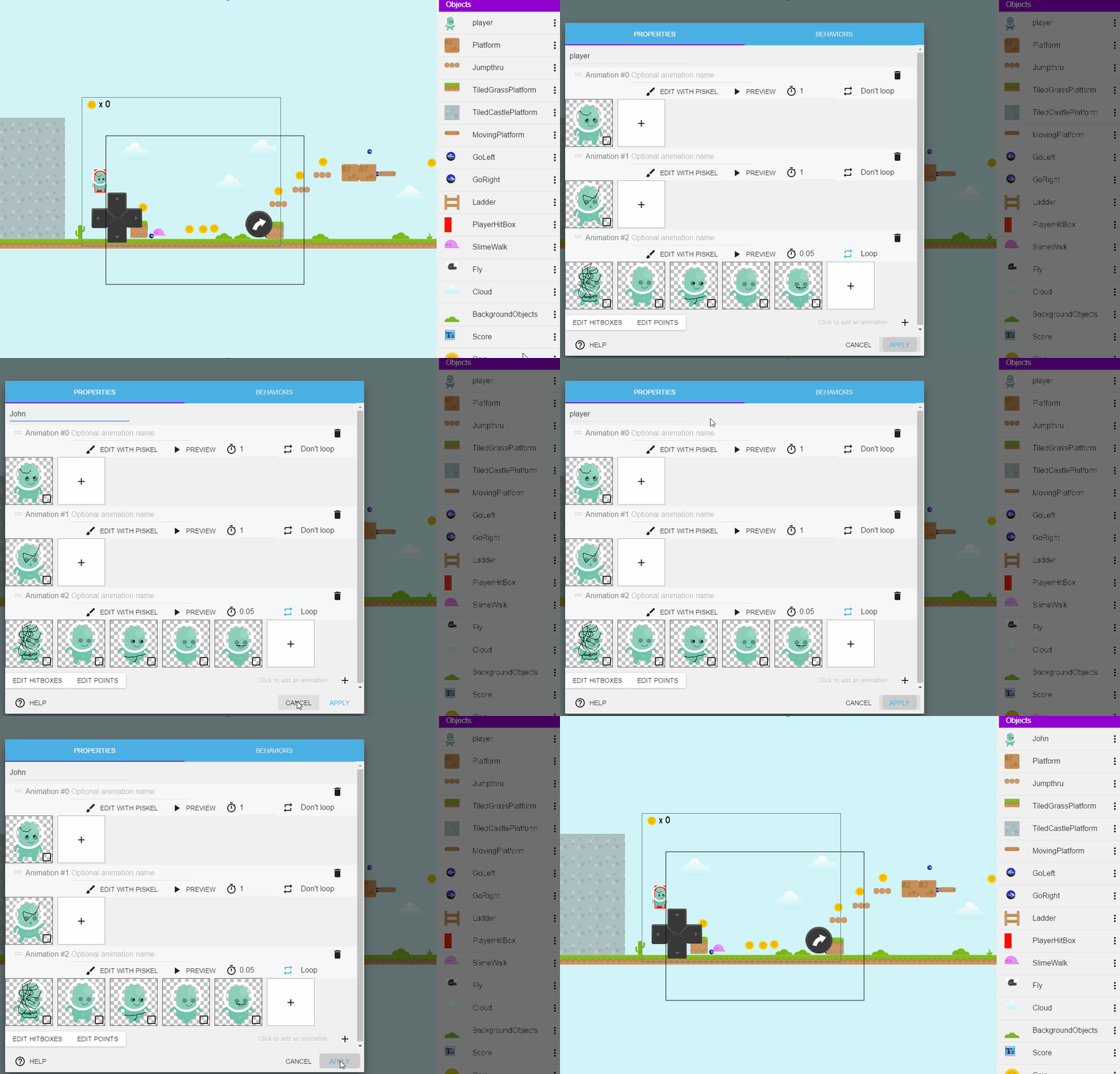
As you can see it gets renamed only if you apply the changes
This might require some bold refactoring of the rename object function - which is right now scattered in two places. My solution works right now - but it doesnt do the check if an object with that name already exists. Moving the checking outside of the object list module and into the index would solve it and makes things a bit simpler. Right now it is a bit confusing that as a third parameter you have to pass another function
blurymind
on 4 Jul 2018
Good job!
Yes you probably need to unify the rename function into a single one in the SceneEditor/index.js and then pass it down to use it at any point where you need it :)
4ian
on 4 Jul 2018
@4ian I was thinking to keep them separate, because I want the unique name check to happen when the input loses focus and the actual renaming when the user clicks on "apply".
When moving out the check function - make it a simple checkIfObjectNameCanBeUsed(newName) function that returns true or false
Not sure if thats the best approach, but I think it will make the code easier to understand
blurymind
on 4 Jul 2018
Then in this case it makes sense to have a slightly different implementation, but factor common code into a tool function so that the code is easier to read and obvious to implement :)
4ian
on 4 Jul 2018
I will try not to break things or change them too much. Right now its a choice between some refactoring or code replication. :)
I trust your judgement in this,so will take whatever approach seems most sensible
Btw do you like the idea of being able to rename the object from there?
I decided to put it there, so when people make a new object, they can rename it instantly.
It also shows the object name that the editor is editing
blurymind
on 4 Jul 2018
Having it here looks correct. Could maybe have a label "Object name:" before the text field and ensure the text field takes the whole width of the dialog.
4ian
on 4 Jul 2018
@4ian yes you are right. I will add that :)
blurymind
on 4 Jul 2018
Made a pull here
https://github.com/4ian/GD/pull/547
blurymind
on 4 Jul 2018
Great job in implementing this :) I think we can now close this :)
4ian
on 17 Jul 2018
Thank you :) sorry for taking a while btw. Got interupted by traveling and
vacation
On Tue, 17 Jul 2018 01:36 Florian Rival, notifications@github.com wrote:
Great job in implementing this :) I think we can now close this :)
—
You are receiving this because you were mentioned.
Reply to this email directly, view it on GitHub
https://github.com/4ian/GD/issues/542#issuecomment-405402542, or mute
the thread
https://github.com/notifications/unsubscribe-auth/AGMbVSeaEgYCnE34RglS_vsmg3jx4Ehtks5uHRVkgaJpZM4U6LRn
.
blurymind
on 17 Jul 2018
Thanks a lot :)
Wend1go
on 17 Jul 2018
There's a bug in this option: If I type unfortunately a space in the name, my GD freeze all my computer and I have to reboot it. It seems to be a bug. I'm using GD 5.00 beta 62 with Linux Debian (stretch) Mint
 magicvince
on 28 Feb 2019
magicvince
on 28 Feb 2019
Related issues
 shadow00dev
·
4Comments
shadow00dev
·
4Comments
 Jose-Moreno
·
5Comments
4ian
·
3Comments
Jose-Moreno
·
5Comments
4ian
·
3Comments
 Jeje2201
·
5Comments
Jeje2201
·
5Comments
 Silver-Streak
·
4Comments
Silver-Streak
·
4Comments
Most helpful comment
Made a pull here
https://github.com/4ian/GD/pull/547