Gb-studio: build fail: bank overflow (addr 40 > 40)
Issue:
Game failed to build/run locally.
How it happened:
I hit "run" to test new code.
Expected result:
Game should have compiled and run.
Actual result:
make error 1.
Screenshot:

Notes:
On our 3rd month of straight coding, just did a big update that removed 2 dozen (24) scenes from the game and replaced them with 2 scenes. Was hoping this would significantly reduce game size and complexity with a simpler and more intuitive experience.
However on build to play test, the GB Studio failed to compile.
Not sure if the game is too big (last compiled game.gb file is only 1 MB, from one week ago). Have used 350 variables so far, dev environment appears to max out around 550 so still under limit here. No MODs added to game yet, just scenes and sprites.
Final note -- yesterday when I tried to compile / run this game, the build error was "possibly wrote twice at addr". Today I coded a bit more and even added some more scenes, then got a new error message "bank overflow (addr 40 > 40)".
Any suggestions?
 numonkeys
All 20 comments
Hi @numonkeys, a couple of questions to better understand the issue: are you using/calling a lot of Custom Events by any chance? How big is the .gbsproj file of the project?
Also it'd be very useful if you could zip the project and attach it to this issue, that way we can run some tests locally.
 pau-tomas
on 15 Apr 2020
pau-tomas
on 15 Apr 2020
Sounds like you have a lot of very complex scripts, or a lot of very unique backgrounds, currently we're limited to 1mb, 64 banks, but it should be possible to raise that.
Have you got some kind of heavy battle script reused in a lot of scenes? That's so far the only thing i've seen to break 64 banks.
As pau-tomas mentioned, if you're using a lot of custom events, that might be an easy way to bloat scripts on 1.2.1, however, it's also being changed, so that code is reused See #393
 RichardULZ
on 15 Apr 2020
RichardULZ
on 15 Apr 2020
Hi guys --
Thx for these questions.
I've been using zero custom events. My brother had set one up but I didn't find it useful (to be honest, I've tried coding my own custom events too but can't figure out how to get them to use in-game variables so have been ignoring custom events altogether).
As for battle scripts, etc, there's definitely lots of heavy scripts throughout the game. There's one encounter screen with 6 options that I had to break out into 6 different scenes because the scripts were so big. When the compile error showed up for that build it was obvious that the solution was to break up the scene into 6 individual scenes. That said, each scene is well under limits.
Related, the build failed after I had built out our first cave. I had built the cave system exploration to take place in one scene (except for combat, which loads a combat screen). This should be fine, though, as we've used the same model for traveling and have successful builds of this model for travel over multiple terrains (desert, plains, forest, sea). Caves shouldn't be different, the code structure isn't totally different.
I've been carefully monitoring backgrounds & asset sizes. I broke the limits early on to discover what they were, and have been coding within limits ever since. When I create a new scene the number comes up as "Scene 246" so I'm guessing there are 245 scenes already -- most of which reuse the same backgrounds over and over with different actors.
As for MB size of the .gbsproj file, was reviewing that yesterday. For my last successful compile (about a week ago) the MB size of the .gbsproj file was 90+ MB. Curiously, the new build that has failed has an MB size of 78 MB according to git (I had removed 20+ scenes with custom artwork, as mentioned).
Yesterday I used git to upload to a private repository here on github. I can grant access to @pau-tomas and/or specific testers to help debug. Given that we're planning on releasing this game once finished & debugged, I don't want to post publicly-downloadable code. There's a lot of new things we're trying out with this game (hence the heavy encounter code).
lmk about specific users for debugging access.
Thanks!
numonkeys
on 15 Apr 2020
Happy to take a look if you can grant me access. @RichardULZ has been investigating similar issues on another project on Discord so would be good for him to get access to (if he wants, of course :D)
pau-tomas
on 15 Apr 2020
sent an invite @pau-tomas . If @RichardULZ would like access, please lmk.
Thanks again for looking into this. GB Studio has been an incredible design / coding platform, looking forward to finishing this game!
numonkeys
on 15 Apr 2020
I took an initial look at the project and I'm afraid the culprit is in the amount of long scripts repeated across scenes.
Unfortunately, for now the only tip I can give is to try to simplify some of the mechanics in order to have shorter scripts. My understanding is that splitting scripts into actors (and then call them with Invoke Script) also helps as it allows to distribute the scripts in different banks.
I ran a quick script to check the script length and identify the bigger ones that need some refactor:
Scene name | Script type | Entity name | Script Length
-- | -- | -- | --
Traveling - EndlessPlains | scene | | 14860
Tjente Lower Catacombs | scene | | 9852
plains encounters - dwarf | scene | | 8721
plains encounters - goblin | scene | | 8615
plains encounters - water tribe | scene | | 8573
plains encounters - sky tribe | scene | | 8559
plains encounters - earth tribe | scene | | 8559
traveling desert - day | scene | | 8410
Tjente Upper Catacombs | scene | | 8332
plains encounters - whiteshore caravan | scene | | 8242
Earth Cave - deep caves | scene | | 8240
traveling beyond caravansary - day | scene | | 8193
Earth Cave - upper caves | scene | | 8186
Earth Cave - lower caves | scene | | 8186
@RichardULZ interesting enough none of those are triggering BANKED_DATA_TOO_LARGE nor over 16384 bytes. I wonder if some other factors need to be taken into account when showing those warnings.
pau-tomas
on 16 Apr 2020
Right, so it sounds like repeated battle scripts are the main culprit.
Judging by @pau-tomas findings on the largest scene scripts, we probably don't have an elegant solution to filling up banks nicely, similar to the music issue, we may just be putting in data untill it won't fit, then using the next bank without ever using up the space in previous banks. Splitting scripts up over multiple actors using actor invoke will chop them into smaller bits so it won't waste as much, but overall it's not ideal.
Over in the discord, I'm experimenting with a way to hot swap backgrounds without loading the scene script or sprites. Depending on how you implement this, it could let you have 1 large scene for battling that can account for the different monster names, health, and backgrounds to use. You would send the enemys type and health before entering the battle scene, and then load the right background.
The other thing i asked @pau-tomas to look into was custom scripts that can use hard links to variables, and soft links that can change when you use them like currently, as migrating a battle script with hard links is very difficult.
We should at least investigate dynamic rom sizes soon in any case, 512kb, 1024, and 2048 options would hold this over for a little while longer, but won't tackle the main underlying problems...
Wouldn't mind a link to your project to take a look at.
RichardULZ
on 16 Apr 2020
@RichardULZ invite sent.
I have more questions/comments.
What script did you run to determine script length for each scene?
Is it possible to get scene-by-scene text-only code view? I know I can put the whole gbsproj file into a text editor, but it's a clunky way to view the code and adds additional code risk. As I'm developing, if I could dig in and see the whole code it would be tremendously helpful.
I'll spend time rethinking code and encounters and game format / layout (the Invoke Actor script idea is a good one, will experiment with that). At the same time, I'm not convinced that this is what has caused the build fail this time because, even with the large scripting, all scenes fall well under 16384 bytes. Only 5 of the 14 scenes in the list are new since the last successful compile, and the new scenes aren't the largest sizes. The dev environment has been compiling larger scripts fine. I wonder if something else is triggering this fail? That said, I'm still going to revisit code to simplify / experiment with Invoke Actor.
For the custom events, it would be incredibly useful (as a game programmer) to be able to use in-game variables directly. As you noted with my code, there's a ton of re-using similar scripts over and over. If there was one custom event I could call, it would remove tons of repetitive code throughout. Is this possible (this may be a feature request)?
Thx again for looking into this! Incredibly helpful, looking forward to being able to move forward with development work again.
numonkeys
on 16 Apr 2020
Hey @numonkeys
@pau-tomas dropped me a message about this issue last night, spent a bit of time today looking into it and think I've got a fix ready that should help. I've been able to successfully build your project and from the little testing I've done it seems to be working correctly.
I've put the update on a PR at #408 @pau-tomas @RichardULZ since you've been looking in to this issue do you want to have a look at the proposed fix and see if you agree, if you're both happy I'll merge.
@RichardULZ I agree on dynamic rom sizes, I think even with this fix this specific project is getting close to the point where it needs to be able to be compiled to a 2Mb or more ROM.
 chrismaltby
on 17 Apr 2020
chrismaltby
on 17 Apr 2020
@chrismaltby Yep, switching to 3 bytes instead of a 2 byte pointer to a 3 byte ptr was my conclusion on discord too.
Whether we automatically resize or just expose cart size as an option, iit shouldn't be too hard, letting users start out at 256kb would be a nice change, so they can see how the game's growing.
I've got dynamic bank allocation going where it scans the last 10 banks to see if any new data can fit, instead of giving up and starting a new bank, saves up to 10% on these larger projects (65 banks down to 55 on one of them).
Music is still an issue for bank allocation, could change as/if we transition to hUGEtracker. I have some updates to gbt i must push as song compilation times are dramatically improved.
RichardULZ
on 17 Apr 2020
@chrismaltby cool!
Before you merge this, pls confirm which gbsproj file you compiled successfully. On the repo I posted there are a dozen or so legacy gbsproj files, all of which will compile fine. There's a branch called "build_problem" or "build_problems" that contains the failing gbsproj file.
Just want to make sure we're comparing apples to apples here so we find the correct solution. :)
Thanks again everyone for looking into this! Looking forward to finishing this game.
numonkeys
on 17 Apr 2020
I tested the build_problem branch with the NickRPG.gbsproj and it now compiles.
The project now uses 63 banks so it's close to the bank overflow issue. Exposing the cart size would be a good solution for this (either similar to the cartridge type selector or as a "hidden" field in the gbsproj file if we want it to be a bit more hidden for now).
pau-tomas
on 17 Apr 2020
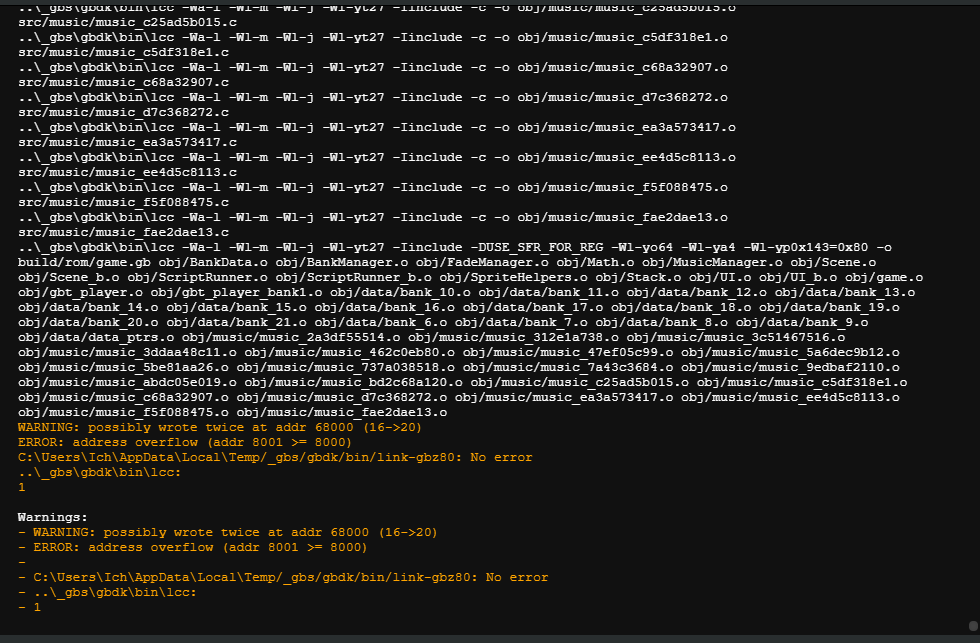
I am sorry, just a quick question in regard to this issue:
Is this address overflow also due to bank overflow?
 locherunderscore
on 17 Apr 2020
locherunderscore
on 17 Apr 2020
@locherunderscore No, this is #388 too much music/bad music bank allocation.
Addr 68000 is a location in hex, each bank is 8000, so 68hex is 104 decimal, 104/8 means bank 13, music can occupy 0-8 banks after main engine code from banks 5, so this is most likely the last music bank getting overflowed.
Edit: Had some of my math wrong
each bank is 4000 hex, 68 hex /4 would be bank 26, Music banks are after banked data.
Still a music bank data issue, should be resolved in latest dev build!
RichardULZ
on 18 Apr 2020
@numonkeys: Chris has merged his change, could you test your project with the latest development build to check that everything is working as expected?
pau-tomas
on 18 Apr 2020
@pau-tomas @chrismaltby circling back about this. have updated & just did a successful build! Thx again for getting on this so quickly.
Have already been experimenting with Invoke Actor, it's certainly a useful way of cleaning up the code & will make it easier to build out similar scenes.
nick
numonkeys
on 21 Apr 2020
Good to hear @numonkeys! If all is good now, do you mind closing the issue? Thanks!
pau-tomas
on 21 Apr 2020
@pau-tomas @chrismaltby so an interesting thing has happened. while testing & debugging code today, I noticed that every time I compiled and ran the game locally using the new build, the cursor (located at assets > ui > cursor.png) failed to load correctly.
the png file itself is fine, but for some reason the game now loads a weird (and ever-changing) variety of cursor graphics.
would you like some screenshots?
sidebar: isn't development work fun? why do these seemingly simple projects never end? lolz it is fun, though.
thanks again for all your work on this.
numonkeys
on 22 Apr 2020
@numonkeys I already fixed it, try re downloading the dev build now, was only pushed 21 hours ago. #413
RichardULZ
on 22 Apr 2020
@RichardULZ confirmed, updated this morning and it worked fine.
thx again everyone.
numonkeys
on 22 Apr 2020
Related issues
 wrt0302
·
5Comments
wrt0302
·
5Comments
 CamburgerHelper
·
4Comments
CamburgerHelper
·
4Comments
 timsamoff
·
4Comments
timsamoff
·
4Comments
 josefnpat
·
4Comments
josefnpat
·
4Comments
 uKomodo
·
5Comments
uKomodo
·
5Comments
Most helpful comment
@pau-tomas @chrismaltby circling back about this. have updated & just did a successful build! Thx again for getting on this so quickly.
Have already been experimenting with Invoke Actor, it's certainly a useful way of cleaning up the code & will make it easier to build out similar scenes.
nick