Gb-studio: Actor overlay issues when playing...
Describe the bug
Dialog boxes appear behind actors and actors don't fade out with scene prooperly.
To Reproduce
Steps to reproduce the behavior:
- Create a situation where a dialog box will appear over an actor in a scene.
- Create a scene with actors that fades to another scene.
- Build; play
Expected behavior
Dialogs should be on the topmost layer; actors should fade properly with scene.
Screenshots
If applicable, add screenshots to help explain your problem.
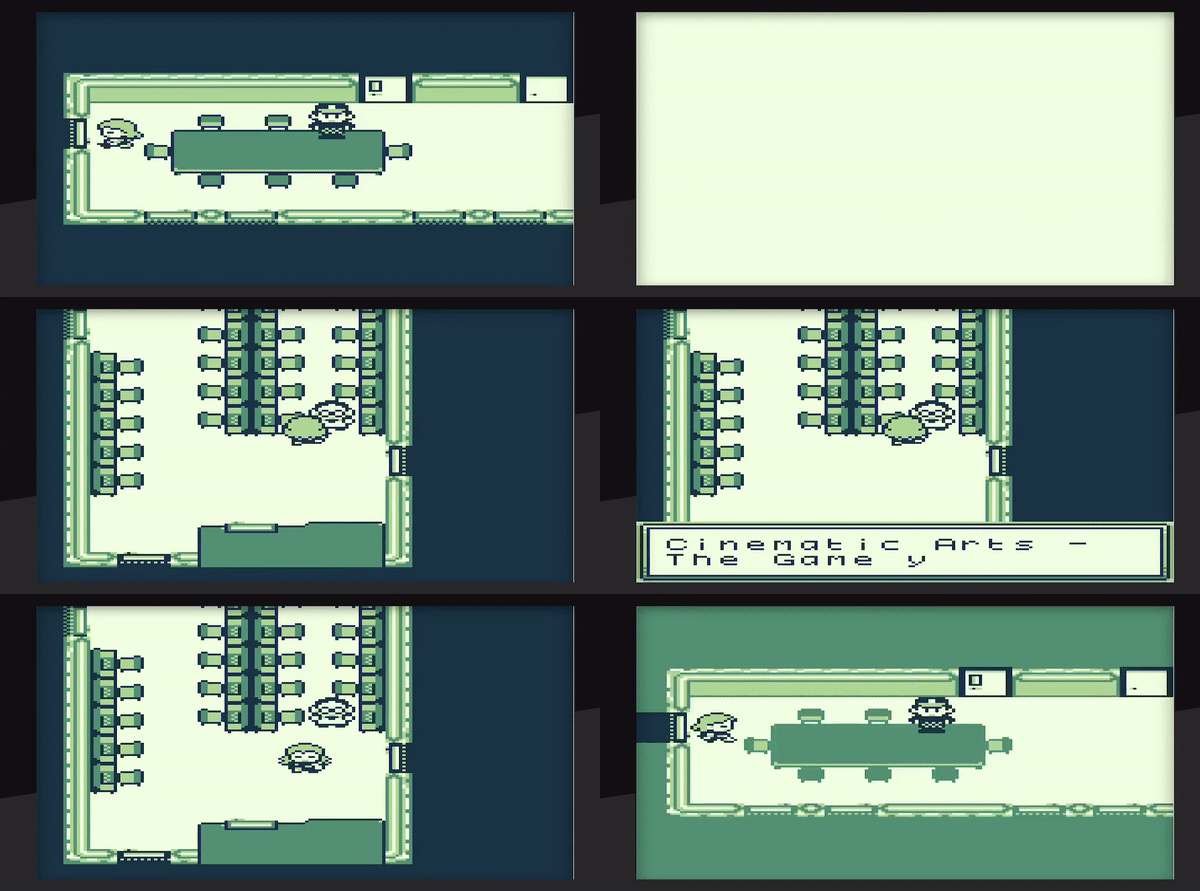
(Apologiues for the weird aspect ratio -- not quite sure why that happened.)
Platform (please complete the following information):
- OS: macOS
- App version Since 1.0.0 (now in 1.1.0).
Additional context
Add any other context about the problem here.
 timsamoff
All 4 comments
As far as I now, sprites are always on the top layer, so the window layer will not clip the sprite. As this is a hardware issue, I don't think its possible to fix this.
 thomas-alrek
on 26 May 2019
thomas-alrek
on 26 May 2019
Hardware issues, very difficult to fix, recommended solution for your use case,
Use transparent green sprites for your doors, and bake the door sprite into your background (or at least the black area into the background.)
Sprites can only be turned fully on or off, there is a secret occlusion mode that puts them behind anything black in the background/window layer, but that wouldn't help much in this case, and could cause other visual artefacts.
Sprite fading could be related to sprite pallet limitations, if there are more pallets we just didn't use, it may be possible to fix.
 RichardULZ
on 26 May 2019
RichardULZ
on 26 May 2019
Re: Transparent Sprite = Brilliant!
As for layering issues, just fyi, @chrismaltby did get emotes to be on the top layer.
timsamoff
on 27 May 2019
@timsamoff The emote layering was sprite fighting, by moving them one pixel left, they would have priority over other sprites, i believe that was the solution.
The window layer is always over the BG, but is treated the same as the background layer when it comes to sprites.
We currently have a (fairly expensive) method of checking sprite positions and comparing them to the window layer height, you could make the math read 1 tile higher, but then they would disappear too early.
The correct solution would probably have to be scan line accurate, turning off all sprites on the line that the window layer starts, but with the c compiler, that is extremely hard, we're lucky to have good vsync now, but the tear line used to shift up and down based on gb cpu usage.
RichardULZ
on 27 May 2019
Related issues
 mrcampbell
·
5Comments
mrcampbell
·
5Comments
 diguifi
·
7Comments
diguifi
·
7Comments
 cubicstyle
·
3Comments
cubicstyle
·
3Comments
 josefnpat
·
4Comments
josefnpat
·
4Comments
 darkhog
·
6Comments
darkhog
·
6Comments