Gatsby: How to get data URI for small frontmatter SVGs?
How do I get a data URI to inline small SVGs listed in markdown frontmatter?
I have this data
---
title: Some Title
logo: logo.svg
---

Some content
which I query like this
  const { allMdx } = useStaticQuery(graphql`
    {
      allMdx(filter: { fileAbsolutePath: { regex: "/assets/projects/" } }) {
       nodes {
          frontmatter {
            title
            logo {
              src: publicURL
            }
          }
        }
      }
    }
  `)
and render like this:
export const Project = ({ title, logo }) => (
  <>
    <img src={logo.src} alt={title} />
    <h1>{title}</h1>
  </>
)
That unfortunately causes jumping content when first opening the site since the SVGs are loaded on the fly rather than being inlined (despite being less than 10 KB in size).
The repo in question is https://github.com/janosh/riebesell.science, the relevant file ProjectList/index.js, the production site https://riebesell.science/projects.
 janosh
All 4 comments
Thank you for opening this!
The data URI behavior you're describing is coming from this (https://www.gatsbyjs.org/docs/importing-assets-into-files/):
To reduce the number of requests to the server, importing images that are less than 10,000 bytes returns a data URI instead of a path. This applies to the following file extensions: svg, jpg, jpeg, png, gif, mp4, webm, wav, mp3, m4a, aac, and oga.
This only happens when you explicitly import a file.
However, you can solve this on your own by adding a dataURI field to the File node.
After installing fs-extra and mini-svg-data-uri in your project:
gatsby-node.js
const svgToMiniDataURI = require("mini-svg-data-uri")
const fs = require("fs-extra")
exports.createResolvers = ({ createResolvers }) => {
const resolvers = {
File: {
dataURI: {
type: "String",
async resolve(parent, args, context, info) {
if (parent.extension === "svg" && parent.sourceInstanceName === "data") {
const svg = await fs.readFile(parent.absolutePath, 'utf8')
return svgToMiniDataURI(svg)
}
return null
}
}
}
}
createResolvers(resolvers)
}
Rest of the project:

As you can see I check on the file extension and on the sourceInstanceName to only convert SVG files in this directory.
The result will be:
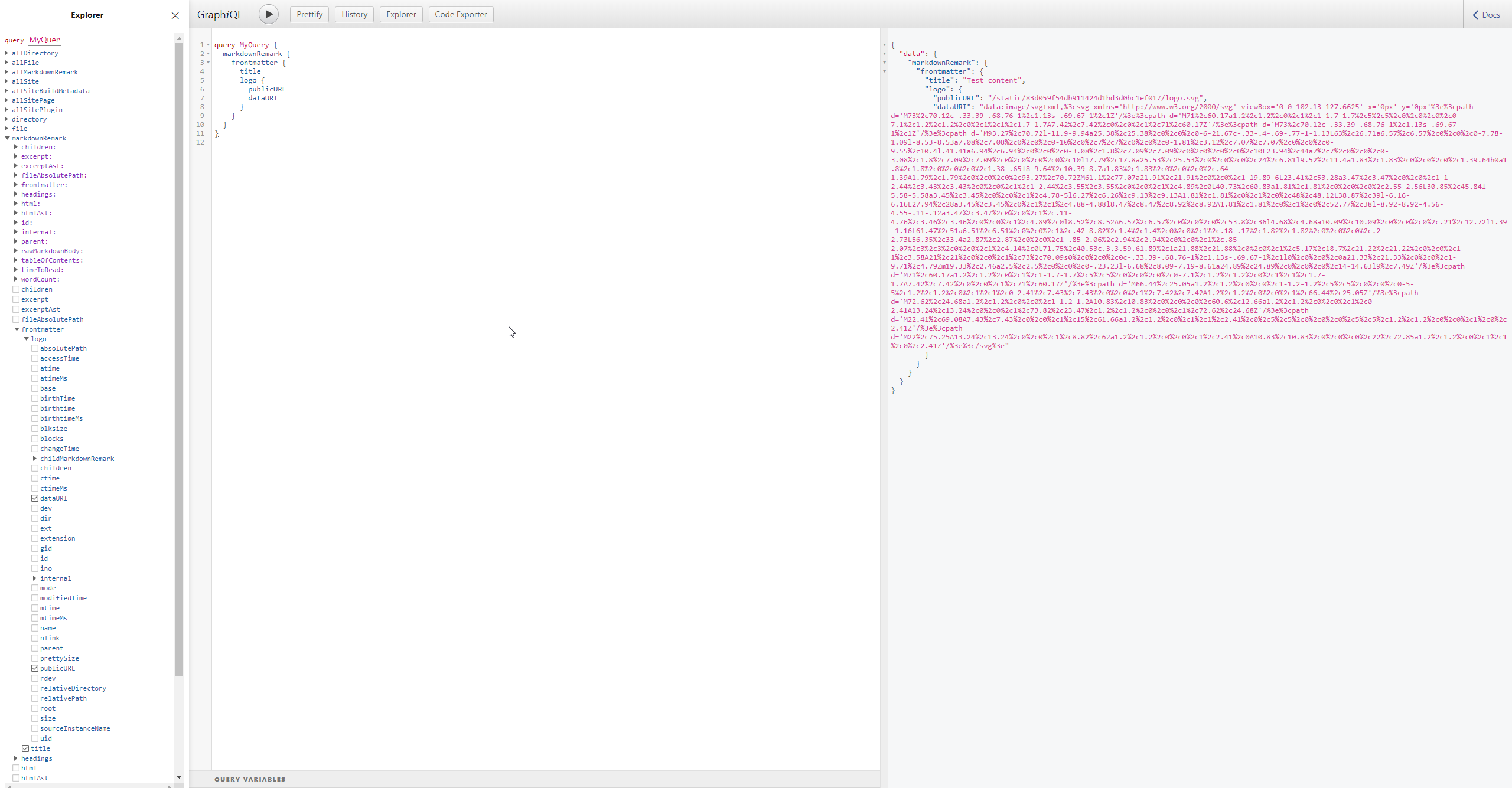
If you want you could also optimize the SVG with svgo like gatsby-transformer-inline-svg. And as you might think, you could make a transformer out of the code snippet above.
We're marking this issue as answered and closing it for now but please feel free to comment here if you would like to continue this discussion. We also recommend heading over to our communities if you have questions that are not bug reports or feature requests. We hope we managed to help and thank you for using Gatsby!
 LekoArts
on 23 Jun 2020
LekoArts
on 23 Jun 2020
@LekoArts Thanks a lot for this detailed walk-through!
janosh
on 23 Jun 2020
Just for posterity, here's the version with SVGO optimization:
const svgToMiniDataURI = require(`mini-svg-data-uri`)
const fs = require(`fs-extra`)
const SVGO = require(`svgo`)

const svgo = new SVGO()

exports.createResolvers = ({ createResolvers }) => {
  const resolvers = {
    File: {
      dataURI: {
        type: `String`,
        async resolve(parent) {
          if (parent.extension === `svg`) {
            const svg = await fs.readFile(parent.absolutePath, `utf8`)
            const { data } = await svgo.optimize(svg)
            return svgToMiniDataURI(data)
          }
          return null
        },
      },
    },
  }

  createResolvers(resolvers)
}
Also, it's probably a good idea to include a check like
if (parent.extension === `svg` && parent.size < 10000) { ... }
so as not to waste build time on generating URIs for SVGs that are too large to be inlined anyway.
janosh
on 23 Jun 2020
Related issues
 benstr
·
3Comments
benstr
·
3Comments
 signalwerk
·
3Comments
signalwerk
·
3Comments
 hobochild
·
3Comments
hobochild
·
3Comments
 totsteps
·
3Comments
totsteps
·
3Comments
 kalinchernev
·
3Comments
kalinchernev
·
3Comments
Most helpful comment
Just for posterity, here's the version with
SVGOoptimization: