Gatsby: develop command crashing when default 8000 port in use,
I've bumped into a bug only in the last day or two and I'm not sure what update might have caused the change. When running npx gatsby develop and I already have something running on port 8000, I'd get the standard response: Would you like to run the app at another port instead? but now the command crashes.
I can still run my server on another port with npx gatsby develop -p 8001 and I so far assume this issue won't interfere with anything else.
I've not found this specific bug reported but there does appear to be recent activity around other yoga-layout-prebuilt bugs..
Here's the error:
/Users/Antonio/code/gatsby-starter-blog/node_modules/yoga-layout-prebuilt/yoga-layout/build/Release/nbind.js:53
        throw ex;
        ^

Error: listen EADDRINUSE: address already in use :::8000
    at Server.setupListenHandle [as _listen2] (net.js:1313:16)
    at listenInCluster (net.js:1361:12)
    at Server.listen (net.js:1447:7)
    at startDevelopProxy (/Users/Antonio/code/gatsby-starter-blog/node_modules/gatsby/dist/utils/develop-proxy.js:79:10)
    at module.exports (/Users/Antonio/code/gatsby-starter-blog/node_modules/gatsby/dist/commands/develop.js:133:53)
    at processTicksAndRejections (internal/process/task_queues.js:97:5)
Emitted 'error' event on Server instance at:
    at emitErrorNT (net.js:1340:8)
    at processTicksAndRejections (internal/process/task_queues.js:84:21) {
  code: 'EADDRINUSE',
  errno: -48,
  syscall: 'listen',
  address: '::',
  port: 8000
}
 Strangehill
All 16 comments
I can confirm i experienced the same issue, latest version of gatsby-cli.
 t2ca
on 7 Jun 2020
t2ca
on 7 Jun 2020
Maybe this is related to some port listening changes made in #22759 ?
Strangehill
on 10 Jun 2020
I can confirm this. A good reproduction is to stand up 2 Hello World starters side-by-side:

First terminal window:
gatsby new port-test-1 https://github.com/gatsbyjs/gatsby-starter-hello-world
cd port-test-1
gatsby develop
Second terminal window
gatsby new port-test-2 https://github.com/gatsbyjs/gatsby-starter-hello-world
cd port-test-2
gatsby develop
The second terminal will produce:
Error: listen EADDRINUSE: address already in use :::8000
    at Server.setupListenHandle [as _listen2] (net.js:1313:16)
    at listenInCluster (net.js:1361:12)
    at Server.listen (net.js:1449:7)
    at startDevelopProxy (/Users/patr7104/Projects/port-test-2/node_modules/gatsby/dist/utils/develop-proxy.js:79:10)
    at module.exports (/Users/patr7104/Projects/port-test-2/node_modules/gatsby/dist/commands/develop.js:133:53)
    at processTicksAndRejections (internal/process/task_queues.js:97:5)
Emitted 'error' event on Server instance at:
    at emitErrorNT (net.js:1340:8)
    at processTicksAndRejections (internal/process/task_queues.js:84:21) {
  code: 'EADDRINUSE',
  errno: 'EADDRINUSE',
  syscall: 'listen',
  address: '::',
  port: 8000
}
```
 patrickarlt
on 11 Jun 2020
patrickarlt
on 11 Jun 2020
Also running into this issue.
Gatsby CLI version: 2.12.48
Gatsby version: 2.23.11
 janosh
on 24 Jun 2020
janosh
on 24 Jun 2020
It was working fine until I pushed my code to Github and deployed it on Netlify. Ctrl+C is also not working to disconnect my localhost.
 adisher
on 27 Jun 2020
adisher
on 27 Jun 2020
Hi,
I confirm i face the same issue. it started happening couple of hours ago. Even my 8000 port is also not in use

also
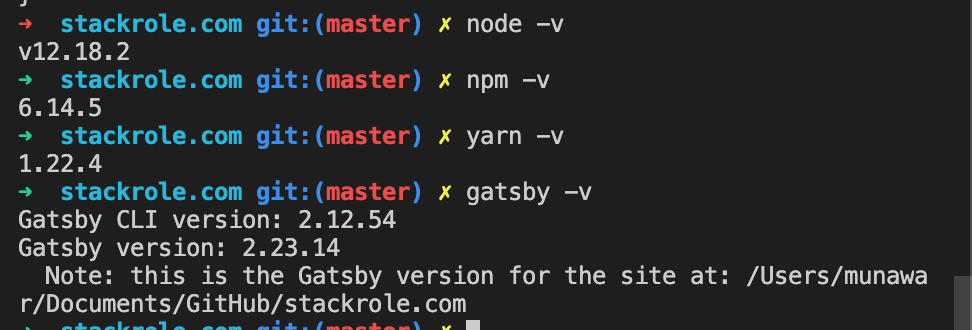
@KyleAMathews and @shannonbux all the help appreciated
 munwr
on 1 Jul 2020
munwr
on 1 Jul 2020
This temporary fix helped me continue my work.
gatsby develop -p 8001
munwr
on 2 Jul 2020
"Temporary fix" does not work for me, I get this:

 pawelBareja
on 2 Jul 2020
pawelBareja
on 2 Jul 2020
"Temporary fix" does not work for me, I get this:
Did you set port as 8001... like this gatsby develop -p 8001
munwr
on 2 Jul 2020
"Temporary fix" does not work for me, I get this:
@pawelBareja That reads like you're running gatsby develop from the same project you're already running it at. The use case I've raised this issue for is running two different projects and forgetting to specify a port for the second project so that it doesn't fail when it sees that port 8000 is already in use.
Strangehill
on 7 Jul 2020
I ran into an issue on macOS where running gatsby develop after hitting ctrl+c gave me a similar error message that the port is already being used. Yes the temporary fix of running gatsby develop -p 8001 on any other unoccupied port works. But my 2013 macbook pro was using alot of power in the background (233 energy impact when viewing on activity monitor).
I searched for the PID using sudo lsof -i tcp:8000 and then simply ran kill -p $PID to kill the connections to port 8000. After doing so, the activity monitor showed regular VS code energy consumption. I then ran gatsby develop and the development build was viewable in browser on port 8000 like expected! Hope this helps someone 😄
 tannerdolby
on 18 Jul 2020
tannerdolby
on 18 Jul 2020
Maybe this is related to some port listening changes made in #22759 ?
It appears to be. The file that provided the expected functionality here is this one, which that PR removed, probably got lost in the noise of all the changes.
Here's how it was used:
Seems like extra handling of program.port/port was removed and this port was renamed/assigned to proxyPort. The surrounding blocks before/after it are still in the current code, so all that should need to be done is:
import { detectPortInUseAndPrompt } from "../utils/detect-port-in-use-and-prompt"

// ...

  try {
   await detectPortInUseAndPrompt(proxyPort)
  } catch (e) {
    if (e.message === `USER_REJECTED`) {
      process.exit(0)
    }

    throw e
  }
Could be program.port instead of proxyPort, no need to assign the returned port value in this check I think, which can leave the proxyPort as a const. The same package for getRandomPort() is used in that utility import. The utility does use the reporter, which the PR introduced a warning to avoid using the reporter due to side effects, so not sure if that applies to the utility module as well?:
I haven't confirmed, but that should be a pretty easy change to test out if it resolves your problem :)
 polarathene
on 19 Jul 2020
polarathene
on 19 Jul 2020
Made a PR for you all, hope that helps, tested and it works :)
polarathene
on 20 Jul 2020
Still happens from time to time. Using Ubuntu 20.04.
I have found, that when terminating Gatsby by hitting ctrl + c, the process is still running in the background, and that is why the port is taken.
I have to manually search for the process, either using top or htop and terminate all node processes related to project dictionary.
 WolffDev
on 30 Jul 2020
WolffDev
on 30 Jul 2020
Still happens from time to time. Using Ubuntu 20.04.
Please open a new issue. This one was resolved based on the problem described of the error message not being displayed when the port was in use.
Nothing was fixed to prevent cases where the port may be in use in scenarios that you describe, those should still yield the proper error though and suggest using an alternative port instead of outright crashing.
I have found, that when terminating Gatsby by hitting ctrl + c, the process is still running in the background, and that is why the port is taken.
Raise an issue about that. I've not experienced an issue with the port being taken, but I have noticed the process doesn't seem to exit properly such as gatsby build, requiring a ctrl + c to properly receive shell input again.
polarathene
on 30 Jul 2020
this works for me:
sudo lsof -i tcp:8000 and then simply ran kill -9 PID
 chrisk8er
on 21 Sep 2020
chrisk8er
on 21 Sep 2020
Related issues
 hobochild
·
3Comments
hobochild
·
3Comments
 timbrandin
·
3Comments
timbrandin
·
3Comments
 3CordGuy
·
3Comments
3CordGuy
·
3Comments
 dustinhorton
·
3Comments
dustinhorton
·
3Comments
 ghost
·
3Comments
ghost
·
3Comments
Most helpful comment
Made a PR for you all, hope that helps, tested and it works :)