Gatsby: www: Logo screen is not working properly on responsive
Description
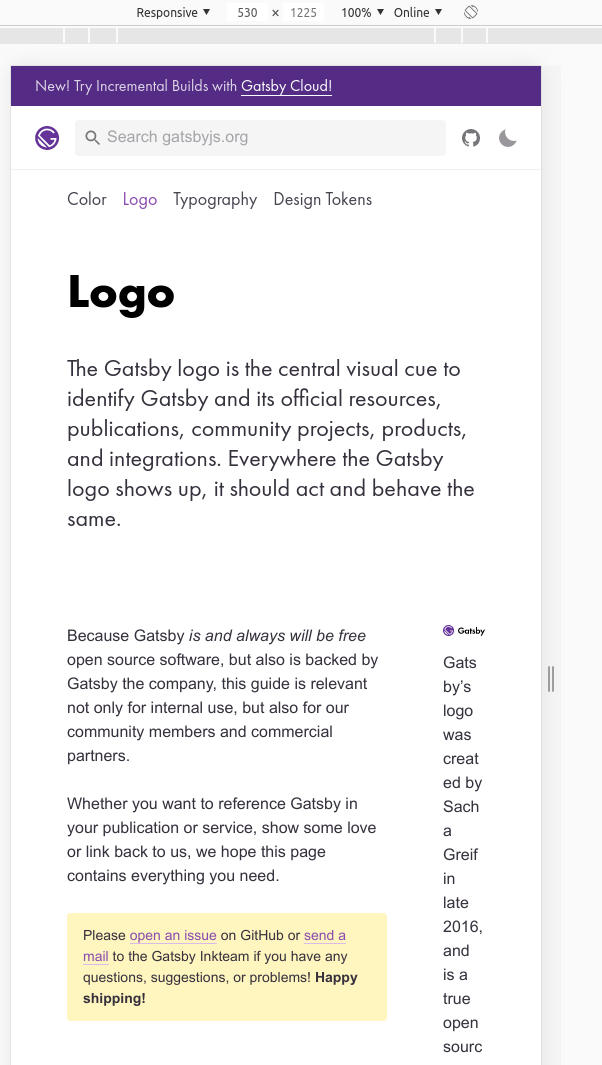
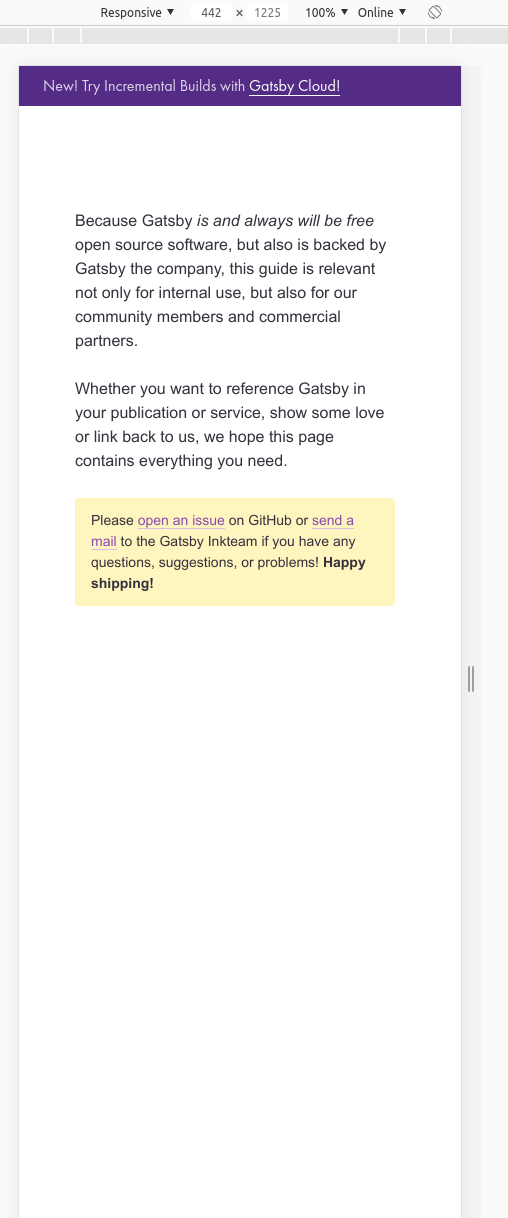
The logo page(https://www.gatsbyjs.org/guidelines/logo/) is not working on mobile screen sizes, basically images are not showing up and scrolling feels like infinite scroll, the next section comes after scrolling a lot.
Steps to reproduce
- Go to https://www.gatsbyjs.org/guidelines/logo/
- Inspect element and select toggle device toolbar
- You will see the page is not properly responsive
Expected result
- The text should not flow out of the width of device.
- The images should appear.
- It should scroll properly.
Actual result
- The text on this page is flowing out of the width of device, because of fixed width given.
- The images are also not showing up.
- Too much scrolling is required to go to the next section of the page.
 abhishekjakhar
All 9 comments
I would love to raise a PR to fix this issue
abhishekjakhar
on 19 May 2020
Confirmed. See screenshots. When the page jumps to a single page column I think the scroll element jumps out of view, somehow, making it impossible to scroll.
Would love to see a PR for this.
cc @fk
 pvdz
on 19 May 2020
pvdz
on 19 May 2020
@pvdz working on it 👍
abhishekjakhar
on 19 May 2020
@pvdz The same issue exists on the following pages also
abhishekjakhar
on 19 May 2020
Hey @abhishekjakhar! 👋
Thanks for opening this (and other issues, and your PRs)! 💜
I believe this was working once upon a time, before we made the transition to theme-ui, and away from styled-system, which I originally used to do the PoC for gatsbyjs.org/guidelines: https://mutability.netlify.app/logo/
As you say in https://github.com/gatsbyjs/gatsby/issues/24218#issuecomment-630805773, all guidelines pages are affected. I'm assuming that fixing this … somewhere in https://github.com/gatsbyjs/gatsby/blob/1f46057d825955a1ebb644141576ac0f0dcbff42/www/src/components/guidelines/containers.js I think … should fix it for all the pages you mentioned. 🤞
Thanks so much for taking this! 🤗
 fk
on 19 May 2020
fk
on 19 May 2020
Hey @fk! 👋
This will help a lot, thank you!
abhishekjakhar
on 19 May 2020
Hi @fk!
All of the components in Guidelines are still using styled-system, none of them have been moved to theme-ui, due to which all of the media query rules are not working in entire set of Guideline components, I have already migrated all of the containers and now there is no scrolling issue, but all of the others pages(logo, color, typography and design tokens) are broken because they are also not migrated to theme-ui. Now, my question is due you want me to do migrate all the guidelines pages in this same PR with containers or should I create a separate PR for each page, otherwise it will be very big PR.
I personally feel that first I should migrate all the Guideline containers to theme-ui so that display is not as broken as it is now, and then in the subsequent steps I will migrate each page of guidelines(logo, color, typography, design tokens).
Please let me know what do you feel about it?
abhishekjakhar
on 22 May 2020
I have already migrated all of the containers
❤️ Thank you, thank you, thank you @abhishekjakhar! 🙏
I personally feel that first I should migrate all the Guideline containers to theme-ui so that display is not as broken as it is now, and then in the subsequent steps I will migrate each page of guidelines(logo, color, typography, design tokens).
Sounds good to me, but happy to review whatever you find is needed to make the transition!
fk
on 22 May 2020
Hey @fk!
I have raised the PR https://github.com/gatsbyjs/gatsby/pull/24383, to convert all the Guidelines containers to theme-ui and make it work on responsive.
I will raise other PR's which will fix the components individually, after this gets merged.
abhishekjakhar
on 23 May 2020
Related issues
 magicly
·
3Comments
magicly
·
3Comments
 benstr
·
3Comments
benstr
·
3Comments
 dustinhorton
·
3Comments
dustinhorton
·
3Comments
 ferMartz
·
3Comments
ferMartz
·
3Comments
 mikestopcontinues
·
3Comments
mikestopcontinues
·
3Comments