Gatsby: What controls whether gatsby-plugin-sass inlines the resulting CSS?
Summary
I have two different Gatsby projects that I believe to be as similar as they could be without being identical, but one of them is getting a FOUC when deployed on Netlify and the other isn't. I think I've narrowed it down that the good one without FOUC is getting inline CSS like this (attached) but the other one isn't:
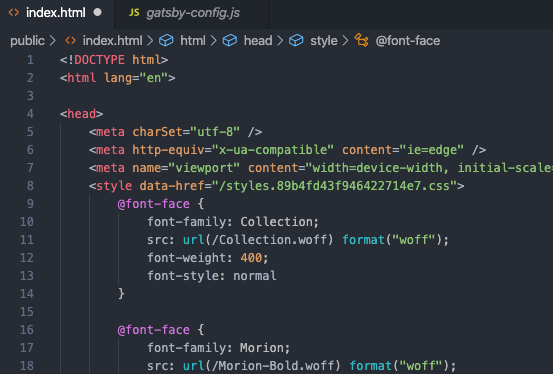
In the other project, I do not even see a style tag, weirdly enough! I can't figure out what the difference is that is causing one to use inline styles on gatsby build and the other to not.
Relevant information
In both projects, I am importing the sass file like this, in the layout.js file:
import("./../stylesheets/index.sass")
Both updated to the latest packages, both with configs like what you see below.
File contents (if changed)
gatsby-config.js:
module.exports = {
  plugins: [
    `gatsby-plugin-react-helmet`,
    `gatsby-plugin-sass`,
    {
      resolve: "gatsby-source-wordpress",
      options: {
        baseUrl: "www.XXXXXXXXXXX.com",
        protocol: "https",
        auth: {},
        cookies: {},
        verboseOutput: false,
        perPage: 100,
        searchAndReplaceContentUrls: {},
        concurrentRequests: 10,
        includedRoutes: ["**/categories", "**/tags", "**/posts"],
        keepMediaSizes: true,
        normalizer: function({ entities }) {
          return entities
        },
      },
    },
  ],
}
package.json: N/A
gatsby-node.js: N/A
gatsby-browser.js: N/A
gatsby-ssr.js: N/A
 sahandnayebaziz
All 8 comments
Hi,
It's a bit hard to know exactly what you're doing and what the difference is. Could you post a snippet of how you import your sass file and maybe a full list of plugins? I can't immediately see what's causing this. Sass isn't inlined by gatsby if not mistaken.
 wardpeet
on 12 Feb 2020
wardpeet
on 12 Feb 2020
Hi @wardpeet! Of course. I added all of the plugins in my gatsby-config in the original issue, here's the full list of plugins in my package.json:
"dependencies": {
    "gatsby": "^2.18.8",
    "gatsby-cli": "^2.8.28",
    "gatsby-image": "^2.2.34",
    "gatsby-plugin-manifest": "^2.2.31",
    "gatsby-plugin-react-helmet": "^3.1.16",
    "gatsby-plugin-sass": "^2.1.26",
    "gatsby-source-filesystem": "^2.1.40",
    "gatsby-source-wordpress": "^3.1.50",
    "lodash": "^4.17.15",
    "node-sass": "^4.13.0",
    "prop-types": "^15.7.2",
    "react": "^16.12.0",
    "react-dom": "^16.12.0",
    "react-feather": "^2.0.3",
    "react-helmet": "^5.2.1"
  },
and this is how I import my sass file:

sahandnayebaziz
on 12 Feb 2020
This is all I believe I have in either project (and in others that have worked too), and this is what is resulting in the style tag with everything in it inline for one project, but not the other. I actually _want_ this inlining behavior because it's preventing a FOUC but I can't figure out how to make it happen in the project that it's not happening in
sahandnayebaziz
on 12 Feb 2020
I tried looking into the source of gatsby-plugin-sass but couldn't immediately answer this question: _is there_ any sort of switch or conditional in that plugin that sometimes makes it inline a style tag in the head and other times makes it just leave a link to a .css file?
sahandnayebaziz
on 12 Feb 2020
I think the problem is your import, can you switch
import("./../stylesheets/index.sass")
into
import "./../stylesheets/index.sass"
The difference between the two is that import() tells webpack to make this a async import so it will give you fouc.
wardpeet
on 13 Feb 2020
Wow, @wardpeet that _totally_ fixed it. That's so interesting. Thank you!
I've got to find this in the Webpack docs and read more about it. I'm glad it was something that I was doing myself.
thank you again!
sahandnayebaziz
on 13 Feb 2020
More on this topic:
https://webpack.js.org/guides/code-splitting/#dynamic-imports
Technically you should never use dynamic imports for css
wardpeet
on 13 Feb 2020
Totally! I didn’t even know that was what I was doing! Thank you :)
sahandnayebaziz
on 16 Feb 2020
Related issues
 KyleAMathews
·
3Comments
KyleAMathews
·
3Comments
 ferMartz
·
3Comments
ferMartz
·
3Comments
 magicly
·
3Comments
magicly
·
3Comments
 totsteps
·
3Comments
totsteps
·
3Comments
 benstr
·
3Comments
benstr
·
3Comments
Most helpful comment
I think the problem is your import, can you switch
into
The difference between the two is that
import()tells webpack to make this a async import so it will give you fouc.