Gatsby: How to duotone images in GraphQL query using colour values from a remote WordPress source?
Summary
I'm working on a Gatsby site that's using gatsby-source-wordpress to pull in data from a self-hosted WordPress site.
Relevant information
I have a collection of custom taxonomies named "Course Areas", each of which has an acf property of 'accent_colour', that I query in gatsby-node.js like so:
const courseAreasResult = await graphql(`
    query GATSBY_NODE_ALL_COURSE_AREAS {
        allWordpressWpCourseArea {
            edges {
                node {
                    id
                    name
                    path
                    acf {
                        accent_colour
                    }
                }
            }
        }
    }
`)
Then I create an index page to list all course areas...
const {
    edges: courseAreas = []
} = courseAreasResult.data.allWordpressWpCourseArea

// Create Course Areas Index
createPage({
    path: '/course-areas/',
    component: slash(courseAreasIndexTemplate)
})
... and create a page for each Course Area, passing in the id and accent_colour as context variables...
courseAreas.forEach(({ node }) => {
    const { id = '', path = '', acf = {} } = node
    const { accent_colour = '' } = acf

    createPage({
        path,
        component: slash(courseAreaTemplate),
        context: {
            id,
            accent_colour
        }
    })
})
...which I can then access in each of the Course Area Page Queries, like so...
query TEMPLATE_COURSE_AREA_QUERY(
    $id: String!
    $accent_colour: String!
) {
    wordpressWpCourseArea(id: { eq: $id }) {
        id
        acf {
            accent_colour
            featured_image {
                localFile {
                    childImageSharp {
                        fluid(
                            maxWidth: 2000
                            duotone: {
                                highlight: $accent_colour
                                shadow: "#222222"
                                opacity: 80
                            }
                            toFormat: PNG
                        ) {
                            ...GatsbyImageSharpFluid_withWebp
                        }
                    }
                }
            }
        }
    }
}
... which is awesome and works just fine, generating beautiful duo-toned images for each individual Course Area page as below 🤩

So What's the Problem?
The problem is I cannot figure out how create duo-toned images for each Course Area card on the index page?
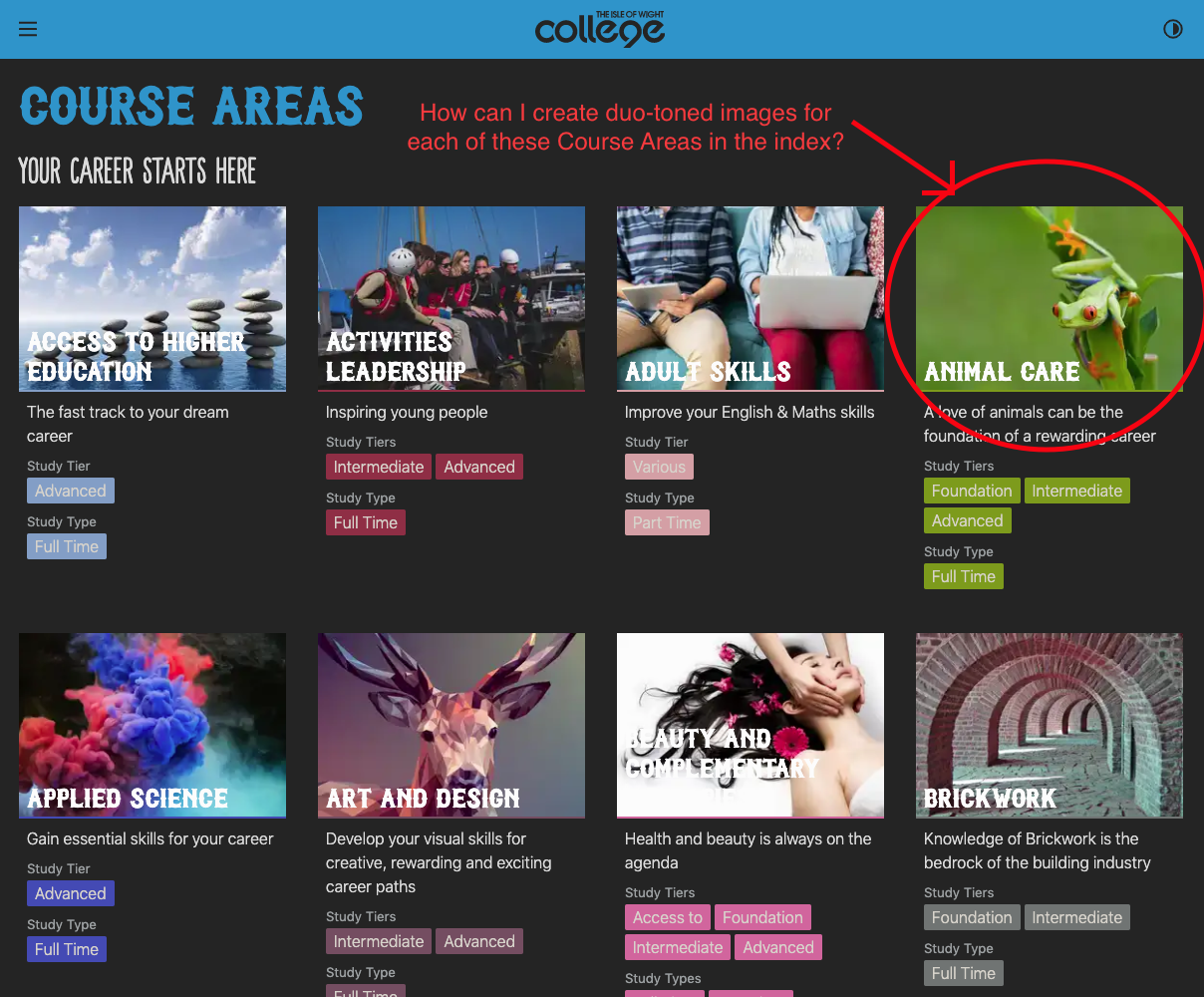
If I pass the accent_colour values as an array in the createPage context, how do I access these values to generate duo-toned images in the graphQL page query?
Here's where I've got to so far:
// Create Course Areas Index - pass array of accent_colours into context
createPage({
    path: '/course-areas/',
    component: slash(courseAreasIndexTemplate),
    context: {
        accent_colours: courseAreas.map(({ node }) => node.acf.accent_colour)
    }
})
My question is, how can I consume each one of these accent_colour values in the index page GraphQL query to generate duo-toned images for each Course Area?
# Current Index page query
# NO CONTEXT
query TEMPLATE_ALL_COURSE_AREAS_INDEX {
    allWordpressWpCourseArea {
        edges {
            node {
                acf {
                    featured_image {
                        localFile {
                            childImageSharp {
                                fluid(maxWidth: 285) {
                                    ...GatsbyImageSharpFluid_withWebp
                                }
                            }
                        }
                    }
                }
            }
        }
    }
}
Even if I consume the context variable within the page query, is there a way to loop through theses values?
# Pseudo code example
query TEMPLATE_ALL_COURSE_AREAS_INDEX($accent_colours: Array!){
    allWordpressWpCourseArea {
        edges {
            node {
                acf {
                    featured_image {
                        localFile {
                            childImageSharp {
                                # Do awesome duo-toning things here
                                # How to access the correct 'accent_colour' for each Course Area?
                                fluid(
                                    maxWidth: 285
                                    duotone: {
                                        highlight: $accent_colours[<?key?>]
                                        shadow: "#222222"
                                        opacity: 80
                                    }
                                    toFormat: PNG
                                ) {
                                    ...GatsbyImageSharpFluid_withWebp
                                }
                            }
                        }
                    }
                }
            }
        }
    }
}
Would welcome any advice or links on how to go about this.
Is this possible to do? If so, Is this approach the best way to go about achieving this?
Or have I missed something?
Thanks in advance,
Aaron.
Environment (if relevant)
System:
OS: macOS 10.14.5
CPU: (8) x64 Intel(R) Core(TM) i7-4771 CPU @ 3.50GHz
Shell: 3.2.57 - /bin/bash
Binaries:
Node: 10.16.3 - /usr/local/bin/node
Yarn: 1.19.1 - /usr/local/bin/yarn
npm: 6.11.3 - /usr/local/bin/npm
Languages:
Python: 2.7.10 - /usr/bin/python
Browsers:
Chrome: 78.0.3904.108
Firefox: 70.0.1
Safari: 12.1.1
npmPackages:
gatsby: 2.18.6 => 2.18.6
gatsby-background-image: 0.9.11 => 0.9.11
gatsby-cli: 2.8.15 => 2.8.15
gatsby-image: 2.2.34 => 2.2.34
gatsby-plugin-csp: ^1.1.3 => 1.1.3
gatsby-plugin-emotion: 4.1.16 => 4.1.16
gatsby-plugin-manifest: 2.2.31 => 2.2.31
gatsby-plugin-offline: 3.0.26 => 3.0.26
gatsby-plugin-react-helmet: 3.1.16 => 3.1.16
gatsby-plugin-react-svg: 2.1.2 => 2.1.2
gatsby-plugin-sharp: 2.3.5 => 2.3.5
gatsby-plugin-sitemap: 2.2.22 => 2.2.22
gatsby-plugin-theme-ui: ^0.2.43 => 0.2.43
gatsby-source-filesystem: 2.1.40 => 2.1.40
gatsby-source-shopify: ^3.0.32 => 3.0.32
gatsby-source-wordpress: 3.1.51 => 3.1.51
gatsby-theme-style-guide: ^0.2.49 => 0.2.49
gatsby-transformer-sharp: 2.3.6 => 2.3.6
npmGlobalPackages:
gatsby-cli: 2.7.58
 IWCollege-AaronBentley
All 8 comments
Hey, sorry for the delay with a response and thanks for the interesting question!
GraphQL is intentionally simple in its query syntax to keep execution logic clear and performant. So complex variable mappings are not directly possible in queries.
Fortunately, Gatsby allows you to modify GraphQL schema using schema customization API. The idea is that you could create a new field, e.g. preview_image_fluid in your WordpressWpCourseArea type and apply custom image transforms to it using tools from gatsby-plugin-sharp.
Then you will be able to write your query like this:
query TEMPLATE_ALL_COURSE_AREAS_INDEX {
  allWordpressWpCourseArea {
    edges {
      node {
        id
        preview_image_fluid
      }
    }
  }
}
And use it in your component:
data.allWordpressWpCourseArea.edges.map(({ node }) => {
  return (
    <Image key={node.id} fluid={node.preview_image_fluid} />
  )
})
Here is an example code for gatsby-node.js to make it work:
const { fluid } = require(`gatsby-plugin-sharp`)

// Using createResolvers API
// https://www.gatsbyjs.org/docs/node-apis/#createResolvers
exports.createResolvers = ({ createResolvers, reporter, cache, }) => {
  // This will create a new field `preview_image_fluid` on type `WordpressWpCourseArea`
  createResolvers({
    WordpressWpCourseArea: {
      preview_image_fluid: {
        // Make this field of a JSON type for simplicity
        type: `JSON`,
        // Apply custom image transformation logic and return data suitable
        // for `fluid` option of `gatsby-image`
        resolve(courseArea, args, context) {
          // We need an ID of the original image file to proceed
          const id = courseArea.acf.featured_image.localFile___NODE

          // Get file node by this ID
          // See https://www.gatsbyjs.org/docs/node-model/
          const file = context.nodeModel.getNodeById({ id })
          if (!file) return null

          // Now that we have the file node of our image - we can transform it as we want
          // See https://www.gatsbyjs.org/packages/gatsby-plugin-sharp/#fluid
          const duotone = {
            highlight: courseArea.acf.accent_color,
            shadow: "#222222",
            opacity: 80
          }
          return fluid({ file, args: { ...args, duotone }, reporter, cache })
        }
      }
    }
  })
}
Note: this is an intentionally simple example and it uses hardcoded arguments for fluid. Technically you can also define arguments if you plan to use this field in different GraphQL queries with different parameters.
I tried it with a simple blog starter and it seems to be working as expected. See the repo or specifically this commit
Hope it helps.
 vladar
on 13 Dec 2019
vladar
on 13 Dec 2019
@vladar Thank you so much for your comments & guidance 🤩 - I'm away from my desk at the moment but will give this a try on Monday.
Thank you sir 👌
IWCollege-AaronBentley
on 13 Dec 2019
Hey @vladar, hope you had a nice weekend.
I've tried to implement your suggestion this morning using createResolvers, I think I'm closer to achieving the desired result but I'm now having issues getting the correct localFile___NODE id - I think this is due to the image being part of the ACF fields within the WordPress CMS. 🤔
Here's what I have so far...
const { fluid } = require('gatsby-plugin-sharp')

// !!! "featured_image" acf field has been renamed to "featured_media" !!!
exports.createResolvers = ({ createResolvers, reporter, cache, }) => {
    // This will create a new field `preview_image_fluid` on type `wordpress__wp_course_area`
    createResolvers({
        wordpress__wp_course_area: {
            preview_image_fluid: {
                type: 'JSON',
                resolve(courseArea, args, context) {
                    // We need an ID of the original image file to proceed

                    // I had to tweak this line as it was always returns NULL
                    // const id = courseArea.acf.featured_media.localFile___NODE
                    // This will get the correct acf -> featured media node ID - but not a "localFile___NODE"
                    const id = courseArea.acf.featured_media___NODE

                    // Get file node by this ID
                    const file = context.nodeModel.getNodeById({ id })
                    if (!file) return null

                    // This is my next issue
                    // 'file' has the correct image, but not the correct localFile___NODE id?
                    // How do I access the localFile___Node value within the 'file' const?

                    // Now that we have the file node of our image - we can transform it as we want
                    const duotone = {
                        highlight: courseArea.acf.accent_colour,
                        shadow: '#222222',
                        opacity: 80
                    }
                    return fluid({
                        file,
                        args: { ...args, duotone },
                        reporter,
                        cache
                    })
                }
            }
        }
    })
... After a little debugging, I think I'm getting the wrong id - here's the contents of id and file variables, I've highlighted the node id in red and the desired localFile___NODE in green:
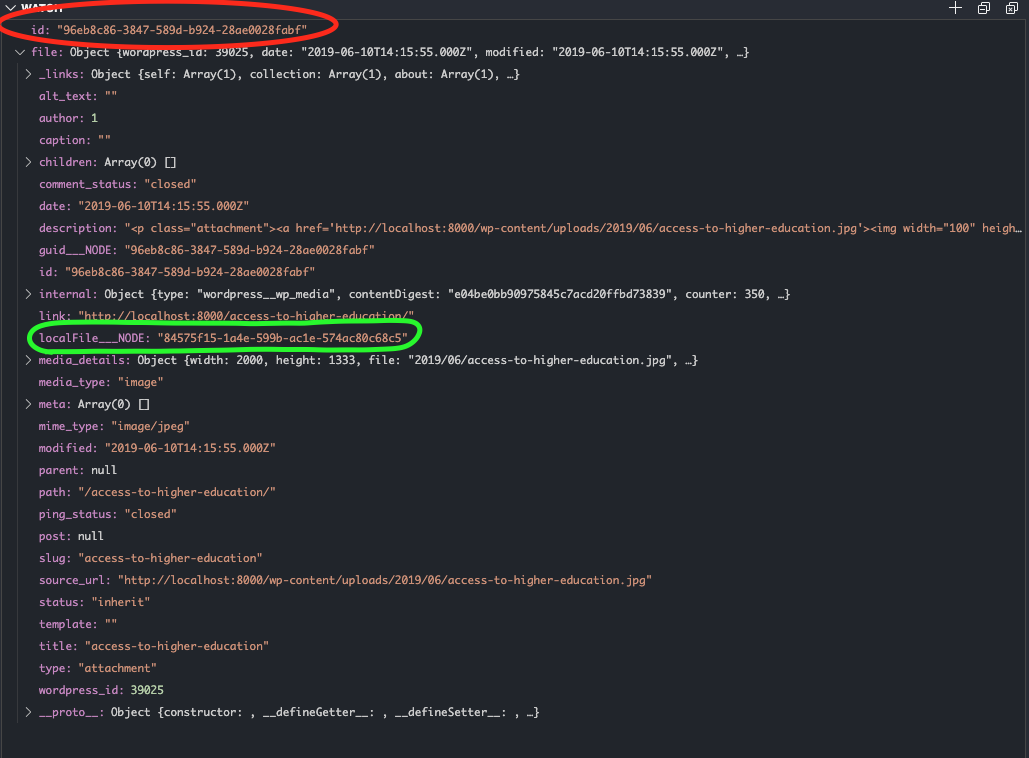
Any ideas on how I can get the correct localFile___NODE id?
Thanks in advance,
Aaron.
IWCollege-AaronBentley
on 16 Dec 2019
Have you tried something like this:
const mediaNodeId = courseArea.acf.featured_media___NODE
const mediaNode = context.nodeModel.getNodeById({ id: mediaNodeId })
const fileId = mediaNode.localFile___NODE
const file = context.nodeModel.getNodeById({ id: fileId })
I guess it could be prettier with nodeModel.runQuery but getNodeById checks should be the fastest.
vladar
on 16 Dec 2019
Thanks for the swift reply @vladar, I'm very happy to report that this is working perfectly 😍
I'd tried something identical earlier to no avail - turns out I hadn't restarted my dev server 😱
Thank you so much for your help with this - it's been driving me crazy for the best part of 2 weeks!
Please can you message me, I'd like to buy you a beer of appreciation 🍻
IWCollege-AaronBentley
on 16 Dec 2019
Hey Aaron, glad this helped! Thank you for the offer of beer, but I would prefer you to send a donation to some charitable organization or open-source project. And thanks for using Gatsby!
vladar
on 17 Dec 2019
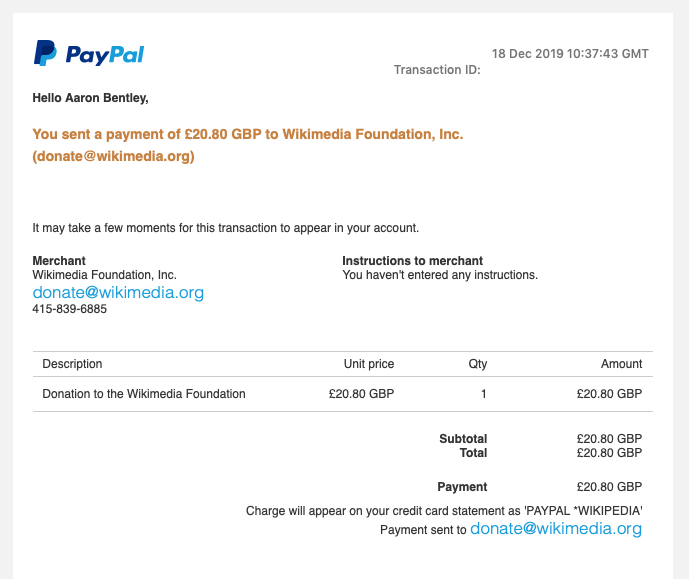
@vladar As you were so kind to share your knowledge on this issue, I've made a £20 donation to Wikimedia Foundation to help towards others sharing knowledge in the future.
Thank you again for your help and guidance here ❤️
IWCollege-AaronBentley
on 18 Dec 2019
That's awesome! You are the best!
vladar
on 18 Dec 2019
Related issues
 brandonmp
·
3Comments
brandonmp
·
3Comments
 kalinchernev
·
3Comments
kalinchernev
·
3Comments
 totsteps
·
3Comments
totsteps
·
3Comments
 ferMartz
·
3Comments
ferMartz
·
3Comments
 benstr
·
3Comments
benstr
·
3Comments
Most helpful comment
@vladar As you were so kind to share your knowledge on this issue, I've made a £20 donation to Wikimedia Foundation to help towards others sharing knowledge in the future.
Thank you again for your help and guidance here ❤️