gatsby-remark-images: disable background-image on gatsby-resp-image-background-image to prevent FOUB
Description
gatsby-remark-images has a blur-up effect that does not work well on .png images with transparent edges. I looked at the gatsby-remark-images source code and it is using css transition for the blur up effect. Unfortunately, the css transitions does not work well on images with alpha transparent edges. It causes a flash of ugly blur-up (FOUB) effect. We need a way to prevent/disable background-image css property on gatsby-resp-image-background-image class for .pngs with transparent edges to prevent FOUB.
Related to https://github.com/gatsbyjs/gatsby/issues/4510#issuecomment-390781917
(Note: the blur-up effect doesn't work well even with backgroundColor: 'transparent' option set for gatsby-remark-images)
Screenshots
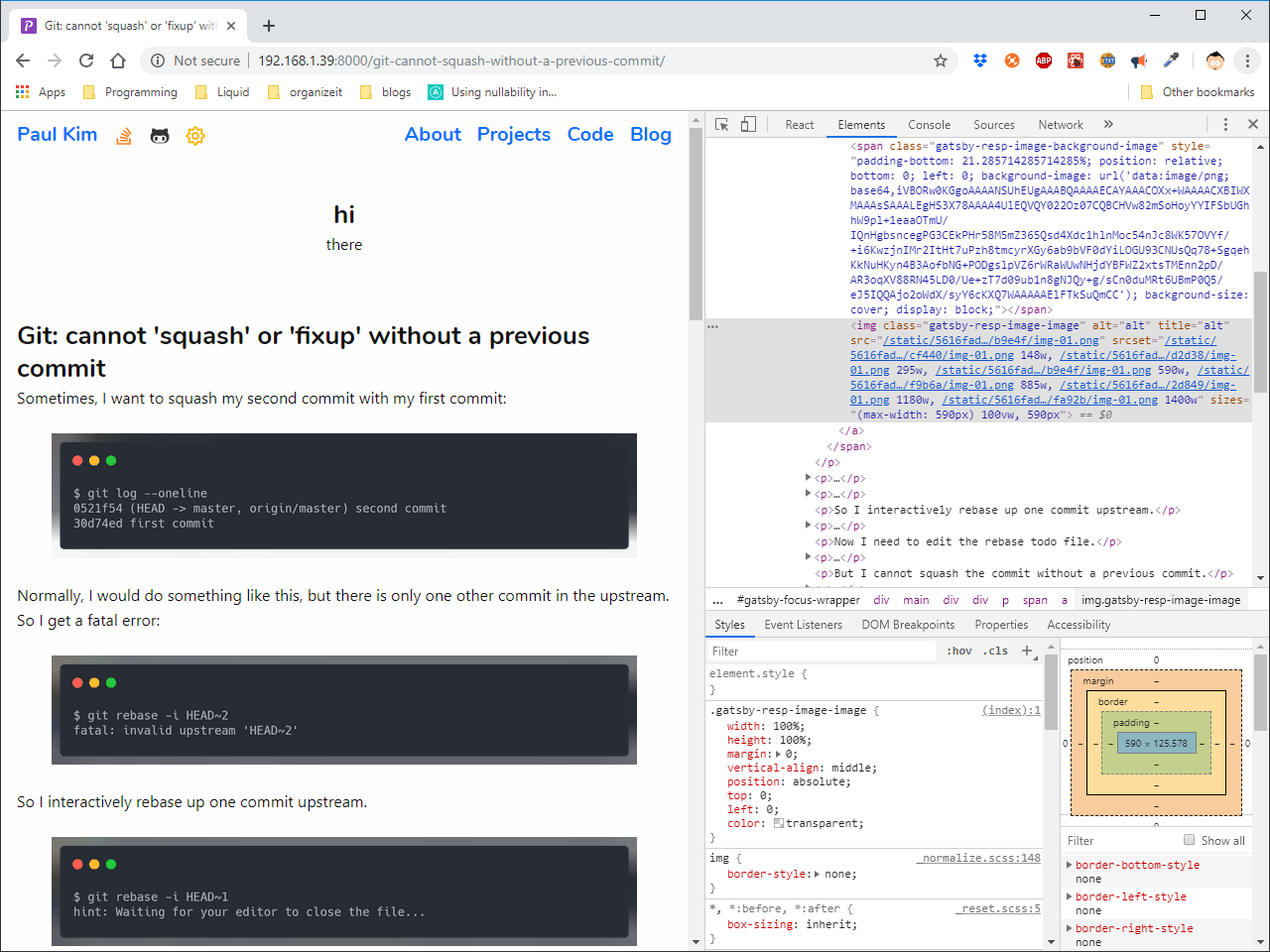

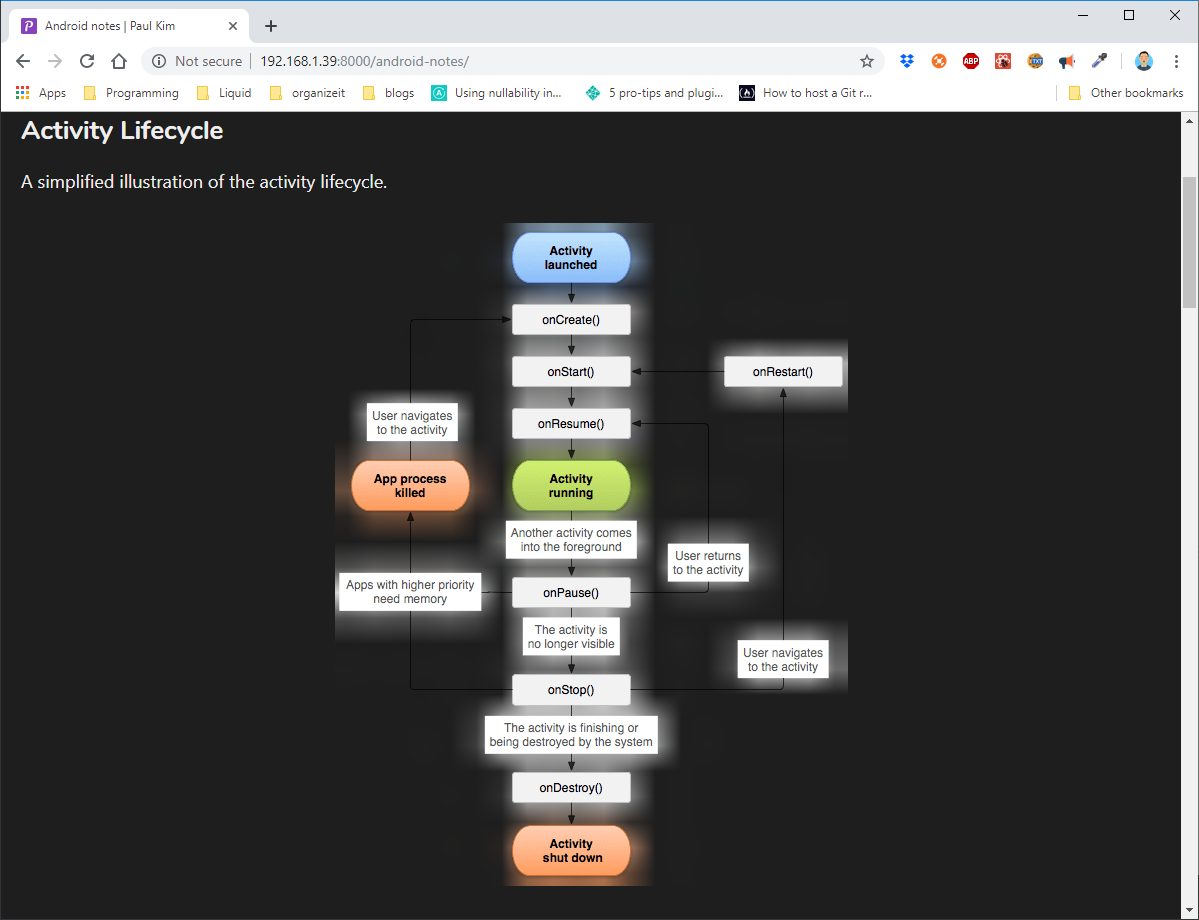
gatsby-config
{
  resolve: `gatsby-transformer-remark`,
  options: {
    plugins: [
      {
        resolve: `gatsby-remark-images`,
        options: {
          maxWidth: 590,
          backgroundColor: `transparent`,
        },
      },
    ],
  },
},
We should have the ability to disable background-image css property on gatsby-resp-image-background-image class on images if it contains alpha transparency.
I think we should automatically disable background-image css property for .png images if backgroundColor: 'transparent" option is set. We can do this for all .png images or only for .png images that have alpha transparency.
Steps to reproduce
- Create a gatsby project.
- Install and add
gatsby-transformer-remarkandgatsby-remark-imagesplugins - set
backgroundColor: 'transparent'option forgatsby-remark-imagesplugin - add .png images to your markdown files that contain alpha transparent edges
- open webpage and refresh page to see flash of ugly blur-up (FOUB)
Expected result
There is no flash of ugly blur-up (FOUB) on page refresh.
Actual result
There is flash of ugly blur-up (FOUB) on page refresh.
Link to demo project
- Go to https://paulkode.com/git-cannot-squash-without-a-previous-commit/
- Refresh the page (try in both dark/light modes)
Environment
  System:
    OS: Linux 4.15 Ubuntu 18.04.3 LTS (Bionic Beaver)
    CPU: (2) x64 Intel(R) Core(TM) i7-6700K CPU @ 4.00GHz
    Shell: 4.4.20 - /bin/bash
  Binaries:
    Node: 12.2.0 - ~/.nvm/versions/node/v12.2.0/bin/node
    Yarn: 1.17.3 - ~/.nvm/versions/node/v12.2.0/bin/yarn
    npm: 6.10.3 - ~/.nvm/versions/node/v12.2.0/bin/npm
  Languages:
    Python: 3.7.3 - /home/paul/.pyenv/shims/python
  Browsers:
    Chrome: 76.0.3809.100
    Firefox: 68.0.1
  npmPackages:
    gatsby: ^2.13.57 => 2.13.57
    gatsby-image: ^2.2.8 => 2.2.8
    gatsby-plugin-emotion: ^4.1.2 => 4.1.2
    gatsby-plugin-feed: ^2.3.6 => 2.3.6
    gatsby-plugin-google-analytics: ^2.1.7 => 2.1.7
    gatsby-plugin-manifest: ^2.2.5 => 2.2.5
    gatsby-plugin-offline: ^2.2.5 => 2.2.5
    gatsby-plugin-react-helmet: ^3.1.3 => 3.1.3
    gatsby-plugin-sass: ^2.1.6 => 2.1.6
    gatsby-plugin-sharp: ^2.2.11 => 2.2.11
    gatsby-plugin-styled-components: ^3.1.2 => 3.1.2
    gatsby-remark-copy-linked-files: ^2.1.5 => 2.1.5
    gatsby-remark-external-links: 0.0.4 => 0.0.4
    gatsby-remark-images: ^3.1.8 => 3.1.8
    gatsby-remark-katex: ^3.1.2 => 3.1.2
    gatsby-remark-prismjs: ^3.3.5 => 3.3.5
    gatsby-remark-responsive-iframe: ^2.2.4 => 2.2.4
    gatsby-remark-smartypants: ^2.1.2 => 2.1.2
    gatsby-source-filesystem: ^2.1.9 => 2.1.9
    gatsby-transformer-remark: ^2.6.12 => 2.6.12
    gatsby-transformer-sharp: ^2.2.6 => 2.2.6
 kimbaudi
All 12 comments
Hello @kimbaudi!
Thank you for a detailed report! Would you like to add a fix to that via PR? I think a separate flag would be better than automatically doing it on transparent background.
Thanks! :purple_heart: :muscle:
 freiksenet
on 12 Aug 2019
freiksenet
on 12 Aug 2019
I'll try working on this one
 stevensukma
on 12 Aug 2019
stevensukma
on 12 Aug 2019
@stevensukma - thanks for taking on this PR! I'm really curious how you plan to implement this. For me, the most interesting part of this task is determining whether .png images contain alpha-transparency (at least on the outer edges of the images). There is this canvas technique, which seems promising. Looking forward to this PR 😄
kimbaudi
on 12 Aug 2019
Thanks for the information, this is my first attempts on open source contribution. Hope you guys don't mind being a little bit patience :pray:.
stevensukma
on 12 Aug 2019
@stevensukma Don't hesitate to ping me if you need any help!
freiksenet
on 12 Aug 2019
@kimbaudi I think for now it's enough to have a flag so that user can manually set that, but in future we can detect the alpha layer in a way that you suggested.
freiksenet
on 12 Aug 2019
@freiksenet - Ok, I will create a new flag to disable blurry bg image for images with alphatransparency. I am most likely only going to check the outer edges for transparency (instead of checking the entire image). This will make this a O(w + h) operation rather than a O(wh) operation. And in the future, set this on by default later on maybe.
kimbaudi
on 16 Aug 2019
I'm running into this problem too, so thanks for taking this on @kimbaudi! In the mean time, does anyone know a workaround for this to get rid of the blurry background image altogether or something? I tried commenting out the gatsby-remark-images plugin stuff in gatsby-config.js but that broke all my images. Note: I am new to both JS and Gatsby and I'm using the Lumen theme.
 benlindsay
on 28 Aug 2019
benlindsay
on 28 Aug 2019
@benlindsay - you can use gatsby-remark-copy-linked-files to copy images instead of gatsby-remark-images. That will copy the images without the blur-up effect.
kimbaudi
on 28 Aug 2019
@kimbaudi Thanks! Turns out the Lumen theme already had that plugin included, but it also had gatsby-remark-relative-images that seemed to mess with it. Commenting out that line fixed it.
benlindsay
on 28 Aug 2019
Sorry for putting this off for over 2 weeks! My phone broke and I spent way too much time trying to repair it to no avail. And my distant cousin came to visit us since last week so I've been away from the computer. But I just finished this task so thanks for waiting!
kimbaudi
on 28 Aug 2019
Hey, you never need to apologize for not spending your free time doing unpaid labor. Thanks for doing this!
benlindsay
on 28 Aug 2019
Related issues
 dustinhorton
·
3Comments
dustinhorton
·
3Comments
 magicly
·
3Comments
magicly
·
3Comments
 Oppenheimer1
·
3Comments
Oppenheimer1
·
3Comments
 andykais
·
3Comments
andykais
·
3Comments
 rossPatton
·
3Comments
rossPatton
·
3Comments
Most helpful comment
Hey, you never need to apologize for not spending your free time doing unpaid labor. Thanks for doing this!