gatsby-theme-blog generate invalid URL for post slug
Description
The slug for post in gatsby-theme-blog are invalid URL when using windows.
This is due to the code that use path.join to create slug at https://github.com/gatsbyjs/gatsby/blob/master/themes/gatsby-theme-blog/gatsby-node.js#L171, which is fine in unix but problematic in windows because path.join returns backslash in windows.
Steps to reproduce
In windows machine, run:
gatsby new my-blog https://github.com/gatsbyjs/gatsby-starter-blog-theme
Then
npm start
Then you should be able to see the links on the home page is incorrect.
Expected result
The slug for post should be valid URL.
Actual result

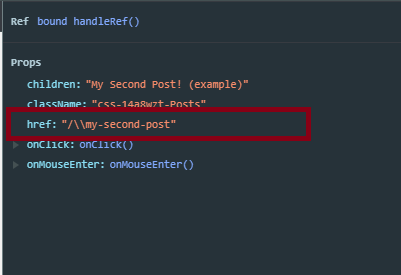
Environment
System:
OS: Windows 10
CPU: (4) x64 Intel(R) Core(TM) i5-6500 CPU @ 3.20GHz
Binaries:
Yarn: 1.16.0 - C:\Program Files (x86)\Yarn\bin\yarn.CMD
npm: 6.9.0 - C:\Program Files\nodejs\npm.CMD
Browsers:
Edge: 44.17763.1.0
npmPackages:
gatsby: ^2.13.6 => 2.13.6
gatsby-theme-blog: ^1.0.0 => 1.0.0
 malcolm-kee
All 4 comments
I can work on the fix once someone can confirm this is valid bug (not due to my misunderstanding 😅)
malcolm-kee
on 8 Jul 2019
Ward is working on a fix 👍🏻
https://github.com/gatsbyjs/gatsby/pull/15370
 LekoArts
on 8 Jul 2019
LekoArts
on 8 Jul 2019
Should be fixed now with https://github.com/gatsbyjs/gatsby/pull/15370
LekoArts
on 15 Jul 2019
I just created a fresh gatsby-starter-blog-theme on Windows but am having the same problem. Should I do something to pull in the changes?
 bravo-kernel
on 20 Jul 2019
bravo-kernel
on 20 Jul 2019
Related issues
 andykais
·
3Comments
andykais
·
3Comments
 dustinhorton
·
3Comments
dustinhorton
·
3Comments
 Oppenheimer1
·
3Comments
dustinhorton
·
3Comments
Oppenheimer1
·
3Comments
dustinhorton
·
3Comments
 benstr
·
3Comments
benstr
·
3Comments
Most helpful comment
Ward is working on a fix 👍🏻
https://github.com/gatsbyjs/gatsby/pull/15370