Gatsby: Gatsby build fails with "Element is not defined" when using "fullcalendar"
Summary
Gatsby develop works fine, build fails when I use this package.
gatsby version: 2.5.14
node version: 11.12.0
Tried:
- wrapping the import with Componentdidmount
componentDidMount() {
    import("@fullcalendar/react")
      .then((FullCalendar) => {
        this.FullCalendar = FullCalendar;
      })
      .catch((error) => console.error(error));
- wrapping the entire return statement with if !window
if (typeof window !== 'undefined') {
      return (
Code in page:
edit: src/pages/events.js
import React from 'react'
import { Link } from 'gatsby'
import styled from 'styled-components'
import Helmet from 'react-helmet'
import PageTitle from '../components/PageTitle'
import Container from '../components/Container'
import Layout from '../components/Layout'
import FullCalendar from '@fullcalendar/react'
import dayGridPlugin from '@fullcalendar/daygrid'
import interactionPlugin from '@fullcalendar/interaction'

import '@fullcalendar/core/main.css'
import '@fullcalendar/daygrid/main.css'

const Text = styled.p`
  text-align: center;
  line-height: 1.6;
  a {
    color: #121212;
  }
`

const FullCalendarWrapper = styled.div`
  .fc-content {
    cursor: pointer;
  }
`

class EventsPage extends React.Component {
  render() {
    const events = [
      {
        title: 'event 1',
        start: '2019-04-02T13:13:55.008',
        end: '2019-04-03T13:13:55.008',
        description: 'this is my event',
      },
      { title: 'event 2', date: '2019-04-02' },
    ]
    return (
      <Layout>
        <Helmet>
          <title>Event Calendar</title>
          <meta name="description" content="Event Calendar" />
        </Helmet>

        <Container>
          <PageTitle>Events</PageTitle>
          <Text>This will be the Event calendar page</Text>
          <FullCalendarWrapper>

            <FullCalendar
              eventClick={this.handleEventClick}
              defaultView="dayGridMonth"
              plugins={[dayGridPlugin, interactionPlugin]}
              events={events}
            />
          </FullCalendarWrapper>
        </Container>
      </Layout>
    )
  }

  handleEventClick = arg => {
    console.log('event clicked', arg)
    alert(arg.event.title + ' ' + arg.event.extendedProps.description)
  }
}

export default EventsPage
Full build log:
8:49:46 PM: [WARNING] We are experiencing internal issues storing deploy logs. Some log lines may be missing.
8:49:46 PM: Build ready to start
8:49:51 PM: build-image version: 9e0f207a27642d0115b1ca97cd5e8cebbe492f63
8:49:51 PM: build-image tag: v3.3.2
8:49:51 PM: buildbot version: ef8d0929ed0baabafd8bbb7d0b021e1fc24180c0
8:49:51 PM: Fetching cached dependencies
8:49:51 PM: Starting to download cache of 138.0MB
8:49:52 PM: Finished downloading cache in 668.016401ms
8:49:52 PM: Starting to extract cache
8:49:58 PM: Finished extracting cache in 6.289207513s
8:49:58 PM: Finished fetching cache in 7.100657052s
8:49:58 PM: Starting to prepare the repo for build
8:49:58 PM: Preparing Git Reference refs/heads/master
8:49:59 PM: Starting build script
8:49:59 PM: Installing dependencies
8:50:00 PM: Started restoring cached node version
8:50:02 PM: Finished restoring cached node version
8:50:03 PM: v10.16.0 is already installed.
8:50:05 PM: Now using node v10.16.0 (npm v6.9.0)
8:50:05 PM: Attempting ruby version 2.6.2, read from environment
8:50:07 PM: Using ruby version 2.6.2
8:50:08 PM: Using PHP version 5.6
8:50:08 PM: Started restoring cached node modules
8:50:08 PM: Finished restoring cached node modules
8:50:08 PM: Installing NPM modules using NPM version 6.9.0
8:50:25 PM: npm WARN [email protected] requires a peer of typescript@* but none is installed. You must install peer dependencies yourself.
8:50:25 PM: npm WARN
8:50:25 PM:  optional SKIPPING OPTIONAL DEPENDENCY: [email protected] (node_modules/fsevents):
8:50:25 PM: npm WARN
8:50:25 PM: notsup SKIPPING OPTIONAL DEPENDENCY: Unsupported platform for [email protected]: wanted {"os":"darwin","arch":"any"} (current: {"os":"linux","arch":"x64"})
8:50:25 PM: added 4 packages from 2 contributors and audited 30790 packages in 15.739s
8:50:25 PM: found 2 moderate severity vulnerabilities
8:50:25 PM:   run `npm audit fix` to fix them, or `npm audit` for details
8:50:25 PM: NPM modules installed
8:50:25 PM: Started restoring cached go cache
8:50:25 PM: Finished restoring cached go cache
8:50:25 PM: unset GOOS;
8:50:25 PM: unset GOARCH;
8:50:25 PM: export GOROOT='/opt/buildhome/.gimme/versions/go1.12.linux.amd64';
8:50:25 PM: export PATH="/opt/buildhome/.gimme/versions/go1.12.linux.amd64/bin:${PATH}";
8:50:25 PM: go version >&2;
8:50:25 PM: export GIMME_ENV='/opt/buildhome/.gimme/env/go1.12.linux.amd64.env';
8:50:25 PM: go version go1.12 linux/amd64
8:50:25 PM: Installing missing commands
8:50:25 PM: Verify run directory
8:50:25 PM: Executing user command: gatsby build
8:50:28 PM: success open and validate gatsby-configs — 0.017 s
8:50:30 PM: success load plugins — 1.380 s
8:50:30 PM: success onPreInit — 0.008 s
8:50:30 PM: success delete html and css files from previous builds — 0.008 s
8:50:30 PM: success initialize cache — 0.011 s
8:50:30 PM: success copy gatsby files — 0.030 s
8:50:30 PM: success onPreBootstrap — 0.020 s
8:50:30 PM: Starting to fetch data from Contentful
8:50:30 PM: Fetching default locale
8:50:30 PM: default locale is : en-US
8:50:30 PM: contentTypes fetched 4
8:50:30 PM: Updated entries  23
8:50:30 PM: Deleted entries  0
8:50:30 PM: Updated assets  16
8:50:30 PM: Deleted assets  0
8:50:30 PM: Fetch Contentful data: 231.493ms
8:50:30 PM: success source and transform nodes — 0.413 s
8:50:31 PM: success building schema — 0.453 s
8:50:31 PM: success createPages — 0.116 s
8:50:31 PM: success createPagesStatefully — 0.062 s
8:50:31 PM: success onPreExtractQueries — 0.006 s
8:50:31 PM: success update schema — 0.032 s
8:50:31 PM: success extract queries from components — 0.172 s
8:50:31 PM: success run static queries — 0.001 s
8:50:31 PM: code block or inline code language not specified in markdown. applying generic code block
8:50:32 PM: success run page queries — 0.933 s — 32/32 34.34 queries/second
8:50:32 PM: success write out page data — 0.005 s
8:50:32 PM: success write out redirect data — 0.001 s
8:50:32 PM: success Build manifest and related icons — 0.151 s
8:50:32 PM: success onPostBootstrap — 0.153 s
8:50:32 PM: info bootstrap finished - 6.744 s
8:50:58 PM: success Building production JavaScript and CSS bundles — 25.932 s
8:51:00 PM: error Building static HTML failed
8:51:00 PM: See our docs page on debugging HTML builds for help https://gatsby.dev/debug-html
8:51:00 PM:   105 |     // ----------------------------------------------------------------------------------------------------------------
8:51:00 PM:   106 |     // from https://developer.mozilla.org/en-US/docs/Web/API/Element/closest
8:51:00 PM: > 107 |     var matchesMethod = Element.prototype.matches ||
8:51:00 PM:       | ^
8:51:00 PM:   108 |         Element.prototype.matchesSelector ||
8:51:00 PM:   109 |         Element.prototype.msMatchesSelector;
8:51:00 PM:   110 |     var closestMethod = Element.prototype.closest || function (selector) {
8:51:00 PM:
8:51:00 PM:   WebpackError: ReferenceError: Element is not defined
8:51:00 PM:
8:51:00 PM:   - main.js:107
8:51:00 PM:     [lib]/[@fullcalendar]/core/main.js:107:1
8:51:00 PM:
8:51:00 PM:   - main.js:7 ./node_modules/@fullcalendar/core/main.js
8:51:00 PM:     [lib]/[@fullcalendar]/core/main.js:7:65
8:51:00 PM:
8:51:00 PM:   - main.js:10 Object../node_modules/@fullcalendar/core/main.js
8:51:00 PM:     [lib]/[@fullcalendar]/core/main.js:10:2
8:51:00 PM:
8:51:00 PM:   - bootstrap:19 __webpack_require__
8:51:00 PM:     lib/webpack/bootstrap:19:1
8:51:00 PM:
8:51:00 PM:   - main.esm.js:1 Module../node_modules/@fullcalendar/react/main.esm.js
8:51:00 PM:     [lib]/[@fullcalendar]/react/main.esm.js:1:1
8:51:00 PM:
8:51:00 PM:   - bootstrap:19 __webpack_require__
8:51:00 PM:     lib/webpack/bootstrap:19:1
8:51:00 PM:
8:51:00 PM:
8:51:00 PM:   - bootstrap:19 __webpack_require__
8:51:00 PM:     lib/webpack/bootstrap:19:1
8:51:00 PM:
8:51:00 PM:   - sync-requires.js:15 Object../.cache/sync-requires.js
8:51:00 PM:     lib/.cache/sync-requires.js:15:56
8:51:00 PM: failed during stage 'building site': Build script returned non-zero exit code: 1
8:51:00 PM:
8:51:00 PM:   - bootstrap:19 __webpack_require__
8:51:00 PM:     lib/webpack/bootstrap:19:1
8:51:00 PM:
8:51:00 PM:   - static-entry.js:9 Module../.cache/static-entry.js
8:51:00 PM:     lib/.cache/static-entry.js:9:22
8:51:00 PM:
8:51:00 PM:   - bootstrap:19 __webpack_require__
8:51:00 PM:     lib/webpack/bootstrap:19:1
8:51:00 PM:
8:51:00 PM:   - bootstrap:83
8:51:00 PM:     lib/webpack/bootstrap:83:1
8:51:00 PM:
8:51:00 PM:
8:51:00 PM:   - universalModuleDefinition:3 webpackUniversalModuleDefinition
8:51:00 PM:     lib/webpack/universalModuleDefinition:3:1
8:51:00 PM:
8:51:00 PM:   - universalModuleDefinition:10 Object.<anonymous>
8:51:00 PM:     lib/webpack/universalModuleDefinition:10:2
8:51:00 PM:
8:51:00 PM:
8:51:00 PM: Skipping functions preparation step: no functions directory set
8:51:00 PM: Caching artifacts
8:51:00 PM: Started saving node modules
8:51:00 PM: Finished saving node modules
8:51:00 PM: Started saving pip cache
8:51:00 PM: Finished saving pip cache
8:51:00 PM: Started saving emacs cask dependencies
8:51:00 PM: Finished saving emacs cask dependencies
8:51:00 PM: Started saving maven dependencies
8:51:00 PM: Finished saving maven dependencies
8:51:00 PM: Started saving boot dependencies
8:51:00 PM: Finished saving boot dependencies
8:51:00 PM: Started saving go dependencies
8:51:00 PM: Finished saving go dependencies
8:51:00 PM: Error running command: Build script returned non-zero exit code: 1
8:51:00 PM: Failing build: Failed to build site
8:51:01 PM: Finished processing build request in 1m9.959340038s
 NiviJah
All 6 comments
Hi @NiviJah,
Sorry to hear you're running into an issue. To help us best begin debugging the underlying cause, it is incredibly helpful if you're able to create a minimal reproduction. This is a simplified example of the issue that makes it clear and obvious what the issue is and how we can begin to debug it.
If you're up for it, we'd very much appreciate if you could provide a minimal reproduction and we'll be able to take another look.
Thanks for using Gatsby! 💜
 prestonso
on 28 Jun 2019
prestonso
on 28 Jun 2019
Appreciate you answering,
the repo with the problem can be seen here:
https://github.com/NiviJah/gatsby-gcn
edit: in case it wasn't obvious,
clone, run gatsby build to see the problem.
the related files are specified in the first comment
NiviJah
on 28 Jun 2019
@NiviJah i've picked up on your issue and i have a solution for it. Here are the steps i took to solve it.
- I've checked your code and as it has alot going on in there, namely in the form of contentful and so on and to keep it simple, i've created a simple Gatsby website using the hello world starter.
- Added the necessary packages, namely
@fullcalendar/core,@fullcalendar/daygrid,@fullcalendar/interaction,@fullcalendar/reactand upon checking the documentation it looks like it's styled with sass so i've added alsonode-sassandgatsby-plugin-sass. - Configured my
gatsby-config.jslike so.
module.exports = {
  plugins:[
    'gatsby-plugin-sass'
  ]
}
- Based on your description it seems that this package is oriented to client-side rendering and when gatsby is going through the build process, all of the work is done with node. And with that it does not have access to certain apis, like window and so on.
- With the above in mind i've added react-loadable, so that i can use the package safely when needed.
- Instead of leaving the calendar implementation directly in the page. I moved it to a component called
MyEventCalendar.jswith the following code:
import React from "react"
import FullCalendar from "@fullcalendar/react"
import dayGridPlugin from "@fullcalendar/daygrid"
import interactionPlugin from "@fullcalendar/interaction"
import "@fullcalendar/core/main.css"
import "@fullcalendar/daygrid/main.css"

class MyEventCalendar extends React.Component {
  handleEventClick = e => {
    console.log('====================================');
    console.log(`title:${e.event.title} description:${e.event.extendedProps.description}`);
    console.log('====================================');
  }
  render() {
    const events = [
      {
        title: "event 1",
        start: "2019-04-02T13:13:55.008",
        end: "2019-04-03T13:13:55.008",
        description: "this is my event",
      },
      {
        title: "event 2",
        start: "2019-05-03T13:13:55.008",
        end: "2019-05-04T13:13:55.008",
        description: "this is another event",
      },
      {
        title: "event 3",
        start: "2019-07-03T13:13:55.008",
        end: "2019-075-04T13:13:55.008",
        description: "this is random event",
      },
    ]
    return (
      <div>
        <h1>this is a event calendar</h1>
        <FullCalendar
          eventClick={this.handleEventClick}
          defaultView="dayGridMonth"
          eventClick={this.handleEventClick}
          defaultView="dayGridMonth"
          plugins={[dayGridPlugin, interactionPlugin]}
          events={events}
        />
      </div>
    )
  }
}

export default MyEventCalendar
- Modified my
src/pages/index.jsto the following:
import React from "react"
import Loadable from 'react-loadable';
const LoadableCallendar=Loadable({
loader:()=>import('../components/MyEventCalendar'),
loading() {
return <div>Loading...</div>
}
})
export default () => <div><LoadableCallendar/></div>
What is happening with this piece of code is that MyEventCalendar.js will be dynamically loaded before being rendered it into the page.
Issuing
gatsby build && gatsby serveto generate a production build and serve it by emulating a production server, yelds the following:

Opening up
http://localhost:9000will show me the following:

- Clicking a event yelds the following:
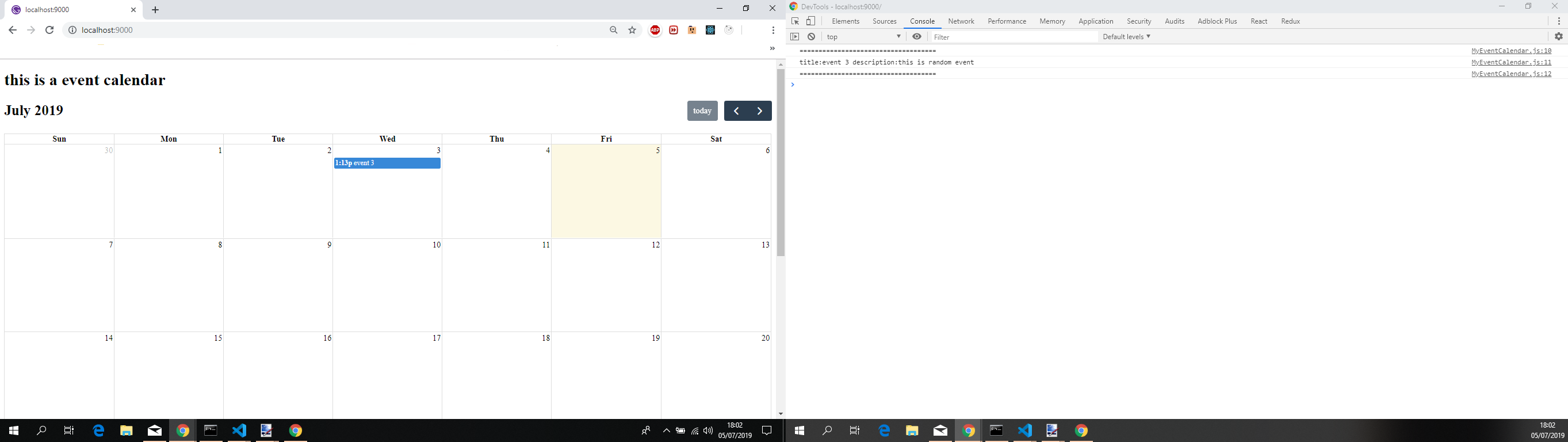
Feel free to provide feedback so that we can close this issue or continue to work on it till we find a suitable solution. If you want i can create a github repo with the code so that you can look at it.
 jonniebigodes
on 5 Jul 2019
jonniebigodes
on 5 Jul 2019
Thank you so much for the very extensive answer @jonniebigodes !
I will follow the steps and report back.
NiviJah
on 5 Jul 2019
This worked perfectly @jonniebigodes !
Here are my changes if someone is following:
npm install react-loadable
npm install --save node-sass gatsby-plugin-sass
gatsby-config.js
plugins:[
'gatsby-plugin-sass'
]
\src\components\EventCalendar.js :
import React from "react"
import FullCalendar from "@fullcalendar/react"
import dayGridPlugin from "@fullcalendar/daygrid"
import interactionPlugin from "@fullcalendar/interaction"
import "@fullcalendar/core/main.css"
import "@fullcalendar/daygrid/main.css"
class MyEventCalendar extends React.Component {
handleEventClick = e => {
console.log('====================================');
console.log(`title:${e.event.title} description:${e.event.extendedProps.description}`);
console.log('====================================');
}
render() {
const events = [
{
title: "event 1",
start: "2019-04-02T13:13:55.008",
end: "2019-04-03T13:13:55.008",
description: "this is my event",
},
{
title: "event 2",
start: "2019-05-03T13:13:55.008",
end: "2019-05-04T13:13:55.008",
description: "this is another event",
},
{
title: "event 3",
start: "2019-07-03T13:13:55.008",
end: "2019-075-04T13:13:55.008",
description: "this is random event",
},
]
return (
<div>
<h1>this is a event calendar</h1>
<FullCalendar
eventClick={this.handleEventClick}
defaultView="dayGridMonth"
eventClick={this.handleEventClick}
defaultView="dayGridMonth"
plugins={[dayGridPlugin, interactionPlugin]}
events={events}
/>
</div>
)
}
}
export default MyEventCalendar
\src\pages\events.js
import React from 'react'
import Loadable from 'react-loadable'

import { Link } from 'gatsby'
import styled from 'styled-components'
import Helmet from 'react-helmet'
import PageTitle from '../components/PageTitle'
import Container from '../components/Container'
import Layout from '../components/Layout'

const Text = styled.p`
  text-align: center;
  line-height: 1.6;
  a {
    color: #121212;
  }
`

const FullCalendarWrapper = styled.div`
  .fc-content {
    cursor: pointer;
  }
`
const LoadableCallendar = Loadable({
  loader: () => import('../components/EventCalendar'),
  loading() {
    return <div>Loading...</div>
  },
})

class EventsPage extends React.Component {
  render() {
    return (
      <Layout>
        <Helmet>
          <title>Event Calendar</title>
          <meta name="description" content="Event Calendar" />
        </Helmet>

        <Container>
          <PageTitle>Events</PageTitle>
          <Text>This will be the Event calendar page</Text>
          <LoadableCallendar />
        </Container>
      </Layout>
    )
  }

  handleEventClick = arg => {
    console.log('event clicked', arg)
    alert(arg.event.title + ' ' + arg.event.extendedProps.description)
  }
}

export default EventsPage
@NiviJah no need to thank. Glad i was able to help you in solving your issue.
jonniebigodes
on 7 Jul 2019
Related issues
 ghost
·
3Comments
ghost
·
3Comments
 ferMartz
·
3Comments
ferMartz
·
3Comments
 totsteps
·
3Comments
totsteps
·
3Comments
 brandonmp
·
3Comments
brandonmp
·
3Comments
 hobochild
·
3Comments
hobochild
·
3Comments
Most helpful comment
This worked perfectly @jonniebigodes !
Here are my changes if someone is following:
npm install react-loadablenpm install --save node-sass gatsby-plugin-sassgatsby-config.js
\src\components\EventCalendar.js :
\src\pages\events.js