The code blow in the default gatsby
const Image = () => {

  return (
    <StaticQuery
      query={graphql`
        query {
          placeholderImage: file(relativePath: { eq: "gatsby-astronaut.png" }) {
            childImageSharp {
              fluid(maxWidth: 300) {
                ...GatsbyImageSharpFluid
              }
            }
          }
        }
      `}
      render={data => {
        console.log(data)
         return(<Img fluid={data.placeholderImage.childImageSharp.fluid} />)}}
    />
  )

}
returns an image. I want to add a prop to it so it changes the graphql query through a dynamic input. like this
const Image = (props) => {

  return (
    <StaticQuery
      query={graphql`
        query {
          placeholderImage: file(relativePath: { eq: props.imgName }) {
            childImageSharp {
              fluid(maxWidth: 300) {
                ...GatsbyImageSharpFluid
              }
            }
          }
        }
      `}
      render={data => {
        console.log(data)
         return(<Img fluid={data.placeholderImage.childImageSharp.fluid} />)}}
    />
  )

}
Is there anyway to achieve this ? I don't want to write a graphQL query for every image.
 Hypothesis-github
All 5 comments
@Hypothesis-github Gatsby's StaticQuery don't allow variables as of now. More on that here, For what you want to achieve i would recomend a different approach. From the top of my head you can for instance create the queries on gatsby-node.js and then inject the results via context and access it through the pageContext special prop. Or alternatively have a pageQuery that gets the information you need and then and filter the data based on the prop you supplied in the component
 jonniebigodes
on 23 Apr 2019
jonniebigodes
on 23 Apr 2019
@Hypothesis-github Gatsby's
StaticQuerydon't allow variables as of now. More on that here, For what you want to achieve i would recomend a different approach. From the top of my head you can for instance create the queries ongatsby-node.jsand then inject the results viacontextand access it through thepageContextspecial prop. Or alternatively have a pageQuery that gets the information you need and then and filter the data based on the prop you supplied in the component
Thank you so much for the quick reply. Your technique will surely work but I wonder if there is any other way to lazy load stuff ( with minimal effort) without actually making them go through the long graphQL query. After all Gatsby is supposed to speed things up not down. I will employ your method ( if there is an example on the node code available please cite.
Hypothesis-github
on 23 Apr 2019
@Hypothesis-github if you don't waiting a bit i'll create a detailed explanation with both approaches i mentioned and report back to you. Sounds good?
Regarding your comment, there is already some work being done in this "department" and by department i mean adding variables to StaticQueries, but this is rather a big problem to take on as there's alot of moving parts going on and some code will probably will need a massive overhaul. I'll leave the more technical details for any of the core development team members.
jonniebigodes
on 23 Apr 2019
@Hypothesis-github if you don't waiting a bit i'll create a detailed explanation with both approaches i mentioned and report back to you. Sounds good?
Regarding your comment, there is already some work being done in this "department" and by department i mean adding variables toStaticQueries, but this is rather a big problem to take on as there's alot of moving parts going on and some code will probably will need a massive overhaul. I'll leave the more technical details for any of the core development team members.
I am looking forward to the explanation. cheers.
Hypothesis-github
on 23 Apr 2019
@Hypothesis-github sorry for the wait, here are the steps i took for both approaches.
- Started out by creating a basic Gatby website using the hello world starter, to keep it simple and avoid adding unnecessary dependencies.
- Added only the dependencies i wanted, namely
gatsby-image,gatsby-plugin-sharp,gatsby-source-filesystemand finallygatsby-transformer-sharp - Grabbed some images from a old wallpaper folder to use as example and added them to
src/assets/images. - Created
gatsby-config.jswith the following content:
module.exports={
    plugins:[
        {
            resolve:`gatsby-source-filesystem`,
            options:{
                name: `images`,
                path:`./src/assets/images`
            }
        },
        `gatsby-transformer-sharp`,
        `gatsby-plugin-sharp`
    ]
}
- Created
gatsby-node.jswith the following content:
exports.createPages = ({ actions, graphql }) => {
  const { createPage } = actions
  const imagesFilesArray = [
    "batmanvillains.jpg",
    "New-Avengers-Illuminati-1.jpg",
    "halo-glyph-wallpaper.jpg",
    "chucknorrium.png",
    "alien_tako_sashimi_wallpaper_by_psychopulse-d33cvhr.jpg",
    "dia_de_los_muertos___wallpaper_by_chronoperates-d4adpsx.jpg"
  ]


  // the query is a bit different, as you can see the fragment is not there.
// if you add ....GatsbyImageSharpFluid you'll get a build error.
// That fragment would only work in the other side of the spectrum(components/pages)
// Not on the server
  return graphql(`
  {
    allImageSharp {
      edges {
        node {
          id
          fluid(maxWidth: 2000) {
            src
            srcSet
            sizes
            aspectRatio
            originalName
          }
        }
      }
    }
  }
  `).then(result => {
    if (result.errors) {
      throw result.errors
    }
    const {data}= result
    const {allImageSharp}= data
    const {edges}= allImageSharp
    const dataForContext= edges.filter(gatsbyimage=>imagesFilesArray.indexOf(gatsbyimage.node.fluid.originalName)!==-1)
    createPage({
        path:'/images/',
        component:require.resolve('./src/templates/ImageFluidTemplate.js'),
        context:{
            allImagesData:dataForContext
        }
    })
  })
}
Key thing to take from this, like i said in the comment for getting images in the server side of the Gatsby spectrum, you'll need to make that query adjustment or a build error will pop up, it's inconsequential as technically what is there is what the fragment will fetch under the hood. Probably a little more information. Also i'm filtering the images i want a priori, below you'll see it working a bit diferent.
- Created the template called
ImageFluidTemplate.js, under./src/templateswith the following content:
import React from "react"
import Img from "gatsby-image"
const ImageFluidTemplate = props => {
  const { pageContext } = props
  const { allImagesData } = pageContext

  return (
    <div style={{ maxWidth: "960px", margin: "0.85rem" }}>
      <h2>This is a page with the images injected via Page Context</h2>
      <div>
        {allImagesData.map(item => (
          <Img
            key={item.node.id}
            fluid={item.node.fluid}
            style={{ margin: "1rem" }}
          />
        ))}
      </div>
    </div>
  )
}

export default ImageFluidTemplate
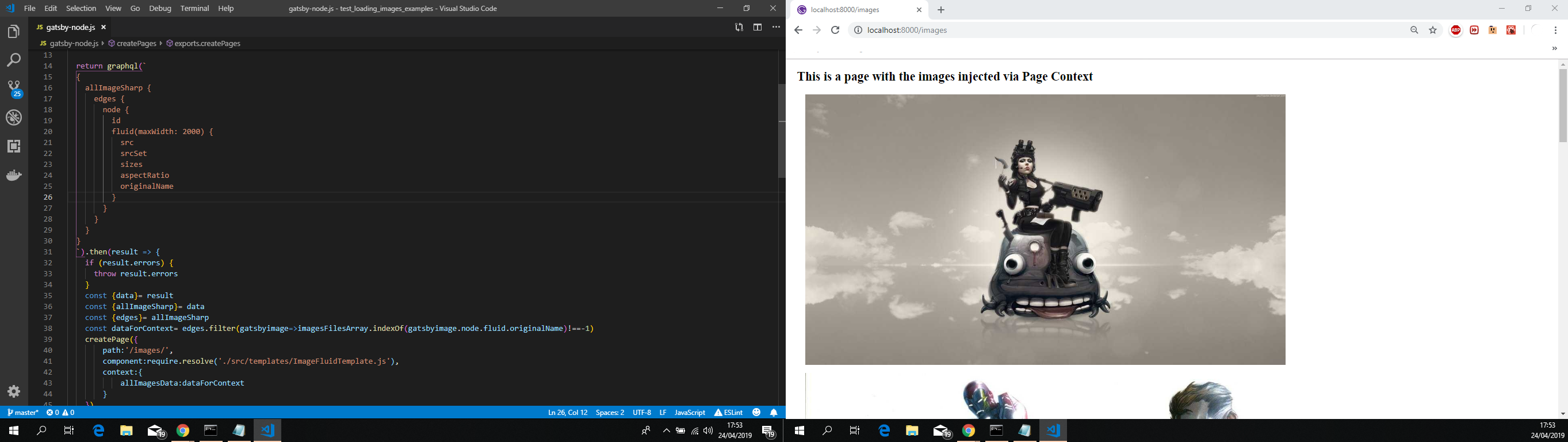
There's nothing too much in here. Just a plain React functional component that will iterate the data in the array and show the images.
- Issuing
gatsby developand opening uphttp://localhost:8000/imageswill show me the following:
Moving onto the other side of the spectrum, to the "client side".
- Created a new page called
page2.jswith the following content:
import React from "react"
import { StaticQuery, graphql } from "gatsby"
import Img from "gatsby-image"

const pagetwo = () => (
  <StaticQuery
    query={graphql`
      {
        allImageSharp {
          edges {
            node {
              id
              fluid(maxWidth: 2000) {
                originalName
                ...GatsbyImageSharpFluid
              }
            }
          }
        }
      }
    `}
    render={data => {
      const imagesFilesArray = [
        "1196_1269477347_large.jpg",
        "49534_1251087275_large.jpg",
        "64489_1228413956_large.jpg",
        "City-Concept-Tron-Legacy-Wallpaper.jpg",
        "holidaylights16.jpg",
        "Mass_Effect_2_Citadel_by_droot1986.jpg",
      ]

      const { allImageSharp } = data
      const { edges } = allImageSharp
      return (
        <div style={{ maxWidth: "960px", margin: "0.85rem" }}>
          <h2>Page Created with Static query</h2>
          {edges
            .filter(
              gatsbyimage =>
                imagesFilesArray.indexOf(
                  gatsbyimage.node.fluid.originalName
                ) !== -1
            )
            .map(image => (
              <Img
                key={image.node.id}
                fluid={image.node.fluid}
                style={{ margin: "1rem" }}
              />
            ))}
        </div>
      )
    }}
  />
)

export default pagetwo
The same approach that was used in gatsby-node.js was applied here, i'm rendering all the filtered images based on the imagesFilesArray in the page itself with a StaticQuery. And you can use the graphql fragment ...GatsbyImageSharpFluid safely without any build errors.
Opening up http://localhost:8000/page2 will show me the following:

In your case you can move this to a separate component like for instance:
import React from "react"
import { StaticQuery, graphql } from "gatsby"
import Img from "gatsby-image"

const ImageWithStatic = ({ imagesshow }) => (
  <StaticQuery
    query={graphql`
      {
        allImageSharp {
          edges {
            node {
              id
              fluid(maxWidth: 2000) {
                originalName
                ...GatsbyImageSharpFluid
              }
            }
          }
        }
      }
    `}
    render={data => {
      const { allImageSharp } = data
      const { edges } = allImageSharp
      return (
        <div style={{ maxWidth: "960px", margin: "0.85rem" }}>
          <h2>component created with Static query</h2>
          {edges
            .filter(
              gatsbyimage =>
                imagesshow.indexOf(gatsbyimage.node.fluid.originalName) !== -1
            )
            .map(image => (
              <Img
                key={image.node.id}
                fluid={image.node.fluid}
                style={{ margin: "1rem" }}
              />
            ))}
        </div>
      )
    }}
  />
)

export default ImageWithStatic
And add it to a page like so:
import React from "react"
import ImageWithStatic from "../components/ImageWithStatic"

export default () => (
  <ImageWithStatic
    imagesshow={[
      "1196_1269477347_large.jpg",
      "49534_1251087275_large.jpg",
      "64489_1228413956_large.jpg",
      "City-Concept-Tron-Legacy-Wallpaper.jpg",
      "holidaylights16.jpg",
      "Mass_Effect_2_Citadel_by_droot1986.jpg",
    ]}
  />
)
A final thought.
Before you go experimenting with the new React hooks feature and try use it. Be advised that you won't be able to take your approach with that, i've tried a couple of approaches when i was creating this reproduction and all of them did not throw any errors when building the site, but when rendering the page itself then it's where the issue poped up.
For demonstrational purposes.
- Created a folder called
hooksundersrc/and inside file calledImages.jswith the following content:
import React, { useState, useEffect } from "react"
import { graphql } from "gatsby"

const Images = props => {
  const [images, setLoadedImages] = useState([])
  const [isLoading, setIsLoading] = useState(true)
  async function fetchGasbyImages() {
    try {
      const listOfQueries = await Promise.all(
        props.ImagesToload.map(item => {
          return graphql(`
                      query{
                        placeHolderImage:file(relativePath:{eq:"${item}"}){
                          childImageSharp {
                            id
                            fluid(maxWidth: 2000) {
                              src
                              srcSet
                              sizes
                              aspectRatio
                            }
                          }
                        }
                      }
                    `)
        })
      )
      const dataRecieved = listOfQueries.map(
        item => item.data.placeHolderImage.childImageSharp
      )
      setIsLoading(false)
      setLoadedImages(dataRecieved)
    } catch (error) {
      console.log(`error fetchGasbyImages`)
      console.log(`error:${error}`)
      console.log("====================================")
    }
  }
  useEffect(() => {
    fetchGasbyImages()
  }, [])
  if (isLoading) {
    return <p>Loading data...</p>
  } else {
    return <div>soon</div>
  }
}

export default Images
Key thing to take from this, i know that i can construct graphql queries on demand with gatsby-node.js on the "server side", so i thought ok, let's put it to the test on the other side with a custom hook.
- Added this to a new page like so:
import React from "react"
import Images from "../hooks/Images"

const pagethree = () => (
  <div style={{ maxWidth: "960px", margin: "0.85rem" }}>
    <h2>Page Created with hook query</h2>
    <h3>soon</h3>
    <Images
      ImagesToload={[
        "batmanvillains.jpg",
        "New-Avengers-Illuminati-1.jpg",
        "halo-glyph-wallpaper.jpg",
        "chucknorrium.png",
        "alien_tako_sashimi_wallpaper_by_psychopulse-d33cvhr.jpg",
        "dia_de_los_muertos___wallpaper_by_chronoperates-d4adpsx.jpg",
      ]}
    />
  </div>
)
export default pagethree
Issued
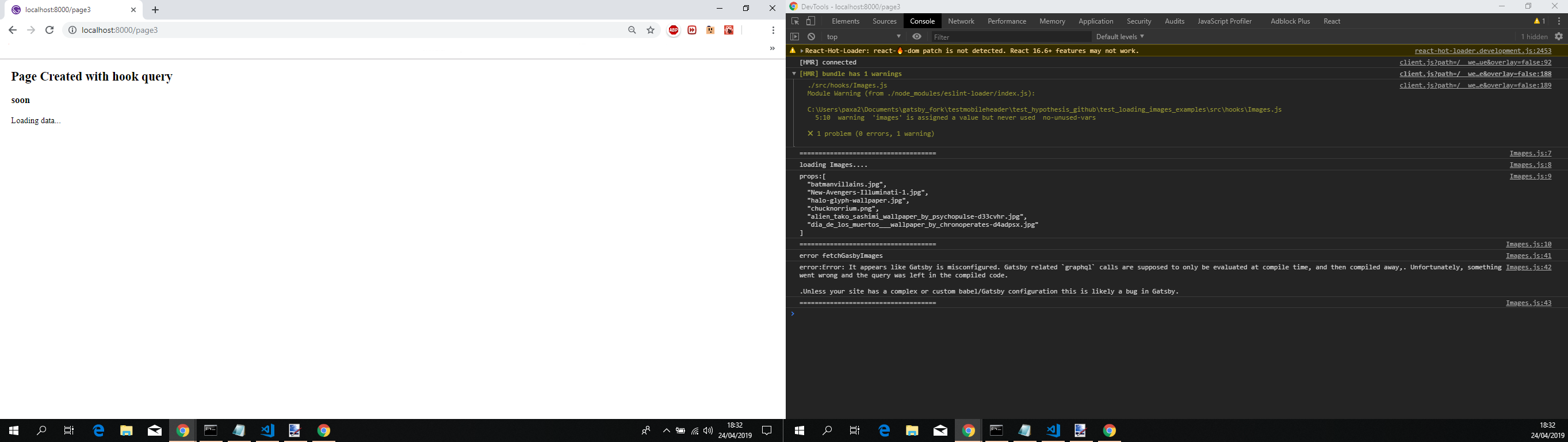
gatsby develop, the build went through with a couple of warnings.Opened
http://localhost:8000/page3and i'm presented with the following:
Sorry for the long comment, feel free to provide feedback so that we can close this issue or continue to work on it till we find a solution.
jonniebigodes
on 24 Apr 2019
Related issues
 dustinhorton
·
3Comments
dustinhorton
·
3Comments
 ferMartz
·
3Comments
ferMartz
·
3Comments
 hobochild
·
3Comments
hobochild
·
3Comments
 benstr
·
3Comments
benstr
·
3Comments
 3CordGuy
·
3Comments
3CordGuy
·
3Comments
Most helpful comment
@Hypothesis-github sorry for the wait, here are the steps i took for both approaches.
gatsby-image,gatsby-plugin-sharp,gatsby-source-filesystemand finallygatsby-transformer-sharpsrc/assets/images.gatsby-config.jswith the following content:gatsby-node.jswith the following content:Key thing to take from this, like i said in the comment for getting images in the server side of the Gatsby spectrum, you'll need to make that query adjustment or a build error will pop up, it's inconsequential as technically what is there is what the fragment will fetch under the hood. Probably a little more information. Also i'm filtering the images i want a priori, below you'll see it working a bit diferent.
ImageFluidTemplate.js, under./src/templateswith the following content:There's nothing too much in here. Just a plain React functional component that will iterate the data in the array and show the images.
gatsby developand opening uphttp://localhost:8000/imageswill show me the following:Moving onto the other side of the spectrum, to the "client side".
page2.jswith the following content:The same approach that was used in
gatsby-node.jswas applied here, i'm rendering all the filtered images based on theimagesFilesArrayin the page itself with aStaticQuery. And you can use the graphql fragment...GatsbyImageSharpFluidsafely without any build errors.Opening up
http://localhost:8000/page2will show me the following:In your case you can move this to a separate component like for instance:
And add it to a page like so:
A final thought.
Before you go experimenting with the new React hooks feature and try use it. Be advised that you won't be able to take your approach with that, i've tried a couple of approaches when i was creating this reproduction and all of them did not throw any errors when building the site, but when rendering the page itself then it's where the issue poped up.
For demonstrational purposes.
hooksundersrc/and inside file calledImages.jswith the following content:Key thing to take from this, i know that i can construct graphql queries on demand with
gatsby-node.json the "server side", so i thought ok, let's put it to the test on the other side with a custom hook.Issued
gatsby develop, the build went through with a couple of warnings.Opened
http://localhost:8000/page3and i'm presented with the following:Sorry for the long comment, feel free to provide feedback so that we can close this issue or continue to work on it till we find a solution.