Gatsby: Cant get markdown files displayed
Summary
Hey, I'm trying to display all the markdown files on a webpage in a nice structured folder/file tree. The markdown files are like documentation/manuals for the users. Machine A has gatsby on it and Machine B has the Gitolite on it with the markdown files. When i use Graphql I can see the data/information of the files and that is jjust what I want.
So I didn't get any errors while building but!!!
My problem is to get them displayed since atm I'm getting a blank screen. I'm not a Dev and never worked with JS or react so sorry if my config doesn't make sense.
Hope you can help me displaying my markdown files.
ps. I just used some default tutorial config and adjusted it.
Relevant information
index.js
import React from "react"
import { graphql } from "gatsby"


export default function Index({ data }) {
  const { edges: posts } = data.allMarkdownRemark
  return (
    <div className="blog-posts">
      {posts
        .filter(post => post.node.frontmatter.title.length > 0)
        .map(({ node: post }) => {
          return (
            <div className="blog-post-preview" key={post.id}>
              <h1>
              </h1>
              <h2>{post.frontmatter.title}</h2>
              <p>{post.excerpt}</p>
            </div>
          )
        })}
    </div>
  )
}

export const pageQuery = graphql`
  query IndexQuery {
  allMarkdownRemark {
    edges {
      node {
        frontmatter {
          title
        }
        excerpt
        rawMarkdownBody
      }
    }
  }
}
`
gatsby-node.js
const path = require("path")

exports.createPages = ({ actions, graphql }) => {
  const { createPage } = actions

  const blogPostTemplate = path.resolve(`src/templates/blog-post.js`)

  return graphql(`
    {
      allMarkdownRemark {
        edges {
          node {
            frontmatter {
              title
            }
          }
        }
      }
    }
 `).then(result => {
    if (result.errors) {
      return Promise.reject(result.errors)
    }

    result.data.allMarkdownRemark.edges.forEach(({ node }) => {
      createPage({
        path: `/blog-post/`,
        component:`/var/www/prokdoc/src/templates/blog-post.js`,
        context: {},
         })
    })
  })
}
src/templates/blog-post.js
import React from "react"
import { Helmet } from "react-helmet"
import { graphql } from "gatsby"


export default function Template({ data }) {
  const { markdownRemark: post } = data
  return (
    <div className="blog-post-container">
      <Helmet title={`Your Blog Name - ${post.frontmatter.title}`} />
      <div className="blog-post">
        <h1>{post.frontmatter.title}</h1>
        <div
          className="blog-post-content"
          dangerouslySetInnerHTML={{ __html: post.html }}
        />
      </div>
    </div>
  )
}

export const pageQuery = graphql`
query {
markdownRemark {
    rawMarkdownBody
    excerpt
    frontmatter {
      title
    }
  }
}
`
Environment (if relevant)
System:
OS: Linux 3.10 CentOS Linux 7 (Core)
CPU: (1) x64 Intel(R) Xeon(R) CPU E5-2630 v4 @ 2.20GHz
Shell: 4.2.46 - /bin/bash
Binaries:
Node: 11.12.0 - /usr/bin/node
npm: 6.7.0 - /usr/bin/npm
Languages:
Python: 2.7.5 - /usr/bin/python
npmPackages:
gatsby: ^2.2.11 => 2.2.11
gatsby-image: ^2.0.34 => 2.0.34
gatsby-plugin-manifest: ^2.0.24 => 2.0.24
gatsby-plugin-markdown-pages: ^1.0.3 => 1.0.3
gatsby-plugin-offline: ^2.0.25 => 2.0.25
gatsby-plugin-react-helmet: ^3.0.11 => 3.0.11
gatsby-plugin-sharp: ^2.0.32 => 2.0.32
gatsby-plugin-typography: ^2.2.10 => 2.2.10
gatsby-source-filesystem: ^2.0.28 => 2.0.28
gatsby-source-git: github:stevetweeddale/gatsby-source-git => 1.0.1
gatsby-transformer-remark: ^2.3.8 => 2.3.8
gatsby-transformer-sharp: ^2.1.17 => 2.1.17
npmGlobalPackages:
gatsby-cli: 2.4.17
File contents (if changed)
gatsby-config.js: N/A
module.exports = {
siteMetadata: {
title: `Gatsby Default Starter`,
description: `Kick off your next, great Gatsby project with this default starter. This barebones starter ships with the main Gatsby configuration files you might need.`,
author: `@gatsbyjs`,
},
plugins: [
`gatsby-plugin-react-helmet`,

{
 resolve: `gatsby-source-git`,
 options: {
   name: `docs`,
   remote: `ssh://FQDN/docs.git`,
   branch: `master`,
   patterns: [`*.md`, `**/*.md`],
  },
},
{
  resolve: `gatsby-source-filesystem`,
  options: {
    name: `images`,
    path: `${__dirname}/src/images`,
  },
},

`gatsby-transformer-sharp`,
`gatsby-plugin-sharp`,
{
  resolve: `gatsby-plugin-manifest`,
  options: {
    name: `gatsby-starter-default`,
    short_name: `starter`,
    start_url: `/`,
    background_color: `#663399`,
    theme_color: `#663399`,
    display: `minimal-ui`,
    icon: `src/images/gatsby-icon.png`, // This path is relative to the root of the site.
  },
},
 {
   resolve: `gatsby-transformer-remark`,
   options: {
      commonmark: true,
      footnotes: true,
      pedantic: true,
      gfm: true,
      plugins: [],
       },
     },
     {
      resolve: `gatsby-plugin-markdown-pages`,
      options: {
         path: `./.cache/gatsby-source-git/docs`,
         templatePath: `./src/templates`,
         template: `blog-post`,
      },
   },
//{
//      resolve: `gatsby-plugin-typography`,
//      options: {
//        pathToConfigModule: `src/utils/typography`,
//      },
//    },
//'gatsby-plugin-offline',
  ],
}
 M1k13
M1k13
All 5 comments
could you give us some more inforamtion about the exact error you get in the browser? It seems to work for me. I haven't copied your gatsby-config.js over.
 wardpeet
on 1 Apr 2019
wardpeet
on 1 Apr 2019
Does it display the markdown pages for you with my config?
I don't get an error, it compiles fine with no error. Only i get a blank screen and not a web-site with my markdown files as info/manual pages.
My idea is to create something like this https://guide.freecodecamp.org/ but than simplified.
This is my output on my web browser when I compile it.
M1k13
on 1 Apr 2019
@M1k13 i've picked up on your issue and i think i have a solution. I'm "dialing down" the wording, as you mentioned in the issue description that you are not a developer nor have you ever worked with javascript and/or React.
Below are the steps i took to emulate your isssue.
- I've created a dummy repository with some documents here, in order to emulate
Gitolite. I tried installing it on Windows Subsystem for Linux in my machine, but to no avail. As it's not a full fledged linux distribution, some pieces are not added per default. And trying to do some magic and getting it to work failed every single time, so i went with the github repository approach. - Added some documents in there so that i could have some data to pull into the Gatsby website. You can see that inside the docs folder in the link supplied above.
- Created a new Gatsby website, my example was based on the hello world starter to keep things simple.
- Installed the bare minimum dependencies to get this reproduction working, namely
gatsby-source-filesystem,gatsby-source-gitandgatsby-transformer-remark. - Moved onto at the lack of a better adjective, "activate" the said plugins, so that when Gatsby is doing it's job it can pick up that some additional plugins were installed and they need to do their job before Gatsby completes theirs.
Which results in the following gatsby-config.js file contents:
module.exports={
    plugins:[
         {
            resolve:`gatsby-source-git`, // git plugin added and configured
            options:{
                name:`gatsby_test_fech_md`,
                branch: `master`,
                remote:`https://github.com/jonniebigodes/gatsby_test_fech_md.git`,
                patterns: `docs/**`
            }
        },

       {
          // plugin that transforms the docs (.md) files into html contents added and configured
           resolve:`gatsby-transformer-remark`,
           options:{
                commonmark: true,
                footnotes: true,
                pedantic: true,
                gfm: true,
           }
       },
       {
           // plugin that will fetch the data inside the folder defined in path and will allow you to manipulate it.
            resolve:`gatsby-source-filesystem`,
            options:{
                name:`gh_data`,
                path: `${__dirname}/.cache/gatsby-source-git/gatsby_test_fech_md/docs`,
            }
        }
    ]
}
Key thing to take from this. Compairing this rather minimal setup to yours, you will see that there are some differences on where the plugins should be added. If you can make the necessary adjustments to your case so that it resembles this, you'll have made a step in the right direction so that your issue can be solved.
Moving on.
- My
gatsby-node.jscontents is the following, i left some comments inside to try and facilitate you when you read the code and try to understand what is happening:
const { createFilePath } = require(`gatsby-source-filesystem`)

exports.createPages=({graphql,actions})=>{
    const {createPage}= actions

    /**
     * query to return all docs from that were fetched from github and transformed into html by gatsby-transformer-remark, this done in a descending order
     */
    return graphql(
        `
            {
                allMarkdownRemark(sort: {fields: [frontmatter___date], order: DESC}) {
                    edges {
                        node {
                            fields {
                                slug
                            }
                            frontmatter {
                                title
                            }
                        }
                    }
                }
            }
        `
    ).then(result=>{
        if (result.errors){
            throw result.errors
        }

        // removes duplicate entries from the result, as they are generated at build time
        // the only ones that interest are the entries by the field slug that contains "/docs/"
        const filterDuplicateDocs= result.data.allMarkdownRemark.edges.filter(item=>{
            return item.node.fields.slug.indexOf("/docs/")!==-1
        })

        /**
         * based on  the array above, Gatsby will create a page for each entry inside
         * createPage(a internal Gatsby function) will recieve the following arguments:
         * component=> file housed in /src/templates/
         * path=> is based on the slug field that exists, this case as the documentation files are inside /docs, the slug will be /docs/a_random_document
         * context is a special Gatsby property that allows the injection of data into a page, in this case what is being passed:
         * - slug is the item generated during the build process by another Gatsby function called onCreateNode (see end of file)
         * - previous and next refer to the the next item in the array if exists and the previous one if exists also,
         * It's intended for pagination. It's optional if you don't want it, just comment out the lines and adjust the template aswell
         *
         */
        filterDuplicateDocs.forEach((element,index) => {
            const previous = index === filterDuplicateDocs.length - 1 ? null : filterDuplicateDocs[index + 1].node
            const next = index === 0 ? null : filterDuplicateDocs[index - 1].node
            createPage({
                component:require.resolve('./src/templates/docTemplate.js'),
                path:`${element.node.fields.slug}`, // it extracts the contents inside slug and generates the path based on it.
                context:{
                    slug:element.node.fields.slug,
                    previous,
                    next
                }
            })
        });
    })
}
/**
 * Gatsby internal function to generate the special field slug,
 * so that it's easier to generate paths and query files and markdown(documents) based on this field
 */
exports.onCreateNode = ({ node, actions, getNode }) => {
    const { createNodeField } = actions
    // checks if a a given element is of type Markdown(document type) and if so creates a physical path based on the information
    if (node.internal.type === `MarkdownRemark`) {
      const value = createFilePath({ node, getNode })
      createNodeField({
        name: `slug`,
        node,
        value,
      })
    }
  }
Key thing to take from this part. Compairing this to your code, you were on the right track, only thing that was different was the path where the pages will "live" inside your Gatsby website.
You were defining path: '/blog-post/', or in other words, exactly the same path for each item inside the array. Making the adjustments on your end based on what i mentioned, should do the trick.
- All that is missing is the template itself, i created a file called
docTemplate.jsinside the following folder structuresrc/templates/. Inside that file i added the following code, i once again i left some contents so that you can better understand what is happening at every step:
import React from "react"
import { graphql,Link } from "gatsby"

const DocTemplate = props => {
  /**
   * retrieves some javascript objects from inside the special props(this object is the way react is implemented) object
   */
  const { data, pageContext } = props


  /**
   * these two objects are extracted from the above element, these "live inside" the gatsby property pageContext
   * see gatsby-node.js pageContext property.
   */

  const { previous, next } = pageContext
  /**
   * this property is being extracted as a result from the graphql query below(pageQuery).
   */
  const { markdownRemark } = data

  /**
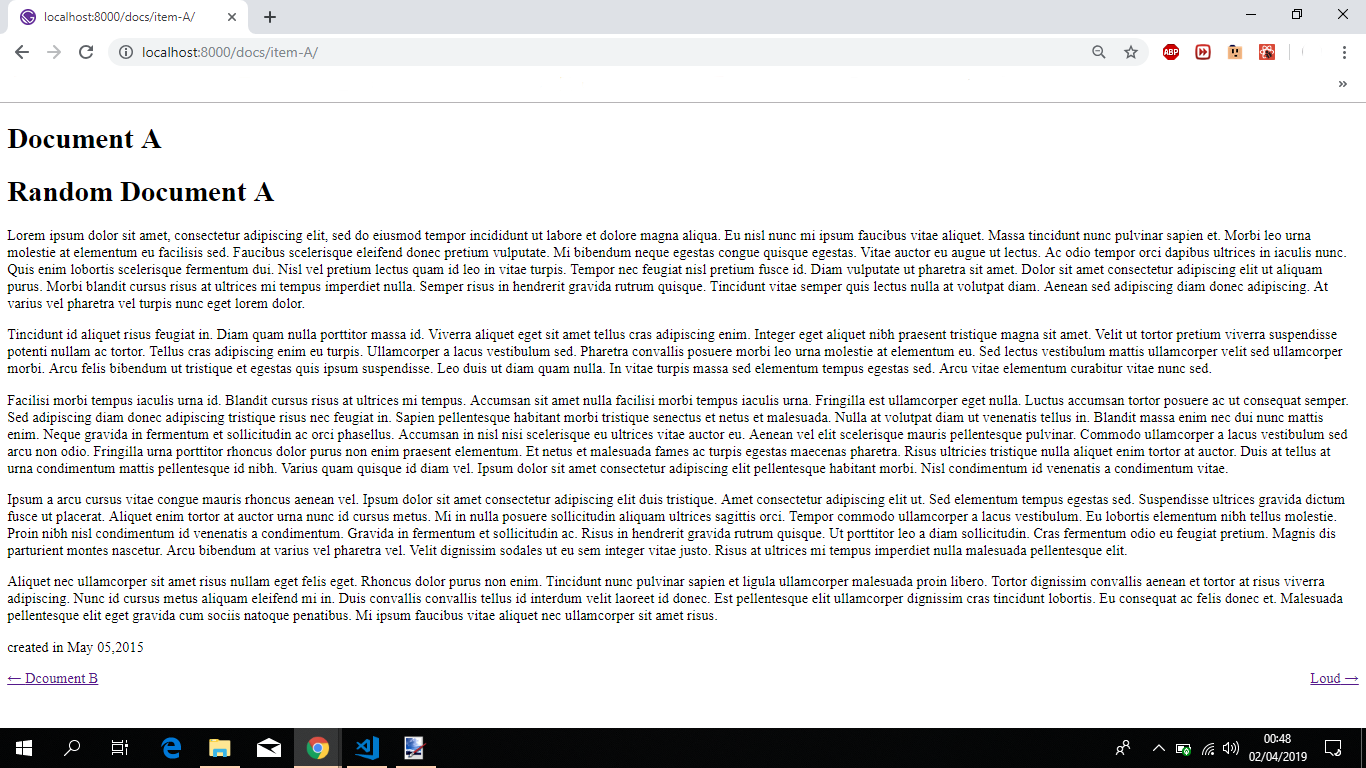
   * contents is rendered below, each item created will have:
   * - A h1(headline) with the title.
   * - the document's content transformed into html so that it can be displayed.
   * - the creation date of the document.
   * - A link to the next and previous documents if they exist.
   *
   *
   */
  return (
    <div className="blog-post-container">
      <div className="blog-post">
        <h1>{markdownRemark.frontmatter.title}</h1>
        <div
          className="blog-post-content"
          dangerouslySetInnerHTML={{ __html: markdownRemark.html }}
        />
        <div>created in {markdownRemark.frontmatter.date}</div>
      </div>
      <ul
        style={{
          display: `flex`,
          flexWrap: `wrap`,
          justifyContent: `space-between`,
          listStyle: `none`,
          padding: 0,
        }}
      >
        <li>
          {previous && (
            <Link to={previous.fields.slug} rel="prev">
              ← {previous.frontmatter.title}
            </Link>
          )}
        </li>
        <li>
          {next && (
            <Link to={next.fields.slug} rel="next">
              {next.frontmatter.title} →
            </Link>
          )}
        </li>
      </ul>
    </div>
  )
}

export default DocTemplate

/**
 * page query to retrieve frontmatter items:
 * - title
 * - date
 * and the transformed markdown to html
 * all these items based the variable slug passed through pageContext inside gatsby-node.js
 */
export const pageQuery = graphql`
  query DocumentBySlug($slug: String!) {
    markdownRemark(fields: { slug: { eq: $slug } }) {
      html
      frontmatter {
        title
        date(formatString: "MMMM DD,YYYY")
      }
    }
  }
`
Key thing to take from this, if you compare both queries, mine and yours you will immediately will see that some diferences are present. In my case i'm fetching the file contents, transformed into html, as noted by the html element inside the query, and the title and date formatted to my needs . All of this based on what is the value inside of the $slug, which in the "world" of programming and more especifically in the world of graphql is a variable.
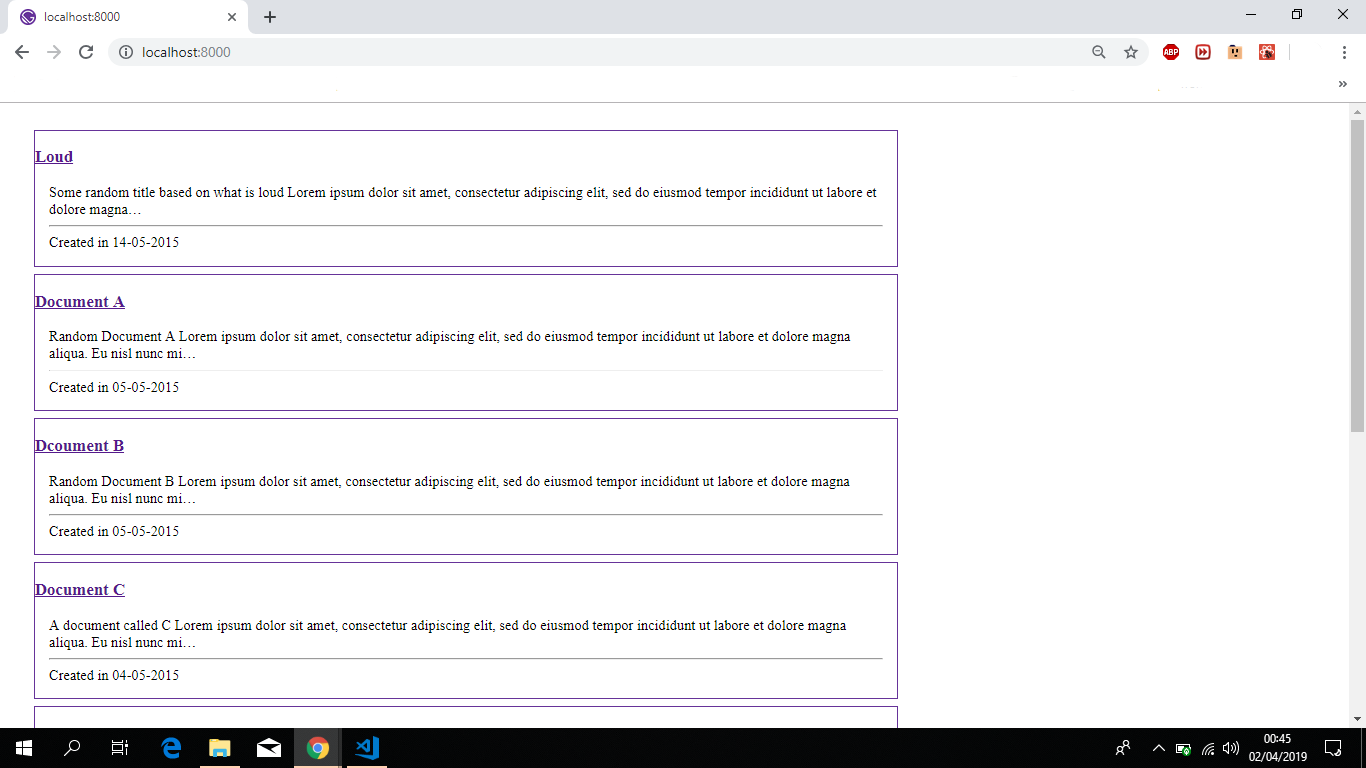
- For the final touch, so that some contents can be shown when you open the index page. A small change is required to the code for that page so that you can have something to show. I left it simple intentionally, once more i left some comments inside the file for a better understanding:
import React from "react"
import { graphql, Link } from "gatsby"

const Index = props => {
  /**
   * retrieves some javascript objects from inside the special props(this object is the way react is implemented) object
   */
  const { data } = props

  /**
   * this property is being extracted as a result from the graphql query below(pageQuery).
   */
  const { allMarkdownRemark } = data
  // removes duplicate entries from the result, as they are generated at build time
  // the only ones that interest are the entries by the field slug that contains "/docs/"
  const filteredDocuments = allMarkdownRemark.edges.filter(item => {
    return item.node.fields.slug.indexOf("/docs/") !== -1
  })
  /**
   * contents is rendereed below.
   * it will iterate over each element inside the filteredDocuments array and will display the following:
   * - A internal link generated and consumed by Gatsby through the <Link> element. With a little styling applied.
   * - The excerpt contents(the first 160 characters inside the document).
   * - The creation date of the document returned through the query
   */
  return (
    <div
      style={{

        maxWidth:`960px`,
        margin: `1.85rem`,
      }}
    >
      {filteredDocuments.map(item => {
          return (
            <div
              key={`item_${item.node.id}`}
              style={{

                margin:'0.5rem 0 0.5rem 0',
                border: "1px solid rebeccapurple",
              }}
            >
              <Link key={`link_${item.node.id}`} to={item.node.fields.slug}>
                <h3 key={`title_${item.node.id}`}>
                  {item.node.frontmatter.title}
                </h3>
              </Link>
              <div style={{ margin: `1rem` }}>
                {item.node.excerpt}
                <hr />
                <div>Created in {item.node.frontmatter.date}</div>
              </div>
            </div>
          )
        })}
    </div>
  )
}
/**
 * page query to retrieve the documents in a descending order. The information retrieved is:
 * - Gatsby internal id
 * - the slug field generated at build time by gatsby-node.js
 * - the tile of the document
 * - creation date of teh document
 * - A excerpt with the first 160 characters of the document.
 */
export const pageQuery = graphql`
  query IndexQuery {
    allMarkdownRemark(sort: { fields: [frontmatter___date], order: DESC }) {
      edges {
        node {
          id
          fields {
            slug
          }
          frontmatter {
            title
            date(formatString: "DD-MM-YYYY")
          }
          excerpt(pruneLength: 160)
        }
      }
    }
  }
`
export default Index
Issuing gatsby develop and opening up a new browser window to http://localhost:8000 will show the following:
Clicking on a random item will redirect and show the following:
Sorry for the really long comment. And i hope that my comment will help you solve our issue.
Feel free to provide feedback so that we can close this issue. Or continue to work on it until we do.
If you want, let me know and i'll host the full reproduction inside a github repository, supply you the url for it and you can take your time going over the code at your own pace
 jonniebigodes
on 2 Apr 2019
jonniebigodes
on 2 Apr 2019
Thank you jonniebigodes! Thanks for the great explanation and examples it really helped a lot.
I'm going to try some css in to it now. Thank a lot again!
M1k13
on 2 Apr 2019
@M1k13 no need to thank. just glad i could be of assistance and helped out solving your issue.
jonniebigodes
on 2 Apr 2019
Related issues
 signalwerk
·
3Comments
signalwerk
·
3Comments
 totsteps
·
3Comments
totsteps
·
3Comments
 dustinhorton
·
3Comments
dustinhorton
·
3Comments
 ferMartz
·
3Comments
ferMartz
·
3Comments
 theduke
·
3Comments
theduke
·
3Comments
Most helpful comment
@M1k13 i've picked up on your issue and i think i have a solution. I'm "dialing down" the wording, as you mentioned in the issue description that you are not a developer nor have you ever worked with javascript and/or React.
Below are the steps i took to emulate your isssue.
Gitolite. I tried installing it on Windows Subsystem for Linux in my machine, but to no avail. As it's not a full fledged linux distribution, some pieces are not added per default. And trying to do some magic and getting it to work failed every single time, so i went with the github repository approach.gatsby-source-filesystem,gatsby-source-gitandgatsby-transformer-remark.Which results in the following
gatsby-config.jsfile contents:Key thing to take from this. Compairing this rather minimal setup to yours, you will see that there are some differences on where the plugins should be added. If you can make the necessary adjustments to your case so that it resembles this, you'll have made a step in the right direction so that your issue can be solved.
Moving on.
gatsby-node.jscontents is the following, i left some comments inside to try and facilitate you when you read the code and try to understand what is happening:Key thing to take from this part. Compairing this to your code, you were on the right track, only thing that was different was the path where the pages will "live" inside your Gatsby website.
You were defining
path: '/blog-post/', or in other words, exactly the same path for each item inside the array. Making the adjustments on your end based on what i mentioned, should do the trick.docTemplate.jsinside the following folder structuresrc/templates/. Inside that file i added the following code, i once again i left some contents so that you can better understand what is happening at every step:Key thing to take from this, if you compare both queries, mine and yours you will immediately will see that some diferences are present. In my case i'm fetching the file contents, transformed into html, as noted by the html element inside the query, and the title and date formatted to my needs . All of this based on what is the value inside of the
$slug, which in the "world" of programming and more especifically in the world of graphql is a variable.Issuing
gatsby developand opening up a new browser window tohttp://localhost:8000will show the following:Clicking on a random item will redirect and show the following:
Sorry for the really long comment. And i hope that my comment will help you solve our issue.
Feel free to provide feedback so that we can close this issue. Or continue to work on it until we do.
If you want, let me know and i'll host the full reproduction inside a github repository, supply you the url for it and you can take your time going over the code at your own pace