Gatsby: [gatsby-remark-images] The blur up effect on markdown images doesn't work in Firefox
Description
I am looking to replicate the blur up effect of gatsby-image, but in the body of my markdown blog post images using gatsby-remark-images. Here are two examples, the top image is what I expect to happen, but the bottom image is what I am seeing (no blur up).
Example image with blur up using gatsby-image

#
Example image with no blur up using gatsby-remark-images
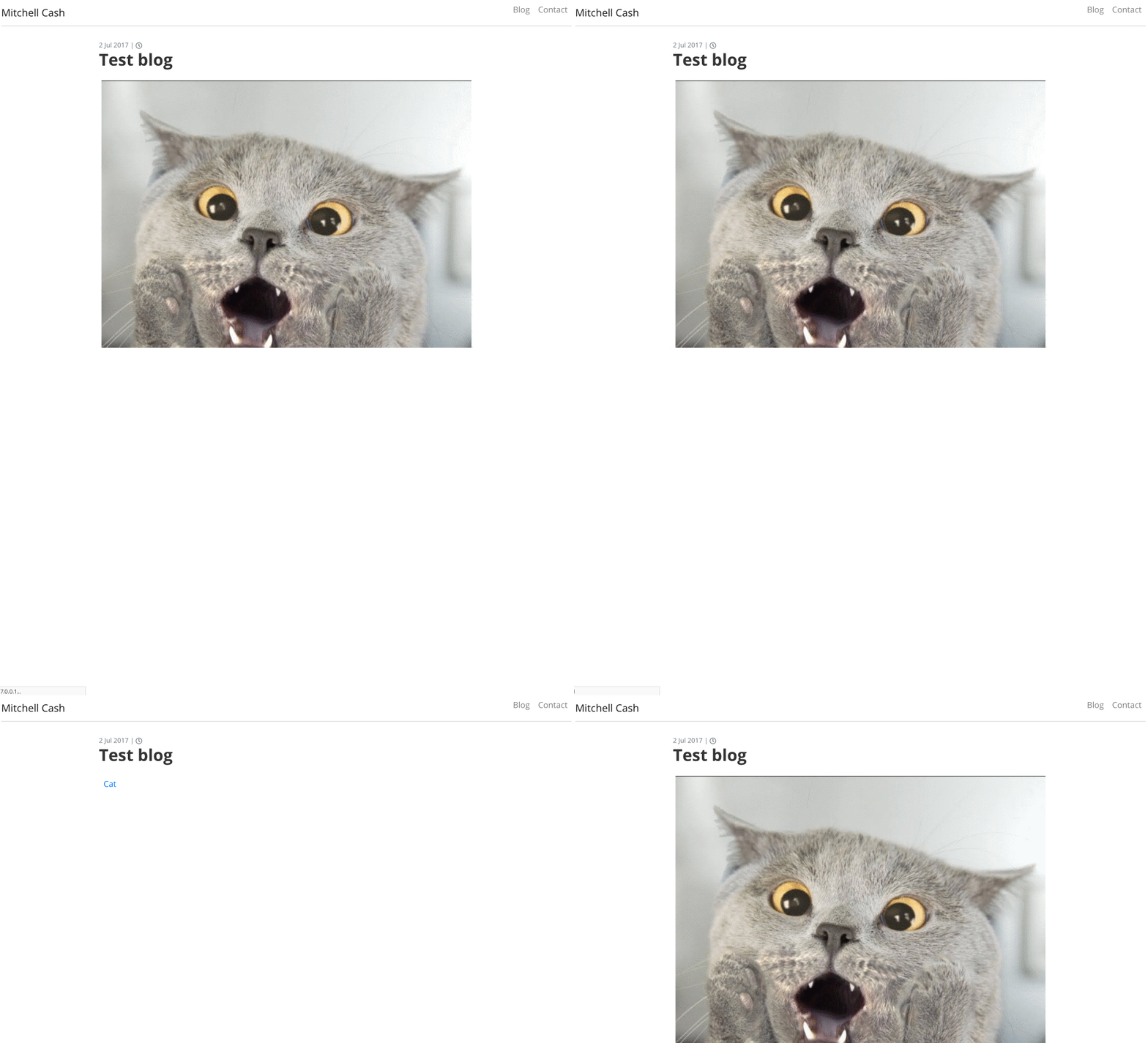
#
Steps to reproduce
Create a markdown page with an image in it. Use a similar setup to below,
package.json
  "dependencies": {
    "gatsby": "^2.0.98",
    "gatsby-image": "^2.0.28",
    "gatsby-plugin-sharp": "^2.0.18",
    "gatsby-remark-copy-linked-files": "^2.0.8",
    "gatsby-remark-images": "^3.0.1",
    "gatsby-transformer-remark": "^2.2.0",
    "gatsby-transformer-sharp": "^2.1.12",
    "react": "^16.6.3",
    "react-dom": "^16.6.3"
  }
gatsby-config.js
module.exports = {
  plugins: [
    'gatsby-plugin-sharp',
    'gatsby-transformer-sharp',
    {
      resolve: 'gatsby-transformer-remark',
      options: {
        plugins: [
          'gatsby-remark-copy-linked-files',
          {
            resolve: 'gatsby-remark-images',
            options: {
              linkImagesToOriginal: false,
              maxWidth: 800
            }
          }
        ]
      }
    },
  ]
}
test-post.md
---
title: "Test blog post"
date: "2017-07-02"
---

Expected result
I was expecting the markdown image to blur up.
I notice the generated HTML between gatsby-image and gatsby-remark-images differs.
gatsby-image
<div class="gatsby-image-wrapper" style="position: relative; overflow: hidden;">
  <div style="width: 100%; padding-bottom: 100%;"></div>
  <img src="data:image/jpeg;base64,/9j/2wBDABALDA4MChAODQ4SERATGCgaGBYWGDEjJR0oOjM9PDkzODdASFxOQERXRTc4UG1RV19iZ2hnPk1xeXBkeFxlZ2P/2wBDARESEhgVGC8aGi9jQjhCY2NjY2NjY2NjY2NjY2NjY2NjY2NjY2NjY2NjY2NjY2NjY2NjY2NjY2NjY2NjY2NjY2P/wgARCAAUABQDASIAAhEBAxEB/8QAFwABAQEBAAAAAAAAAAAAAAAAAAQCBf/EABYBAQEBAAAAAAAAAAAAAAAAAAECAP/aAAwDAQACEAMQAAABt1Lg3WSE5myamFH/xAAbEAEAAwEAAwAAAAAAAAAAAAABAAIREhMhIv/aAAgBAQABBQK9sneJczyMoodEPUHZd+v/xAAWEQADAAAAAAAAAAAAAAAAAAAAARD/2gAIAQMBAT8BrP/EABQRAQAAAAAAAAAAAAAAAAAAACD/2gAIAQIBAT8BH//EABoQAAIDAQEAAAAAAAAAAAAAAAABEBEhMYH/2gAIAQEABj8CNjPBWlZ0U//EABsQAQADAQADAAAAAAAAAAAAAAEAESExQVFx/9oACAEBAAE/IVo5UDVR+RtqYocuQZg4yeykSKeAioVjX2f/2gAMAwEAAgADAAAAEITfwf/EABgRAAIDAAAAAAAAAAAAAAAAAAABEBEx/9oACAEDAQE/EKnTP//EABQRAQAAAAAAAAAAAAAAAAAAACD/2gAIAQIBAT8QH//EAB0QAQACAgIDAAAAAAAAAAAAAAEAESExQWFxkbH/2gAIAQEAAT8QR2IGTTARIl0s1rUNAzsqcmuB0tX5gU3kDG4GBeOI7Omh6llJE+x96wpvtn//2Q==" alt="" style="position: absolute; top: 0px; left: 0px; width: 100%; height: 100%; object-fit: cover; object-position: center center; opacity: 0; transition: opacity 0.5s ease 0.5s;">
  <picture>
    <source srcset="/static/e6d467e838b46fd013cf48d16a9e8947/21791/maxresdefault.jpg 200w,
/static/e6d467e838b46fd013cf48d16a9e8947/063a3/maxresdefault.jpg 400w,
/static/e6d467e838b46fd013cf48d16a9e8947/e1890/maxresdefault.jpg 720w" sizes="(max-width: 720px) 100vw, 720px">
    <img alt="" src="/static/e6d467e838b46fd013cf48d16a9e8947/e1890/maxresdefault.jpg" style="position: absolute; top: 0px; left: 0px; width: 100%; height: 100%; object-fit: cover; object-position: center center; opacity: 1; transition: opacity 0.5s ease 0s;">
  </picture>
  <noscript>
    <picture>
      <source srcSet="/static/e6d467e838b46fd013cf48d16a9e8947/21791/maxresdefault.jpg 200w,
/static/e6d467e838b46fd013cf48d16a9e8947/063a3/maxresdefault.jpg 400w,
/static/e6d467e838b46fd013cf48d16a9e8947/e1890/maxresdefault.jpg 720w" sizes="(max-width: 720px) 100vw, 720px" />
      <img src="/static/e6d467e838b46fd013cf48d16a9e8947/e1890/maxresdefault.jpg" alt="" style="position:absolute;top:0;left:0;transition:opacity 0.5s;transition-delay:0.5s;opacity:1;width:100%;height:100%;object-fit:cover;object-position:center"/>
    </picture>
  </noscript>
</div>
gatsby-remark-images
<span class="gatsby-resp-image-wrapper" style="position: relative; display: block; max-width: 720px; margin-left: auto; margin-right: auto;">
<span class="gatsby-resp-image-background-image" style="padding-bottom: 100%; position: relative; bottom: 0px; left: 0px; background-image: url("data:image/jpeg;base64,/9j/2wBDABALDA4MChAODQ4SERATGCgaGBYWGDEjJR0oOjM9PDkzODdASFxOQERXRTc4UG1RV19iZ2hnPk1xeXBkeFxlZ2P/2wBDARESEhgVGC8aGi9jQjhCY2NjY2NjY2NjY2NjY2NjY2NjY2NjY2NjY2NjY2NjY2NjY2NjY2NjY2NjY2NjY2NjY2P/wgARCAAUABQDASIAAhEBAxEB/8QAFwABAQEBAAAAAAAAAAAAAAAAAAQCBf/EABYBAQEBAAAAAAAAAAAAAAAAAAECAP/aAAwDAQACEAMQAAABt1Jk3XRk5uyaiCf/xAAaEAEAAwEBAQAAAAAAAAAAAAABAAIREgMi/9oACAEBAAEFArWyd41sJ2yi52Qcg6+j9f/EABYRAAMAAAAAAAAAAAAAAAAAAAABEP/aAAgBAwEBPwGs/8QAFBEBAAAAAAAAAAAAAAAAAAAAIP/aAAgBAgEBPwEf/8QAGxAAAgIDAQAAAAAAAAAAAAAAAAERIRAgMYH/2gAIAQEABj8CLxXgpSk7p//EABsQAQADAQADAAAAAAAAAAAAAAEAESExQVFx/9oACAEBAAE/IXQ5TA1AfktlMXOXIMYOMlPasQFeAjAvuIvZ/9oADAMBAAIAAwAAABC00P8A/8QAGBEAAgMAAAAAAAAAAAAAAAAAAAEQETH/2gAIAQMBAT8QqdM//8QAFBEBAAAAAAAAAAAAAAAAAAAAIP/aAAgBAgEBPxAf/8QAHBABAAMBAAMBAAAAAAAAAAAAAQARMSFBYZGh/9oACAEBAAE/ECBiOmOQAwq++1mQSCPZUd9qqOLX2UKXYHNgcPURFdND5FltofstheTfbP/Z"); background-size: cover; display: block; opacity: 0;"></span>
<img class="gatsby-resp-image-image" style="width:100%;height:100%;margin:0;vertical-align:middle;position:absolute;top:0;left:0;box-shadow:inset 0px 0px 0px 400px white;" alt="Cat" title="" src="/static/e6d467e838b46fd013cf48d16a9e8947/ac8b8/maxresdefault.jpg" srcset="/static/e6d467e838b46fd013cf48d16a9e8947/a84ec/maxresdefault.jpg 200w,
/static/e6d467e838b46fd013cf48d16a9e8947/77e60/maxresdefault.jpg 400w,
/static/e6d467e838b46fd013cf48d16a9e8947/ac8b8/maxresdefault.jpg 720w" sizes="(max-width: 720px) 100vw, 720px">
</span>
Actual result
I was expecting the blur up effect to work as the README describes that it should:
Using the "blur up" technique popularized by Medium and Facebook where a small 20px wide version of the image is shown as a placeholder until the actual image is downloaded.
Environment
System:
  OS: macOS 10.14.3
  CPU: (4) x64 Intel(R) Core(TM) i5-4278U CPU @ 2.60GHz
  Shell: 5.0.2 - /usr/local/bin/bash
Binaries:
  Node: 10.15.0 - /usr/local/opt/node@10/bin/node
  Yarn: 1.13.0 - /usr/local/bin/yarn
  npm: 6.4.1 - /usr/local/opt/node@10/bin/npm
Languages:
  Python: 2.7.15 - /Users/mitchellcash/.pyenv/shims/python
Browsers:
  Chrome: 71.0.3578.98
  Firefox: 64.0.2
  Safari: 12.0.3
npmPackages:
  gatsby: ^2.0.98 => 2.0.98
  gatsby-image: ^2.0.28 => 2.0.28
  gatsby-plugin-netlify: ^2.0.7 => 2.0.7
  gatsby-plugin-sharp: ^2.0.18 => 2.0.18
  gatsby-remark-copy-linked-files: ^2.0.8 => 2.0.8
  gatsby-remark-images: ^3.0.1 => 3.0.1
  gatsby-source-filesystem: ^2.0.17 => 2.0.17
  gatsby-transformer-remark: ^2.2.0 => 2.2.0
  gatsby-transformer-sharp: ^2.1.12 => 2.1.12
npmGlobalPackages:
  gatsby-cli: 2.4.8
 MitchellCash
All 21 comments
Thank you for opening this @MitchellCash
Could you link to a minimal reproduction for this? That will make it easy to debug
 sidharthachatterjee
on 25 Jan 2019
sidharthachatterjee
on 25 Jan 2019
@sidharthachatterjee sure thing, I spun up this minimal prod build:
Repo: https://github.com/MitchellCash/gatsby-no-blur-demo
Prod URL: https://gatsby-no-blur-demo.netlify.com/
Notice on the first home page that the image blurs up thanks to gatsby-image and then click on blog and either of the blog posts and notice the image does not blur up as advertised (using gatsby-remark-images).
MitchellCash
on 26 Jan 2019
@MitchellCash i've picked up on your issue, cloned your repository and for starters you have a little error in
page/blog.js you have <h1 class="display-4">Blog</h1> and it should be <h1 className="display-4">Blog</h1>.
Issuing gatsby develop with your current code, you get a blur effect on the index page with any issues.
Clicking blog and opening one post, the blur kicks in. Navigating back and going to another blog post does not.
I did a couple of tests and i came up with the following:
- Changing the image to another one works, the blur effect kicks in, navigating back and forward.
- Going back to the image you have and changing
todoes not kick in the blur effect.
- Opened up devtools in chrome and copied the element code for blog post 2 as you can see bellow:
<img class="gatsby-resp-image-image" style="width: 100%; height: 100%; margin: 0px; vertical-align: middle; position: absolute; top: 0px; left: 0px; box-shadow: white 0px 0px 0px 400px inset; opacity: 1; transition: opacity 0.5s ease 0s;" alt="bananas" title="" src="/static/54c6d4ca73c80f046a54ff774bdbec74/ac8b8/cat.jpg" srcset="/static/54c6d4ca73c80f046a54ff774bdbec74/a84ec/cat.jpg 200w,
/static/54c6d4ca73c80f046a54ff774bdbec74/77e60/cat.jpg 400w,
/static/54c6d4ca73c80f046a54ff774bdbec74/ac8b8/cat.jpg 720w" sizes="(max-width: 720px) 100vw, 720px">
- Went back to post 1 and did the same:
<img class="gatsby-resp-image-image" style="width:100%;height:100%;margin:0;vertical-align:middle;position:absolute;top:0;left:0;box-shadow:inset 0px 0px 0px 400px white;" alt="Cat" title="" src="/static/54c6d4ca73c80f046a54ff774bdbec74/ac8b8/cat.jpg" srcset="/static/54c6d4ca73c80f046a54ff774bdbec74/a84ec/cat.jpg 200w,
/static/54c6d4ca73c80f046a54ff774bdbec74/77e60/cat.jpg 400w,
/static/54c6d4ca73c80f046a54ff774bdbec74/ac8b8/cat.jpg 720w" sizes="(max-width: 720px) 100vw, 720px">
The contents is exactly the same regarding the image. What i'm inclined to believe is that gatsby will not act upon the same image. Even if you change the description.
Is this an error? I don't think it is. i think it's a "defensive" strategy implemented to avoid doing duplicate work on the same content. But once again i might be wrong as i'm not the author of the plugin.
Hope i could shed some insight on the matter. Feel free to provide some feedback
 jonniebigodes
on 26 Jan 2019
jonniebigodes
on 26 Jan 2019
@jonniebigodes thanks! I was using some existing code and forgot to clean up the mess proper. I have done so now in the repo just to make sure no other issue is introduced while we focus on the no blur issue.
Very interesting what you say! I use Firefox, so I jumped over to Chrome and you are correct the blur up effect is working as I would expect...
So it's Firefox specific from what I can tell, I tested on a few different Firefox instances across Windows and macOS and got the same "no-blur" issue on them all. I've tried to do some research as to why the Firefox browser engine is not rendering this like Chrome's, but came up with nothing concrete at the moment.
Any ideas?
MitchellCash
on 27 Jan 2019
@MitchellCash tested it in firefox 64.0.2 and yes it looks like doesn't play nice with with the content coming from the plugin, or someone forgot something, because while spending the entire morning at this, finally it hit me! i was checking the elements tab on chrome devtools and this made me think,
with the image element selected from a page:
<img class="gatsby-resp-image-image" style="width: 100%; height: 100%; margin: 0px; vertical-align: middle; position: absolute; top: 0px; left: 0px; box-shadow: white 0px 0px 0px 400px inset; opacity: 1;
transition: opacity 0.5s ease 0s<!--chrome ease is here-->;" alt="other" title="" src="/static/432c6f471ae58e52c7a4dcfe45f073e5/de96d/other.jpg" srcset="/static/432c6f471ae58e52c7a4dcfe45f073e5/cb654/other.jpg 200w,
/static/432c6f471ae58e52c7a4dcfe45f073e5/5a3b5/other.jpg 400w,
/static/432c6f471ae58e52c7a4dcfe45f073e5/de96d/other.jpg 800w,
/static/432c6f471ae58e52c7a4dcfe45f073e5/7f4e9/other.jpg 1200w,
/static/432c6f471ae58e52c7a4dcfe45f073e5/c385b/other.jpg 1600w,
/static/432c6f471ae58e52c7a4dcfe45f073e5/e8800/other.jpg 2400w,
/static/432c6f471ae58e52c7a4dcfe45f073e5/2ba34/other.jpg 3500w" sizes="(max-width: 800px) 100vw, 800px">
and the same page loaded in firefox and looking at the devtools and the same element selected:
<img class="gatsby-resp-image-image" style="width:100%;height:100%;margin:0;vertical-align:middle;position:absolute;top:0;left:0;box-shadow:inset 0px 0px 0px 400px white;" alt="Cat" title="" src="/static/54c6d4ca73c80f046a54ff774bdbec74/ac8b8/cat.jpg" srcset="/static/54c6d4ca73c80f046a54ff774bdbec74/a84ec/cat.jpg 200w,
/static/54c6d4ca73c80f046a54ff774bdbec74/77e60/cat.jpg 400w,
/static/54c6d4ca73c80f046a54ff774bdbec74/ac8b8/cat.jpg 720w" sizes="(max-width: 720px) 100vw, 720px">
and in here...where's the ease transition?
As you can see here:
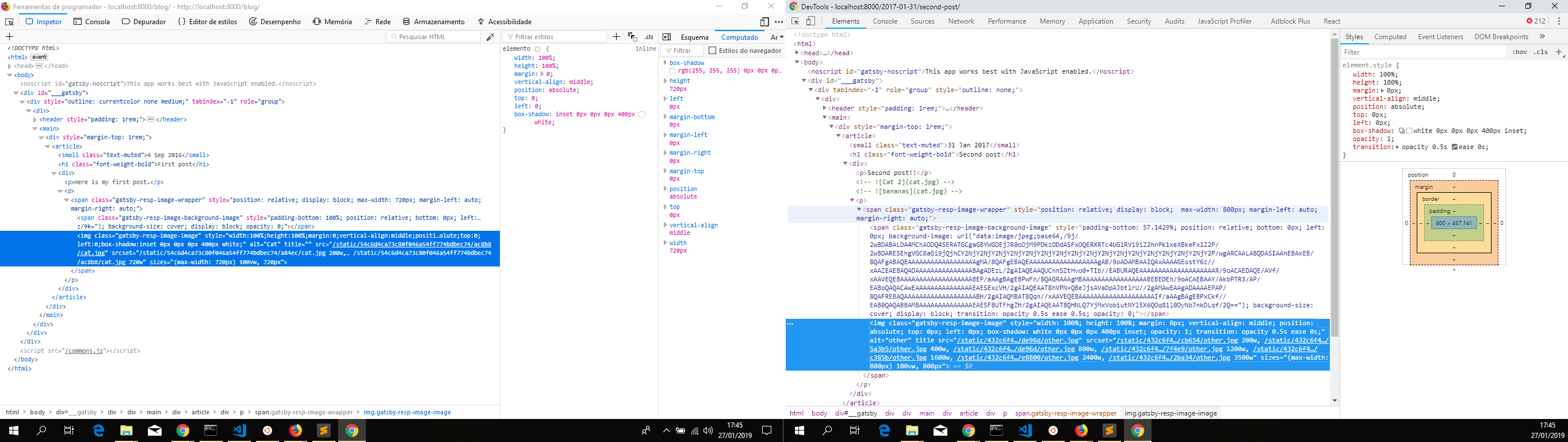
Why this is happening is beyond my understanding. I'm going to "kick it up upstairs"(pardon the bad pun) to the dev team so that they can take a look at it and see if a solution can be found.
With that two things:
1- Sorry for the hassle you're experiencing not getting this feature working
2- Good catch, thank you very much for bringing to the attention of the team 👍
As i'm not aware of who's responsible for maintaining the following plugins:
- gatsby-remark-images
- gatsby-transformer-remark
I'm ccing this to @DSchau and @pieh so that you guys can take a look at this situation.
Thanks in advance
jonniebigodes
on 27 Jan 2019
@jonniebigodes thanks for looking into this, I look forward to seeing what the problem and solution is.
MitchellCash
on 28 Jan 2019
Hiya!
This issue has gone quiet. Spooky quiet. 👻
We get a lot of issues, so we currently close issues after 30 days of inactivity. It’s been at least 20 days since the last update here.
If we missed this issue or if you want to keep it open, please reply here. You can also add the label "not stale" to keep this issue open!
Thanks for being a part of the Gatsby community! 💪💜
![gatsbot[bot] picture](https://avatars2.githubusercontent.com/in/12849?v=4&s=40) gatsbot[bot]
on 22 Feb 2019
gatsbot[bot]
on 22 Feb 2019
Hey again!
It’s been 30 days since anything happened on this issue, so our friendly neighborhood robot (that’s me!) is going to close it.
Please keep in mind that I’m only a robot, so if I’ve closed this issue in error, I’m HUMAN_EMOTION_SORRY. Please feel free to reopen this issue or create a new one if you need anything else.
Thanks again for being part of the Gatsby community!
gatsbot[bot]
on 5 Mar 2019
This issue still exists on gatsby latest. I have bumped all dependencies on my demo repo to show this:
Repo: https://github.com/MitchellCash/gatsby-no-blur-demo
Prod URL: https://gatsby-no-blur-demo.netlify.com/
This issue should be reopened, but I don't have access to change labels or reopen the issue.
/cc @jonniebigodes and @sidharthachatterjee who might have this power.
MitchellCash
on 5 Mar 2019
@MitchellCash just reopened and i'm labeling it to inkteam review. Sounds good?
jonniebigodes
on 5 Mar 2019
@jonniebigodes thanks so much!
MitchellCash
on 7 Mar 2019
I get a similar problem.
Just add a image logo inside the header and you will get the flickering on firefox when changing to the default page2.
 IMarty
on 10 Mar 2019
IMarty
on 10 Mar 2019
Any update? This problem also appears on my Chrome 73.
 MicroBenz
on 28 Apr 2019
MicroBenz
on 28 Apr 2019
I'm running into this problem on a gatsby-mdx site. I created a minimal working example (code and site) to test this issue in isolation. I think everything is configured correctly, so maybe the issue is related.
 raulrpearson
on 7 May 2019
raulrpearson
on 7 May 2019
@MitchellCash, I just noticed you're using gatsby-remark-copy-linked-files, but I read this on gatsby-remark-images docs:
[...] add the gatsby-remark-copy-linked-files plugin. Do note with this it will load in the images, but won’t use the features of Sharp such as the elastic container or the blur-up enhancements.
Possibly unrelated since one should be able to load both plugins without interference? Mentioning just in case.
raulrpearson
on 7 May 2019
Have you tried writing the gatsby-config.js plugin section like this
as is shown in the screenshot below that I took from the gatsby-remark-images page in the docs?
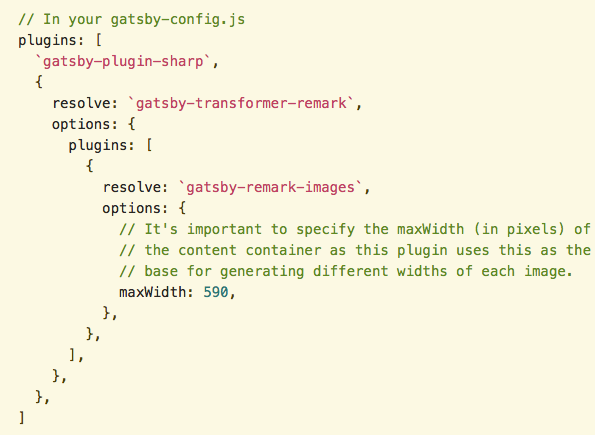
The file in gatsby-config.js file in your repository has the corresponding block written
as shown in this screenshot
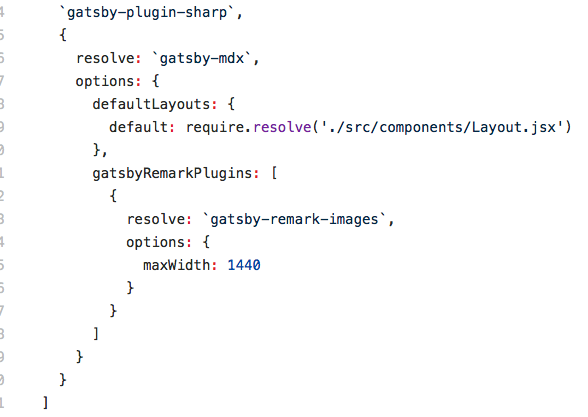
 jjcav84
on 7 May 2019
jjcav84
on 7 May 2019
Thanks, @jjcav84. The thing is I want to use gatsby-mdx _instead of_ gatsby-transformer-remark, I don't think they're meant to work together.
I'm going to build an example site using remark to implement your suggestions, but I think that's basically what Mitchell has done and he's running into the same problem.
The difference in his setup is that he's including gatsby-remark-copy-linked-files, which is why I mentioned it.
raulrpearson
on 7 May 2019
I have not been able to get your repository to work but this starter uses MDX and manages to lazy load and blur up the image in the index.mdx file at src/pages/index.mdx so I would suggest just following that example which you can find here. (https://github.com/ChristopherBiscardi/gatsby-starter-mdx-basic) but I'm going to keep on playing around to see if I can get your repository to blur up as well because I feel like it is possible and I may be getting close to success.
jjcav84
on 7 May 2019
Notice that the image in that starter is being included using the Img component provided by gatsby-image, which is not what I'm looking for.
Let's continue our discussion on Discord. If we learn something new, we can share it over here.
raulrpearson
on 7 May 2019
I have a temporary solution, add those code in your gatsby-browser.js:
diff --git a/gatsby-browser.js b/gatsby-browser.js
index 08d110f..bd76135 100644
--- a/gatsby-browser.js
+++ b/gatsby-browser.js
@@ -10,4 +10,36 @@ import 'katex/dist/katex.min.css'
 import './src/style/global.scss'
 import './src/style/custom-block.scss'

+import { imageBackgroundClass, imageClass, imageWrapperClass } from 'gatsby-remark-images/constants'
+
 export const wrapRootElement = wrap
+
+export const onRouteUpdate = function() {
+  var imageWrappers = document.querySelectorAll("." + imageWrapperClass); // https://css-tricks.com/snippets/javascript/loop-queryselectorall-matches/
+  // for cross-browser looping through NodeList without polyfills
+
+  var _loop = function _loop(i) {
+    var imageWrapper = imageWrappers[i];
+    var backgroundElement = imageWrapper.querySelector("." + imageBackgroundClass);
+    var imageElement = imageWrapper.querySelector("." + imageClass);
+
+    var onImageLoad = function onImageLoad() {
+      backgroundElement.style.transition = "opacity 0.5s 0.5s";
+      backgroundElement.style.opacity = 0;
+      imageElement.style.transition = "opacity 0.5s";
+      imageElement.style.opacity = 1;
+      imageElement.removeEventListener("load", onImageLoad);
+    };
+
+    if (imageElement.complete) {
+      backgroundElement.style.opacity = 0;
+    } else {
+      imageElement.style.opacity = 0;
+      imageElement.addEventListener("load", onImageLoad);
+    }
+  };
+
+  for (var i = 0; i < imageWrappers.length; i++) {
+    _loop(i);
+  }
+}
The problem is https://github.com/gatsbyjs/gatsby/blob/5640078ec52fb18afa5aa4fd81974a317759c771/packages/gatsby-remark-images/src/gatsby-browser.js#L7 won't call, so the blur-up style won't stick to <img>. Maybe because I use gatsby-mdx instead of gatsby-transformer-remark
 meritozh
on 21 May 2019
meritozh
on 21 May 2019
@MitchellCash <3 the picture
 sebastienfi
on 19 Jun 2019
sebastienfi
on 19 Jun 2019
Related issues
 dustinhorton
·
3Comments
dustinhorton
·
3Comments
 3CordGuy
·
3Comments
3CordGuy
·
3Comments
 rossPatton
·
3Comments
rossPatton
·
3Comments
 jimfilippou
·
3Comments
jimfilippou
·
3Comments
 KyleAMathews
·
3Comments
KyleAMathews
·
3Comments