gatsby-plugin-remove-trailing-slashes not working when using `gatsby develop`
Description
gatsby-plugin-remove-trailing-slashes seems to work when running gatsby serve but not when running gatsby develop
Steps to reproduce
I created a demo project from the CLI to demonstrate the behaviour.
https://github.com/itmayziii/gatsby-trailing-slahes-demo
Expected result
Gatsby plugins should work the same in develop as when building the project.
Actual result
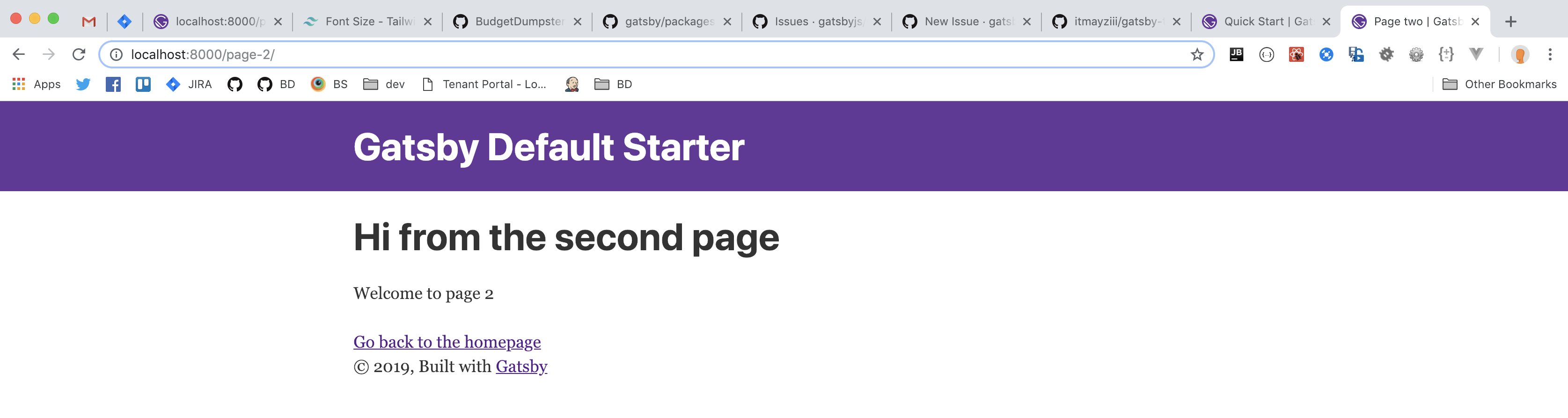
gatsby develop is not removing trailing slashes.
What happened.
Environment
System:
OS: macOS 10.14.2
CPU: (8) x64 Intel(R) Core(TM) i7-7920HQ CPU @ 3.10GHz
Shell: 3.2.57 - /bin/bash
Binaries:
Node: 10.15.0 - /usr/local/bin/node
Yarn: 1.12.3 - /usr/local/bin/yarn
npm: 6.4.1 - /usr/local/bin/npm
Browsers:
Chrome: 71.0.3578.98
Firefox: 64.0.2
Safari: 12.0.2
npmPackages:
gatsby: ^2.0.76 => 2.0.76
gatsby-image: ^2.0.20 => 2.0.25
gatsby-plugin-manifest: ^2.0.9 => 2.0.12
gatsby-plugin-offline: ^2.0.16 => 2.0.20
gatsby-plugin-react-helmet: ^3.0.2 => 3.0.5
gatsby-plugin-remove-trailing-slashes: ^2.0.6 => 2.0.6
gatsby-plugin-sharp: ^2.0.14 => 2.0.16
gatsby-source-filesystem: ^2.0.8 => 2.0.12
gatsby-transformer-sharp: ^2.1.8 => 2.1.9
 itmayziii
All 22 comments
Sorry about the confusion @itmayziii
Just cloned this and tested it out. The plugin seems to be working fine but I suppose the confusion is based on the fact that the Link in https://github.com/itmayziii/gatsby-trailing-slahes-demo/blob/cfe4de7d85be0be5ec22d608fb52974e8cd96405/src/pages/index.js#L17 actually links to /page-2/
From the documentation at https://www.gatsbyjs.org/packages/gatsby-plugin-remove-trailing-slashes/
This plugin is intended to remove trailing slashes from paths generated by Gatsby itself.
This however does not prevent the resolution of pages that have trailing slashes, due to the way browsers are built to interpret URLs as paths.
This means that a user will need to take the extra step of ensuring that all router links direct towards paths that do not end in a slash.
For example, will render the view related to /about but will display as /about/ in the browsers address bar.
 sidharthachatterjee
on 16 Jan 2019
sidharthachatterjee
on 16 Jan 2019
My mistake @sidharthachatterjee, you are right that changing the link to /page-2 fixes the issue.
Actually I encountered this issue in a little more complicated setup and am still experiencing the issue, even when going directly to the url, but it is a private repository for work. I'm trying to figure out the best way to share the example with you.
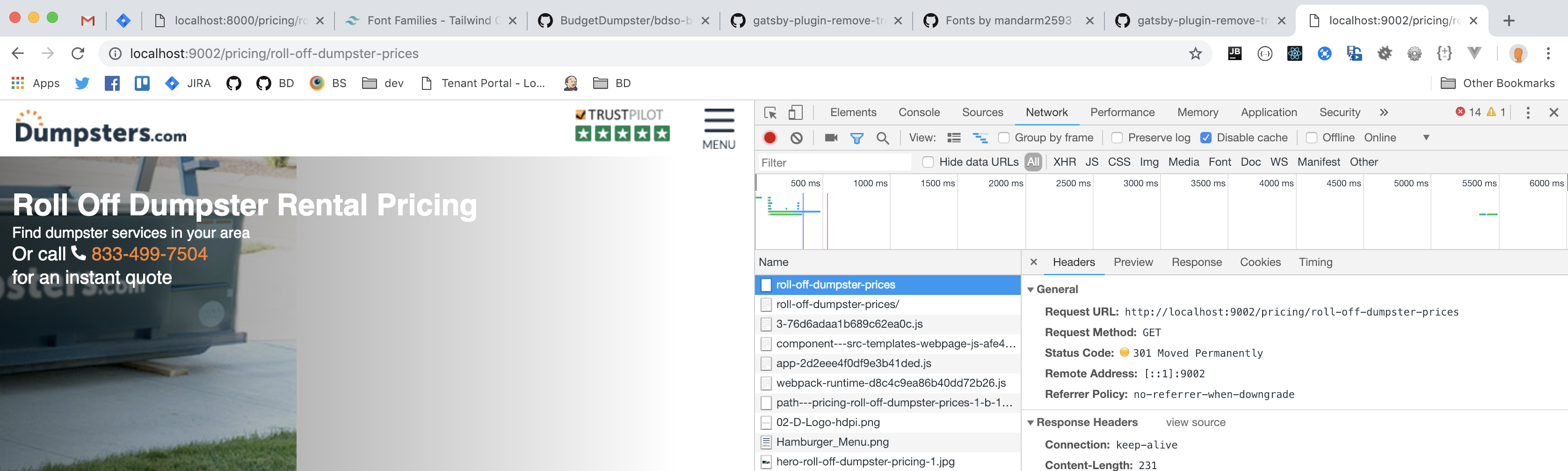
Below is the network request to localhost:8000/pricing/roll-off-dumpster-prices but it responded with a 301 to the version with the trailing slash.

What information can I give you that would be helpful?
Here is the info from the more complicated example
System:
OS: macOS 10.14.2
CPU: (8) x64 Intel(R) Core(TM) i7-7920HQ CPU @ 3.10GHz
Shell: 3.2.57 - /bin/bash
Binaries:
Node: 10.15.0 - /usr/local/bin/node
Yarn: 1.12.3 - /usr/local/bin/yarn
npm: 6.4.1 - /usr/local/bin/npm
Browsers:
Chrome: 71.0.3578.98
Firefox: 64.0.2
Safari: 12.0.2
npmPackages:
gatsby: ~2.0.0 => 2.0.75
gatsby-image: ~2.0.20 => 2.0.20
gatsby-plugin-offline: ~2.0.16 => 2.0.16
gatsby-plugin-postcss: ~2.0.2 => 2.0.2
gatsby-plugin-react-helmet: ~3.0.2 => 3.0.2
gatsby-plugin-react-svg: ~2.0.0 => 2.0.0
gatsby-plugin-remove-trailing-slashes: ~2.0.6 => 2.0.6
gatsby-source-filesystem: ~2.0.8 => 2.0.8
gatsby-source-graphql: ~2.0.7 => 2.0.7
itmayziii
on 16 Jan 2019
@itmayziii Do you have any redirects specifically configured? That 301 looks strange
This is when running gatsby develop, correct?
sidharthachatterjee
on 16 Jan 2019
@sidharthachatterjee this was running gatsby develop. I just double checked gatsby serve again though and it appears to be the same problem
itmayziii
on 16 Jan 2019
I just realised that the 301 is default behaviour for most servers (and express in this instance). Chrome does not append the trailing slash in the status bar though.
The plugin is only intended to remove trailing slashes from paths generated by Gatsby itself. Just to clear up confusion, can you please elaborate on expected behaviour versus actual?
sidharthachatterjee
on 16 Jan 2019
Yeah let me give it a shot.
Expected
When visiting http://www.domain.com/prices
There should be no redirect to http://www.domain.com/prices/
Google has recommemded that a site should pick a convention of whether or not to use trailing slashes and stick to it https://webmasters.googleblog.com/2010/04/to-slash-or-not-to-slash.html
Our team has decided that the non trailing slash version of our site is our convention and this is replacing and existing site so it’s important that we follow the same existing url conventions.
Actual
http://www.domain.com/prices does a 301 redirect to http://www.domain.com/prices/
It is expected that ‘gasby develop’ and ‘gatsby serve’ work the same way
itmayziii
on 16 Jan 2019
I also have this concern. We recently switched a lot of properties to Gatsby, but using the same urls because we have marketing campaigns using them. However, the 301/302 redirect is deleting the url params.
e.g.
mysite.com/page?utm_source=google
becomes
mysite.com/page/
and the tracking does not register.
Any insight into this would be very helpful.
 abohannon
on 29 Jan 2019
abohannon
on 29 Jan 2019
I am experiencing 301 Moved Permanently redirect to /reviews/ when hitting /reviews page in development or build/serve modes.
Reviews page is located in /src/pages/reviews.js.
I am using [email protected], [email protected], Node.js v10.15.0 x64, Windows 10 Pro x64.
 igorpupkinable
on 7 Feb 2019
igorpupkinable
on 7 Feb 2019
Just in case anyone else comes across this issue, I'm solving the problem with a combination of Nginx configuration and the Gatsby remove trailing slashes plugin.
On the Nginx side I'm redirecting all trailing slash versions to the non trailing slash version
This goes in my server block configuration
rewrite ^/(.*)/$ /$1 permanent;
You need the Gatsby plugin also because even though the server is redirecting all traffic to the non trailing slash version, the Gatsby javascript seems to be adding the trailing slash to the URL bar. If you use the plugin it will stop doing that.
To clarify
Behaviour without plugin
https://www.example.com/test will give a 200 response but the javascript will change the url bar to be https://www.example.com/test/
It should be also noted I'm not using gatsby serve anywhere anymore. We are using docker with a Nginx container instead.
itmayziii
on 15 Feb 2019
Hiya!
This issue has gone quiet. Spooky quiet. 👻
We get a lot of issues, so we currently close issues after 30 days of inactivity. It’s been at least 20 days since the last update here.
If we missed this issue or if you want to keep it open, please reply here. You can also add the label "not stale" to keep this issue open!
Thanks for being a part of the Gatsby community! 💪💜
![gatsbot[bot] picture](https://avatars2.githubusercontent.com/in/12849?v=4&s=40) gatsbot[bot]
on 8 Mar 2019
gatsbot[bot]
on 8 Mar 2019
not stale
igorpupkinable
on 11 Mar 2019
I had a similar issue, a 301 redirect from non-slash to slash while removing trailing slashes with the plugin, and what fixed it seemed completely unrelated to the affected paths.
@itmayziii, @abohannon, @igorpupkinable are you creating _any_ pages programmatically in gatsby-node?
I noticed that for one (and only one) type of pages, I was calling createPage({ path: ... }) passing a path with a trailing slash (_woops_), but as it was removed later by the plugin, the mistake wasn't visible when listing all the available paths after build.
The fact that it added the 301 redirects on completely unrelated pages didn't help to pinpoint the issue, and making sure that manually created pages had clean paths fixed the issue for ALL paths.
Also, if you are using createFilePath from gatsby-source-filesystem, make sure to set the trailingSlash option to false:
const nodePath = createFilePath({ node, getNode, trailingSlash: false });
Anyway, this gotcha should be documented in the plugin's doc.
 feychenie
on 25 Apr 2019
feychenie
on 25 Apr 2019
Actually, all is said in this phrase (by @sidharthachatterjee)
The plugin is only intended to remove trailing slashes from paths generated by Gatsby itself.
So yeah, double check the paths you generate programmatically (basically all that is not a path of a file sitting in the /pages/ folder)
feychenie
on 25 Apr 2019
@feychenie
Thanks for the tip and we are creating pages using gatsby-node, but we definitely do not have trailing slashes in our data. The issue for me specifically was that the gatsby javascript was putting the trailing slash back in the URL after the page had loaded so that if a user were to refresh there page they would get a 301 which is not ideal.
itmayziii
on 25 Apr 2019
The issue for me specifically was that the gatsby javascript was putting the trailing slash back in the URL after the page had loaded so that if a user were to refresh there page they would get a 301 which is not ideal.
Yes that's exactly what I am talking about
feychenie
on 26 Apr 2019
I'm using gatsby-plugin-remove-trailing-slashes, but it doesn't do much.
Visiting /contact-us redirects (301) to /contact-us/.
Is there a way to get rid of the redirect and the trailing slash without involving server configuration?
 moroshko
on 11 Jul 2019
moroshko
on 11 Jul 2019
I'm experiencing the same issue. We intend not to have a server setup for this so an nginx configuration wouldn't work in our case.
 jamesncampbell
on 18 Sep 2019
jamesncampbell
on 18 Sep 2019
Problem here as well. This is an issue if you're trying to align your develop URLs with production URLs.
Seems it would need to be handled in this file with some simple middleware and a config switch:
https://github.com/gatsbyjs/gatsby/blob/master/packages/gatsby/src/commands/develop.js
 mshick
on 22 Oct 2019
mshick
on 22 Oct 2019
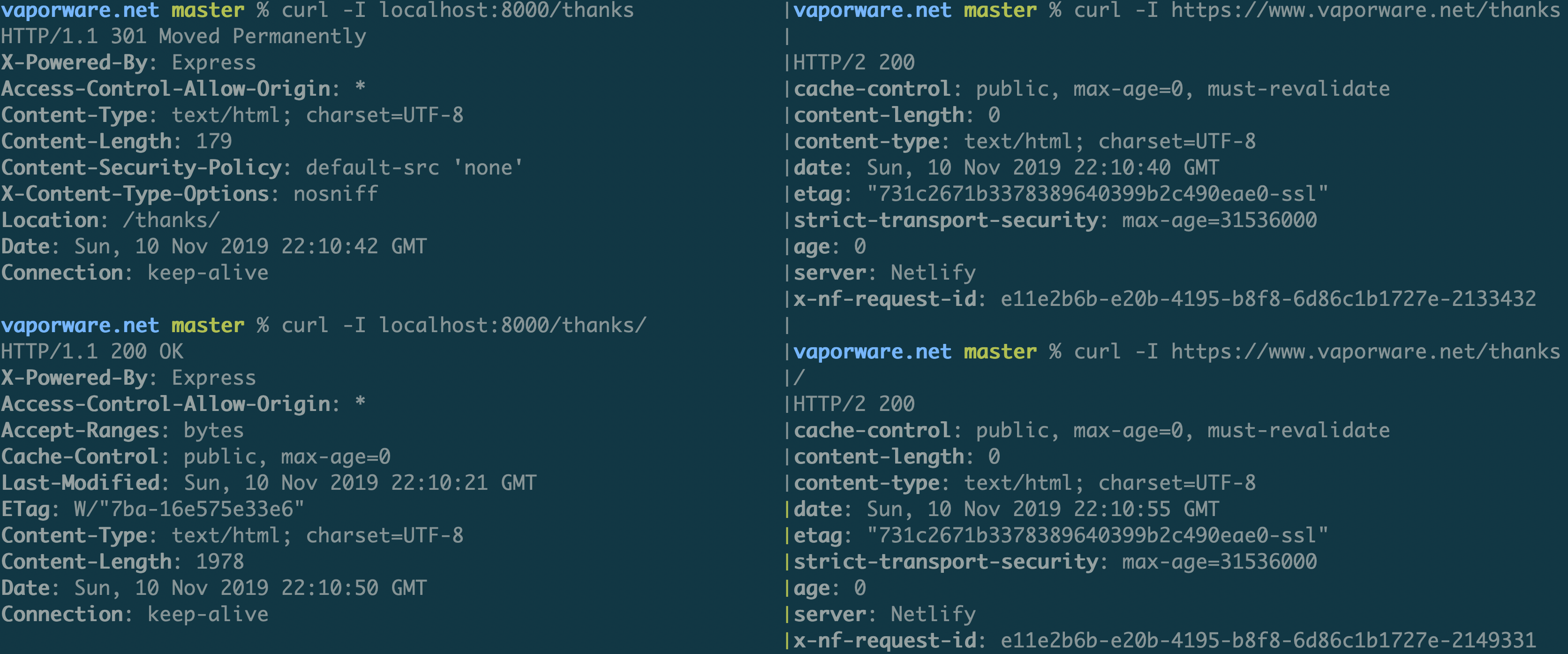
I fixed this issue by removing the plugin remove-trailing-slashes. It doesn't align develop and production, but it works for hosting on netlify without trailing slashes:
(localhost on left, netlify production on right):
 toobulkeh
on 10 Nov 2019
toobulkeh
on 10 Nov 2019
Hiya!
This issue has gone quiet. Spooky quiet. 👻
We get a lot of issues, so we currently close issues after 30 days of inactivity. It’s been at least 20 days since the last update here.
If we missed this issue or if you want to keep it open, please reply here. You can also add the label "not stale" to keep this issue open!
As a friendly reminder: the best way to see this issue, or any other, fixed is to open a Pull Request. Check out gatsby.dev/contribute for more information about opening PRs, triaging issues, and contributing!
Thanks for being a part of the Gatsby community! 💪💜
![github-actions[bot] picture](https://avatars2.githubusercontent.com/in/15368?v=4&s=40) github-actions[bot]
on 3 Dec 2019
github-actions[bot]
on 3 Dec 2019
Hey again!
It’s been 30 days since anything happened on this issue, so our friendly neighborhood robot (that’s me!) is going to close it.
Please keep in mind that I’m only a robot, so if I’ve closed this issue in error, I’m HUMAN_EMOTION_SORRY. Please feel free to reopen this issue or create a new one if you need anything else.
As a friendly reminder: the best way to see this issue, or any other, fixed is to open a Pull Request. Check out gatsby.dev/contribute for more information about opening PRs, triaging issues, and contributing!
Thanks again for being part of the Gatsby community! 💪💜
github-actions[bot]
on 14 Dec 2019
bump, please reopen.
i'm seeing this with and w/o gatsby-plugin-remove-trailing-slash enabled.
also, linking #19543 to this
 aleclarson
on 29 Apr 2020
aleclarson
on 29 Apr 2020
Related issues
 Oppenheimer1
·
3Comments
Oppenheimer1
·
3Comments
 magicly
·
3Comments
magicly
·
3Comments
 kalinchernev
·
3Comments
kalinchernev
·
3Comments
 timbrandin
·
3Comments
timbrandin
·
3Comments
 ghost
·
3Comments
ghost
·
3Comments
Most helpful comment
Yes that's exactly what I am talking about