Summary
so i have a blog, everything works great when running gatsby develop, but when i run gatsby build && gatsby serve, and i check "view source code" on chrome and firefox, there is no html contents. and no meta tags from helmet.
this is what i get inside the body tag:
<body><div id="___gatsby"><div style="outline:none" tabindex="-1" role="group"></div></div>
everything does work in the browser, only problem is with this.
i am new with gatsby, what am i missing here?
Relevant information
Environment (if relevant)
System:
OS: Windows 10
CPU: (8) x64 Intel(R) Core(TM) i7-8650U CPU @ 1.90GHz
Binaries:
npm: 6.4.1 - C:\Program Files\nodejs\npm.CMD
Browsers:
Edge: 42.17134.1.0
npmPackages:
gatsby: ^2.0.53 => 2.0.53
gatsby-image: ^2.0.20 => 2.0.20
gatsby-plugin-feed: ^2.0.11 => 2.0.11
gatsby-plugin-google-analytics: ^2.0.8 => 2.0.8
gatsby-plugin-manifest: ^2.0.9 => 2.0.9
gatsby-plugin-offline: ^2.0.16 => 2.0.16
gatsby-plugin-react-helmet: ^3.0.2 => 3.0.2
gatsby-plugin-robots-txt: ^1.3.0 => 1.3.0
gatsby-plugin-sharp: ^2.0.14 => 2.0.14
gatsby-plugin-sitemap: ^2.0.3 => 2.0.3
gatsby-remark-copy-linked-files: ^2.0.7 => 2.0.7
gatsby-remark-external-links: 0.0.4 => 0.0.4
gatsby-remark-images: ^3.0.1 => 3.0.1
gatsby-remark-responsive-iframe: ^2.0.7 => 2.0.7
gatsby-source-filesystem: ^2.0.8 => 2.0.8
gatsby-transformer-remark: ^2.1.12 => 2.1.12
gatsby-transformer-sharp: ^2.1.9 => 2.1.9
File contents (if changed)
gatsby-config.js: N/A
package.json: N/A
gatsby-node.js: N/A
gatsby-browser.js: N/A
gatsby-ssr.js: N/A
 derridHeidegger
All 13 comments
Could you share a repo?So that the issue could be looked at?
 jonniebigodes
on 6 Dec 2018
jonniebigodes
on 6 Dec 2018
hey, thanks for answering. sorry, i have been away on the weekend and now have issues with the internet.
i have created a repo: repo
by the way, i have noticed that if i comment the gatsby-plugin-offline i do get the contents in view page source.
also with gatsby-plugin-offline: if i check the index.html in the public folder the content is there.
derridHeidegger
on 9 Dec 2018
anyone?
derridHeidegger
on 11 Dec 2018
What happens if you curl the homepage from the terminal?
 KyleAMathews
on 11 Dec 2018
KyleAMathews
on 11 Dec 2018
i run curl for localhost:9000 which is the build. this is what i get:
PS C:\WINDOWS\system32> curl http://localhost:9000
StatusCode : 200
StatusDescription : OK
Content :
Vary: Accept-Encoding
Connection: keep-alive
Accept-Ranges: bytes
Content-Length: 12537
Cache-Control: public, max-age=0
Content-Type: text/html; charset=UTF-8
Date: Tue, 11 Dec...
Forms : {}
Headers : {[Vary, Accept-Encoding], [Connection, keep-alive], [Accept-Ranges, bytes], [Content-Length,
12537]...}
Images : {@{innerHTML=; innerText=; outerHTML=
 ;
;outerText=; tagName=IMG; style=transition:opacity 0.5s 0.25s; left: 0px; top: 0px; width: 100%;
height: 100%; position: absolute; opacity: 1; object-fit: cover; object-position: center;; alt=; sr
c=data:image/png;base64,iVBORw0KGgoAAAANSUhEUgAAABQAAAAUCAIAAAAC64paAAAACXBIWXMAAAsSAAALEgHS3X78AAA
CYklEQVQ4y42Uy28SQRjA+dM8efDmwYN6qF6qiSY+Y/WgQRMibY00TaWNBSRSCraYQtHl/bR0KyxQWCgWWAqU8izl/Sq7rLNsRH
lVJpvJtzPfb77nDIOcZHSoqZSrp4+KtXIziubaLRysMCZiCYqOoVnhjNEi8RcztdxxeTzc6VBfT+5O2Vhpb+vw4wMdZ0ppWvP9x
zLeJoDNThf2W+Nz1+XzNxQubSToSKKW+BDc+WOnkshhSVgeCiGpViZMEg1oxc26Knt+ae3bEtJTZwzE1kXLccG0+sOOlrcvZXvs
czPkITfsa20vwIKnhsh+BnjUarT74Gb13CY7KBVJMv3z4N1NszQYsMWM62HNrCis/GxXn0iYls23uz5LPBcv0bH8hUH2XRoM85y
SXv7JBtO87jMIvWq+H5GoYIHCLA1ZxD6Qap3Ak8IKfW7TJ50lK6uP9E6RgndHaODtCJ6Z5RyHfnE7j6gRbcKlCYNSt+rtETHTpU
GgEP8FYmdNqd/Mo7aiVWTfuH2L9xASvfxxlqr01EYkrJszvNkgW9bH0OuFr+99m+y9IOeyU6zIp/Hubp/yMEztlzFPwOhdvq+nI
oS1JNn4t2sugCmVsDvPe2KKolnZLCxhOcAKQRDDXTQaVi46lqYhIBwHTrl3oWqhMRDtaJge37lOBMKo4tfbqhVX0J7snTsWps8u
ZWuoOQY6CcjpSIF55UvmqNgr5wUwtV1IVdnXtnSfPEB2qjDNqnvczRl0m+j6Jn5lXb6nAQJqinmN0ZEBj03YLzghY8PnTRz80o/
GRJZpOLCb0PM9BN7pvUEjx28V00WUg9jIVwAAAABJRU5ErkJggg==}}
InputFields : {}
Links : {@{innerHTML=נסיון בגטסבי; innerText=נסיון בגטסבי; outerHTML= aria-current="page">נסיון בגטסבי; outerText=נסיון בגטסבי; tagName=A; href=/;
aria-current=page}, @{innerHTML=דף הבית; innerText=דף הבית; outerHTML= aria-current="page">דף הבית; outerText=דף הבית; tagName=A; href=/;
aria-current=page}, @{innerHTML=בלוג; innerText=בלוג; outerHTML=
שני; innerText=דף שני; outerHTML=דף שני; outerText=דף
שני; tagName=A; href=/page-2}...}
ParsedHtml : System.__ComObject
RawContentLength : 12537
derridHeidegger
on 11 Dec 2018
this is with the offline plugin on
derridHeidegger
on 11 Dec 2018
Hmmm, that doesn't look like HTML. Why is it parsed?
KyleAMathews
on 11 Dec 2018
have no clue. you can check the repo. maybe i am doing something wrong in gatsby node? or not configuring the offline plugin? although i am using it the simple way as possible.
derridHeidegger
on 11 Dec 2018
@derridHeidegger i've cloned your repo and installed the dependencies.
After that i issued gatsby build && gatsby serve. Build process finishes ok and when i open any browser the content is shown.
With firefox opened in and the dev console on the side, as you can see bellow on the image, this is what the body contains.
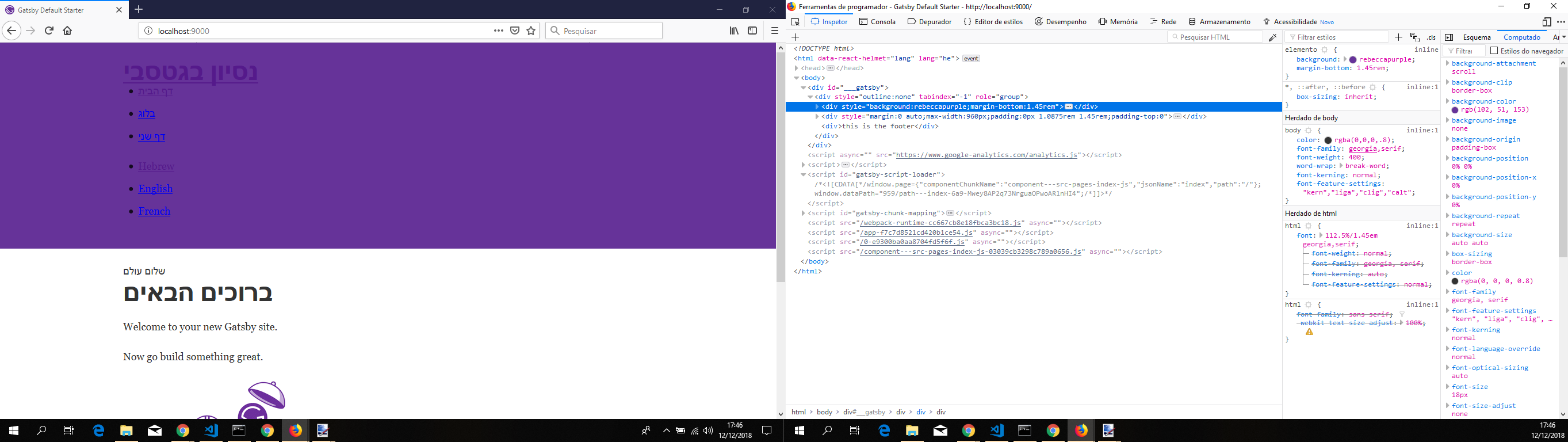
And the head content is bellow.

Tested it in incognito mode on firefox, same output, opened normal and incognito mode chrome, the same result, changed the languages and still the same result.
One thing that caught my eye while cloning your repo, is there any reason for the launch.json file inside the .vscode? Are you launching via a the integrated console or any other console or using the file, or to put it simply using debug tab on vscode?
Going through that, using the configuration for debug, it "sits" there and times out eventually, no build no nothing.
jonniebigodes
on 12 Dec 2018
hi, the issue is when i check "view page source", as i said, everything is working except that. which means SEO issue. When checking with inspect is a different thing. i am using the debug in vscode, i should put it in the gitignore, but i made the repo without it.
i do not think the launch.json has any effect. the one thing that do is if i comment the offline plugin.
derridHeidegger
on 13 Dec 2018
hi, the issue is when i check "view page source", as i said, everything is working except that. which means SEO issue.
Hi 👋
Your assumption is wrong, using "View page source" is not a reliable method to check that. As Kyle said you could use curl or look at the public/index.html.
https://github.com/gatsbyjs/gatsby/issues/10017#issuecomment-439946657
I did the latter (doing a build and looking at the index file):

All tags are there 👍 There's no issue with your project. The service worker just doesn't let you look at it via "View page source".
As there's no bug I'm closing this issue, if you have further questions you can of course ask them here.
 LekoArts
on 13 Dec 2018
LekoArts
on 13 Dec 2018
The service worker just doesn't let you look at it via "View page source".
so basically no issue for SEO? ok thanks for all your help
derridHeidegger
on 13 Dec 2018
A small addition to this thread.
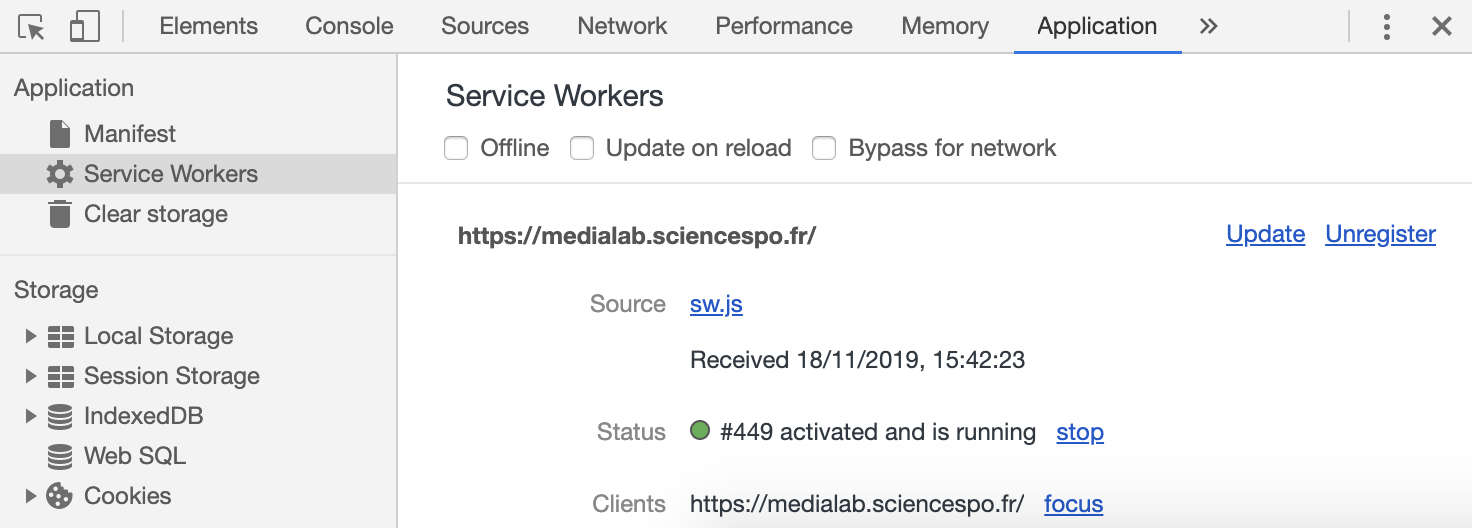
Like @derridHeidegger, I assumed the view-source page was equivalent to a curl command, that it was the output as received from the server. What I learned with this issue is view-source displays the source of the page as received from the network—directly _or_ via a service worker; the latter is what @LekoArts writes in a way.
If you click on the Unregisiter link of the service worker (Chrome Dev Tools > Application > Service Workers), _then_ "view source", what is displayed is the source code as transfered from the server.
 oncletom
on 18 Nov 2019
oncletom
on 18 Nov 2019
Related issues
 jimfilippou
·
3Comments
jimfilippou
·
3Comments
 brandonmp
·
3Comments
KyleAMathews
·
3Comments
brandonmp
·
3Comments
KyleAMathews
·
3Comments
 dustinhorton
·
3Comments
dustinhorton
·
3Comments
 kalinchernev
·
3Comments
kalinchernev
·
3Comments
Most helpful comment
A small addition to this thread.
Like @derridHeidegger, I assumed the
view-sourcepage was equivalent to acurlcommand, that it was the output as received from the server. What I learned with this issue isview-sourcedisplays the source of the page as received from the network—directly _or_ via a service worker; the latter is what @LekoArts writes in a way.If you click on the
Unregisiterlink of the service worker (Chrome Dev Tools > Application > Service Workers), _then_ "view source", what is displayed is the source code as transfered from the server.