Gatsby: Site asks to add to home on Android
Description
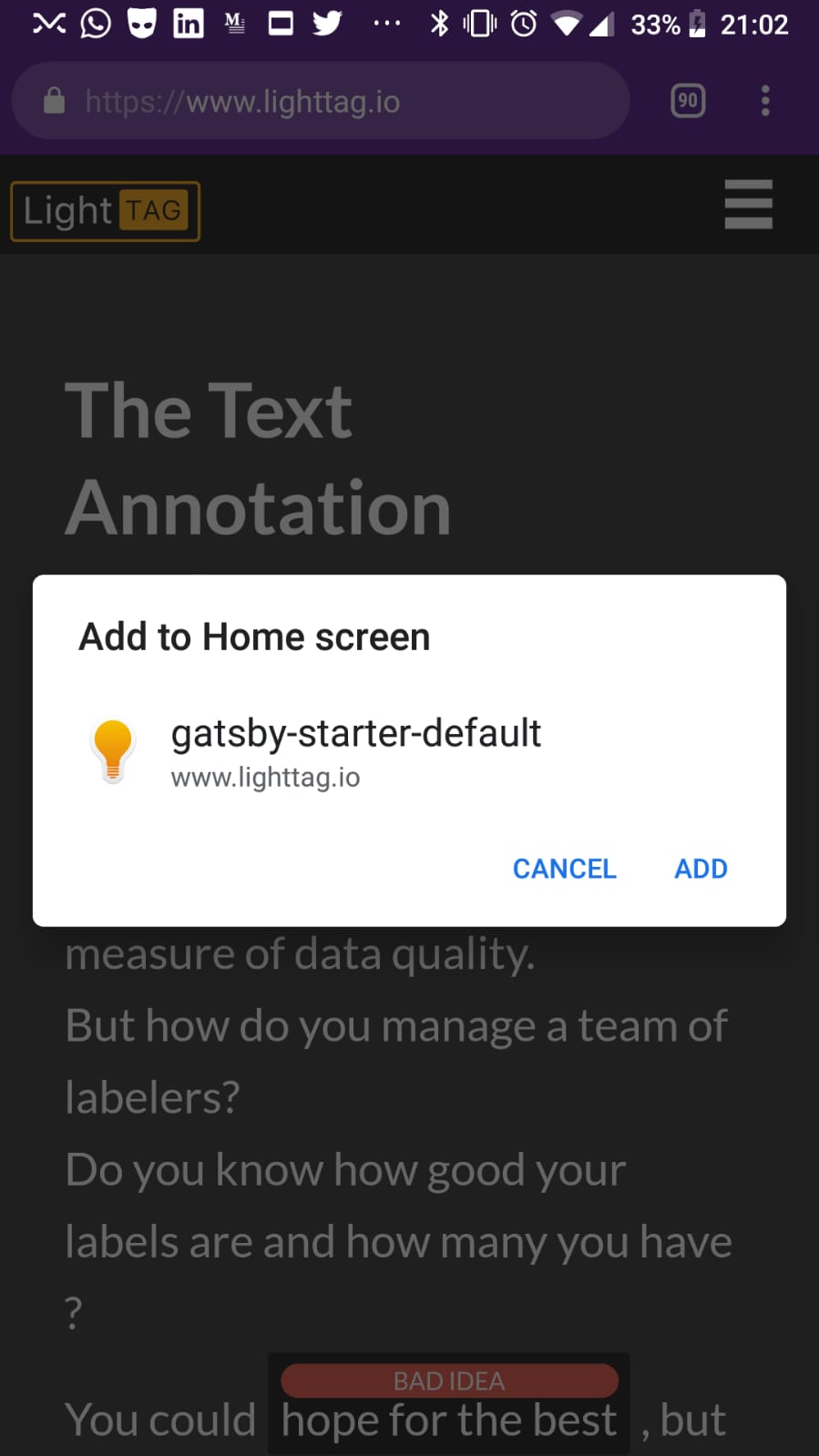
When users go to our Website on Android, they get a pop up to add the site to their home screen.
This isn't something we coded (intentionally).
Steps to reproduce
Not sure? Goto www.lighttag.io with Chrome on Android.
Expected result
What should happen?
Not getting this pop up
Actual result
Environment
gatsby info --clipboard
System:
OS: Linux 4.15 Ubuntu 16.04.3 LTS (Xenial Xerus)
CPU: x64 Intel(R) Core(TM) i7-6500U CPU @ 2.50GHz
Shell: 4.3.48 - /bin/bash
Binaries:
Node: 10.10.0 - /usr/local/bin/node
npm: 6.4.1 - /usr/local/bin/npm
Browsers:
Chrome: 62.0.3202.94
Firefox: 63.0
npmPackages:
gatsby: ^2.0.34 => 2.0.34
gatsby-image: ^2.0.18 => 2.0.18
gatsby-plugin-canonical-urls: ^2.0.7 => 2.0.7
gatsby-plugin-catch-links: ^2.0.6 => 2.0.6
gatsby-plugin-glamor: ^2.0.6 => 2.0.6
gatsby-plugin-google-gtag: ^1.0.2 => 1.0.2
gatsby-plugin-manifest: ^2.0.7 => 2.0.7
gatsby-plugin-offline: ^2.0.10 => 2.0.10
gatsby-plugin-react-helmet: ^3.0.1 => 3.0.1
gatsby-plugin-robots-txt: ^1.3.0 => 1.3.0
gatsby-plugin-sharp: ^2.0.10 => 2.0.10
gatsby-plugin-sitemap: ^2.0.2 => 2.0.2
gatsby-plugin-stripe-checkout: ^1.0.7 => 1.0.7
gatsby-plugin-typography: ^2.2.1 => 2.2.1
gatsby-remark-images: ^2.0.5 => 2.0.5
gatsby-source-filesystem: ^2.0.6 => 2.0.6
gatsby-transformer-remark: ^2.1.11 => 2.1.11
gatsby-transformer-sharp: ^2.1.7 => 2.1.7
npmGlobalPackages:
gatsby-cli: 2.4.2
gatsby-config.js
const path = require(`path`)

module.exports = {
  siteMetadata: {
    title: 'LightTag - Text Annotation for Teams',
    twitterHandle: '@LabeledData',
    siteUrl: 'https://www.lighttag.io',
  },
  plugins: [
    // 'gatsby-plugin-react-helmet',
    {
      resolve: `gatsby-plugin-manifest`,
      options: {
        name: 'gatsby-starter-default',
        short_name: 'starter',
        start_url: '/',
        background_color: '#663399',
        theme_color: '#663399',
        display: 'minimal-ui',
        icon: 'src/images/gatsby-icon.png', // This path is relative to the root of the site.
      },
    },
    {
      resolve: `gatsby-source-filesystem`,
      options: {
        name: `images`,
        path: `${__dirname}/src/images`,
      },
    },
    {
      resolve: `gatsby-plugin-canonical-urls`,
      options: {
        siteUrl: `https://www.lighttag.io`,
      },
    },

    'gatsby-plugin-offline',
    'gatsby-plugin-catch-links',
    `gatsby-plugin-sitemap`,
    {
      resolve: 'gatsby-source-filesystem',
      options: {
        path: `${__dirname}/src/pages`,
        name: 'pages',
      },
    },
    `gatsby-plugin-glamor`,
    `gatsby-transformer-sharp`,
    `gatsby-plugin-sharp`,
    {
      resolve: `gatsby-transformer-remark`,
      options: {
        plugins: [
          {
            resolve: `gatsby-remark-images`,
            options: {
              // It's important to specify the maxWidth (in pixels) of
              // the content container as this plugin uses this as the
              // base for generating different widths of each image.
              maxWidth: 590,
              showCaptions: true,
            },
          },
        ],
      },
    },
    {
      resolve: `gatsby-plugin-google-gtag`,
      options: {
        // You can add multiple tracking ids and a pageview event will be fired for all of them.
        trackingIds: [
         'redacted'
        ],
        // This object gets passed directly to the gtag config command
        // This config will be shared accross all trackingIds
        gtagConfig: {
          optimize_id:          'redacted',
          anonymize_ip: true,
        },
        // This object is used for configuration specific to this plugin
        pluginConfig: {
          // Puts tracking script in the head instead of the body
          head: true,
          // Setting this parameter is also optional
          respectDNT: true,
          // Avoids sending pageview hits from custom paths

        },
      },
    },
    {
      resolve: `gatsby-plugin-typography`,
      options: {
        pathToConfigModule: `src/utils/typography.js`,
      },
    },
    {
      resolve: 'gatsby-plugin-robots-txt',
      options: {
        host: 'https://www.lighttag.io',
        sitemap: 'https://www.lighttag.io/sitemap.xml',
        policy: [
          {
            userAgent: '*',
            allow: '/',
            disallow: ['/legal/*'],
          },
        ],
      },
    },
  ],
}
 talolard
All 7 comments
This is what gatsby-plugin-offline does. It adds a service worker so your site is now under PWA standards.
 krismorf
on 4 Nov 2018
krismorf
on 4 Nov 2018
It’s actually the combination of the offline and manifest plugin. You can read up on the behavior here (+ how to disable the prompt):
https://developers.google.com/web/fundamentals/app-install-banners/
 LekoArts
on 4 Nov 2018
LekoArts
on 4 Nov 2018
@LekoArts Thanks.
I read up on the gatsby-plugin-manifest. If I don't want this behaviour (No need for users to save our site to Home), is it sage to remove the plugin ?
talolard
on 4 Nov 2018
If you don't want your site to be a PWA, you can remove the manifest plugin. However I personally would says that PWAs are getting more and more important and it would be a worthwhile time investment for you to configure the prompt behavior instead of disabling it completely.
LekoArts
on 4 Nov 2018
Thanks @LekoArts
If you don't mind, I'm still a little confused about how to disable it.
Do I want to do something like this ?
window.addEventListener('beforeinstallprompt', (e) => {
  // Prevent Chrome 67 and earlier from automatically showing the prompt
  e.preventDefault();
})
Where would I put this ?
talolard
on 4 Nov 2018
You change the "display" key for the manifest in the options to gatsby-plugin-manifest to "browser"
https://developers.google.com/web/fundamentals/web-app-manifest/
 KyleAMathews
on 4 Nov 2018
KyleAMathews
on 4 Nov 2018
Thanks!
talolard
on 4 Nov 2018
Related issues
 Oppenheimer1
·
3Comments
Oppenheimer1
·
3Comments
 signalwerk
·
3Comments
signalwerk
·
3Comments
 dustinhorton
·
3Comments
dustinhorton
·
3Comments
 3CordGuy
·
3Comments
3CordGuy
·
3Comments
 totsteps
·
3Comments
totsteps
·
3Comments
Most helpful comment
You change the "display" key for the manifest in the options to gatsby-plugin-manifest to "browser"
https://developers.google.com/web/fundamentals/web-app-manifest/