Gatsby: Popular Animation Library (GSAP) doesn't work after site is built
Summary
Using GSAP on my gatsby site works fine during development, but does not work in the built version.
I'm guessing this has something to do with me using it only in componentDidMount, and therefore being ignored from the server rendering or something of that sort. Either way, I'm not sure how I'd work around this. Any ideas would be greatly appreciated!
Relevant information
Using the latest GSAP, and the latest gatsby (v2).
Using gatsby-starter-blog
Win10
Environment (if relevant)
Ran gatsby info --clipboard but it did not work, despite being on the latest gatsby-cli
File contents (if changed)
gatsby-config.js:
module.exports = {
  siteMetadata: {
    title: 'Gatsby Starter Blog',
    author: 'Kyle Mathews',
    description: 'A starter blog demonstrating what Gatsby can do.',
    siteUrl: 'https://gatsbyjs.github.io/gatsby-starter-blog/',
  },
  pathPrefix: '/gatsby-starter-blog',
  plugins: [
    {
      resolve: `gatsby-source-filesystem`,
      options: {
        path: `${__dirname}/src/pages`,
        name: 'pages',
      },
    },
    {
      resolve: `gatsby-plugin-emotion`,
      options: {
        // Accepts all options defined by `babel-plugin-emotion` plugin.
      },
    },
    {
      resolve: `gatsby-transformer-remark`,
      options: {
        plugins: [
          {
            resolve: `gatsby-remark-images`,
            options: {
              maxWidth: 590,
            },
          },
          {
            resolve: `gatsby-remark-responsive-iframe`,
            options: {
              wrapperStyle: `margin-bottom: 1.0725rem`,
            },
          },
          'gatsby-remark-prismjs',
          'gatsby-remark-copy-linked-files',
          'gatsby-remark-smartypants',
        ],
      },
    },
    `gatsby-transformer-sharp`,
    `gatsby-plugin-sharp`,
    {
      resolve: `gatsby-plugin-google-analytics`,
      options: {
        //trackingId: `ADD YOUR TRACKING ID HERE`,
      },
    },
    `gatsby-plugin-feed`,
    {
      resolve: `gatsby-plugin-manifest`,
      options: {
        name: `Gatsby Starter Blog`,
        short_name: `GatsbyJS`,
        start_url: `/`,
        background_color: `#ffffff`,
        theme_color: `#663399`,
        display: `minimal-ui`,
        icon: `src/assets/gatsby-icon.png`,
      },
    },
    `gatsby-plugin-offline`,
    `gatsby-plugin-react-helmet`,
    {
      resolve: 'gatsby-plugin-typography',
      options: {
        pathToConfigModule: 'src/utils/typography',
      },
    },
  ],
}
package.json:
{
  "name": "gatsby-starter-blog",
  "description": "Starter Gatsby Blog",
  "version": "1.0.0",
  "author": "Kyle Mathews <[email protected]>",
  "bugs": {
    "url": "https://github.com/gatsbyjs/gatsby-starter-blog/issues"
  },
  "dependencies": {
    "emotion": "^9.2.12",
    "emotion-server": "^9.2.12",
    "gatsby": "^2.0.0",
    "gatsby-plugin-emotion": "^2.0.5",
    "gatsby-plugin-feed": "^2.0.5",
    "gatsby-plugin-google-analytics": "^2.0.5",
    "gatsby-plugin-manifest": "^2.0.2",
    "gatsby-plugin-offline": "^2.0.5",
    "gatsby-plugin-react-helmet": "^3.0.0",
    "gatsby-plugin-sharp": "^2.0.5",
    "gatsby-plugin-typography": "^2.2.0",
    "gatsby-remark-copy-linked-files": "^2.0.5",
    "gatsby-remark-images": "^2.0.1",
    "gatsby-remark-prismjs": "^3.0.0",
    "gatsby-remark-responsive-iframe": "^2.0.5",
    "gatsby-remark-smartypants": "^2.0.5",
    "gatsby-source-filesystem": "^2.0.1",
    "gatsby-transformer-remark": "^2.1.1",
    "gatsby-transformer-sharp": "^2.1.1",
    "gsap": "^2.0.2",
    "lodash": "^4.17.11",
    "lodash-es": "^4.17.11",
    "prismjs": "^1.15.0",
    "react": "^16.5.1",
    "react-dom": "^16.5.1",
    "react-emotion": "^9.2.12",
    "react-helmet": "^5.2.0",
    "react-typography": "^0.16.13",
    "typeface-merriweather": "0.0.43",
    "typeface-montserrat": "0.0.43",
    "typography": "^0.16.17",
    "typography-theme-wordpress-2016": "^0.15.10"
  },
  "devDependencies": {
    "eslint": "^4.19.1",
    "eslint-plugin-react": "^7.11.1",
    "gh-pages": "^1.2.0",
    "prettier": "^1.14.2"
  },
  "homepage": "https://github.com/gatsbyjs/gatsby-starter-blog#readme",
  "keywords": [
    "gatsby"
  ],
  "license": "MIT",
  "main": "n/a",
  "repository": {
    "type": "git",
    "url": "git+https://github.com/gatsbyjs/gatsby-starter-blog.git"
  },
  "scripts": {
    "dev": "gatsby develop",
    "lint": "./node_modules/.bin/eslint --ext .js,.jsx --ignore-pattern public .",
    "test": "echo \"Error: no test specified\" && exit 1",
    "format": "prettier --trailing-comma es5 --no-semi --single-quote --write 'src/**/*.js' 'src/**/*.md'",
    "develop": "gatsby develop",
    "build": "gatsby build",
    "deploy": "gatsby build --prefix-paths && gh-pages -d public",
    "fix-semi": "eslint --quiet --ignore-pattern node_modules --ignore-pattern public --parser babel-eslint --no-eslintrc --rule '{\"semi\": [2, \"never\"], \"no-extra-semi\": [2]}' --fix gatsby-node.js"
  }
}
gatsby-node.js:
const _ = require('lodash')
const Promise = require('bluebird')
const path = require('path')
const { createFilePath } = require('gatsby-source-filesystem')

exports.createPages = ({ graphql, actions }) => {
  const { createPage } = actions

  return new Promise((resolve, reject) => {
    const blogPost = path.resolve('./src/templates/blog-post.js')
    resolve(
      graphql(
        `
          {
            allMarkdownRemark(sort: { fields: [frontmatter___date], order: DESC }, limit: 1000) {
              edges {
                node {
                  fields {
                    slug
                  }
                  frontmatter {
                    title
                  }
                }
              }
            }
          }
        `
      ).then(result => {
        if (result.errors) {
          console.log(result.errors)
          reject(result.errors)
        }

        // Create blog posts pages.
        const posts = result.data.allMarkdownRemark.edges;

        _.each(posts, (post, index) => {
          const previous = index === posts.length - 1 ? null : posts[index + 1].node;
          const next = index === 0 ? null : posts[index - 1].node;

          createPage({
            path: post.node.fields.slug,
            component: blogPost,
            context: {
              slug: post.node.fields.slug,
              previous,
              next,
            },
          })
        })
      })
    )
  })
}

exports.onCreateNode = ({ node, actions, getNode }) => {
  const { createNodeField } = actions

  if (node.internal.type === `MarkdownRemark`) {
    const value = createFilePath({ node, getNode })
    createNodeField({
      name: `slug`,
      node,
      value,
    })
  }
}
gatsby-browser.js: N/A
gatsby-ssr.js: N/A
 orshick
All 19 comments
Is their console errors? Can you provide a link to source of your site? Any reason to suspect this problem is related to Gatsby?
 KyleAMathews
on 5 Oct 2018
KyleAMathews
on 5 Oct 2018
Thanks a lot for your reply Kyle!
Nope, no console errors unfortunately. Considering the page is only 39kb (when inspecting network tab) I doubt that GSAP is getting loaded at all.
The page i linked above (https://clever-wiles-b95d3a.netlify.com/other-page) is literally the page I was practicing with GSAP on. I'm not sure if it's gatsby per se, maybe it's more of a general SSR thing. However, it does work properly while I have it in gatsby develop mode
Here is the github link to the relevant page: https://github.com/orshick/chancelor/blob/master/src/pages/other-page.js
orshick
on 5 Oct 2018
How are you loading GSAP Orshick? Where are you putting the
Thanks again. I assumed that something working in development but not in production builds would be categorized as related to GatsbyJS itself, but fair enough, i'll take it to the spectrum chat.
orshick
on 8 Oct 2018
No worries! It can seem confusing to start with, but running "gatsby develop" is very different from building the site. It's a visual preview, but there's a lot more that happens. When I'm looking at other people's code I ask others to test it under "gatsby build" too, because of these differences.
Look forward to talking to you on Spectrum.chat :-)
 endymion1818
on 8 Oct 2018
endymion1818
on 8 Oct 2018
OK, figured out what was wrong. Turns out I had to import the GSAP libraries from "gsap" rather than "gsap/all", even though that is the path they suggest in the docs. Go figure.
Thanks for the offer to help @endymion1818. Unfortunately I wasn't fully able to figure out how to post on Spectrum. I'll have to learn that one of these days :)
orshick
on 12 Oct 2018
If anyone else comes here with the same problem, @orshick's solution solved it for me but I didn't realize it at first because I had to disable gatsby-plugin-offline and get a chrome extension to clear the service worker.
 TylerBarnes
on 24 Oct 2018
TylerBarnes
on 24 Oct 2018
Hello.
I do have the same problem.
I am not sure what to do.
"I had to disable gatsby-plugin-offline and get a chrome extension to clear the service worker. "??
import { TimelineLite, TweenLite, Power0, Power1 } from 'gsap'
I am importing it well etc, in dev. everything is working exceptionally nice but in pro is totally broken without to give an error.
is just not working.
Please help me out asap, as this problem is bothering my colleague and me for more than 2 days....
Thank you.
 konstantina89f
on 10 Dec 2018
konstantina89f
on 10 Dec 2018
How are you using those functions? If it’s working in Develop mode but not Production, it’s possible that it’s not coming across to the frontend after build ... you could try wrapping your function in a check for the window object. Not sure that the offline plugin is your problem in this case but there is also a Gatsby plugin that removes that too
endymion1818
on 10 Dec 2018
@konstantina89f this is the extension to clear your service worker.
Make sure you put all your gsap code inside componentdidmount. If you put any of it in your constructor your build will silently fail. I found initializing gsap code in the constructor and controlling it elsewhere worked fine and built fine locally but it caused infinite build times on netlify with no errors.
You could also try using import { TimelineMax, Power0, Power1 } from 'gsap'. This is what I usually use and it works great.
TylerBarnes
on 10 Dec 2018
Dear both,
Thank you so much for the quick responses.
First, let me say that i am on Vue js not react.
So, after trying what is suggested by u, the new situation is as following:
- npm install gatsby-plugin-remove-serviceworker installed.
- the chrome extension Clear Service Worker installed and used.
- replace: import { TimelineLite, TweenLite, Power0, Power1 } from 'gsap'
with: import { TimelineMax, Power0, Power1 } from 'gsap' and
import TweenLite from 'gsap/TweenLite' - All the functions/methods are called within mounted () { } (also event Listener for btn)
- in dev is totally fine the functionality,
in prod i have still nothing moving. nothing working, nothing at all. WITHOUT erros.
p.s. i have console.log everthing and they really look good. I cannot think of anything more, please try to think why we cannot make it in production with me :)
p.s.2 I seriously in need of a solution.
Thanks a lot of all of u guys.
Regards,
Dina
konstantina89f
on 11 Dec 2018
@konstantina89f you're in the gatsby issues which is built in React. The solution you need will be related to your setup with Vue. You should uninstall gatsby-plugin-remove-serviceworker since that's only for gatsby sites. I recommend opening an issue at the repo of whichever framework you're using.
TylerBarnes
on 11 Dec 2018
@TylerBarnes @endymion1818 I'm having the same Issue. Everything works fine in development but when pushed to production the animations are not rendered and do not throw any console errors.
I tried the above solutions but still no luck. I uninstalled gatsby-plugin-offline but couldn't find the extension mentioned above. Here is my code.
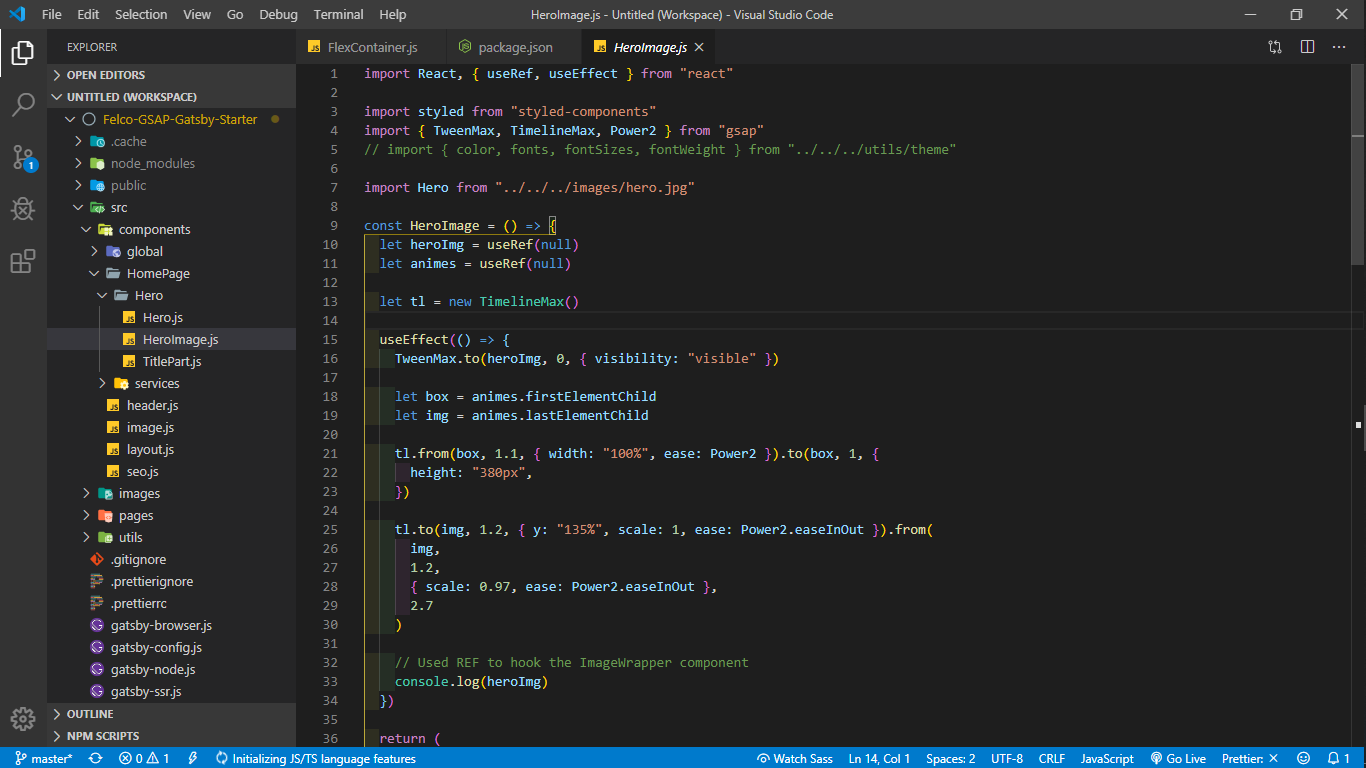
 AshfaqKabir
on 28 Dec 2019
AshfaqKabir
on 28 Dec 2019
Hey let me know if you receive my email.
Get Outlook for Androidhttps://aka.ms/ghei36
From: AshfaqKabir notifications@github.com
Sent: Saturday, December 28, 2019 5:44:15 PM
To: gatsbyjs/gatsby gatsby@noreply.github.com
Cc: Konstantina FIFLI konstadina89fifli@hotmail.gr; Mention mention@noreply.github.com
Subject: Re: [gatsbyjs/gatsby] Popular Animation Library (GSAP) doesn't work after site is built (#8810)
@TylerBarneshttps://github.com/TylerBarnes @endymion1818https://github.com/endymion1818 I'm having the same Issue. Everything works fine in development but when pushed to production the animations are not rendered and do not throw any console errors.
I tried the above solutions but still no luck. I uninstalled gatsby-plugin-offline but couldn't find the extension mentioned above. Here is my code.
[Screenshot (2)]https://user-images.githubusercontent.com/45657135/71545903-166bad00-29bb-11ea-8545-679e00124cde.png
—
You are receiving this because you were mentioned.
Reply to this email directly, view it on GitHubhttps://github.com/gatsbyjs/gatsby/issues/8810?email_source=notifications&email_token=ACWWSBWEXDN7SL36I7TLLXLQ25X47A5CNFSM4FZEO6YKYY3PNVWWK3TUL52HS4DFVREXG43VMVBW63LNMVXHJKTDN5WW2ZLOORPWSZGOEHYMI2A#issuecomment-569427048, or unsubscribehttps://github.com/notifications/unsubscribe-auth/ACWWSBR2QIXIMV3MAEJYPOTQ25X47ANCNFSM4FZEO6YA.
konstantina89f
on 28 Dec 2019
Hey. So I have found the solution back then.
I don't remember it exactly right now but there is a bug at the import.
First of all dont import Everything if you don't need them all. I will send you the import I replaced them with just in 5 min :)
Get Outlook for Androidhttps://aka.ms/ghei36
From: konstantina FIFLI konstadina89fifli@hotmail.gr
Sent: Saturday, December 28, 2019 5:47:21 PM
To: gatsbyjs/gatsby reply@reply.github.com
Subject: Re: [gatsbyjs/gatsby] Popular Animation Library (GSAP) doesn't work after site is built (#8810)
Hey let me know if you receive my email.
Get Outlook for Androidhttps://aka.ms/ghei36
From: AshfaqKabir notifications@github.com
Sent: Saturday, December 28, 2019 5:44:15 PM
To: gatsbyjs/gatsby gatsby@noreply.github.com
Cc: Konstantina FIFLI konstadina89fifli@hotmail.gr; Mention mention@noreply.github.com
Subject: Re: [gatsbyjs/gatsby] Popular Animation Library (GSAP) doesn't work after site is built (#8810)
@TylerBarneshttps://github.com/TylerBarnes @endymion1818https://github.com/endymion1818 I'm having the same Issue. Everything works fine in development but when pushed to production the animations are not rendered and do not throw any console errors.
I tried the above solutions but still no luck. I uninstalled gatsby-plugin-offline but couldn't find the extension mentioned above. Here is my code.
[Screenshot (2)]https://user-images.githubusercontent.com/45657135/71545903-166bad00-29bb-11ea-8545-679e00124cde.png
—
You are receiving this because you were mentioned.
Reply to this email directly, view it on GitHubhttps://github.com/gatsbyjs/gatsby/issues/8810?email_source=notifications&email_token=ACWWSBWEXDN7SL36I7TLLXLQ25X47A5CNFSM4FZEO6YKYY3PNVWWK3TUL52HS4DFVREXG43VMVBW63LNMVXHJKTDN5WW2ZLOORPWSZGOEHYMI2A#issuecomment-569427048, or unsubscribehttps://github.com/notifications/unsubscribe-auth/ACWWSBR2QIXIMV3MAEJYPOTQ25X47ANCNFSM4FZEO6YA.
konstantina89f
on 28 Dec 2019
Thanks, @konstantina89f the problem was with import after all. Anyone else who is having the problem here is the solution import { gsap, TweenMax, TimelineMax, Power2 } from "gsap/dist/gsap"; for gsap v3. Gsap do have a detailed article about it and I found the solution here
AshfaqKabir
on 28 Dec 2019
Yes that was all. Is what I meant with the import !
Get Outlook for Androidhttps://aka.ms/ghei36
From: AshfaqKabir notifications@github.com
Sent: Saturday, December 28, 2019 7:13:16 PM
To: gatsbyjs/gatsby gatsby@noreply.github.com
Cc: Konstantina FIFLI konstadina89fifli@hotmail.gr; Mention mention@noreply.github.com
Subject: Re: [gatsbyjs/gatsby] Popular Animation Library (GSAP) doesn't work after site is built (#8810)
Thanks, @konstantina89fhttps://github.com/konstantina89f the problem was with import after all. Anyone else who is having the problem here is the solution import { gsap, TweenMax, TimelineMax, Power2 } from "gsap/dist/gsap"; for gsap v3. Gsap do have a detailed articlehttps://greensock.com/docs/v2/NPMUsage about it. I found the solution herehttps://greensock.com/docs/v3/Installation?checked=core,gsap2,TweenMax,TimelineMax,Power2#umd
—
You are receiving this because you were mentioned.
Reply to this email directly, view it on GitHubhttps://github.com/gatsbyjs/gatsby/issues/8810?email_source=notifications&email_token=ACWWSBSVW6EAAPBMDMDJAZTQ26CKZA5CNFSM4FZEO6YKYY3PNVWWK3TUL52HS4DFVREXG43VMVBW63LNMVXHJKTDN5WW2ZLOORPWSZGOEHYN66Q#issuecomment-569433978, or unsubscribehttps://github.com/notifications/unsubscribe-auth/ACWWSBUB4HODUUREV52I6GTQ26CKZANCNFSM4FZEO6YA.
konstantina89f
on 29 Dec 2019
Related issues
 theduke
·
3Comments
theduke
·
3Comments
 signalwerk
·
3Comments
signalwerk
·
3Comments
 totsteps
·
3Comments
totsteps
·
3Comments
 dustinhorton
·
3Comments
dustinhorton
·
3Comments
 brandonmp
·
3Comments
brandonmp
·
3Comments
Most helpful comment
OK, figured out what was wrong. Turns out I had to import the GSAP libraries from "gsap" rather than "gsap/all", even though that is the path they suggest in the docs. Go figure.
Thanks for the offer to help @endymion1818. Unfortunately I wasn't fully able to figure out how to post on Spectrum. I'll have to learn that one of these days :)