Gatsby: Clicking on a links when using the Twitter plugin is causing white screen (and console error)
If you go to https://next.gatsbyjs.org/blog/2018-09-14-gatsby-v2/ and then click on the link with the text "Several core Gatsby contributors and I started a company", the screen goes white and this error appears in the console:
Uncaught (in promise) DOMException: Failed to execute 'removeChild' on 'Node': The node to be removed is not a child of this node.
This issue suggests it's due to an uncaught exception in our code https://github.com/facebook/react/issues/6895#issuecomment-281405036
quite possibly here: https://github.com/gatsbyjs/gatsby/blob/882d1a721cbaf0ed6dcc10c99d399858ec75d7ae/packages/gatsby/cache-dir/navigation.js#L89
 KyleAMathews
All 19 comments
/cc @pieh @davidbailey00
KyleAMathews
on 15 Sep 2018
FYI, this bug seems to be affecting all relative links "/blog/...". I tried to debug but could not figure out why the issue is happening.
Another thing that may be random but for me it works well on MAC+Chrome+AdBlock plugins. Once I load the page in Incognito (No AdBlock plugins) the links fail.
 helmutgranda
on 15 Sep 2018
helmutgranda
on 15 Sep 2018
For me this is happening as well in Chromium 68, but working fine in Firefox 61. Edit: Doesn't seem to be a browser issue. My guess is something to do with the twitter widget.
 stefanprobst
on 15 Sep 2018
stefanprobst
on 15 Sep 2018
I agree with @stefanprobst that this might be something to do with the Twitter widget, but not 100% sure... I haven't been able to reproduce this with a test site using templates yet, but I haven't tried adding Twitter etc yet.
 davidbailey00
on 15 Sep 2018
davidbailey00
on 15 Sep 2018
@davidbailey00 great find! It confirms why on the browser where I have Adblock the page works as expected. AdBlock prevents a listener to be attached into the link from https://platform.twitter.com/widgets.js.
Interesting enough it is affecting relative links only.
helmutgranda
on 15 Sep 2018
@helmutgranda strangely I haven't been able to reproduce this with a minimal example (this time, using Twitter) - visit https://wizardly-babbage-0faa32.netlify.com/pandas-eating-carrots/ and click "Link to other post". These pages are both generated with a template + Markdown, like the Gatsby blog. It looks like something else is going wrong at the same time...
davidbailey00
on 15 Sep 2018
@fk any idea? I think I saw a PR from you recently for the blog.
KyleAMathews
on 15 Sep 2018
@KyleAMathews just to clarify - I do still think this is related to the Twitter plugin, but it's only occurring in certain circumstances, which I'm not 100% sure of at the moment. I think it would be best to refactor the plugin, maybe using react-tweet-embed, to fix the root problem rather than looking elsewhere.
davidbailey00
on 15 Sep 2018
What makes you think it's related to the Twitter plugin?
KyleAMathews
on 15 Sep 2018
@KyleAMathews two reasons:
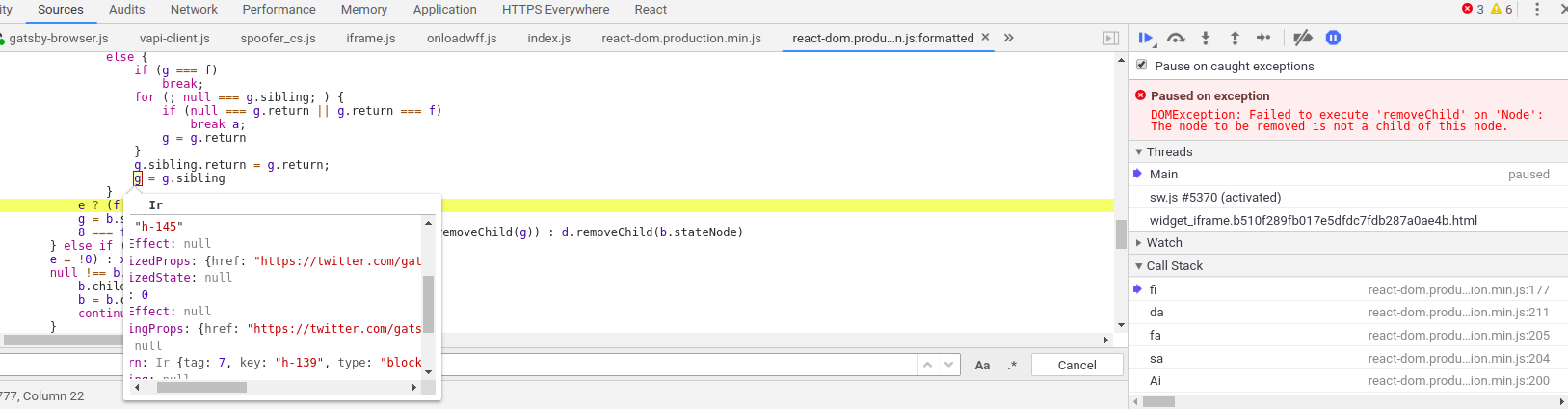
1) @helmutgranda has said that when blocking the Twitter script, the problem doesn't occur - this would make sense since the script replaces elements directly which React isn't aware of.
2) the element which React is attempting to remove is the Twitter blockquote, before it's transformed:
davidbailey00
on 15 Sep 2018
Ah ok. Makes sense too because the error only occurs when clicking between blog posts which share the same component so react is trying to reuse components.
KyleAMathews
on 15 Sep 2018
@davidbailey00 Yes this is what I found as well and why I originally thought this was a browser issue: on my setup the widget renders as a <blockquote> on Firefox, and a <twitterwidget> custom element (which isn't a valid html element anyway) on Chromium. Firefox works fine, Chromium not.
stefanprobst
on 15 Sep 2018
cc @stefanprobst @helmutgranda I've rewritten the Twitter plugin to fix this! See #8191
davidbailey00
on 15 Sep 2018
@davidbailey00 Nice!!
I wanted to share some extra debugging info, after I reported my findings of the Twitter plugin colliding with the page I visited this site:
https://www.stevenmercatante.com/how-to-add-twitter-buttons-to-a-gatsby-site/
Which uses the twitter plugin and it the local pages work as expected. I decided to download a local version and run it. Overall the site was able to work with some minor exceptions and noticed that when I disabled 'gatsby-plugin-catch-links' the site would not throw an error, I noticed that you already reported a similar bug:
https://github.com/gatsbyjs/gatsby/issues/8193
What is even more interesting is that the page used to report the error does not use the Twitter plugin.
helmutgranda
on 15 Sep 2018
@helmutgranda Apart from its behaviour, unfortunately the bug I just opened is actually completely unrelated to this one (from a code point of view)...
With regards to this bug, it makes sense that the site won't error after removing plugin-catch-links because then the full HTML is downloaded when links are clicked. But anyway, this bug (i.e. with Twitter, not the other one I reported) should be fixed as soon as the PR is accepted :)
davidbailey00
on 15 Sep 2018
Sounds good! Just thought I would share the extra findings.
helmutgranda
on 15 Sep 2018
Hey guys,
I'm running in the same issue and I don't have the twitter plugin installed.
I'm still trying to figure out where this is coming from as I just refactored parts of my website and not sure what caused this.
Running the latest gatsby version (2.19.17)
 ancashoria
on 16 Feb 2020
ancashoria
on 16 Feb 2020
I have narrowed it down to the use of react portal with https://github.com/alex-cory/react-useportal
ancashoria
on 16 Feb 2020
I have managed to fix it by removing bindTo config from usePortal and removing <div id="top-level" /> from gatsby-browser.js and gatsby-ssr.js
  const { openPortal, closePortal, isOpen, Portal } = usePortal({
    bindTo:
      typeof document !== 'undefined' && document.getElementById('top-level')
  })
Related issues
 ehowey
·
97Comments
ehowey
·
97Comments
 cusspvz
·
128Comments
cusspvz
·
128Comments
 jsanchez034
·
92Comments
jsanchez034
·
92Comments
 blainekasten
·
130Comments
blainekasten
·
130Comments
 omrllm
·
83Comments
omrllm
·
83Comments
Most helpful comment
cc @stefanprobst @helmutgranda I've rewritten the Twitter plugin to fix this! See #8191