Gatsby: Hot module replacement not working with the default starter
Windows 10, Chrome 60.0.3112.90. I run:
gatsby new gatsby-site
cd gatsby-site
gatsby develop
I edit the file src/pages/index.js from <h1>Hi people</h1> to <h1>Hi people 123</h1>. No change is shown in the browser unless I refresh the page. No error is shown on the command line, only:
 DONE  Compiled successfully in 379ms                                                                                                                                                    9:40:47 AM

 I  Your site is running at http://localhost:8000
 I  Your graphql debugger is running at http://localhost:8000/___graphql
Only the following js errors are reported on the web page itself:
lowPriorityWarning.js:40 Warning: Accessing PropTypes via the main React package is deprecated, and will be removed in  React v16.0. Use the latest available v15.* prop-types package from npm instead. For info on usage, compatibility, migration and more, see https://fb.me/prop-types-docs
printWarning @ lowPriorityWarning.js:40
:8000/favicon.ico Failed to load resource: the server responded with a status of 404 (Not Found)
 Kurren123
All 28 comments
Hi,
- What is your current version of gatsby? (run
gatsby -Vin the root directory of your project) - Did you try in incognito mode? (maybe an extension is blocking the websocket)
 dethi
on 12 Aug 2017
dethi
on 12 Aug 2017
Hi @dethi. Still doesn't work after an npm upgrade or in incognito mode. My package.json file is:
{
  "name": "gatsby-starter-hello-world",
  "description": "Gatsby hello world starter",
  "license": "MIT",
  "scripts": {
    "develop": "gatsby develop",
    "build": "gatsby build",
    "serve": "gatsby serve"
  },
  "dependencies": {
    "gatsby": "1.8.4",
    "gatsby-link": "1.6.7"
  }
}
@dethi please also note that the react hot boiler plate example does work for me.
Kurren123
on 14 Aug 2017
I'm having this issue on a Windows environment.
gatsby develop boots fine. I just don't get any hot reload. When I change files, they are compile successfully but no hot reloading is done.
I'm on Gatsby 1.1.13 and using node 8.7
I used npm i gatsby-cli -g to install gatsby.
 billy-le
on 31 Oct 2017
billy-le
on 31 Oct 2017
Can definitely back this up, does not work when installing from scratch.
 thibmaek
on 5 Nov 2017
thibmaek
on 5 Nov 2017
I am also experiencing this issue with a previous gatsby project which HMR has worked for in the past.
 jamieguerrero
on 19 Nov 2017
jamieguerrero
on 19 Nov 2017
hmmm me tooo : / (as reference, hmr works on a clean install of create-react-app)
EDIT: upon further inspection - browser console outputs CORS error, could it be a wepack-dev-server issue?
 GramParallelo
on 21 Nov 2017
GramParallelo
on 21 Nov 2017
I too am running into this issue when running gatsby develop from a Windows machine.
Node is currently at 9.2.0
Gatspy is currently at 1.9.118
Chrome is throwing the following error in console:
GET http://0.0.0.0:8000/__webpack_hmr net::ERR_ADDRESS_INVALID
 brandonjcreek
on 21 Nov 2017
brandonjcreek
on 21 Nov 2017
@KyleAMathews The issue is that on Windows, localhost should be used instead of 0.0.0.0 for development. Since some update which happened during the last few days, all of my webpack-imported resources are being loaded from 0.0.0.0, which is incorrect for Windows users.
 kripod
on 21 Nov 2017
kripod
on 21 Nov 2017
As @kripod mentioned, it looks like the issue is that program.host is coming in as 0.0.0.0 on Windows here.
 mewdriller
on 21 Nov 2017
mewdriller
on 21 Nov 2017
This should be fixed now https://github.com/gatsbyjs/gatsby/pull/2983
 KyleAMathews
on 21 Nov 2017
KyleAMathews
on 21 Nov 2017
My issue was actually occurring on macOS High Sierra (latest stable).
thibmaek
on 21 Nov 2017
@thibmaek same deal see https://github.com/gatsbyjs/gatsby/issues/2960#issuecomment-346130796 for more
 rdela
on 21 Nov 2017
rdela
on 21 Nov 2017
Hi @KyleAMathews. The issue still seems to be there. Windows 10 Chrome gatsby 1.1.27.
Kurren123
on 13 Dec 2017
@Kurren123 can you try with Gatsby 1.9.131
https://github.com/gatsbyjs/gatsby/blob/master/packages/gatsby/package.json#L4
and gatsby-cli 1.1.27
https://github.com/gatsbyjs/gatsby/blob/master/packages/gatsby-cli/package.json#L4
…please? If bug persists, what is happening? 0.0.0.0 error? what is your develop command? did you try setting --host/-H localhost? Or use your local IP? What works and what fails?
rdela
on 13 Dec 2017
It's not working for me either.
I have gatsby-cli 1.1.31 and have tried setting -H localhost explicitly.
I have tried with Chrome (Canary) and Firefox (Dev Edition) and got the same results.
This is on Windows Server 2008 R2 (please don't ask).
The behavior I'm seeing specifically is that no hot reloading takes place, however the browser complains about a lost connection to the HMR endpoint when I stop gatsby develop.
I'm getting none of the normal HMR output while it is running however.
It works just fine for the project in a Fedora 27 VM. At this point I'm all out of ideas unfortunately :(
 Cu3PO42
on 26 Jan 2018
Cu3PO42
on 26 Jan 2018
It looks like the browser (i.e. client) is the cause of the issue on Windows. When I load up the starter using Microsoft Edge, I see the following message in the console: webpack-hot-middleware's client requires EventSource to work. You should include a polyfill if you want to support this browser.
Both Chrome and Firefox appear to support Server-Side Events (reference) and when I loaded it up in Chrome the hot reload worked as expected.
It looks like the MS Edge status for the feature is "Under Consideration", but until that changes we'll either have to refresh the page manually, add a polyfill, or use a different browser.
 davidwesst
on 29 Jan 2018
davidwesst
on 29 Jan 2018
I don't see how that could be the case in my particular instance since I tried all of Chrome, Chrome Canary, Firefox and Firefox Dev Edition (all up to date).
Cu3PO42
on 29 Jan 2018
With gatsby version 1.9.200 in Windows 10. It doesn't work.
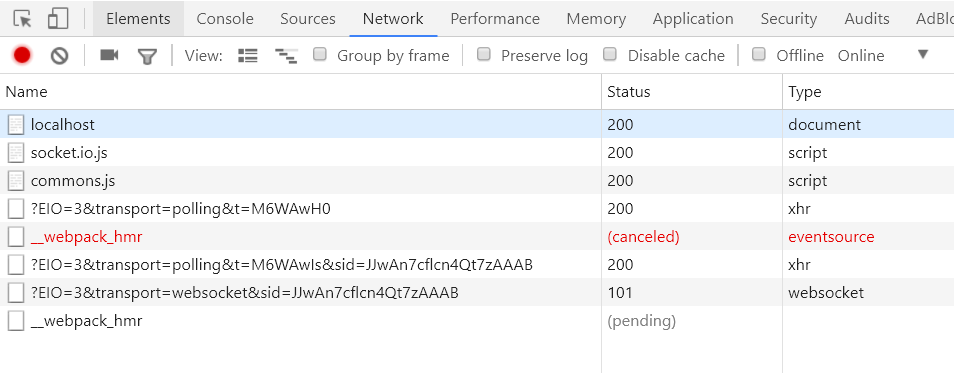
 sant123
on 16 Feb 2018
sant123
on 16 Feb 2018
@KyleAMathews I am having this same issue, except the issue only occurs in Firefox v59.0.2. I noticed the issue because FF is the only browser not rendering my fonts, otherwise everything is fine... so strange. Screenshot of the console logs:

 tetreault
on 27 Apr 2018
tetreault
on 27 Apr 2018
also wanted to chime in that gatsby, while loading my fonts in chrome and safari, also wont load the fonts in mobile safari, mobile chrome, and mobile FF on iOS. I'm not seeing any error pop up though in the mobile safari inspector.
tetreault
on 27 Apr 2018
just chiming in with even more info -- inside the generated styles.css file from npm run build I can find the imports of my font files in there, and I see the font files placed in the /static/ folder. so for the life of me I can't figure out why my font-family rules wont work or why these font files arent present when i check the inspector for mobile safari (at least FF had a console error pop up)
tetreault
on 27 Apr 2018
finally resolved this using the typefaces method.
tetreault
on 27 Apr 2018
I'm also seeing this fail. Can't add an error because I'm not getting any – just no HMR.
 fardarter
on 17 Jul 2018
fardarter
on 17 Jul 2018
same problem here:
{
  "name": "gatsby-starter-hello-world",
  "description": "Gatsby hello world starter",
  "license": "MIT",
  "scripts": {
    "develop": "gatsby develop",
    "build": "gatsby build",
    "serve": "gatsby serve"
  },
  "dependencies": {
    "gatsby": "next",
    "react": "^16.3.2",
    "react-dom": "^16.3.2"
  }
}
this is a screeshot of my firefox network tab for error:
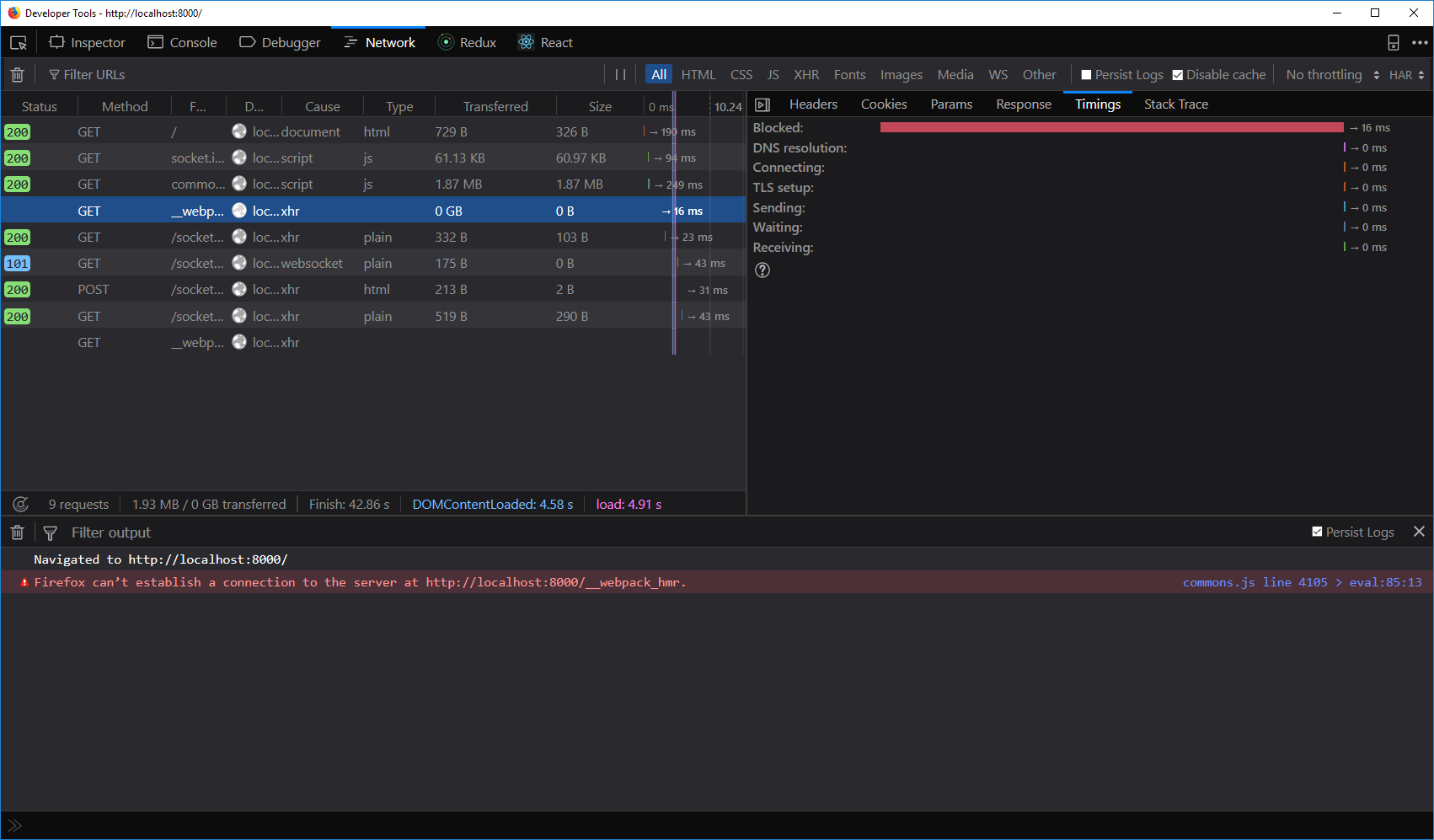
I don't know it help or no but this is the link to when I click on ? icon in that page.
 saostad
on 26 Jul 2018
saostad
on 26 Jul 2018
I got it working by making a new repo. Go figure.
On Thu, 26 Jul 2018 at 18:19, saostad notifications@github.com wrote:
same problem here:
{
"name": "gatsby-starter-hello-world",
"description": "Gatsby hello world starter",
"license": "MIT",
"scripts": {
"develop": "gatsby develop",
"build": "gatsby build",
"serve": "gatsby serve"
},
"dependencies": {
"gatsby": "next",
"react": "^16.3.2",
"react-dom": "^16.3.2"
}
}—
You are receiving this because you commented.
Reply to this email directly, view it on GitHub
https://github.com/gatsbyjs/gatsby/issues/1769#issuecomment-408153309,
or mute the thread
https://github.com/notifications/unsubscribe-auth/ALYpBal04TPlrghjgzmjNmeqBrIcDbsWks5uKewbgaJpZM4O0ZE7
.
fardarter
on 26 Jul 2018
what do you mean new repo? Go figure! ?
saostad
on 26 Jul 2018
I find out hot reloading works with plugins and transformers but if you change data in your react component, it's not working.
saostad
on 27 Jul 2018
Related issues
 kalinchernev
·
3Comments
kalinchernev
·
3Comments
 dustinhorton
·
3Comments
KyleAMathews
·
3Comments
dustinhorton
·
3Comments
KyleAMathews
·
3Comments
 Oppenheimer1
·
3Comments
Oppenheimer1
·
3Comments
 signalwerk
·
3Comments
signalwerk
·
3Comments
Most helpful comment
I find out hot reloading works with plugins and transformers but if you change data in your react component, it's not working.