Gatsby: MS Edge/IE11 gatsby-link navigation fails (in built site only)
I was having this issue with my site Iv'e built with gatsby where links are _very_ buggy in Edge. I've been trying to figure out whether it's some issue with my local config or a bug in gatsby. (I'm confused because the gatsby-default-starter demo doesn't exhibit the issue).
I completely wiped my node modules, ungraded to latest node LTS, then installed gatsby-cli and did a gatsby new test, and the resulting site is still giving me the errors.
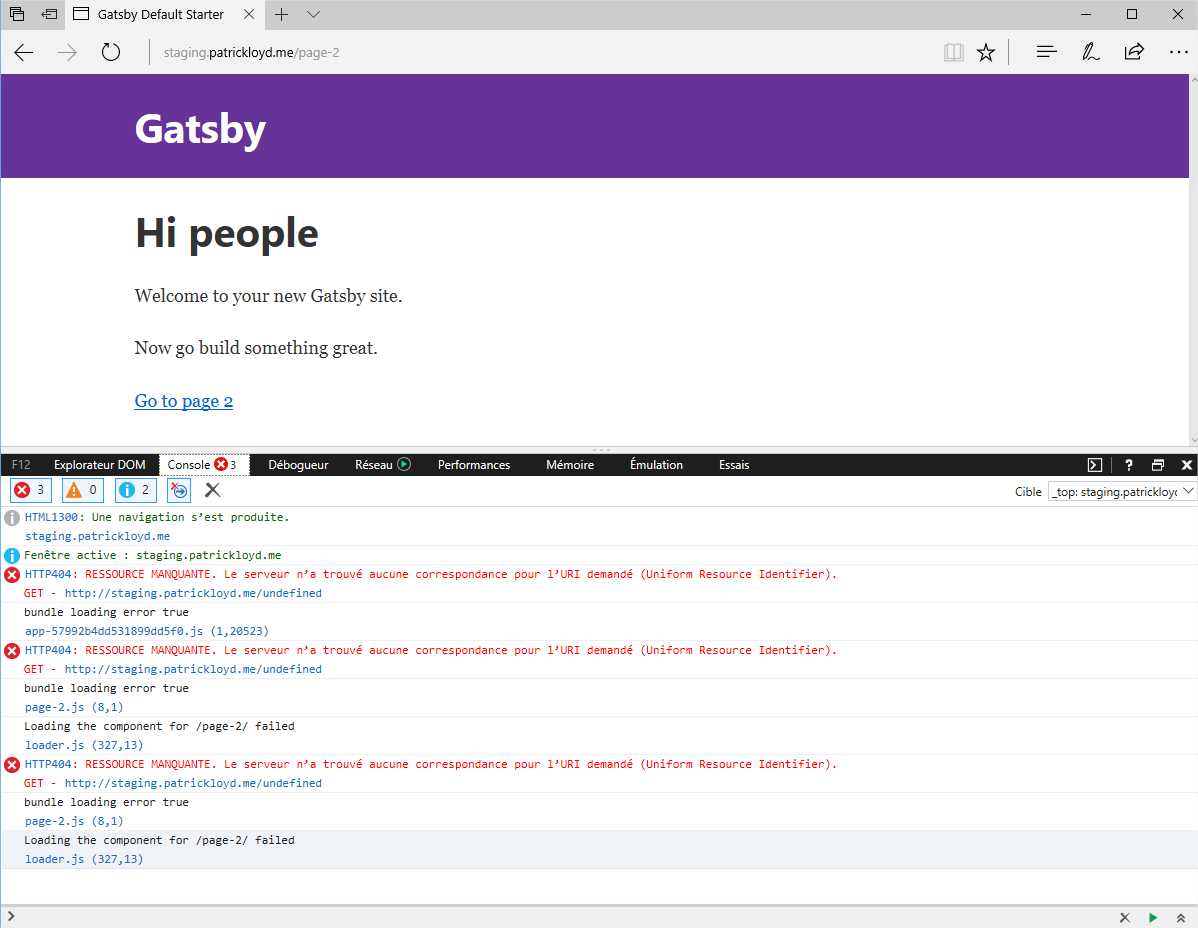
HTTP404: NOT FOUND
Iv'e tested in all the other modern browsers and haven't seen any issues like this.
I have a copy producing the errors in Edge at (redacted)
I'm fairly new to working in a node environment so I'm not sure how to debug the issue.
 pnloyd
All 36 comments
Confirmed.
In Edge, the navigation doesn't happen where in Chrome it succeeds.
Error is raised from gatsby\packages\gatsby\src\cache-dir\loader.js line 289.
 sebastienfi
on 3 Aug 2017
sebastienfi
on 3 Aug 2017
@KyleAMathews Do you happen to know if the gatsby-default-starter demo site is using newish versions of the relevant packages? I'm curious since it is not giving the errors, but my deployment of the starter is.
edit: I finally got a win10 VM working to diagnose with. The issue is only happening in the built site, it works just fine in develop mode. So I'm guessing that something that happens during compilation must be causing the issue..? :-/
pnloyd
on 3 Aug 2017
Seems like there's a bug somewhere in here that's triggered in MS Edge https://github.com/gatsbyjs/gatsby/blob/master/packages/gatsby/src/cache-dir/loader.js
If someone wants to be a Gatsby hero, we need to add testing for our runtime which gets run in every browser out there on something like https://saucelabs.com/
 KyleAMathews
on 5 Aug 2017
KyleAMathews
on 5 Aug 2017
Appears as though IE11 is effected as well.
pnloyd
on 8 Aug 2017
Has anyone been able to crack this one? Happening to me too on EDGE and IE
The same links are broken in both browsers.
Clicking them produces an error and page does not load. Oddly enough, entering the URL directly does work and loads the page fine.
 jazozaya
on 10 Aug 2017
jazozaya
on 10 Aug 2017
@pnloyd Can you zip and host your site's source that reproduce the error ?
sebastienfi
on 10 Aug 2017
@sebastienfi I will if there's a specific rational to do so, but I feel like the source produced by gatsby new should be sufficient for diagnostics.
pnloyd
on 10 Aug 2017
@pnloyd do you see a websocket error previously to this 404 error in IE ?
Something like WebSocket Error: Network Error 12030
sebastienfi
on 11 Aug 2017
@sebastienfi this is only showing up in built sites not in development
KyleAMathews
on 11 Aug 2017
@sebastienfi IE11 isn't throwing any errors like that.

pnloyd
on 11 Aug 2017
@KyleAMathews Yes! I do have the same error in build, preceeded by the socket error.



sebastienfi
on 11 Aug 2017
Errors on built site are 404 not found
GET - http://localhost/undefined

bundle loading error true
index.js (8,1)

Loading the component for /blog/ failed
loader.js (332,13)
The error also happens on https://www.gatsbyjs.org/blog
there's also this warning
DOM7011: The code on this page disabled back and forward caching. For more information, see: http://go.microsoft.com/fwlink/?LinkID=291337
 bskimball
on 11 Aug 2017
bskimball
on 11 Aug 2017
Unfortunately the callstack is not very informative. If the page is already cached it will work fine but if the loader has to fetch the resource, that's when the issue happens.
looks like error is here in loader.js
var fetchResource = function fetchResource(resourceName) {
  var cb = arguments.length > 1 && arguments[1] !== undefined ? arguments[1] : function () {};

  if (resourceStrCache[resourceName]) {
    process.nextTick(function () {
      cb(null, resourceStrCache[resourceName]);
    });
  } else {
    // Find resource
    var resourceFunction = resourceName.slice(0, 9) === "component" ? asyncRequires.components[resourceName] || asyncRequires.layouts[resourceName] : asyncRequires.json[resourceName];

    // Download the resource
    resourceFunction(function (err, executeChunk) {
      resourceStrCache[resourceName] = executeChunk;
      cb(err, executeChunk);
    });
  }
};
Narrowing it down to an undefined chunk in a function
    // Download the resource
    resourceFunction(function (err, executeChunk) {
      resourceStrCache[resourceName] = executeChunk;
      cb(err, executeChunk);
    });
executeChunk is returning as undefined only in Edge or IE11
bskimball
on 11 Aug 2017
Odds are the problem is in here https://github.com/gatsbyjs/gatsby/tree/master/packages/gatsby/src/loaders/gatsby-module-loader
KyleAMathews
on 12 Aug 2017
Yeah, I'm just trying to wrap my head around how it's loaded. I'm assuming the result returned by the module loader is in a format that Edge can't read.
Looks like it may be as simple as removing the carriage returns. I'll turn the template literals to a one-liner, and test.
bskimball
on 12 Aug 2017
Curious if https://github.com/gatsbyjs/gatsby/pull/1901 helped any here? Would love if someone could test
KyleAMathews
on 24 Aug 2017
I'll test it.
@KyleAMathews 1.9.7 still appears to be erroring on Edge. I'd just like to note that on my personal site (http://patrickloyd.me), one link works (the about) where as the /skills and /work links do not. You can still get to /skills and /work if those were your initial requests.
'/ -> /skills' does not work,
'/skills -> /' does work,
yet '/ -> /about' works. Very inconsistent behavior.
Makes me wonder if the root cause is something to do with alphanumeric order or array order or the like.
pnloyd
on 24 Aug 2017
Seeing this still(on a client site we just launched :-/ )... I'm digging in.
 danielfarrell
on 31 Aug 2017
danielfarrell
on 31 Aug 2017
@danielfarrell at one point i had narrowed it down to require.ensure statement in the gatsby-module-loader is where it was failing in IE. I traced that back to an issue with webpack that was resolved in version 2.3.
bskimball
on 31 Aug 2017
@bskimball Does that imply the fix for this bug is upgrading webpack?
On Thu, Aug 31, 2017 at 12:25 PM, bskimball notifications@github.com
wrote:
@danielfarrell https://github.com/danielfarrell at one point i had
narrowed it down to require.ensure statement in the gatsby-module-loader is
where it was failing in IE. I traced that back to an issue with webpack
that was resolved in version 2.3.—
You are receiving this because you were mentioned.
Reply to this email directly, view it on GitHub
https://github.com/gatsbyjs/gatsby/issues/1704#issuecomment-326396610,
or mute the thread
https://github.com/notifications/unsubscribe-auth/AVN5cUrajil1g9urSFPnaGg_CND-5Ggiks5sdwitgaJpZM4OsIxp
.
pnloyd
on 31 Aug 2017
@pnloyd that's what it looks like to me. I worked on it in PR #1782 and #1783
I know @danielfarrell did some work on the module-loader, he may be able to get further along than I did.
bskimball
on 31 Aug 2017
what is the webpack bug that was fixed? Maybe we can monkey patch it. If someone can track down the commit in webpack 🙇
 jquense
on 31 Aug 2017
jquense
on 31 Aug 2017
@jquense it looks to me like this issue https://github.com/webpack/webpack/issues/2506
bskimball
on 31 Aug 2017
hmm that issue looks like it might be webpack2 only. The v1 code doesn't seem to suffer from the issue noted in that issue and PR
jquense
on 31 Aug 2017
@jquense I must have missed that. I am pretty sure that failure happens at the require.ensure statement in gatsby-module-loader. I couldn't figure out why it was failing.
bskimball
on 31 Aug 2017
Can anyone throw up a repo with as little code as possible demonstrating the issue? It'll be easier to track down if we have a reproduction
jquense
on 31 Aug 2017
The official gatsby blog fails in IE/Edge. I can try to put one in my repo after work, but just taking the default starter and adding a test page should suffice if anyone else can get to it quicker.
bskimball
on 31 Aug 2017
Ya all you need to do to get a copy that reproduces the error is do gatsby
new with latest gatsby.
On Thu, Aug 31, 2017 at 12:55 PM, bskimball notifications@github.com
wrote:
The official gatsby blog fails in IE/Edge.
—
You are receiving this because you were mentioned.
Reply to this email directly, view it on GitHub
https://github.com/gatsbyjs/gatsby/issues/1704#issuecomment-326403568,
or mute the thread
https://github.com/notifications/unsubscribe-auth/AVN5cdnCvp4LKzeNosliM-km_QAD4ezIks5sdw-6gaJpZM4OsIxp
.
pnloyd
on 31 Aug 2017
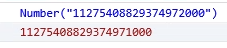
Digging deep over here, it looks like the chunkId's are ending up slightly different. 11275408829374971000 vs 11275408829374972000 and that is why it's not finding the correct filename to load in the script. That makes me think it's a webpack issue, but I'm still digging.
danielfarrell
on 1 Sep 2017
Wow, this is a bad bug, here is the root of the issue...
danielfarrell
on 1 Sep 2017
What?? 😨
KyleAMathews
on 1 Sep 2017
Arf...
On the left side, Chrome console output, right side, Edge's.

sebastienfi
on 1 Sep 2017
Yep, something is casting the chunk id to a number, and IE/Edge has a precision bug, and that is why it's not finding the right chunk. Trying to find out where that is getting cast still.
danielfarrell
on 1 Sep 2017
Congrats @danielfarrell for having found this !
Created a bug in Charka's Core issue tracker.
How should we proceed to work around this meanwhile it's fixed in Edge?
sebastienfi
on 1 Sep 2017
Looks like if I adjust the get-hash-fn file to end up with a smaller number it fixes the issue, and that seems like a smart path. Making a PR now.
danielfarrell
on 1 Sep 2017
Related issues
 theduke
·
3Comments
theduke
·
3Comments
 dustinhorton
·
3Comments
dustinhorton
·
3Comments
 signalwerk
·
3Comments
signalwerk
·
3Comments
 andykais
·
3Comments
andykais
·
3Comments
 ferMartz
·
3Comments
ferMartz
·
3Comments
Most helpful comment
Looks like if I adjust the get-hash-fn file to end up with a smaller number it fixes the issue, and that seems like a smart path. Making a PR now.