Gatsby-theme-novela: Contentful Errors
Prerequisites
- [X] Have you searched the issue tracker for similar issues (either past or present)?
- [X] Can you reproduce the issue consistently?
- [X] Are you reporting to the correct repository?
- [ ] Is this something you can debug and fix? Send a pull request! Bug fixes and documentation fixes are welcome.
Description
Version of Novela you are using
0.16.0 or greater
Number of posts you have and which data source
- [1] Local
- [1] Contentful
Describe the bug
Running $ yarn dev gives me the following
To Reproduce
Steps to reproduce the behavior:
- Run
$ ncu; ncu -u - Run
$ yarn; yarn dev - See error
$ yarn dev
yarn run v1.22.4
$ gatsby develop
success open and validate gatsby-configs - 0.119s
success load plugins - 3.074s
success onPreInit - 0.017s
success initialize cache - 0.012s
success copy gatsby files - 0.056s
success onPreBootstrap - 0.017s
success createSchemaCustomization - 0.009s
Starting to fetch data from Contentful
info Fetching default locale
info default locale is: en-US
info contentTypes fetched 2
info Updated entries 3
info Deleted entries 0
info Updated assets 7
info Deleted assets 0
Fetch Contentful data: 419.624ms
success source and transform nodes - 1.124s
success building schema - 0.518s
{ contentful: true, local: false }

Config rootPath /


Config basePath /


Config authorsPath /authors


Querying Authors & Articles source: Contentful


 ERROR #85923  GRAPHQL

There was an error in your GraphQL query:

Cannot query field "allContentfulArticle" on type "Query".

If you don't expect "allContentfulArticle" to exist on the type "Query" it is most likely a typo.
However, if you expect "allContentfulArticle" to exist there are a couple of solutions to common problems:

- If you added a new data source and/or changed something inside gatsby-node.js/gatsby-config.js, please try a restart of your development server
- The field might be accessible in another subfield, please try your query in GraphiQL and use the GraphiQL explorer to see which fields you can query and what shape they have
- You want to optionally use your field "allContentfulArticle" and right now it is not used anywhere. Therefore Gatsby can't infer the type and add it to the GraphQL schema. A quick fix is to add a least one entry with that field ("dummy content")

It is recommended to explicitly type your GraphQL schema if you want to use optional fields. This way you don't have to add the mentioned "dummy content". Visit our docs to learn how you can define the schema for "Query":
https://www.gatsbyjs.org/docs/schema-customization/#creating-type-definitions

File: node_modules/@narative/gatsby-theme-novela/src/gatsby/node/createPages.js:114:40


 ERROR

TypeError: Cannot read property 'articles' of undefined
    at Object.module.exports [as createPages] (/Users/skurilyak/dev/slavakurilyak/slavakurilyak/node_modules/@narative/gatsby-theme-novela/src/gatsby/node/createPages.js:120:65)


 ERROR #11321  PLUGIN

"@narative/gatsby-theme-novela" threw an error while running the createPages lifecycle:


    You must have at least one Author and Post. As reference you can view the
    example repository. Look at the content folder in the example repo.
    https://github.com/narative/gatsby-theme-novela-example


  Error: You must have at least one Author and Post. As reference you can view the
      example repository. Look at the content folder in the example repo.
      https://github.com/narative/gatsby-theme-novela-example

  - createPages.js:148 Object.module.exports [as createPages]
    [slavakurilyak]/[@narative]/gatsby-theme-novela/src/gatsby/node/createPages.js:148:11

  - From previous event:

  - api-runner-node.js:258 runAPI
    [slavakurilyak]/[gatsby]/dist/utils/api-runner-node.js:258:22

  - api-runner-node.js:375 Promise.catch.decorateEvent.pluginName
    [slavakurilyak]/[gatsby]/dist/utils/api-runner-node.js:375:15

  - From previous event:

  - api-runner-node.js:374
    [slavakurilyak]/[gatsby]/dist/utils/api-runner-node.js:374:12

  - timers.js:439 processImmediate
    internal/timers.js:439:21

  - From previous event:

  - api-runner-node.js:368
    [slavakurilyak]/[gatsby]/dist/utils/api-runner-node.js:368:11

  - From previous event:

  - api-runner-node.js:275 module.exports
    [slavakurilyak]/[gatsby]/dist/utils/api-runner-node.js:275:12

  - index.js:421 module.exports
    [slavakurilyak]/[gatsby]/dist/bootstrap/index.js:421:9

  - develop-process.js:433 async module.exports
    [slavakurilyak]/[gatsby]/dist/commands/develop-process.js:433:7


failed createPages - 0.412s
success createPagesStatefully - 0.084s
success onPreExtractQueries - 0.002s
success update schema - 0.035s
success extract queries from components - 0.694s
success write out requires - 0.076s
success write out redirect data - 0.006s
warn The icon(src/assets/favicon.png) you provided to 'gatsby-plugin-manifest' is not square.
The icons we generate will be square and for the best results we recommend you provide a square icon.

success Build manifest and related icons - 0.149s
success onPostBootstrap - 0.155s
⠀
info bootstrap finished - 8.886s
⠀
success run static queries - 0.033s - 6/6 181.71/s
success run page queries - 0.015s - 3/3 199.54/s
⠀
You can now view the site in the browser.
⠀
  http://localhost:8000/
⠀
View GraphiQL, an in-browser IDE, to explore your site's data and schema
⠀
  http://localhost:8000/___graphql
⠀
Note that the development build is not optimized.
To create a production build, use gatsby build
⠀
success Building development bundle - 7.538s
TL;DR
Contentful gives the following errors:
- Cannot query field "allContentfulArticle" on type "Query"
- TypeError: Cannot read property 'articles' of undefined
- "@narative/gatsby-theme-novela" threw an error while running the createPages lifecycle: You must have at least one Author and Post
Expected behavior
I expect $ yarn dev to work without Contentful throwing errors
 slavakurilyak
All 8 comments
yeah im also facing those errors
 syntaxhacker
on 16 Jun 2020
syntaxhacker
on 16 Jun 2020
Any update?
 thangisme
on 26 Jun 2020
thangisme
on 26 Jun 2020
Want to give it a shot @thangisme?
 brotzky
on 26 Jun 2020
brotzky
on 26 Jun 2020
yeah im also facing those errors
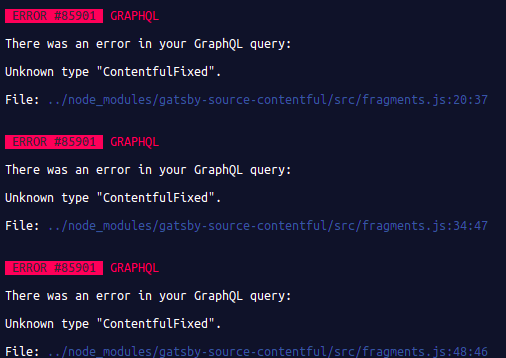
These are temporary workarounds, but it's enough for me.
1. go to contentful and create dummy image there.
2. go to "node_modules/gatsby-source-contentful/src/fragments.js" and comment all the code, then save
solution 2 is the easiest.
 TheZano
on 6 Jul 2020
TheZano
on 6 Jul 2020
I've solved the issue by creating a new Content model called article which is a dublicate from post. Also make sure all fields (e.g. bio, social) are filled even if they are not mandatory in Contentful.
 Utzel-Butzel
on 15 Jul 2020
Utzel-Butzel
on 15 Jul 2020
Creating a new article Content model did not solve the issue for me. Any other ideas?
slavakurilyak
on 3 Aug 2020
Hey @slavakurilyak - ran into the same issue. When the theme moved from 0.15.7 to 0.15.8 the GraphQL query changed from allContentfulPost to allContentfulArticle
https://github.com/narative/gatsby-theme-novela/commit/6d44512e7ad51ebf1a4eb6353a56f6eac13e365e
I'm going to dig into the rationale behind this because it's a breaking change for anyone who uses the theme who set up their schema using the 'Post' label for their models.
The quick fix is to wipe your package-lock.son and pin your theme to 0.15.7 in your package.json: "@narative/gatsby-theme-novela": "0.15.7"
The contentful-export.json in the repo seems to have always had the 'post' schema name, so I'm not sure how this got changed or why.
 connorwhitman
on 4 Aug 2020
connorwhitman
on 4 Aug 2020
@connorwhitman The quick fix worked. Thanks!
slavakurilyak
on 4 Aug 2020
Related issues
 sw-yx
·
3Comments
sw-yx
·
3Comments
 vzahradnik
·
3Comments
vzahradnik
·
3Comments
 devanSAGA
·
4Comments
devanSAGA
·
4Comments
 bravo-kernel
·
4Comments
bravo-kernel
·
4Comments
 slorber
·
3Comments
slorber
·
3Comments
Most helpful comment
Hey @slavakurilyak - ran into the same issue. When the theme moved from 0.15.7 to 0.15.8 the GraphQL query changed from
allContentfulPosttoallContentfulArticlehttps://github.com/narative/gatsby-theme-novela/commit/6d44512e7ad51ebf1a4eb6353a56f6eac13e365e
I'm going to dig into the rationale behind this because it's a breaking change for anyone who uses the theme who set up their schema using the 'Post' label for their models.
The quick fix is to wipe your
package-lock.sonand pin your theme to 0.15.7 in yourpackage.json:"@narative/gatsby-theme-novela": "0.15.7"The
contentful-export.jsonin the repo seems to have always had the 'post' schema name, so I'm not sure how this got changed or why.