Gatsby-theme-novela: Unable to change styles & add logo
Prerequisites
- [x] Have you searched the issue tracker for similar issues (either past or present)?
- [x] Can you reproduce the issue consistently?
Description
Version of Novela you are using - 0.15.2
Number of posts you have and which data source
- [x] Local - 3 posts
- [ ] Contentful - 0 posts
What are you trying to achieve?
I'm trying to change the styles & logo as described in docs.
What's blocking you?
I tried to follow docs but neither the styles nor the logo is updating.
I'm getting the error below when I locally run the site.
TypeError: Cannot read property 'colors' of undefined

blog/src/@narative/gatsby-theme-novela/gatsby-plugin-theme-ui/index.js:6

  3 | export default {
  4 |   ...novelaTheme,
  5 |   initialColorMode: `dark`,
> 6 |   colors: {
  7 |     ...novelaTheme.colors,
  8 |     primary: "#000",
  9 |     secondary: "#73737D",
Additional context
My folder structure is as mentioned in docs.
blog
  └── src
    └── @narative
      └── gatsby-theme-novela
        └── components
          └── Logo
            └── index.js
      └── gatsby-plugin-theme-ui
        └── index.js
The content of gatsby-plugin-theme-ui/index.js is same as mentioned here
What am I doing wrong?
 gupta-ji6
All 6 comments
To update the logo, change the following file to your liking:
src/@narative/gatsby-theme-novela/components/Logo/Logo.tsx
Colors can be changed by modifying:
src/@narative/gatsby-theme-novela/gatsby-theme-ui/colors.ts
Hint: Copy the original files and start modifiying them. I hope that helps! :)
 nicolai92
on 15 May 2020
nicolai92
on 15 May 2020
@nicolai92 @brotzky I have the same issue, I tried to change file inside this path: src/@narative/gatsby-theme-novela/components/Logo/Logo.tsx but nothing happen.
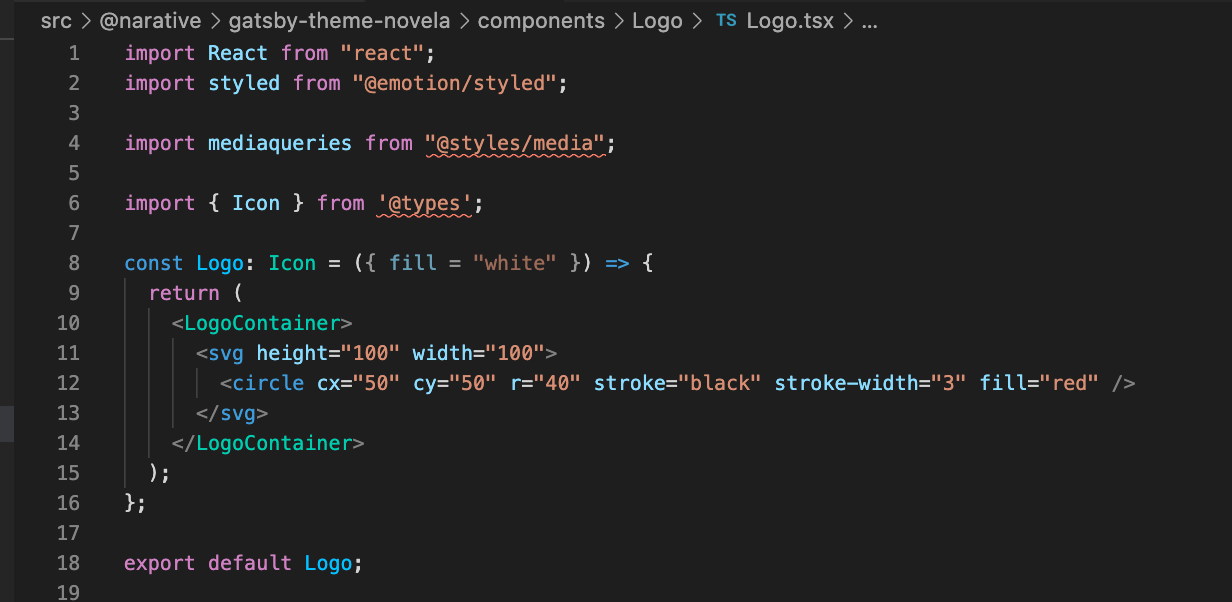
And also, what if I want to change some page, templates or some graphQL requests. What I need to do?
 ximet
on 23 Sep 2020
ximet
on 23 Sep 2020
@ximet
I'd suggest reading through Gatsby's shadowing functionality first. You should be able to do the necessary changes on your own then. 😉
nicolai92
on 24 Sep 2020
@nicolai92 but I shadowed using right path, src/@narative/gatsby-theme-novela/components/Logo/Logo.tsx and nothing happen. Maybe path not correct? Because I have issues only with this theme
ximet
on 24 Sep 2020
@ximet
I think, you missed the className inside the SVG definition. If you have a look at the const LogoContainer = styled.div (...) right after the export default Logo; you see, that the logo is referenced by its className -- depending, whether it's used for desktop or mobile pages. 😇
nicolai92
on 24 Sep 2020
@nicolai92 yes, you're right! My fail! Thank you
ximet
on 24 Sep 2020
Related issues
 jorgeorejas
·
3Comments
jorgeorejas
·
3Comments
 KrisBraun
·
4Comments
KrisBraun
·
4Comments
 vzahradnik
·
3Comments
vzahradnik
·
3Comments
 sw-yx
·
3Comments
sw-yx
·
3Comments
 mabasic
·
4Comments
mabasic
·
4Comments
Most helpful comment
To update the logo, change the following file to your liking:
src/@narative/gatsby-theme-novela/components/Logo/Logo.tsxColors can be changed by modifying:
src/@narative/gatsby-theme-novela/gatsby-theme-ui/colors.tsHint: Copy the original files and start modifiying them. I hope that helps! :)