Game-compatibility: Quantum Redshift [MS-021] [1.04]
Issues
- Crash on title screen
_From @jarupxx on December 15, 2016 6:12_
tested on 988e2fc5caae5a4b693d285e578fd2362c91e558
I follow the message that I pressed the start button, however nothing happens.

_Copied from original issue: Cxbx-Reloaded/Cxbx-Reloaded#30_
 PatrickvL
All 20 comments
_From @LukeUsher on December 23, 2016 14:50_
No idea what's going on here, my best guess would be one of the XAPI functions is not being correctly intercepted.
I don't have access to this game right now, but I'll have a look after Christmas, I think it's quite easy to find.
PatrickvL
on 21 Aug 2017
@jarupxx Is this a duplicate of issue #280?
It's the other way around : #280 (after fixing the reported regression) became a duplicate of this issue, so that one will be closed now.
PatrickvL
on 21 Aug 2017
_From @furrya on April 2, 2017 1:27_
Now, it's passing away the controller error

PatrickvL
on 21 Aug 2017
_From @furrya on April 11, 2017 1:40_
When hardware video mode is enabled strange error appears in this game

KrnlDebug.txt
But, when I have run it's with harware video mode off, the game gets to the white screen now after the title


Cxbx Reloaded 8dd3487232bac263d5e8a6b8edc1d97f01e396fb (Apr 11 2017)
PatrickvL
on 21 Aug 2017
_From @jarupxx on May 12, 2017 9:5_
Tested on PR #458. The controller does work properly and reaches in-game. About the missing textures, I hope it helps investigation of @blueshogun96.
http://shogun3d-cxbx.blogspot.jp/2011/01/more-on-quantum-redshift.html


PatrickvL
on 21 Aug 2017
_From @blueshogun96 on May 12, 2017 18:54_
Great work. This is one of my favourite Xbox games, and I am greatly interested in it. I read up on the fix for controller input issues and I'll give a few other titles a go that had the issue, such as metal slug 3.
Shogun
PatrickvL
on 21 Aug 2017
_From @jarupxx on May 13, 2017 0:54_
Well, it became work controller by reconnecting. However, It is necessary to recognize the controller without reconnecting.
PatrickvL
on 21 Aug 2017
@LukeUsher Could you look into this?
PatrickvL
on 21 Aug 2017
_From @LukeUsher on May 13, 2017 8:29_
Input shouldn't be a problem anymore after the latest merge, please report if there is a problem
PatrickvL
on 21 Aug 2017
_From @jarupxx on May 13, 2017 10:24_
Tested with PR #460. Does not responded to input yet.
I reading the log, it seems that XInitDevices is called only for the function related to the input.
[0x1554] EmuXapi.cpp : EmuPatch_XInitDevices(
   dwPreallocTypeCount  : 2
   PreallocTypes        : 001A85B0
);
_From @LukeUsher on May 13, 2017 10:36_
Hmm. Perhaps XInitDevices is still incorrect.
PatrickvL
on 21 Aug 2017
_From @jarupxx on May 13, 2017 11:51_
You might already be aware of this but I found information on XInitDevices.
XBMC calls XInitDevices(0, NULL) which results in a default initialization.
MAME calls XInitDevices with a preallocated list of devices to look for.
http://coinopsproject.freeforums.org/trackballs-for-dummies-help-with-coinops-3-t94-20.html
Quantum Redshift not calls XInitDevices(0, NULL). It seems necessary to do "something" other than a default initialization.
PatrickvL
on 21 Aug 2017
_From @ObiKKa on May 13, 2017 20:55_
Yes, same for me after PR 461 (Although this thing jaruppx referred to was based on a previous PR). Pressing on any key doesn't help to get the game past the first splash screen that I see, similar to some screens above.

PatrickvL
on 21 Aug 2017
_From @jarupxx on May 15, 2017 22:44_
Tested with PR #469. The controller is fully working now. Resolved by PR 460, 465, 469. Great work!
PatrickvL
on 21 Aug 2017
Tested with Version 52afb762. Controller support still works.
 jarupxx
on 1 Sep 2017
jarupxx
on 1 Sep 2017
Testing with the latest master, there seems to be some graphical regressions at the title screen which needed me to rely on wireframe. Furthermore, the Intro videos don't render, but audio plays fine, and additionally, the UI colors seem to be very wrong, but I didn't need to rely on wireframe to see those thankfully.
The game crashes when attempting to use the virtual keyboard:
Cxbx-Reloaded
---------------------------
Received Exception Code 0xC0000005 @ EIP := 0x040784B5

  Press "OK" to terminate emulation.
  Press "Cancel" to debug.
---------------------------
OK   Cancel
---------------------------
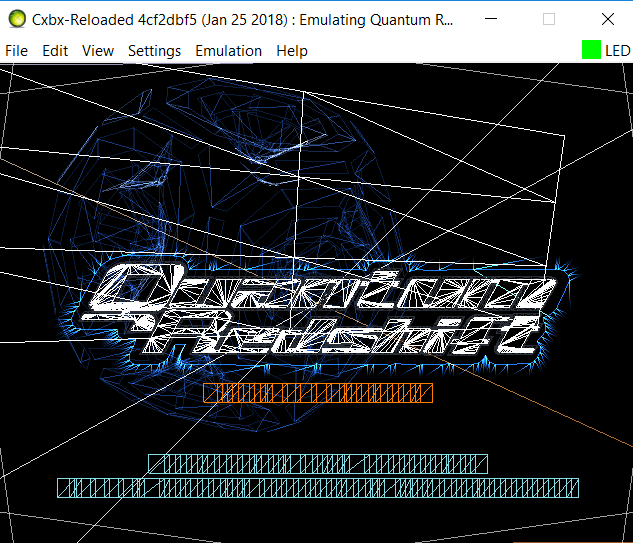
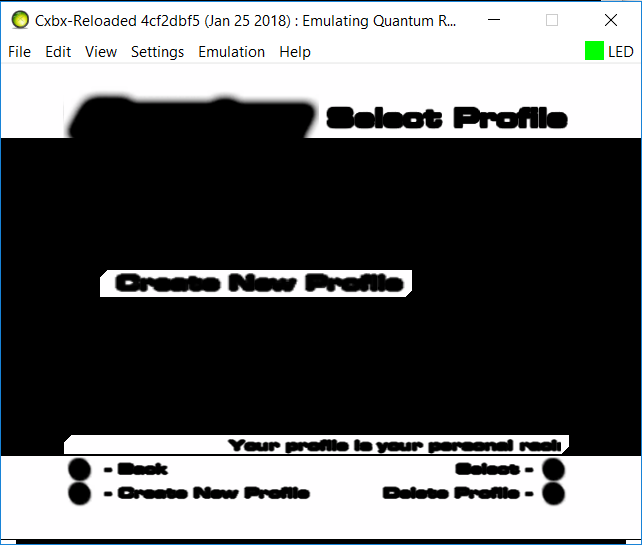
 Voxel9
on 27 Jan 2018
Voxel9
on 27 Jan 2018
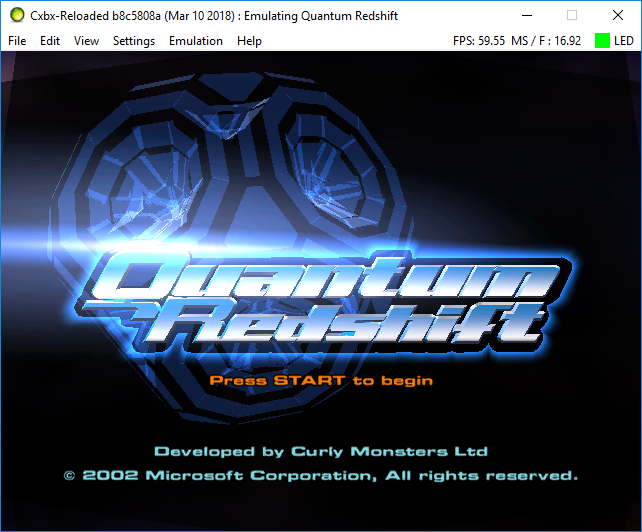
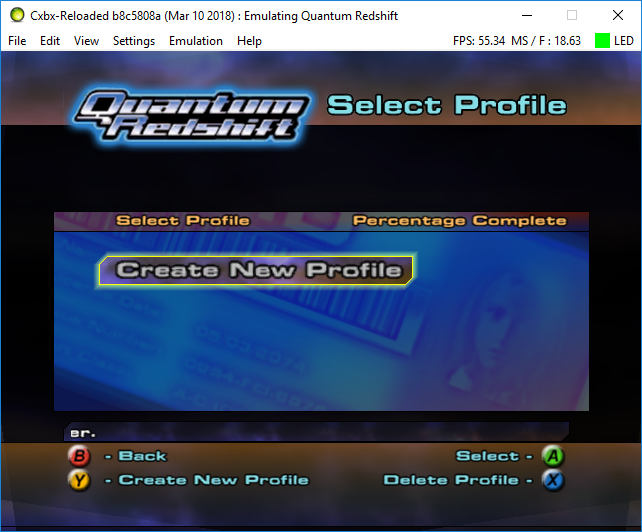
I just tested this game with the latest master, and the graphics problems in the above screenshots seems to be fixed. The player character in the last screenshot looks a bit... scary :P
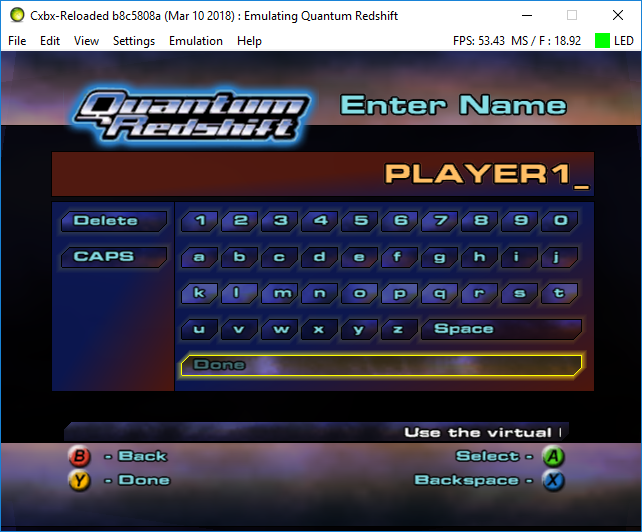


The game crashes when starting a race and when trying to load an existing profile.
Upon start of the game with the debug version of CXBX-R, about stack corruption. See the screenshot below:
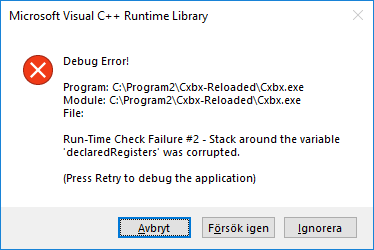
When I did a kerneldump with the debug version, it ended up with a filesize of more than 200MB, so I guess I can't attach that here.
 Harteex
on 11 Mar 2018
Harteex
on 11 Mar 2018
Dumps
Xbe.txt
KrnlDebug.zip
Status
Current behavior:
It renders stuff now! Loops on loading screen
Screenshots
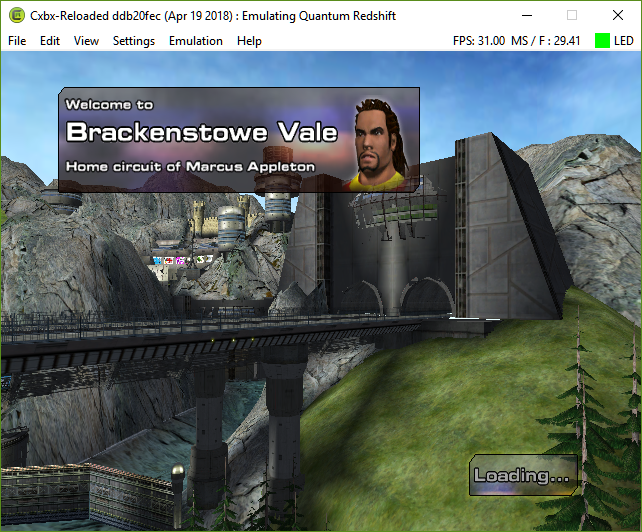
Additional Information
build ddb20fec
 MarcoLoves360
on 19 Apr 2018
MarcoLoves360
on 19 Apr 2018
I’m impressed that it actually renders correctly. Since the middle of Cxbx it has had broken geometry.
Not sure if this is still the case, but it also hung on the old Cxbx during loading. The reason was because a call to CreateTexure failed (512x512 DXT) but creating a false positive didn’t help either so it might be something else.
Shogun
 blueshogun96
on 19 Apr 2018
blueshogun96
on 19 Apr 2018
Current logging state. Still hanging on a endless loop of the error you see at the log's end
KrnlDebug.txt
 dreimer1986
on 15 Sep 2019
dreimer1986
on 15 Sep 2019
Related issues
 Shideravan
·
3Comments
Shideravan
·
3Comments
 NNX3x
·
3Comments
PatrickvL
·
3Comments
NNX3x
·
3Comments
PatrickvL
·
3Comments
 ghost
·
3Comments
ghost
·
3Comments
ghost
·
3Comments
ghost
·
3Comments