Game-compatibility: Jet Set Radio Future [PAL] [IG-024] [1.01]
>> See updated issue HERE <<
Issues
- broken graphics on various locations
_From @furrya on March 21, 2017 0:58_
I just have launched the game on windows 7 x 64 , and I can see normal graphic on some locations , but on others it's broken


_Copied from original issue: Cxbx-Reloaded/Cxbx-Reloaded#251_
 PatrickvL
All 108 comments
_From @BenNottelling on March 21, 2017 5:18_
Looking like windows 7 is the best OS for this emulator
PatrickvL
on 21 Aug 2017
_From @furrya on March 22, 2017 0:23_
With the latest commit, the graphics now is same on Windows 7 and on Windows 10


PatrickvL
on 21 Aug 2017
_From @furrya on March 25, 2017 1:15_
With the latest commits - Win 10 x64

PatrickvL
on 21 Aug 2017
_From @bhodg22 on March 25, 2017 11:56_
Does the rest of the level stay normal for you? I find it sometimes flickers to shades of black at times, also what GPU are you using
PatrickvL
on 21 Aug 2017
_From @furrya on March 25, 2017 12:20_
@bhodg22 Same behaviour on my Palit Geforce 610, Regardless of the OS ( Win 7 x64, Win 10 x64) . Flickers appears many times on the start and ingame also
PatrickvL
on 21 Aug 2017
_From @bhodg22 on March 30, 2017 9:4_
With the latest commit, I managed to get past the first cut scene and back into the garage, and the game was actually running full speed but then crashed when I tried going to the next level
PatrickvL
on 21 Aug 2017
@bhodg22 : When reporting something like this, please mention exactly which commit you're referring to, by copy-pasting the URL for it, like this : https://github.com/Cxbx-Reloaded/Cxbx-Reloaded/commit/2a8cc3722ba1eea8fe61c035149cd923f9ffe0a0 (which GitHub renders like this : https://github.com/Cxbx-Reloaded/Cxbx-Reloaded/commit/2a8cc3722ba1eea8fe61c035149cd923f9ffe0a0 )- this IS the one you're referring to, isn't it?
PatrickvL
on 21 Aug 2017
@furrya This flickering is also present in other software, specifically the Dashboard, JSRF and other titles - see https://github.com/Cxbx-Reloaded/Cxbx-Reloaded/issues/91#issuecomment-280917520
PatrickvL
on 21 Aug 2017
_From @bhodg22 on March 30, 2017 9:52_
yeah thats the one i was referring to, I didnt bother posting any details because I tried to recreate it a second time but it didnt quite make it to the end of the cutscene, might try a third time soon
PatrickvL
on 21 Aug 2017
_From @LukeUsher on March 30, 2017 9:56_
I've been able to play up to the point of the tutorial where you do the 'boost dash'. I usually get a crash at that point, but it seems to be caused by my graphics drivers.
PatrickvL
on 21 Aug 2017
_From @ObiKKa on April 18, 2017 17:43_
Urgent disaster! Needs remedying! After PR #375 (Overlay conversion) & #376 (Integrated copy OOVPAs. Most likely problem.) game crashes after company intros shown.
 PatrickvL
on 21 Aug 2017
PatrickvL
on 21 Aug 2017
If the function locations differ, that's probably the main cause of regressing. Video issues shouldn't give such hard crashes
PatrickvL
on 21 Aug 2017
_From @bhodg22 on April 18, 2017 22:53_
Strange, my JSRF runs fine on that same commit
PatrickvL
on 21 Aug 2017
Then maybe you're running another version of the same game
PatrickvL
on 21 Aug 2017
_From @bhodg22 on April 18, 2017 23:9_
Might be similar to the futurama issues, where other people can boot the PAL version as I still cannot
PatrickvL
on 21 Aug 2017
_From @jarupxx on April 19, 2017 12:5_
@ObiKKa compare PR #374 log & #376, we will find the cause of the regression
PatrickvL
on 21 Aug 2017
_From @LukeUsher on April 19, 2017 12:19_
JSRF also still works for me. How many times did you try? JSRF only boots successfully 8/10 times for me, the other times I get a similar error you see above.
PatrickvL
on 21 Aug 2017
_From @ObiKKa on April 19, 2017 15:46_
@LukeUsher & @jarupxx, that's strange. today I restarted the merged master of PR 374 (b525828e6959bd2f57b260e784b77391cb8c3024) coz I already downloaded it before. Still worked. Then I booted up the merged master of PR 376 (77933ad8ebf261634cfc2bde978f4fb8cc14d689), the old download - could be before you made that 2nd commit after I read the page ( OOVPA integration D3D 5849 to 3925).
But never mind that, in that build I ran JSRF (US region) again and it got to the menu and in-game again.
To Luke, I only ran JSRF twice on that last build (PR 376) a day before as I was testing other games.
Seems strange that some games do fail to run forward to the same progress line for inexplicable reasons sometimes. But, yeah, all seems to be fine. I'll test the newest build again, although that's unlikely to change my experience in Innocent Tears, etc.
PatrickvL
on 21 Aug 2017
_From @ObiKKa on April 20, 2017 23:2_
Oh, after about 4 crashes (That's a lot. Luke says his own test crashes on avg 2x every 10 tries.) I was able to see the main menu screen. But lots of blackness in the background and occasionally switching to yellow/white visuals.
Then in-game, first cutscene looks similar like before. But in-game was horrible. It appears that PR #384 (Implement HLE cache) may have mucked up the visuals for me. I think it may remember the first or so crash and then made the visuals worse on later boots. It's been much black over everything in the world for half of the viewing angles. Also when it's finally back to yellow and white polygons (corrupt vertex shaders ATM) I saw one gray shader on a platform was flickering.

- Re-test 22/04/2017: Thank you, Luke for that PR #389 (Fix HLE Cache) which included an option to clear HLE cache. That should become useful when testing various games to ensure that a previous bootup doesn't in any way affect sequential ones if one doesn't want that to happen.
Of course, this game has returned to 'normalcy' in buggy terms.
But after that PR #390 (DXBX improvements, etc?) the character model hasn't changed at all. Also none of us the testers are the wiser as to why this game slows down after starting to get into the game. Is it the memory leaks?
PatrickvL
on 21 Aug 2017
I suspect the graphics are damaged because the HLE cache might be skipping the detection of render state and texture state addresses
PatrickvL
on 21 Aug 2017
_From @LukeUsher on April 21, 2017 4:42_
Sorry about that, i overlooked that part of HLE patching. Should be an easy fix, I'll hopefully get that done before Monday.
PatrickvL
on 21 Aug 2017
_From @furrya on April 22, 2017 2:39_
For me the state of the emulation gets better than in previous builds
The game looks better , it's looks like c1e4d973 now


1 st screen 18 Apr Build and second Cxbx-Reloaded Version 1a9b20ad (Apr 21 2017)
PatrickvL
on 21 Aug 2017
_From @ObiKKa on April 23, 2017 23:1_
The main character model in the intro game cutscene seems to be fully rendered a bit better after PR #392 (Removed CreatePalette) and #393 (Temporarily disabled vertex buffer cache). And I could see some vehicles in the background in the main menu. But yeah loading the game takes a way long time and game runs slower as a result.
This game is easier said than done to fix up...

PatrickvL
on 21 Aug 2017
_From @bhodg22 on April 24, 2017 0:36_
I also have the very slow loading and also the main menu is very slow, graphics on characters has improved alot and ingame is a bit slower, however my speedup trick still works to get the game running fullspeed
PatrickvL
on 21 Aug 2017
This should now render a lot better!
PatrickvL
on 21 Aug 2017
_From @ObiKKa on April 29, 2017 22:9_
No. After PR #406, it has crashed many times for me. I also re-cleared the HLE cache a few times later on as well.
Now the emulation seems to be so accurate that anything a game requires is missing then it becomes so brutal to said emulation!

KrnlDebug_(2017-04-30_Index-Buffer_Crash).txt
- Re-test: After using Luke's PR #410 (Revert of some AV query capabilities) I can now get in-game. Though the game would crash before entering the start menu a few times. So you have to clear the HLE cache before trying again, which will test your patience.
But I now see that my character's head in the intro cutscene is corrupted again.
PatrickvL
on 21 Aug 2017
You're getting the same results as me, while Luke is getting increasingly better results. I suspect it's related to the version we're running (NTSC/PAL , older/newer builds of the game, or whatever).
PatrickvL
on 21 Aug 2017
_From @blueshogun96 on April 29, 2017 22:21_
This is the exact same crash that I would get with the old Cxbx. Something has definitely regressed. It's the same with both PAL and NTSC, so it's not just him.
Several other titles (most notably SEGA titles) are regressing right now, and I'll make a note of each one.
Shogun.
PatrickvL
on 21 Aug 2017
_From @LukeUsher on April 29, 2017 22:23_
Interestingly JSRF still works on my machine, in fact it's what I perform most of my testing with: I know how prone to regressions it is. Perhaps there's something different between my master and this one.
PatrickvL
on 21 Aug 2017
_From @blueshogun96 on April 29, 2017 22:25_
Sadly, I'd have to assume that also. It also reminds me of how Outrun2 appears to work for everyone else... except me! I'll be sure to keep you updated.
Shogun.
PatrickvL
on 21 Aug 2017
_From @LukeUsher on April 29, 2017 22:36_
Should be fixed now, my new implementation of AvQueryAvCapabilities was the problem.
PatrickvL
on 21 Aug 2017
That was quick Luke - thanks!
PatrickvL
on 21 Aug 2017
@blueshogun96 Have you considered submitting pull requests? Bug reports are nice and all, but better code, yeah, shiver me timbers, that's what we really want! ;)
PatrickvL
on 21 Aug 2017
_From @blueshogun96 on April 29, 2017 22:47_
@PatrickvL I have, but unfortunately I haven't had my own fix for such things. Some of these errors are beyond me, especially for me being out of the loop so long. :(
Shogun.
PatrickvL
on 21 Aug 2017
_From @CakeLancelot on April 30, 2017 7:26_
In build 394aee6b the game is much more stable and I'm able to make it through the first cutscene, though the graphics are about the same compared to the last few builds. Seems a bit faster too but that may just be me. Excellent progress guys!


PatrickvL
on 21 Aug 2017
_From @LukeUsher on April 30, 2017 7:46_
In my recent testing, I managed to get past the cutscene and into gameplay properly, I played up until meeting Beat. One thing that was a little strange: after the intro finished, the music and sound became perfect.
PatrickvL
on 21 Aug 2017
_From @CakeLancelot on April 30, 2017 8:38_
In my recent testing, I managed to get past the cutscene and into gameplay properly, I played up until meeting Beat. One thing that was a little strange: after the intro finished, the music and sound became perfect.
I haven't played past dogenzaka hill, but during the time on that level the audio was still broken for me.
On top of that as mentioned before that some of the particles and effects start working after using graffiti however this will revert when you enter the next 'scene' (includes the jumpcuts in cutscenes while loading in assets or whatever it's doing).
Also encountered this weirdness when spraypainting a wall:

Then again as #271 shows there are differences in accuracy depending on graphics hardware, perhaps drivers even.
Let me know if you need any other info, my specifications are listed in #271.
PatrickvL
on 21 Aug 2017
_From @ObiKKa on May 2, 2017 16:40_
Unfortunately I'm not able to continue in the Start menu for a while after all these little and big PRs. One same error message shows up before loading those intro splash screens (Press _Ignore_ to resume) and repeatedly after a brief period of time in the Start menu (I cannot see the menu buttons at this time).
I think it might be worth it to tackle that 'XInputPoll' problem.
Also congratulations to @blueshogun96 for his work on getting those Panzer Dragoon game(s) up and running! :) Hopefully a fourth regular programmer on this team? Dream on!

- Re-test with Luke's recent commit:
Yes, JSRF did get back into the game after Luke's PR #424 (Remove unnecessary breakpoint. Reason: Resources are now separated from host resources so those errors kept popping up early.). But only after I tested 2 other games.
However I now see those stretched coloured graphical glitches linking the boots of my skater on a level surface as well as between the outer of either boot/leg to their adjacent arm when jumping high in the air.
Now, to the other two games - Namco Museum and Battlestar Galactica: No, those new error messages still pop up at the same time so they are not solved yet.
Created with photocollage.com:

Re-test 2 (04/05/2017):
Hi again. Some slightly good news. The polygonal surface 'linking' errors between the appendages/limbs of the player model have been for the most part removed. But I still see that gray/white thin stretch between a couple limbs on the left side. I had to jump high in the air to capture a shot and show it clearly to you.
Now, I don't know which commit improved this glitch somewhat.

Re-test 3 (05/05/2017):
Even after a series of PR's consisting of logging improvements (ie. #436) Namco Museum and Battlestar Galactica still crashes the same as before. JSRF does have problems trying to reach the menu before I could get in-game (coz of similar error messages as other games). Also I saw the linking glitch between the boots like in re-test 1 above - it's perhaps a random area each time you boot the game up. Also the blue flashing stars upon grinding on the rails seem to be rendered worse.
PatrickvL
on 21 Aug 2017
I've seen almost the same error for a while, until I fixed a bug in D3DSurface_LockRect; it didn't account for textures, instead of surfaces being passed in
PatrickvL
on 21 Aug 2017
Regarding the glitches linking some elements together: this might be caused by the same issue that seems to have broken Turok (right after starting a game), probably an index buffer change. @LukeUsher Could it be that our index buffers are not correctly aligned?
PatrickvL
on 21 Aug 2017
_From @bhodg22 on May 13, 2017 3:4_
Was meant to post this earlier, I managed to get to the beat mission in a build from about 2 months ago and the sound was also became perfect back then as well. As for one of the latest builds (Maybe from about 10 days ago?) Alot of the ingame elements have become invisible for me (buildings, the ground, rails, etc) making it impossible for me to progress further in the games as i cant see the levels!
PatrickvL
on 21 Aug 2017
_From @CakeLancelot on May 13, 2017 7:3_
As of 2d720a1 the shading on the characters has improved, though many previous graphical issues are still present.

vs 394aee6

PatrickvL
on 21 Aug 2017
Which one is the better one? Do you have some reference material perhaps?
PatrickvL
on 21 Aug 2017

Not the exact scene but the first one seems the most similar.
 austinhanna
on 22 Aug 2017
austinhanna
on 22 Aug 2017
I can confirm a nother crash everytime we enter a new map location or visit the garage for 8 times. The loading stops and appears black screen with the error message to press ok or debug. The reason i'm saving the game many times to bypass the story. All that it counts in to the missions scene's we watch.
 HyperScorpio
on 23 Aug 2017
HyperScorpio
on 23 Aug 2017
https://www.youtube.com/watch?v=6K3ECkhgO64 Take a look at this! Very interesting indeed,
austinhanna
on 23 Aug 2017
@AustinHnn That thing happens to me as well. And the funny thing you have a Ryzen CPU and appears Black in the map, and i have a Intel CPU and all appears white. 😆 And that part when the graphics are fixed i can see the map perfectly, when you go back it shows white. 😆 Is the only part of the code is fixed?
HyperScorpio
on 23 Aug 2017
@HyperScorpio @AustinHnn Please try to keep conversation to the gitter.im channel or the discord server, these issues have more or less already been reported. I will create a new issue to centralize everything related to JSRF soon, just need to make comparison images/videos.
 CakeLancelot
on 23 Aug 2017
CakeLancelot
on 23 Aug 2017
@CakeLancelot Send us the links please. 👍
HyperScorpio
on 23 Aug 2017
@HyperScorpio Read the readme. It exists exactly for these type of questions.
PatrickvL
on 23 Aug 2017
Right on top, you'll find a "chat on gitter" button. Pressing that should direct you to the chat room.
PatrickvL
on 23 Aug 2017
Also, we do like to be treated nicely. No faul language, and using friendly expressions like "please" and "thank you" are appreciated
PatrickvL
on 23 Aug 2017
I finish the game and i save before crash, and i got the error on the loadings.
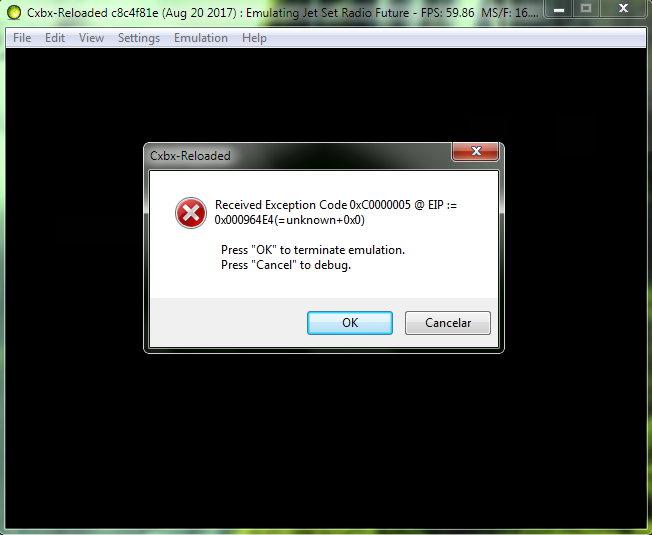
Here's XBE file: Xbe.txt
The same reports in the past?
Thank you guys. 👍
HyperScorpio
on 24 Aug 2017
@CakeLancelot Not having a conversation. Was highlighting a graphical issue which this thread is for.
austinhanna
on 29 Aug 2017
Copying some information from #174:
When I was testing out JSRF I saw some differences in my game's rendering compared to the one posted. Now I still get the graphical errors as described in Cxbx-Reloaded/Cxbx-Reloaded#251 but my UI seems to be completely black at all times.
At first I thought this difference was due to my graphics card but I've also tried running it on my iGPU and got the same results. So this might be something else, maybe OS.
From Cxbx-Reloaded/Cxbx-Reloaded#251 (UI renders correctly)
Running on my PC (UI is blacked out)

Here are my PC's specs:
MSI Z97-G55 SLI
Intel Pentium G3258 OC'ed to 4.4 ghz
Sapphire Nitro R9 FURY 4GB (Stock)
2 Crucial Ballistix Sport 8GB (total 16GB)
I'm running on Windows 8.1
Build db7da95d (Will update if needed)
CakeLancelot
on 16 Sep 2017
I'm getting the same black UI on my RX 480, haven't bothered to test iGPU
 BenNottelling
on 16 Sep 2017
BenNottelling
on 16 Sep 2017
Copying some information from Cxbx-Reloaded/Cxbx-Reloaded#251
Which one is the better one? Do you have some reference material perhaps?
Sure, here's some comparisons:


I also noted that the lighting itself is more accurate, for example the first comparison.
CakeLancelot
on 16 Sep 2017
There is also some information regarding graphical glitches in #44, though I have closed it per the one-game one-issue rule. Here are some highlights:
_From @CakeLancelot on August 8, 2017 18:8_
Can you verify on hardware if possible?
I can confirm this issue (Second image is actual xbox):
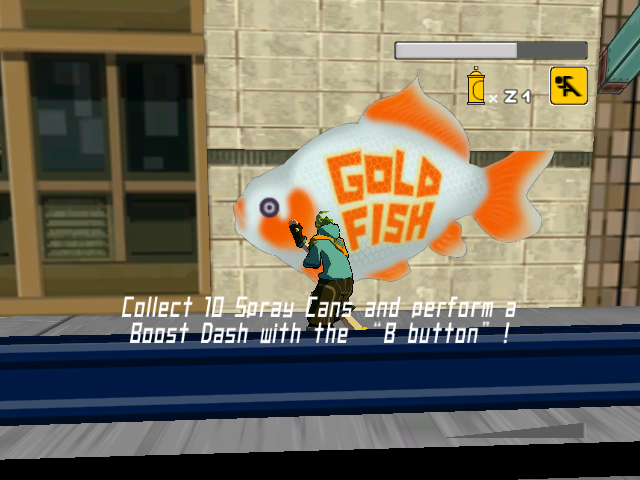

_From @HyperScorpio on August 10, 2017 14:14_
Map Zone - 99th Street.

Graffiti problems.

The annoying white cross.
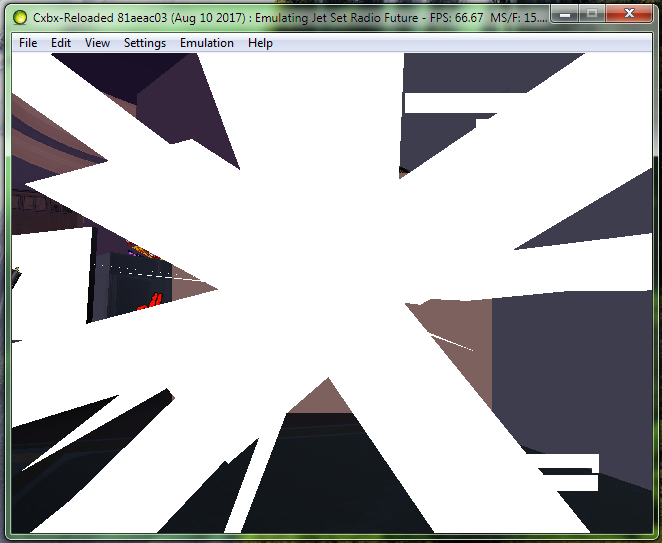
The annoying brown rectangle.

After beat the crazy cop.
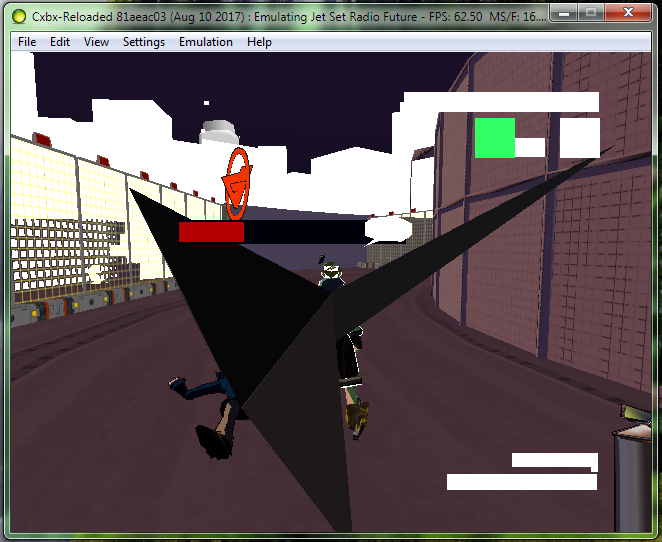
Before entering on the Garage.
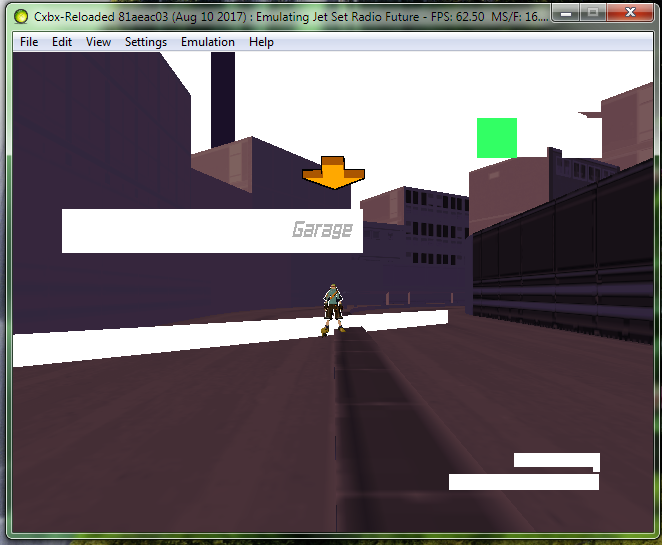
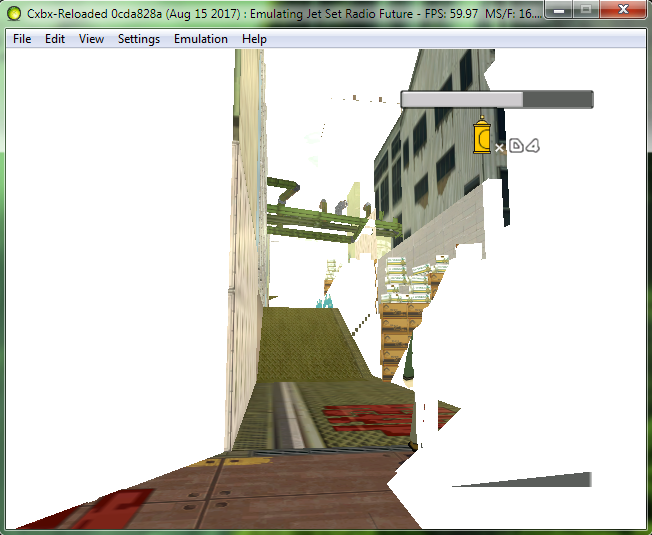
CakeLancelot
on 16 Sep 2017
As of version a4fa5551 there appears to be a regression. I haven't tested each individual commit between this and 8b11cce5 as there aren't on appveyor but I will see if I can compile and test.
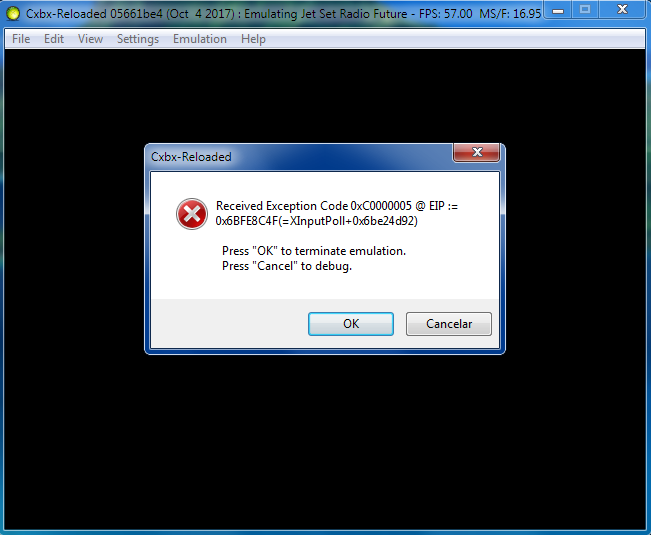
The game crashes right after the final splash screen (graffiti warning). I have managed to get past this screen once but it then crashed promptly afterwards, not sure what the difference was there. Here is the error message and log:
Cxbx-Reloaded
---------------------------
Received Exception Code 0xC0000005 @ EIP := 0x5E8875CF(=XInputPoll+0x5e6c2c52)

  Press "OK" to terminate emulation.
  Press "Cancel" to debug.
---------------------------
OK   Cancel
---------------------------
Could you retest in https://github.com/Cxbx-Reloaded/Cxbx-Reloaded/pull/738?
IT might be necessary to clear your cache too (All EmuDisk partitions except for 1 and 2) in the Cxbx-Reloaded folder
 LukeUsher
on 20 Sep 2017
LukeUsher
on 20 Sep 2017
So the cause of JSRF instability in early boot appears to be that two function signatures are (almost) exactly the same,making it difficult to patch them accurately.
So my priority is going to be removing those patches.
8B4424048B0D........898130240000C2040090909090909090909090909090 00 0000 0020 _D3DDevice_SetVerticalBlankCallback@4 ^0006D ?g_pDevice@D3D@@3PAVCDevice@1@A
8B4424048B0D........89812C240000C2040090909090909090909090909090 00 0000 0020 _D3DDevice_SetSwapCallback@4 ^0006D ?g_pDevice@D3D@@3PAVCDevice@1@A
LukeUsher
on 21 Sep 2017
Those NOPs at the end don't help much either
PatrickvL
on 21 Sep 2017
They may look the same as 4361, but JSRF's 4134 has different signatures. More than that it is preferable that the patch becomes unnecessary.
8B4424048B0D........89812C240000C2040090909090909090909090909090 00 0000 0020 _D3DDevice_SetVerticalBlankCallback@4 ^0006D ?g_pDevice@D3D@@3PAVCDevice@1@A
8B4424048B0D........898128240000C2040090909090909090909090909090 00 0000 0020 _D3DDevice_SetSwapCallback@4 ^0006D ?g_pDevice@D3D@@3PAVCDevice@1@A
 jarupxx
on 21 Sep 2017
jarupxx
on 21 Sep 2017
I can´t bypass this error anymore, even rescan the dam game for x20 times. Thank you all 👍
HyperScorpio
on 4 Oct 2017
It still works for me, I was playing it earlier today, perhaps you have a different version of the game? Or maybe the data is corrupted, or maybe you need to manually delete the Xbox Cache Partitions (All partitions except for Partition 1 & Partition2). There are a large number of possible causes here
LukeUsher
on 4 Oct 2017
Also from your debug log it looks like you have an NTSC version of JSRF: This issue is for the version marked as region-other.
You should create a new issue for that version of the game, if one doesn't exist already.
Also this thread should really be split up, it's impossible to tell which reports are for what version, it all got dumped in here!
LukeUsher
on 4 Oct 2017
Also this thread should really be split up, it's impossible to tell which reports are for what version, it all got dumped in here!
I'll try to tackle this issue, I do agree it's very disorganized. I'll try to remove any unnecessary comments in order to make it slightly more manageable.
As for different versions - This should be a good reference for the different versions of the game. Currently there's an issue for the japan trial version and this one, which I'll just specify as PAL (combo disk is supposedly different - is the standalone version?). I also have the NTSC combo disc, so I'll add that when possible.
CakeLancelot
on 4 Oct 2017
HyperScorpio
on 8 Oct 2017
Its way too fast!its unplayable for me!i have an i7 with 16gb ram and a geforce 1050,i tried the latest (14/11/2017) version and its stupidly fast that i cannot even see what's going on. what can i do to slow it down
 Solstar
on 14 Nov 2017
Solstar
on 14 Nov 2017
You can try turning on VSync in the config
LukeUsher
on 14 Nov 2017
Timing being (severely) off is a known issue right now
PatrickvL
on 14 Nov 2017
@LukeUsher that seems to work..in the intro at least. because after the logos and disclaimer ends,the game abruply ends with "received exception code " etc with the main theme still playing in the background
Solstar
on 14 Nov 2017
after clearing the cache it seems to work now. 60 fps steady, no slowdown whatsoever. If it wasn't for those graphic bugs and ligthing issues, it would be perfectly playable.
Solstar
on 14 Nov 2017
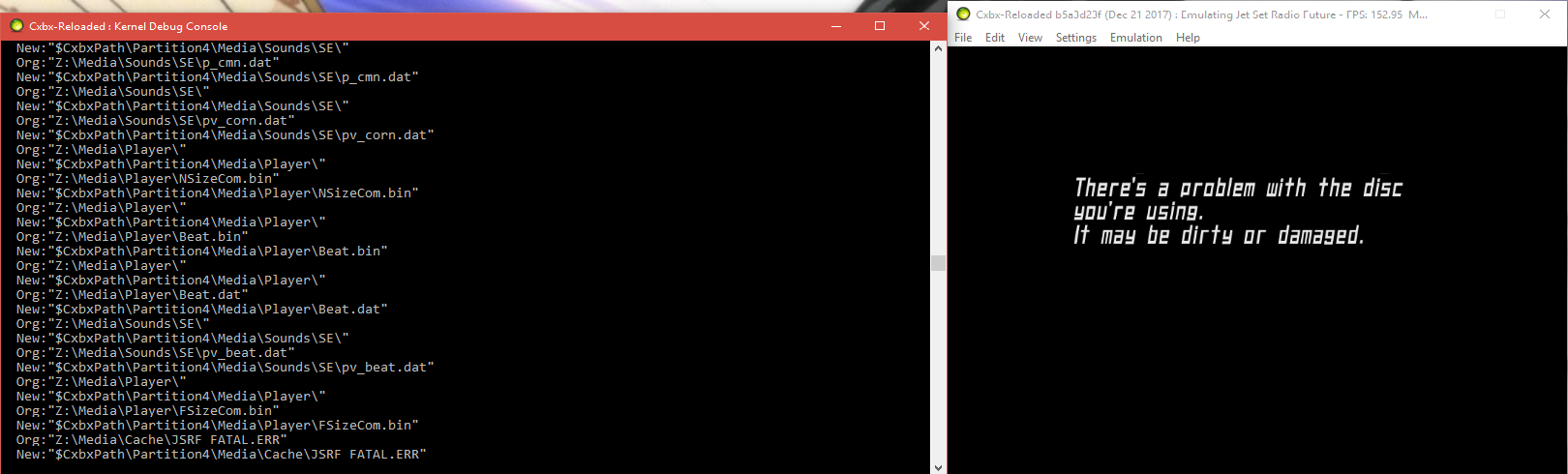
i'm on win.10 /64bits i7 gtx 1060 Cannot pass the loading screen every time I have this message on the black screen (disc damaged) I also want to extract files with win.rar Magique.ISO and C-xbox 2.0.7. always the same result
 ghost
on 21 Dec 2017
ghost
on 21 Dec 2017
I also want to extract files with win.rar Magique.ISO and C-xbox 2.0.7. always the same result
Don't use Winrar for extracting Xisos. Qwix or C-Xbox Tool should work, and if they don't the dump is probably damaged in some other way. I've also seen this error when VSync is not enabled, so maybe try enabling that and see if it works.
CakeLancelot
on 21 Dec 2017
i have test VSync forced ON and i have same result :( i have extract the game with C-Xbox Tool 2.0.7.
ghost
on 22 Dec 2017
Rather than extracting from an ISO, you could try using an FTP client to transfer the files directly from your Xbox console, direct from the D: drive if using.a disc. This will rule out issue switch the extraction tools you are using. Failing that, your game dump could be bad: can you confirm it works on a real Xbox too?
Also you could try cleaning your cache partitions: this is different from clearing the HLECache. There is an EmuDisk sub folder under %AppData%\Cxbx-Reloaded. Please delete all contents of EmuDisk, except for Partition1 and Partition2: these ones should stay, and try again.
LukeUsher
on 22 Dec 2017
My disk is not in very good condition its must be the main reason a little too much damage and my xbox original is dead :(
ghost
on 22 Dec 2017
New video from InsertMoreCoinsblog IMC: Cxbx WIP (build from november) - Jet Set Radio Future (USA) - Shortplay (Dec 6, 2017).
 ObiKKa
on 27 Dec 2017
ObiKKa
on 27 Dec 2017
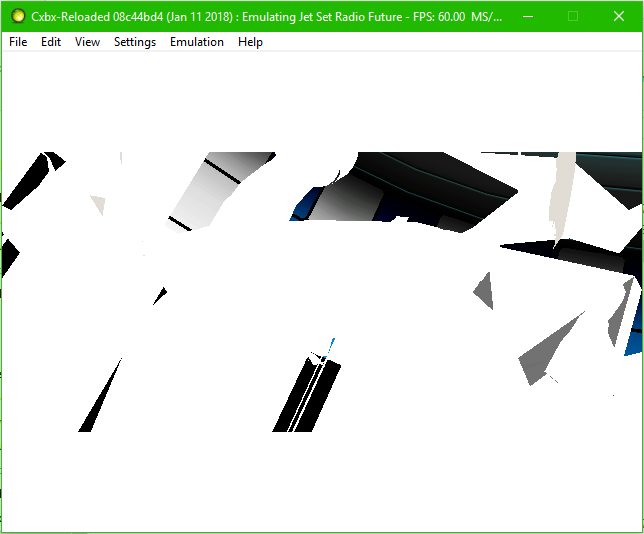
Upon entering the first cutscene when entering Dogenzaka Hill, cxbx-reloaded issues to release a kernal dump to github and K's facial mesh stretches across the screen as well as an invisible body with only moving arms and hands visible. Happens with or without pixel shaders.
 Photon-Phoenix
on 12 Jan 2018
Photon-Phoenix
on 12 Jan 2018
How do I slow my game down? It's speeding up all over the place.
 Suplex7
on 13 Feb 2018
Suplex7
on 13 Feb 2018
Timing is still being worked on
PatrickvL
on 13 Feb 2018
I found something interresting... If you go to the Garage and select the 3rd training and if you don´t complete the training, try to go around the Garage Map, it doesn´t show any bug or even in the sky, just thinking my self there is some problems with the charathers polygons and the graffiti Souls. You need to investigate more about that PatrickvL. 👍 Or there is some map far away from the garage just making this annoying bug. Some building maybe, up there i don´t know. Cutscenes can maybe have that problem too. It seems the sun light is not the problem at all, if we use the câmera some point of the view just shows the white bug and in the other it doesn´t. Pixel Shaders doesn´t solve our problem, but maybe for other games you are working on.
Cheers.
HyperScorpio
on 16 Feb 2018
I can confirm the last comment, tho I just had to first complete the 1st training and on my second (retry) of the same training, all the white bugs disappeared UNTIL I used the spray button, which launched the spray/graffiti animation with the "spray particles" effect. Right at that moment, all the massive white texture bugs came right back. Some ideas on this?
Edit: Also the screen goes completely white bugged when dashing is in use. Might it use the same kind of "spray/cloud/explosion" effects as the spray cans?
 nils-trubkin
on 26 Feb 2018
nils-trubkin
on 26 Feb 2018
Ingame still but this new video from JGG seems to suggest that the 'white-out' problem with the in-game GFX has been stopped but that the framerate has grinded almost to a halt.
Edit: Ah ha, that's right. Luke has a new PR#956 where in one of the commits he says that this game no longer has THAT same 'white-outs' problem.
- Cxbx-Reloaded Xbox Emulator - Jet Set Radio Future Ingame! (fb5436e4) (John GodGames Emus. Published on 1 Mar 2018.)
But this video from another tester shows it to be running just fine.
- Cxbx Reloaded Mar 1 2018 - Jet Set Radio Future 60FPS (bhodg22. Published on 1 Mar 2018. Doesn't mention the build used.)
EDIT (04/03/2018): See this game in glorious ultra-widescreen format courtesy of Esppiral V!
- Jet Set Radio Future CXBX -R 21:9 (Esppiral V. Published on Mar 1, 2018.)
In this new video from Literalmente, see the garbage splash visuals popping up on-screen at a couple moments (i.e. when the skater reaches some of the round-shaped marks) in the tutorial stage after 3:58 and 4:46 (While just simply running). There are some missing graphics on a couple key characters & background props in a music room in the intro cutscene after the tutorial level. Otherwise, it almost all looks fine.
- Emulação - Jet Set Radio Future in-game no CxBx-Reloaded (emulador de XBox) (Literalmente{Game}. Published on Mar 3, 2018. Build used: fb5436e; PR#957.)
ObiKKa
on 2 Mar 2018
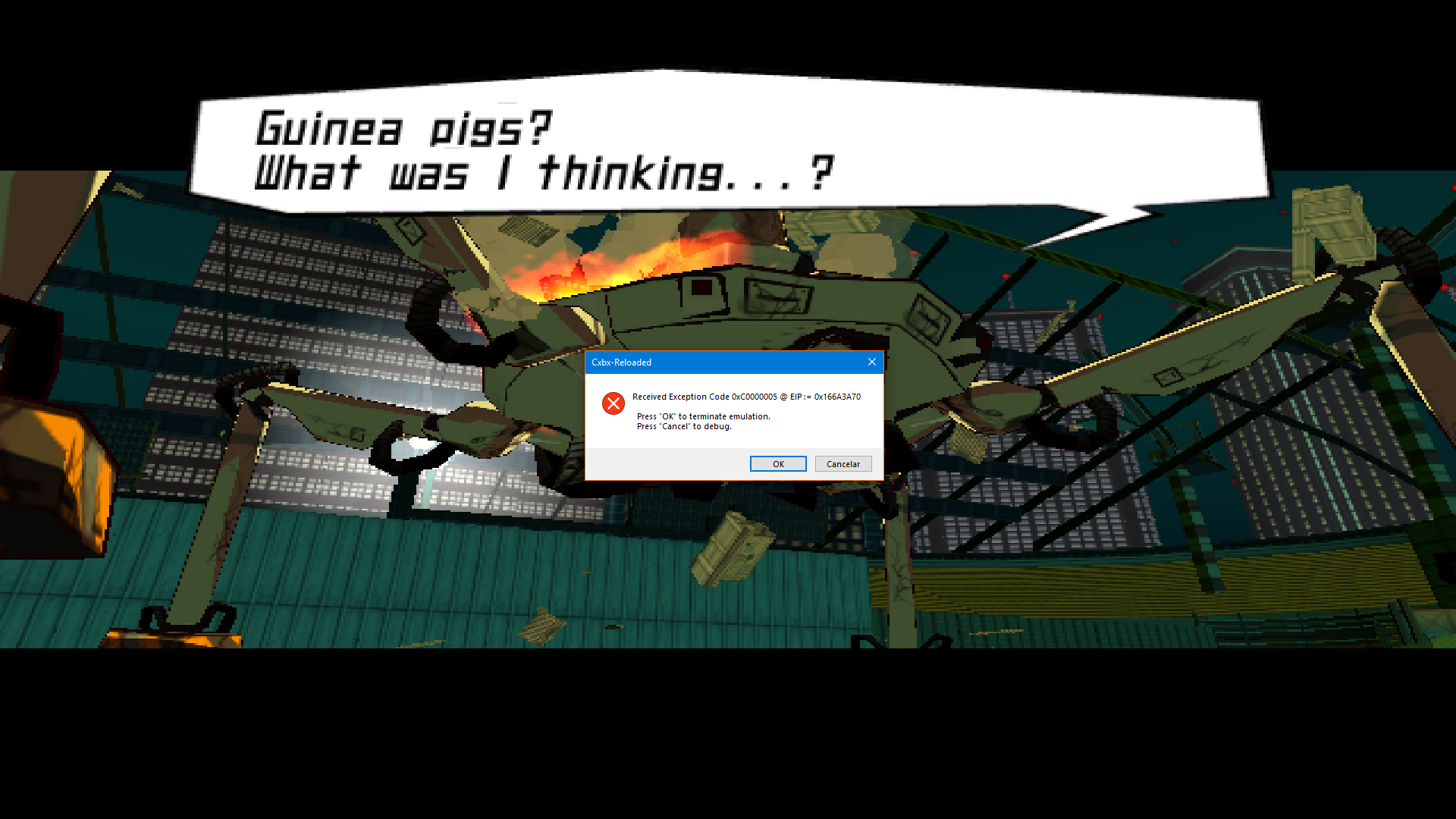
A nother crash found it. I can´t bypass this.
The older versions before 1 March was working good.
Thank you all!
When does the crash occur exactly?
CakeLancelot
on 4 Mar 2018
@CakeLancelot After we defeat Hayashi the in the stadium.
When he speaks "What was i'm thinking...?" the error appears.
https://www.youtube.com/watch?v=udBHidVrDSw
Go to 3:25.
And i can´t finish this level.
HyperScorpio
on 4 Mar 2018
Can you please zip and upload your savedata so we can easily reproduce & investigate:
Go to %AppData%/Cxbx-Reloaded/Partition1/UDATA/
Where Title ID is the title Id for your version of JSRF, you can find it in the Xbe dump.
LukeUsher
on 4 Mar 2018
After trying to play, All I can say is that it is currently in a playable state.. Other games as well are getting into the stages of playable this year, And It amazed me enough to try CXBX after my attempts on doing that a couple months ago when It wasn't stable enough to run on my computer.
y'know? 120 FPS feels like 60. But unfortunately, on my side. most of the ground textures are not working, But the game is still very playable. Unlike the original hardware or 360.
But mind you, Theres a few sounds that are not working, like voicelines, Spray Sounds. ETC. And i Recommend you turn your sound off for times like that. Once that is fixed, Ill be one happy person over here.
And from what the user Hyper Scorpio has said, The game stops after we beat hayashi again. And I hope this is fixed in the next update. That along with the SFX errors, Or pops.
 Rdup222
on 6 Mar 2018
Rdup222
on 6 Mar 2018
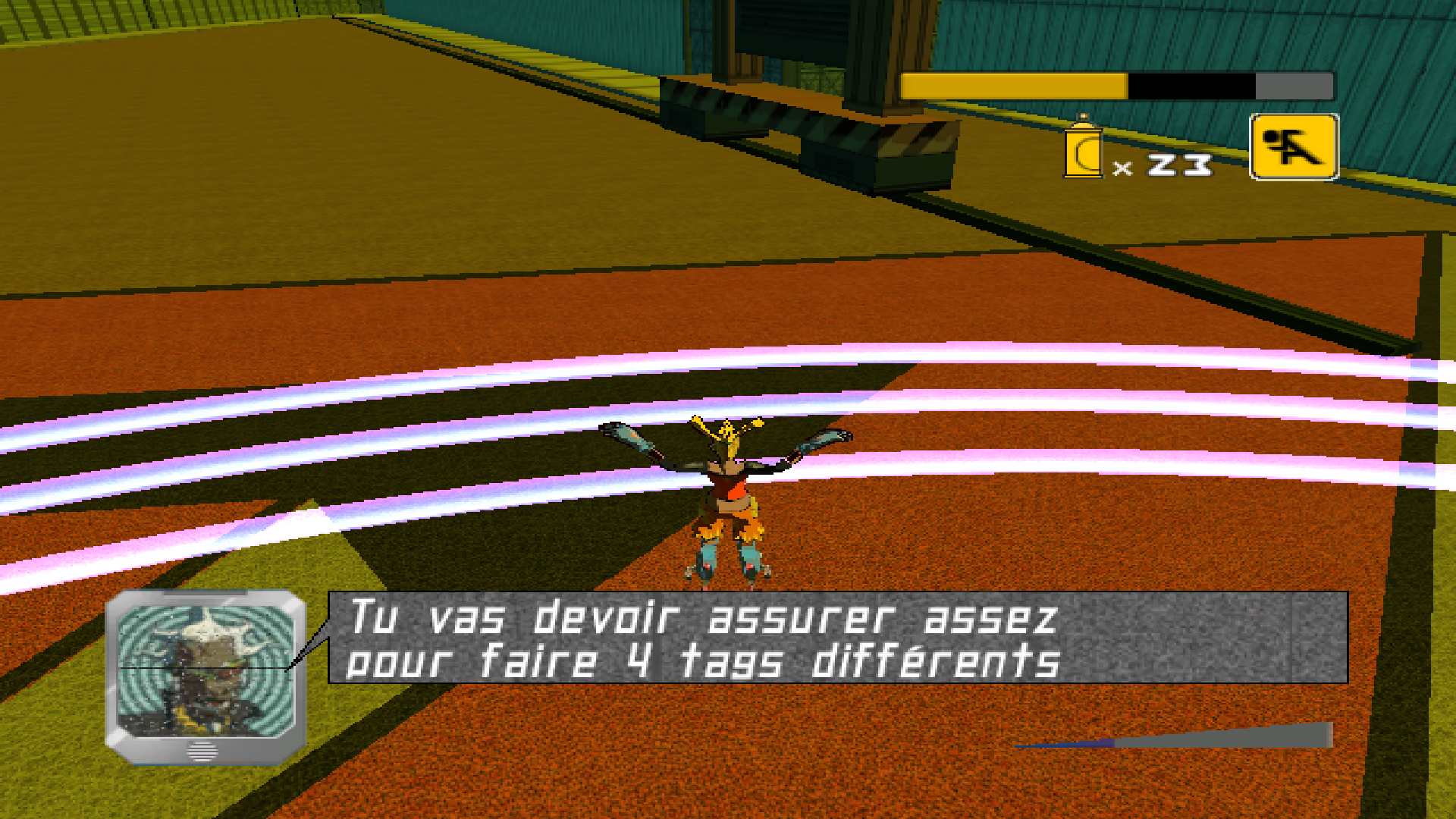
Tested again and still crashes, i got something before i defeat Hayashi. DJ Professor K when he speaks the last ballon message just changed to french language. I will send 2 saves. The first one is all levels untill there with all Graffiti Souls completed and collected. The 2nd save is before i fight against Hayashi.
Please if you guys can fix it to able to continue to play.
Thank you all!
Jet Set Radio Future-8f0bb158.zip
Update: Even after cleaning All CXBX Data it doesn´t work, but before was working.
HyperScorpio
on 9 Mar 2018
I just forget to post the french bug letters.
HyperScorpio
on 9 Mar 2018
Hi here, it's great to see the work accomplished ! Now my game runs perfectly fine talking to FPS...
The last bug I've seen comes when I paint graffitis... They don't appear:
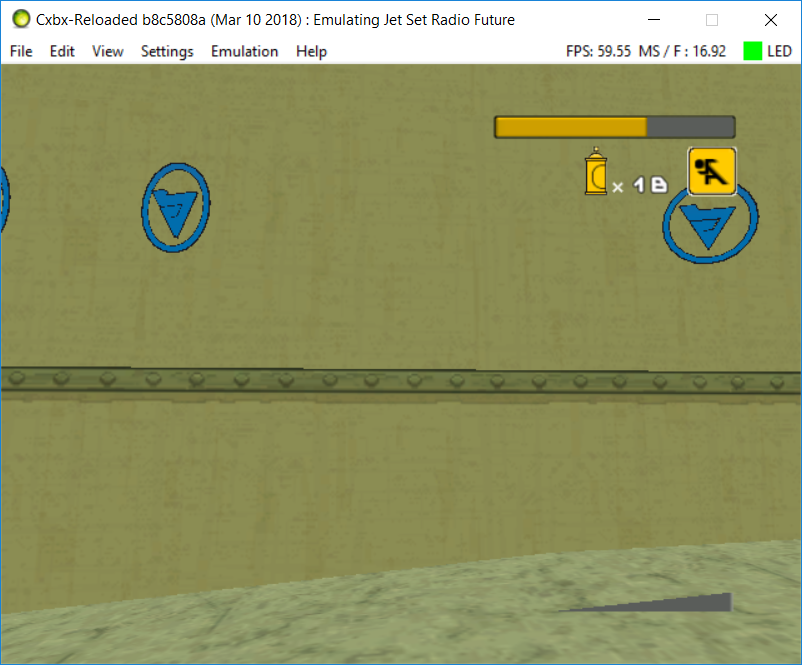
Tried almost everything.
My specs:
Intel i5-7300HQ @2.5-3.5GHz
NVidia GTX 1050 @4GB GDDR5
8GB DDR4-2400 RAM
Jet Set Radio Future PAL
Cxbx-Reloaded build b8c5808a
 HauruI
on 11 Mar 2018
HauruI
on 11 Mar 2018
@HauruI they removed for a reason, need to be fixed.
HyperScorpio
on 12 Mar 2018
JSRF PAL used to be able to go ingame for me, but it regressed to instantly crashing a couple of months ago. I still keep the build from Nov 27, 2017 around because it's able to start both JSRF and Panzer Dragoon Orta.
I'm running an I7, GTX 1080 and Win10 64 bit
Here are the log dumps:
 SputnikKaputtnik
on 12 Mar 2018
SputnikKaputtnik
on 12 Mar 2018
@SputnikKaputtnik no difference anymore to the older version.
HyperScorpio
on 12 Mar 2018
@HyperScorpio What do you mean no difference? I ran both versions today. The older one will start the game, the new one will crash instantly.
SputnikKaputtnik
on 12 Mar 2018
@SputnikKaputtnik Strange. i always remove the %AppData% CXBX Reloaded and the Folder on the regedit.
HyperScorpio
on 12 Mar 2018
@HyperScorpio Deleting the roaming/appdata/cxbx folder did the trick. Thank you for pushing me in the right direction!
SputnikKaputtnik
on 12 Mar 2018
I Tested the game again, i clean all files including the configuration, i just start and play and i got the crash again. Total 2h10 min. We can use 2 free tools, one is Registry Scanner to delete all files belongs as CXBX and File Searchy to remove all the CXBX Database. It seems is not problem from the save game after all.
Waiting for next month. Bye.
HyperScorpio
on 17 Mar 2018
Regarding the Hayashi bug, the first bad commit appears to be 179c158. As the commit was mainly pertaining to HLEDB_V2, I've uploaded two HLEcaches in a zip file. BAD is the one generated by build 179c158 and doesn't work, while GOOD is the build right before it (e252cdf) that does work.
CakeLancelot
on 18 Mar 2018
By tweaking my HLEcache ini file on the latest build I've confirmed that this is related to it, but I haven't found out which specific function yet.
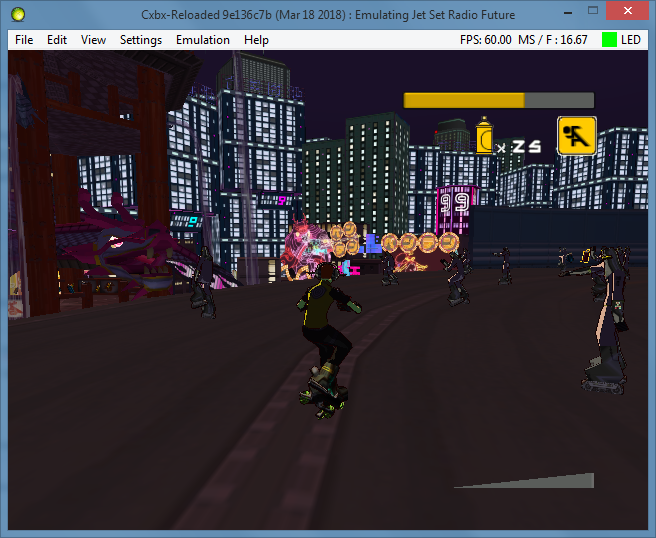
(Noise Tanks after beating Hayashi boss battle)
CakeLancelot
on 18 Mar 2018
Summarizing the differences between the BAD (https://github.com/Cxbx-Reloaded/Cxbx-Reloaded/commit/179c158) and GOOD (https://github.com/Cxbx-Reloaded/Cxbx-Reloaded/commit/e252cdf) HLECache files attached above by @CakeLancelot :
D3DCubeTexture_LockRect=193d00 // Was absent in BAD. In GOOD *and* BAD 193d00 equals Lock2DSurface?!?
D3DDevice_CreateImageSurface=18f2c0 // Was 18d710 in BAD (D3D_CreateStandAloneSurface)
// Absent in GOOD : D3DDevice_GetTexture2=18e990
D3DVolumeTexture_LockBox=193da0 // Was 18f120 in BAD. In GOOD *and* BAD, 193da0 equals Lock3DSurface?!?
// Absent in GOOD : D3D_CreateStandAloneSurface=18f2c0
D3DCubeTexture_LockRect isn't patched, so it's address equaling Lock2DSurface causes no problems.
Same for D3DVolumeTexture_LockBox and Lock3DSurface.
D3DDevice_CreateImageSurface and D3D_CreateStandAloneSurface both aren't patched, so it's also unlikely that these cause trouble.
So, it might have something to do with D3DDevice_GetTexture2 not being found anymore, because that one is patched...
For reference, @CakeLancelot generated Jet_Set_Radio_Future-8f0bb158.zip an unmodified HLEcache from the latest build (https://github.com/Cxbx-Reloaded/Cxbx-Reloaded/commit/61fc3c5f)
In it, D3DDevice_CreateImageSurface is restored to 18d710 and D3DVolumeTexture_LockBox to 18f120 (all other differences between GOOD and this are sound-related).
PatrickvL
on 18 Mar 2018
The hard crash after Hayashi has been solved as of this PR https://github.com/Cxbx-Reloaded/Cxbx-Reloaded/pull/1000
Turns out that the cause was simply a patch that we neglected to remove after fixing D3DDevice_SetTexture to correctly update the internal state.
LukeUsher
on 19 Mar 2018
To further what @ObiKKa was mentioned earlier, I was able to get 60FPS easily from build in early March however after some recent commits, the game basically chuggs down to a 1-5 fps. When the game is not in focus the FPS returns to normal, but no sound plays.
I have uploaded another video which demonstrates this (For some reason audio still does not record). https://youtu.be/093Lyz8kRFc
I can grab logs if required
Edit: CPU is also pretty much pinned on all 4 cores, AND the same slowdown/speedup is also happening in Crash tWoC when loading in to main menu
 bhodg22
on 19 Mar 2018
bhodg22
on 19 Mar 2018
Thank you guys! Tired of Guinea Pigs. Soon or later will be forced to use the latest DX because happens the same to demul, it have DX11 because of the bugs and crashes. I know is not the same thing soon you will understand it why.
HyperScorpio
on 19 Mar 2018
The only problem I have is the sounds having that loud pop every time. Like selecting something, grabbing a graffiti soul. And spraying paint. I still don’t know if you could fix that.
Rdup222
on 19 Mar 2018
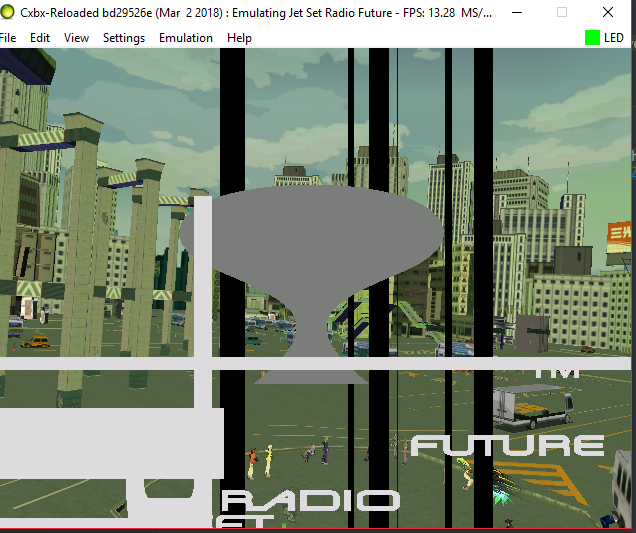
Another problem is frame dipping on the intro, Missing textures on my side.
Rdup222
on 19 Mar 2018
Related issues
 Voxel9
·
3Comments
Voxel9
·
3Comments
 mnadareski
·
3Comments
PatrickvL
·
3Comments
PatrickvL
·
3Comments
ghost
·
3Comments
mnadareski
·
3Comments
PatrickvL
·
3Comments
PatrickvL
·
3Comments
ghost
·
3Comments
Most helpful comment
The hard crash after Hayashi has been solved as of this PR https://github.com/Cxbx-Reloaded/Cxbx-Reloaded/pull/1000
Turns out that the cause was simply a patch that we neglected to remove after fixing D3DDevice_SetTexture to correctly update the internal state.