Galaxy: Cut tool not working in new workflows
We've got the latest version of your @bgruening's cut tool (1.1.0) and when I include it in a workflow, it fails with the error:
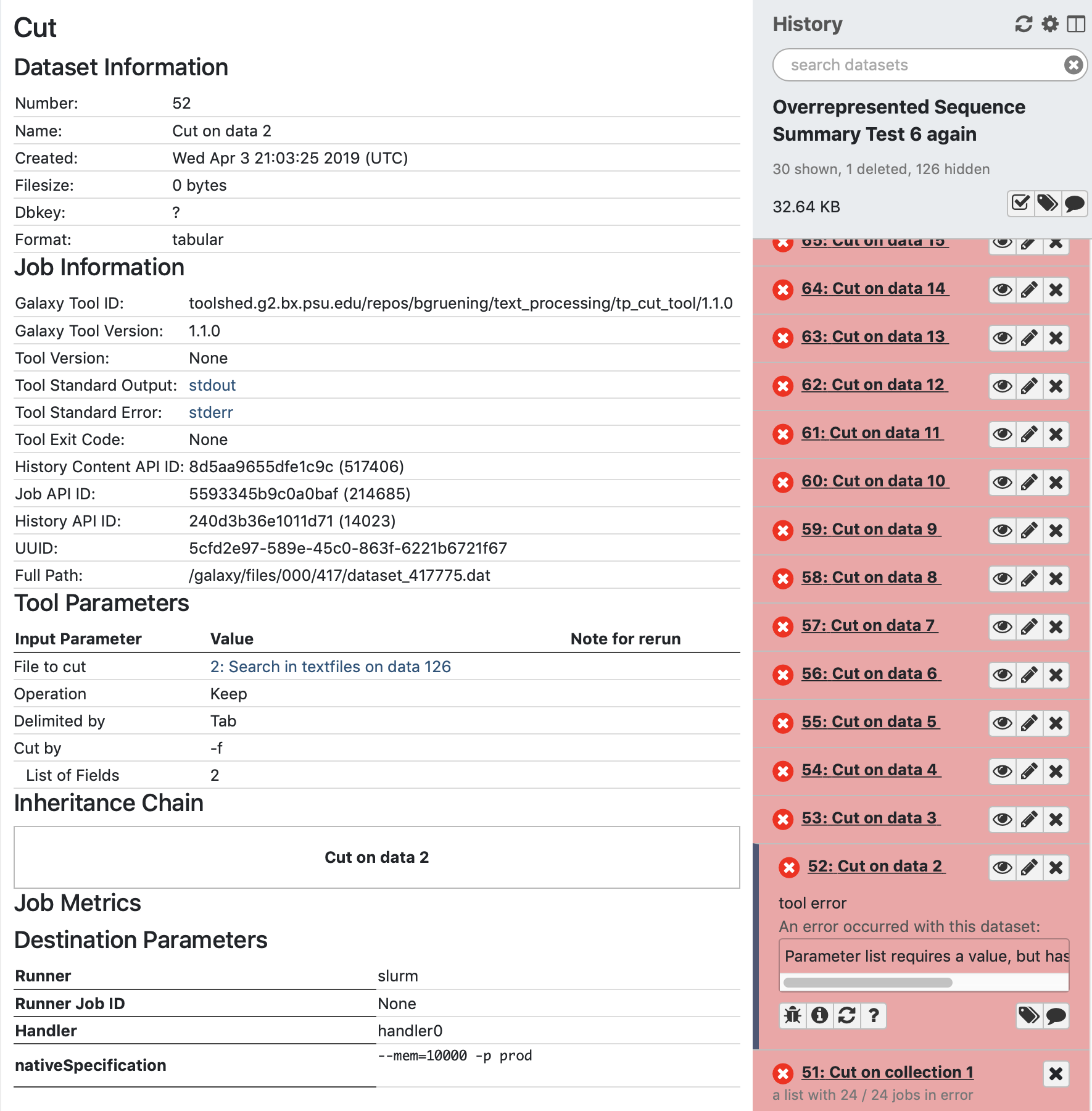
Parameter list requires a value, but has no legal values defined.
despite all required values being filled in.
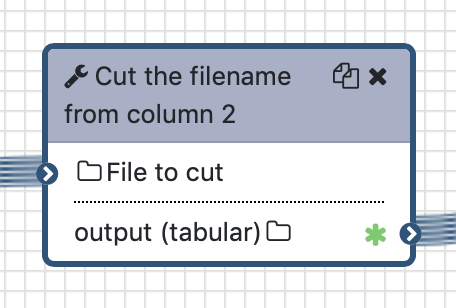
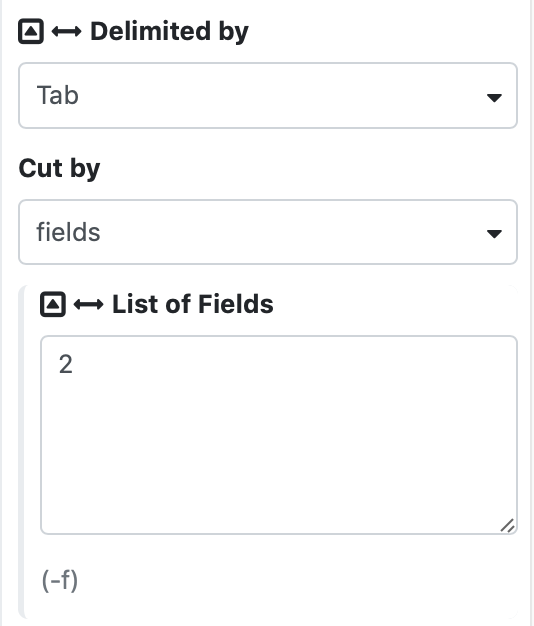
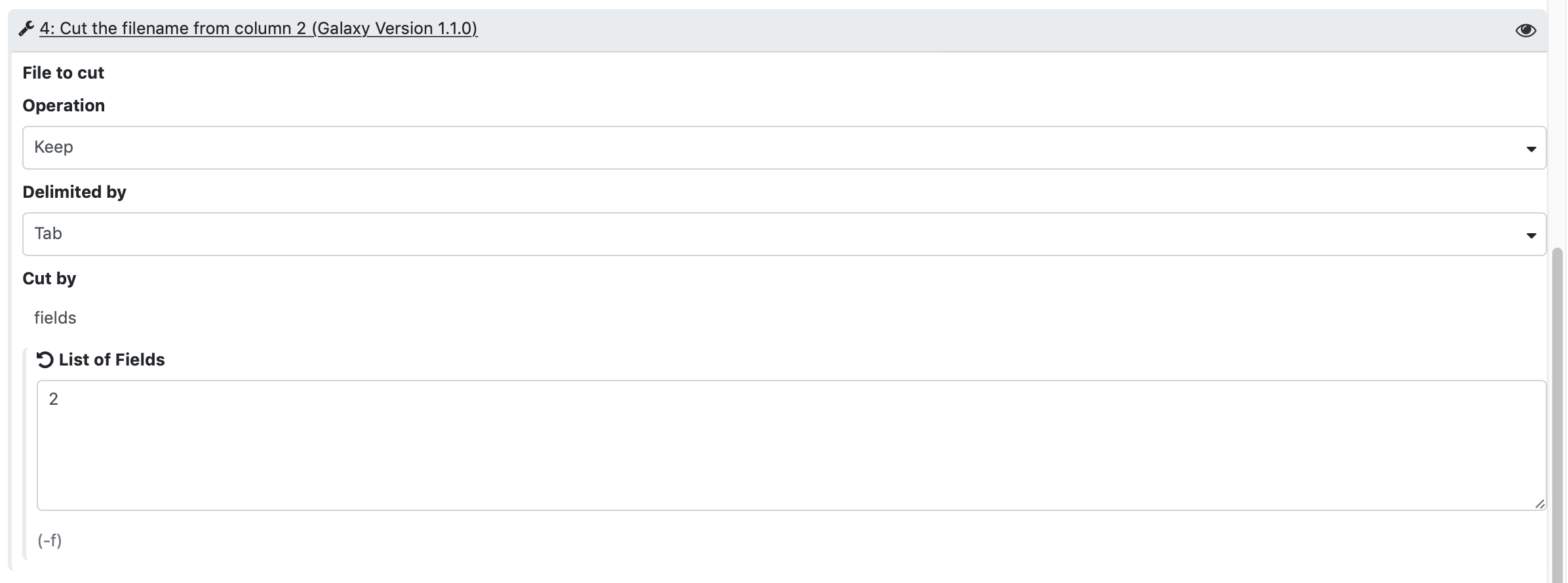
I have not tried old workflows with this tool incorporated, so I can only attest to new workflows with the tool. Here are some relevant screenshots:
The tool in the workflow editor:
It's set values in the workflow editor:
Its shown values in the form when running the workflow:
The info on a failed output:
Further, I went to view the tool in the admin settings and I get the following error:
Error displaying tool, probably due to a problem in the tool config. The exception is: list indices must be integers, not str.
This started happening after upgrading to 19.01.
I created a test workflow with the 2 cut tools we have. The other succeeds:
 hepcat72
All 32 comments
I believe that 'Sort' (Galaxy Version 1.1.1) is affected by this same issue. Sort says it completes successfully but it's output is 0 bytes and it has this in the stderr:
sort: invalid number at field start: invalid count at start of `None,Nonenr'
grep: write error
If you omit the "on column" field entry in the workflow or select "Nothing Selected", it produces output with no error.
hepcat72
on 4 Apr 2019
The command that's run when the sort tool is run via the workflow is:
python '/galaxy/galaxy-app/tools/filters/sorter.py' --input='/galaxy/files/000/426/dataset_426213.dat' --output='/galaxy/files/000/426/dataset_426225.dat' --key=,nr --header 0
and apparently, not entering a column in the workflow does not work-around the issue. That only works if you run the tool manually.
Should I create a separate issue for this? I really suspect they're both actually the same issue...
hepcat72
on 5 Apr 2019
I can't reproduce this with the description alone, and the Galaxy instance is behind some authentication.
 mvdbeek
on 5 Apr 2019
mvdbeek
on 5 Apr 2019
I have a test case for the cut issue.
Can you access this or does that require authentication?
https://galaxy.princeton.edu/u/rleach/h/cut-test-1
Probably does. I have a small test workflow though. Let me see if I can zip that up with an input file.
hepcat72
on 5 Apr 2019
yes, this is behind authentication. the workflow file would be suffcient.
mvdbeek
on 5 Apr 2019
hepcat72
on 5 Apr 2019
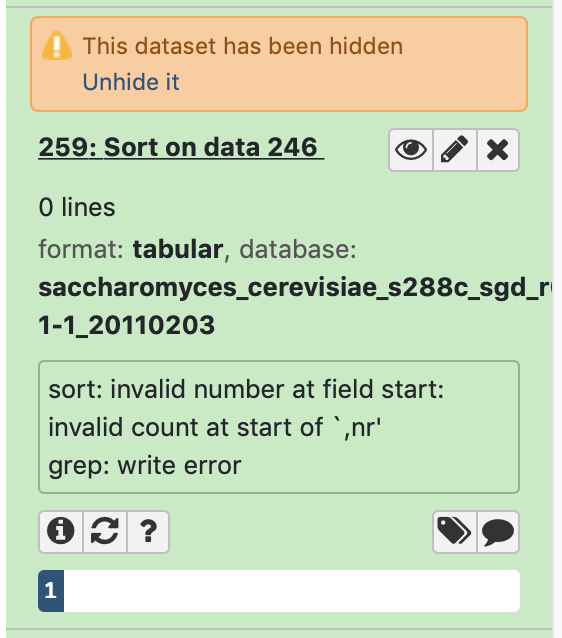
Maybe the sort and cut column selection things are unrelated? I don't know. Seems too coincidental for both column selection things to have issues. The sort though isn't red. It's green:
hepcat72
on 5 Apr 2019
So the main issue should be fixed by https://github.com/galaxyproject/galaxy/pull/7678, which I introduced when adding the possibility to set and view tag parameters in the workflow editor.
If sort fails but turns up as green that's not good. These tools do set the exit code correctly, so we should change them to use exit code detection.
mvdbeek
on 6 Apr 2019
... which I've done in https://github.com/galaxyproject/galaxy/pull/7679
mvdbeek
on 6 Apr 2019
Should be fixed with the merge of the listed PRs.
 dannon
on 6 Apr 2019
dannon
on 6 Apr 2019
We updated today, but the above fix didn't appear to work. I'm still seeing errors with cut and sort. The only difference now is that the sort result is red and the error message is slightly different.
Cut:
Parameter list requires a value, but has no legal values defined.
Sort:
Fatal error: Exit code 1 ()
Error running sorter.py
Command '(grep '^#' /galaxy/files/000/429/dataset_429606.dat) >> /galaxy/files/000/429/dataset_429618.dat' returned non-zero exit status 1
Were you unable to reproduce the errors using the workflow I shared?
@mvdbeek
hepcat72
on 8 Apr 2019
Yes. Did you rebuild the client ?
mvdbeek
on 8 Apr 2019
@lparsons - Did you rebuild the client for that update I asked for earlier?
hepcat72
on 8 Apr 2019
OK. I neglected to let Lance know it would require a client rebuild. My bad. I'll let you know. Thanks.
hepcat72
on 8 Apr 2019
@mvdbeek I was under the impression the client would get rebuilt if there were changes to the js files, but I'm forcing a rebuild now. See: https://galaxyproject.github.io/training-material/topics/admin/tutorials/upgrading/slides.html#16
 lparsons
on 8 Apr 2019
lparsons
on 8 Apr 2019
@lparsons You are correct, the client should be rebuilt if using the 'standard' deployment mechanisms. Do you happen to be running a setup without run.sh and/or common_startup.sh, though?
dannon
on 8 Apr 2019
No, I'm using run.sh (implying common_startup.sh). I'm not really sure if the client was rebuilt or not though... How would I determine that?
lparsons
on 8 Apr 2019
Well..... Same result. Both cut and sort still fail with the errors I posted above.
hepcat72
on 8 Apr 2019
I've run the cut sample workflow a half dozen times now: without changing it, changing the value to the fields field in the editor, and re-adding the cut tool in the editor entirely. Fails every time. Perhaps you need to send the output to a new history (which is what I'm doing... let me try without sending to a new history).
hepcat72
on 8 Apr 2019
Or could it be a browser issue?
hepcat72
on 8 Apr 2019
Looks to me to be the input in this case.
- Simple
txtfiles will fail since the cut tool is looking to validate columns. - Sort seems to fail when there are no comment lines, thus the
grep "^#"exits with code 1.
I'd say the first is a limitation of the tool, but the second seems clearly a bug. Haven't confirmed it yet though, but if/when I do I'll report it.
lparsons
on 8 Apr 2019
Damn, looks like there's something else missing.
mvdbeek
on 8 Apr 2019
@lparsons Ok, so yeah, your client should rebuild (when necessary) when run.sh is executed. The file <galaxy_dir>/static/client_build_hash.txt will always contain the git hash of the revision the client was last built at. On startup, galaxy does a git diff of the client directory against the revision stored in that file. If there's any diff (including local changes), it'll rebuild and store the new hash.
dannon
on 9 Apr 2019
OK, so there's a lot of things going on here that need to be unwrapped.
I still think the actual workflow issue here is solved if you see the field like this in the workflow editor:
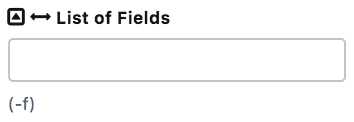 (as opposed to a larger text area). Note that this won't show the values that are entered in the workflow editor after saving and reloading the workflow in the editor. We can fix this, but I don't think this is critical enough to be included as a bug fix in a stable release, this will need a little time to mature (that's actually how the tag field works, but then we need to split fields on newlines).
Now Bjoern's tool allows you to pass in a text file (because it can operate on tabular files that are not delimited by tabs), but if you select fields as the delimiter it does actually have to be a dataset with tabular datatype. If it isn't you will see Parameter list requires a value, but has no legal values defined. if run in a workflow. We can't realistically do anything about that on the Galaxy side since txt is a valid input for this tool, but the tool could use a conditional and change the input format if fields is chosen.
I think Lance has properly diagnosed the sort tool issue, this is because we went from too lax validation (green output for a failed run) to too stringent. I will fix this (with tests this time ...).
mvdbeek
on 9 Apr 2019
Actually there are tests, we just run them in a cron job, not against PRs ... and guess what, the sort tool is failing: https://jenkins.galaxyproject.org/view/All/job/docker-main-tools/lastCompletedBuild/testReport/
mvdbeek
on 9 Apr 2019
Regarding cut...
I think that I missed the cause of my issue because I was operating under the assumption that if it works on the command line, it would work in galaxy. Having an alternative cut tool with stricter input validation is a good idea, though personally, I would probably have done one of the following 2 things to distinguish the difference in the behavior of the command line version of cut:
- Name it somewhat differently, like "strict cut"
- Make the differences in behavior a selectable option, defaulted to the selection that mimics the command line cut tool - similar to the change I submitted to Bjoern's column replace tool, which let's the user select to error when a value is missing
I would think that most everyone is familiar with command line unix cut tool and would think that that's precisely what they're running if the tool name and the option flags are the same (in fact, it even says it runs the unix cut tool). Thus, if it works on the command line, I assumed it would work on galaxy. That's not apparently the case however. If Lance's diagnosis is correct (which I assume it is) there exists added input file validation to ensure the file is strictly tab-delimited (however that has been implemented). My input file had tab characters, but not on every line and the number of tabs were inconsistent. As to the type, the input file in the editor's tool interfaces says "Data input 'input' (txt)" and what I was directing in was 'txt'. There doesn't appear to be anything in that interface that suggests it shouldn't work. If you run the tool outside of a workflow, it will let you select the errant file, but it won't let you enter a column number. So the input validation works in that context even though it's unclear to the user as to what the problem is.
The error from the tool, when running it in a workflow, indicates there's a problem with the fields parameter, whereas the problem is from the file validation. So unless I, as a user, know that there is a requirement that the input for this cut tool needs a consistent number of tab characters (or whatever the validation is checking) over and above that the command line tool requires, there's nothing to suggest to me what the problem is. In fact, it leads me to believe I've entered a bad column value in the fields parameter.
So since I suspect that this input validation is happening outside of the cut tool's interface, my suggestions above aren't a reasonable change to the cut tool. Rather, I would think that an error message that mentions a failure to validate the input file type might make it easier for the user to correct the issue (and not report it as a bug).
That said, I had already switched to the alternate cut tool - so I solved my problem despite the fact that I didn't know why the problem was occurring, but reported it as a bug because I assumed it should work (based on the fact that I could run it on the command line).
hepcat72
on 9 Apr 2019
So Galaxy let's you write tools that need a lot of knowledge to use them properly, but if as a tool author you do that, you and your users will have to live with the consequences. Our job is to make it easy to write easy to use tools.
If the tool author chooses to let you select an incompatible datatype and do a validation against a different datatype once the dataset is loaded up into the tool form that's hacky but fine (there is another, better IMO, way that I outlined in https://github.com/galaxyproject/galaxy/issues/7661#issuecomment-481213192), but if you're creating a workflow or queueing up individual runs we don't have a way to prevent selecting the wrong input, and that's where all comparisons with the command line are a little lacking, because on the command line you don't have any way to do that up front validation either.
2. Make the differences in behavior a selectable option, defaulted to the selection that mimics the command line cut tool - similar to the change I submitted to Bjoern's column replace tool, which let's the user select to error when a value is missing
That's actually a good example of how a tool is supposed to be written if you want to use a type="data_column" parameter, which is you have to require a tabular input. How you handle missing values in that tool is not relevant to Galaxy IMO.
I'm closing this since the main issue is fixed (and thanks for reporting @hepcat72 and following through)
mvdbeek
on 10 Apr 2019
There’s one thing you mentioned that I’m not sure I’m completely clear on. Let me see if I interpreted what you said correctly. You said if you enter something in the fields field, the filetype must be tabular and that the tool should change the datatype if something is entered there in order to work properly.
The fields field is cut’s -f option. On the command line, you can use -f with a file delimited by something other than tab characters by supplying -d. That file may or may not have tab characters and still work.
I’m guessing that you’re not saying that -f only works for tab delimited files. So what is it you’e saying exactly? Are you saying that the interface for the -f should use a method of data entry other than what is being used? I.e. use something other than the column selector interface that shows column options in a selectable GUI way? Since cut’s -f option works on other delimiters and isn’t strict about the consistency of the number of tabs per line, I would think that the column selector interface shouldn’t be used in the cut wrapper at all, or rather only in the case where the input type is specifically tabular. Otherwise, changing the delimiter or cutting a file with irregular numbers of tabs per line will fail.
hepcat72
on 10 Apr 2019
You said if you enter something in the fields field, the filetype must be tabular and that the tool should change the datatype if something is entered there in order to work properly.
No, if you use a type="data_column" validator select field you need a datatype that has columns. That can be csv, tsv, tabular or others. But it can't be txt.
mvdbeek
on 10 Apr 2019
... I'm going to create a separate issue for the sort bug just so I can keep up with the status of the fix. I've been biding my time and pondering possibly working around the issue by adding an empty header line in my workflow so that sort will work.
hepcat72
on 24 Apr 2019
it should have been fixed, but if it's not working yes, please open a new issue.
mvdbeek
on 24 Apr 2019
I should have deleted that comment. I checked before creating the issue and saw you merger a fix of sorter.py and asked Lance to pull it.
hepcat72
on 24 Apr 2019
Related issues
 jennaj
·
4Comments
mvdbeek
·
3Comments
mvdbeek
·
4Comments
jennaj
·
4Comments
mvdbeek
·
3Comments
mvdbeek
·
4Comments
 mtekman
·
3Comments
mtekman
·
3Comments
 afgane
·
4Comments
afgane
·
4Comments