Galaxy: Display output labels in workflow editor
from @mblue9 in https://github.com/galaxyproject/tools-iuc/pull/2103#issuecomment-424235825
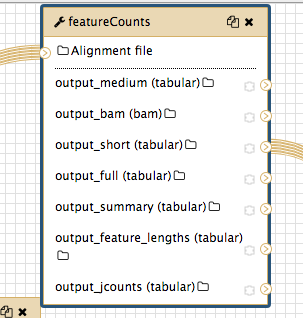
I received some user feedback that in the editor view the featurecounts outputs are a bit confusing, see below (e.g. it's not very obvious to users what
output_short,output_mediumandoutput_fullare).
This should be straightforward, we can display the label (maybe on hover, to not cram too much text in there ?)
 mvdbeek
All 4 comments
Displaying the labels would be really great (if that's possible)!
 mblue9
on 25 Sep 2018
mblue9
on 25 Sep 2018
As usual I haven't thought about this enough. Many tools use cheetah to fill in a couple of things, this is most of the time {on_string} and/or {tool.name}. We could try to fill those in using cheetah, but we'd probably miss some of the more extravagant labels like ${input.name} (as BAM). A quick grep through the IUC tells me this isn't used a lot and would probably improve the situation for 95% of the tools. Or we just display the label as it is defined in the xml (${tool.name} on ${on_string}: junction counts) for the featureCounts example.
mvdbeek
on 25 Sep 2018
I made some progress on this, I think this is actually feasible if we replace on_string with input dataset(s):
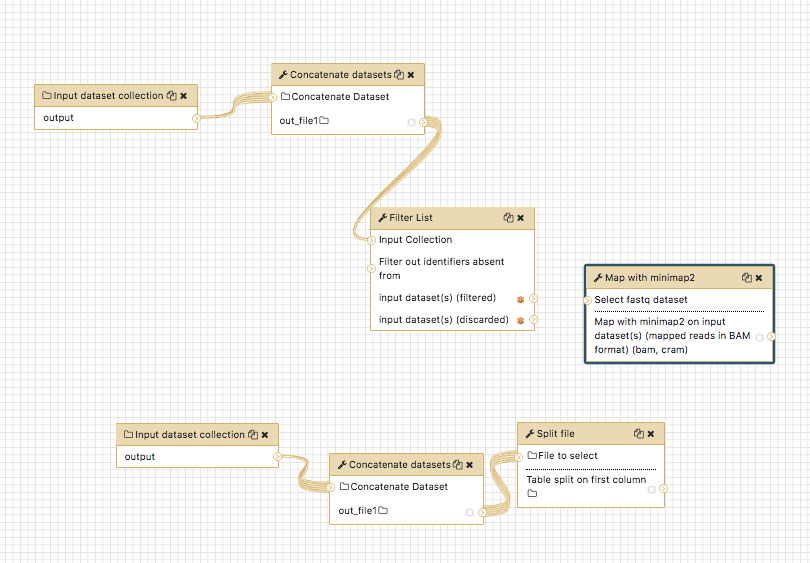
Concatenate datasets here doesn't have a label, but the others do.
This is from https://github.com/mvdbeek/galaxy/commit/4cdd0774c5fd5b9a1eaafe034ae1c20c077abf92 -- Just need to figure out what to do with the actual variable name. We have to display it somewhere so that the rename actions make sense.
mvdbeek
on 25 Sep 2018
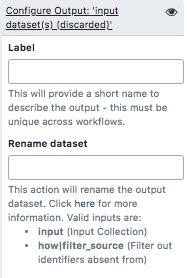
I think I got this right now, and in addition I'm also displaying the available inputs as a list, with the variable name in bold and the label as you see it in the editor next to it -- that should hopefully make things easier:
mvdbeek
on 26 Sep 2018
Related issues
 beatrizserrano
·
4Comments
beatrizserrano
·
4Comments
 tnabtaf
·
4Comments
tnabtaf
·
4Comments
 jennaj
·
4Comments
jennaj
·
4Comments
 dannon
·
5Comments
dannon
·
5Comments
 jmchilton
·
4Comments
jmchilton
·
4Comments
Most helpful comment
I think I got this right now, and in addition I'm also displaying the available inputs as a list, with the variable name in bold and the label as you see it in the editor next to it -- that should hopefully make things easier:
