Galaxy: Access to shared histories
I want to share a history via link. If I do so, the data items are not viewable. (Permissions on first dataset were manually changed.)
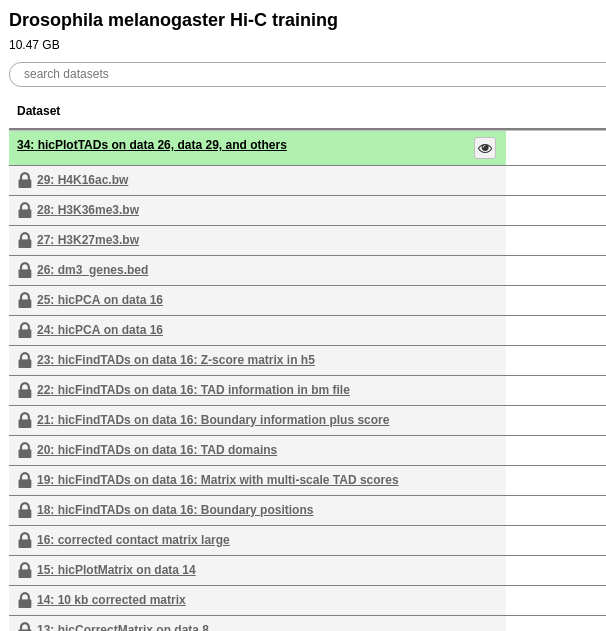
The only way to change this is to change the access permissions in my history for every item by hand (!!!). It would be nice if either
- the default option that if I share my history via link, all items are viewable or
- that checkboxes with
make all items viewableand / ormake all items editableare offered.
Thanks for considering.
 joachimwolff
All 13 comments
This just happened to me to. Super mind numbing to to edit dataset permissions individually. Sharing by link should definitely give a checkbox to remove any access permissions.
 hexylena
on 2 Jul 2018
hexylena
on 2 Jul 2018
Update: there is also no API for this so it isn't possible to automate with bioblend.
hexylena
on 2 Jul 2018
This happened again to us and it's really tough to explain to our users: "No sharing doesn't work like all of the other systems, that 'NOTE' in the management screen for access permissions is the most important note and you need to read + understand it to do sharing right." It isn't a user problem, it's a user experience/expectations problem from the other web based systems they use. I think there is sufficient evidence that our sharing interface is "clunky" and would like to propose the following (requiring API + UI changes):
I'd like to propose we try and align our interface (where possible) like Google Drive to better match what users will be familiar with. A history is like a folder, and then inside there are datasets. Honestly I think we should copy the dialog wholesale:
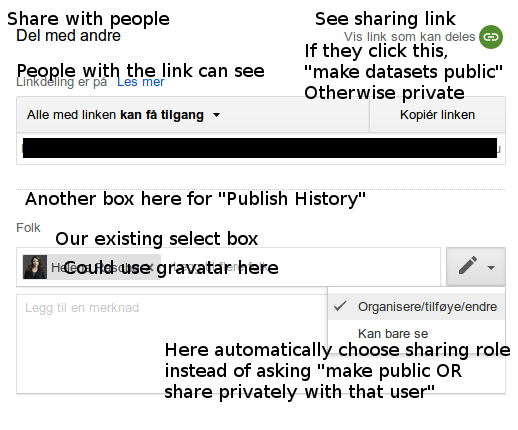
And then re-use exactly the same sharing form for dataset permissions, just like gdrive does for sharing folders vs datasets. If necessary, put in a "Old sharing form" button at the bottom which shows the old sharing form?
hexylena
on 22 Aug 2018
Problem continues with creating pages. From @eschen42 on gitter
If I create and make "accessible" Galaxy pages that reference particular datasets (through the page editor, not by pasting links), will this make them not public?
hexylena
on 12 Sep 2018
@dannon @guerler what do you think about this? (Easy) sharing is for our users currently broken :(
 bgruening
on 12 Sep 2018
bgruening
on 12 Sep 2018
This isn't something we recently broke, right, it has always been like this?
(regardless of the answer to that, yes, we should improve the behavior here somehow -- sharing by a link being worthless is pretty annoying)
 dannon
on 12 Sep 2018
dannon
on 12 Sep 2018
I'd imagine that this is how it always worked, but we should add some smart logic to the sharing functions to detect permission issues and then an easy and immediate way for the user to change them.
Clippy pops up: "hey, it looks like you are trying to share this item with x, but they won't be able to view yz due to permissions, would you like to give them access to all these items, some of these items, or none?" Similarly for making sharable links, allow making things public.
 blankenberg
on 12 Sep 2018
blankenberg
on 12 Sep 2018
@blankenberg Ok, cool, I thought it had always been like this, too. I like that solution, should be fairly straightforward to detect and have an extra action on the sharing interface.
dannon
on 12 Sep 2018
As an aside, it looks like permissions don't exist at the collection level since it can be viewed/expanded; perhaps they should be?
Could also just be looking at the image wrong.
blankenberg
on 12 Sep 2018
Yes this is how it always worked.
- sharing a link
- sharing pages
- sharing histories
are all affected by this.
I mean, +0 on clippy since I definitely proposed that in https://github.com/galaxyproject/galaxy/issues/935 , but I'd really rather it be fixed with a google style sharing dialog and a checkbox (defaulting to checked) that says "all of these items will be shared with the people you're allowing access" (since that would be less complicated/overwhelming on the UI side than allowing complicated operations like selecting individual datasets.)
hexylena
on 12 Sep 2018
I was halfway there with https://github.com/galaxyproject/galaxy/pull/1334, I don't think much is missing there
I had a rudimentary attempt, that probably needs quite a bit more work
 mvdbeek
on 12 Sep 2018
mvdbeek
on 12 Sep 2018
As an aside, it looks like permissions don't exist at the collection level since it can be viewed/expanded; perhaps they should be?
Could also just be looking at the image wrong.
If so, I see it the same way. I have collections with 211 members each that have been multiply processed (i.e., processed with tools that produce multiple 211-member collections) - to manipulate each dataset's permission manually is daunting to say the least.
 eschen42
on 18 Sep 2018
eschen42
on 18 Sep 2018
This should be fixed with #6793 @joachimwolff we'll upgrade tuesday.
hexylena
on 7 Dec 2018
Related issues
 mtekman
·
4Comments
mtekman
·
4Comments
 scholtalbers
·
5Comments
scholtalbers
·
5Comments
 natefoo
·
4Comments
natefoo
·
4Comments
 beatrizserrano
·
4Comments
blankenberg
·
4Comments
beatrizserrano
·
4Comments
blankenberg
·
4Comments