Gala: Arranging multiple monitors on top of eachother
Currently it isn't possible to position an external monitor above (or below?) the primary monitor. Not sure if this is a feature or a bug, but I'm hoping it's the latter.
Maybe relevant?:
https://elementaryos.stackexchange.com/questions/8415/multiple-monitors-not-functioning-properly
https://www.reddit.com/r/elementaryos/comments/6qzift/how_to_move_a_window_to_second_monitor_above/
Want to back this issue? Post a bounty on it! We accept bounties via Bountysource.
 cmonagle
All 9 comments
Could you describe why not? Where / how it fails?
I've also had issues, where the Display settings interaction had hard to describe quirks, but I've been able to do this.
Maybe if you experienced something similar you could create a screen recording?
 peteruithoven
on 3 Aug 2017
peteruithoven
on 3 Aug 2017
Two screencasts:
First one demosntrastes bugginess attempting to stack monitors (though I was able to do it this time)
Second demonstrates that even after, you can't pass through wingpanel to actually move windows to the above the primary display.
cmonagle
on 3 Aug 2017
I've also experienced the first issue (Screencast from 2017-08-02 18.23.28).
The second I haven't experienced.
peteruithoven
on 3 Aug 2017
I can make it work by making the top monitor the primary, and then dragging a windows to the bottom monitor. The dragged window forces me to place it in some sort of weird quadrant, but then I can resize the window as normal, and use it just fine. So strange.
 derekmoyes
on 10 Nov 2017
derekmoyes
on 10 Nov 2017
I get same issue here.
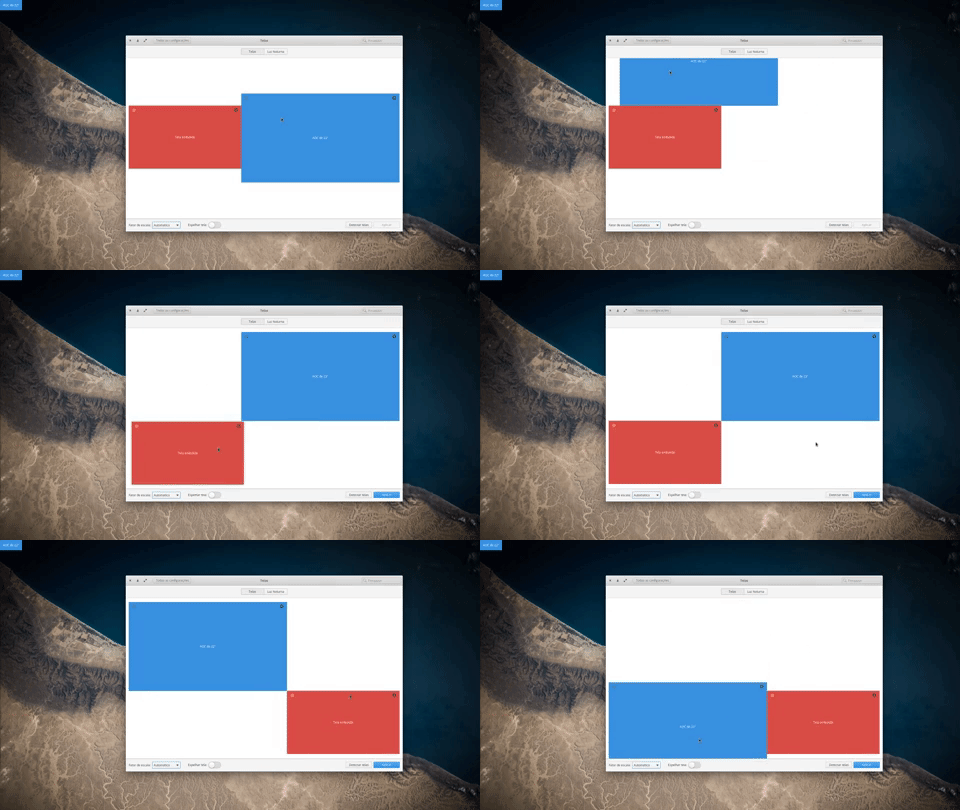
 brcmesquita
on 11 Mar 2019
brcmesquita
on 11 Mar 2019
I get same issue here.
me too
would really like for this to work
 zagatta
on 3 Apr 2019
zagatta
on 3 Apr 2019
Same issue here. After insisting it suddenly let me stack the monitors. However the top monitor behaves strangely. Maximizing the windows only takes 10% right of the screen and I can't move the windows in the middle of the screen; it's like the screen is split vertically in two parts. Making the top monitor the primary is not a valid solution for me because then the app bar is between the monitors which is annoying.
 m0skit0
on 4 Jul 2019
m0skit0
on 4 Jul 2019
Same issue here. After insisting it suddenly let me stack the monitors. However the top monitor behaves strangely. Maximizing the windows only takes 10% right of the screen and I can't move the windows in the middle of the screen; it's like the screen is split vertically in two parts. Making the top monitor the primary is not a valid solution for me because then the app bar is between the monitors which is annoying.
Same Issue here.
brcmesquita
on 4 Jul 2019
The various issues mentioned above have been fixed thanks to updates to the panel and Displays settings plug.
 cassidyjames
on 14 Apr 2020
cassidyjames
on 14 Apr 2020
Related issues
 waldyrious
·
4Comments
waldyrious
·
4Comments
 danrabbit
·
3Comments
danrabbit
·
3Comments
 techdev5521
·
3Comments
techdev5521
·
3Comments
 Blast-City
·
4Comments
Blast-City
·
4Comments
 hanaral
·
4Comments
hanaral
·
4Comments
Most helpful comment
Same issue here. After insisting it suddenly let me stack the monitors. However the top monitor behaves strangely. Maximizing the windows only takes 10% right of the screen and I can't move the windows in the middle of the screen; it's like the screen is split vertically in two parts. Making the top monitor the primary is not a valid solution for me because then the app bar is between the monitors which is annoying.