Gala: Graphical glitches when resuming from suspension
This has been an off-and-on problem for me. Generally it seems to be fixed (or broken) every few months by OS updates from AppCenter
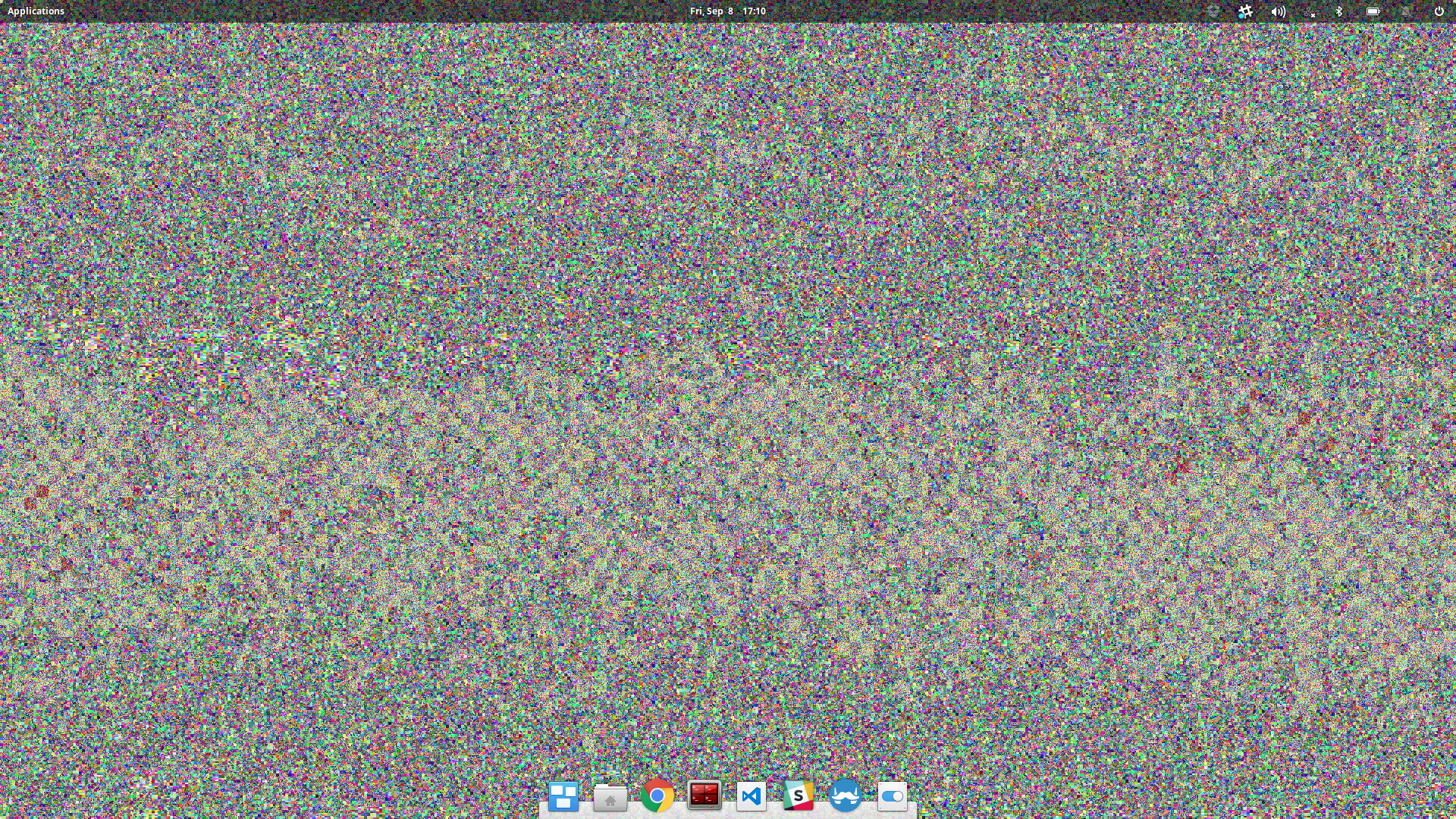
Desktop view
Look at the corners; there are small ~6px squares in each corner filled with noise

And this occasionally happens to the desktop:

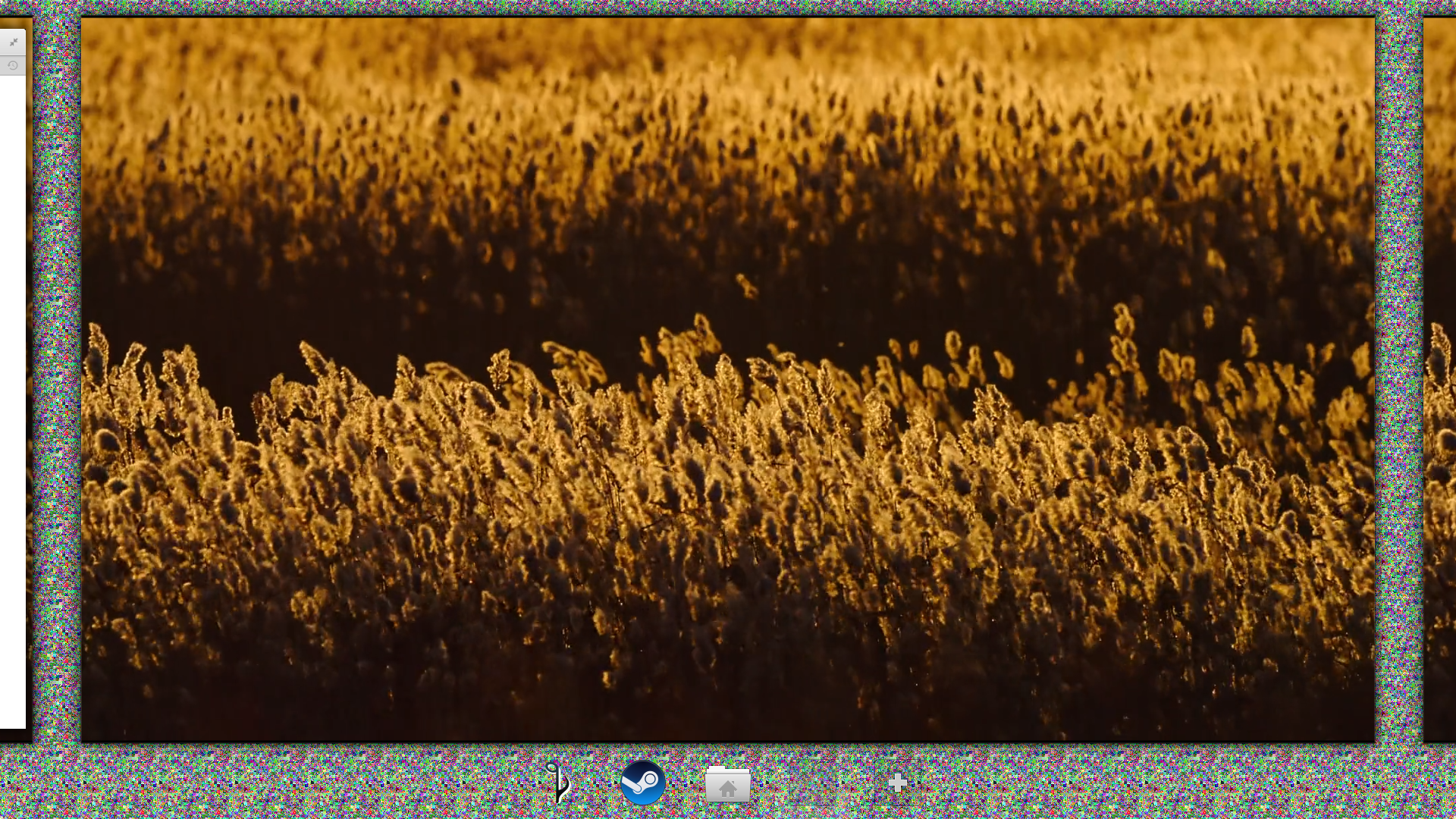
Multitasking view
Don't know what's happening here. If Gala is tiling the same image for the background, it might be reading from junk memory after resuming.

 SamCarlberg
All 22 comments
I have similar issues, after I lock my screen and unlock again,
https://www.reddit.com/r/elementaryos/comments/6dxx67/disappearing_login_sessions_when_locked/
Run sudo -i scratch-text-editor /etc/default/acpi-support
Find and change POST_VIDEO=true to POST_VIDEO=false
Find and change SAVE_VBE_STATE=true to SAVE_VBE_STATE=false
Restart your laptop, issue should be solved.
 kmf
on 9 Sep 2017
kmf
on 9 Sep 2017
could resolve it with a
gala --replace
I've had this issue on my PC's nvidia card, but haven't seen it on my intel laptop.
 Nine-H
on 18 Sep 2017
Nine-H
on 18 Sep 2017
@kmf How would you recommend running that?
I noticed that when I try that from the Terminal it's running "in the foreground", meaning you can't use that terminal anymore and can't close it.
I would recommend running it from the Applications menu.
Relevant Stack overflow question: https://elementaryos.stackexchange.com/questions/8952/artifacts-in-background (which has many duplicates)
 peteruithoven
on 11 Feb 2018
peteruithoven
on 11 Feb 2018
@kmf, that reddit topic you mention is about people losing their session, are you sure that's relevant for this issue? Has the workaround that was shared there and you share here helped with this issue?
peteruithoven
on 11 Feb 2018
@peteruithoven ...
perhaps in a screen session?
I'm not sure if it's related ... but what is consistent is NVIDIA cards ...
kmf
on 12 Feb 2018
You just need to add ampersand & at the end of the line:
gala -r &
This tells the shell to run the command at the background. It works fine for me, but if for some reason gala continues to die after you close the terminal, you can do the following:
nohup gala -r &
nohup catches and ignores the hang-up signal, that is otherwise sent to gala.
One problem is that after I restart gala, the wingpanel doesn't turn black for maximized windows. To fix this I just need to kill it and it gets restarted automatically:
pkill wingpanel
 itoshkov
on 12 Feb 2018
itoshkov
on 12 Feb 2018
Same here with NVIDIA card
 omouren
on 31 Jul 2018
omouren
on 31 Jul 2018
I think I've fixed this for Juno in #330, does anyone with an Nvidia card want to test these changes?
(gala --replace stopped working for me, so I've had to sudo ninja install my branch and reboot; YMMV.)
 jlnr
on 8 Sep 2018
jlnr
on 8 Sep 2018
@jlnr that appears to fix it for me here with an NVIDIA GTX 1050Ti and the proprietary drivers. Awesome!
 cassidyjames
on 13 Sep 2018
cassidyjames
on 13 Sep 2018
Is there any progress with this bug?
 MauricioFIUBA
on 19 Oct 2018
cassidyjames
on 20 Oct 2018
MauricioFIUBA
on 19 Oct 2018
cassidyjames
on 20 Oct 2018
I still have this issue in Juno.
 Austint30
on 21 Oct 2018
Austint30
on 21 Oct 2018
@Austint30 it's closed because it was merged to master but not released as an update yet, so wait a little bit for that.
 donadigo
on 21 Oct 2018
donadigo
on 21 Oct 2018
@donadigo Thanks for the info. I'll wait patiently. :)
Austint30
on 21 Oct 2018
There was a gala release on 12/17/2018: 0.3.2~r679+pkg45~ubuntu5.0.1. Are we expecting this issue to be fixed? If so, I'm still experiencing it. I'm not sure how the "release schedule/process" works. But I did verify I have that version installed.
 seesemichaelj
on 7 Jan 2019
seesemichaelj
on 7 Jan 2019
There was a gala release on 12/17/2018:
0.3.2~r679+pkg45~ubuntu5.0.1. Are we expecting this issue to be fixed? If so, I'm still experiencing it. I'm not sure how the "release schedule/process" works. But I did verify I have that version installed.
I haven't experienced it since I installed Juno on the same hardware and with NVidia proprietary drivers.
itoshkov
on 7 Jan 2019
this still happens to me
elementary OS 5.1.7 Hera
Nitro 5 Laptop - gtx 1650
 tdias25
on 26 Oct 2020
tdias25
on 26 Oct 2020
Yes this still happend to me..
Elementary OS 5.1.7 Hera
Nvidia MX130
nvidia-driver-455
Asus Vivobook A407UF
 aalfiann
on 18 Dec 2020
aalfiann
on 18 Dec 2020
This still happens to me after a suspend, in my case the machine was suspended all night and in the morning this issue occurred, it wasn't just the wallpaper either, it was also the wingpanel that had the artifacts. The issue is gone now since I've woken the pc, it reappeared after I rebooted as well (only for a short time, now it's completely gone). It was slightly scary, I thought my GPU was dead or something.
 relaxed-dev
on 10 Feb 2021
relaxed-dev
on 10 Feb 2021
This still happens to me after a suspend, in my case the machine was suspended all night and in the morning this issue occurred, it wasn't just the wallpaper either, it was also the wingpanel that had the artifacts. The issue is gone now since I've woken the pc, it reappeared after I rebooted as well (only for a short time, now it's completely gone).
Does the workaround described here help?
itoshkov
on 10 Feb 2021
Will have to try it when the issue arises again. Although the issue was gone I executed the command to restart the wm.
relaxed-dev
on 10 Feb 2021
Related issues
 waldyrious
·
4Comments
waldyrious
·
4Comments
 danrabbit
·
3Comments
danrabbit
·
3Comments
 worldofpeace
·
3Comments
peteruithoven
·
3Comments
worldofpeace
·
3Comments
peteruithoven
·
3Comments
 hanaral
·
4Comments
hanaral
·
4Comments
Most helpful comment
Fixed by https://github.com/elementary/gala/pull/330