Fyne: Too many successive GUI updates do not properly update the view
Describe the bug:
So, I have a grid of 25x50 canvas.Rectangles and I want to change the color of each of those rectangles. I'm using a nested loop to update each rectangle's color but the updates are not rendered for the last few nodes/cells.
If I make the thread go to sleep after every iteration, each update is properly rendered. If I use a grid of lesser dimensions, the updates are properly rendered.
To Reproduce:
Look at the code below.
Screenshots:
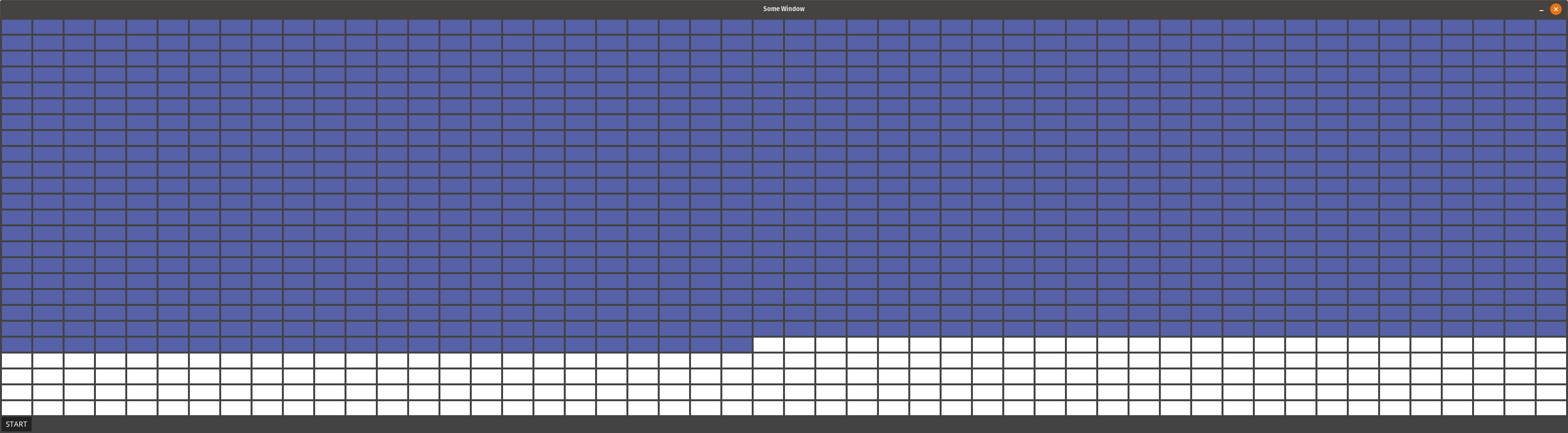
Example code:
app := app.New()
win := app.NewWindow("Some Window")

win.Resize(fyne.Size{Width: 1200, Height: 800})

container := fyne.NewContainerWithLayout(layout.NewGridLayout(50))
for i := 0; i < 25; i++ {
    for j := 0; j < 50; j++ {
        container.AddObject(canvas.NewRectangle(color.RGBA{R: 255, G: 255, B: 255, A: 1}))
    }
}

container.AddObject(widget.NewButton("START", func() {
    for i := 0; i < 25; i++ {
        for j := 0; j < 50; j++ {
            index := i*50 + j
            obj, _ := container.Objects[index].(*canvas.Rectangle)
            obj.FillColor = color.RGBA{R: 20, G: 30, B: 100, A: 1}
            obj.Refresh()
                        // Uncomment the line below and all rectangles are updated
            // time.Sleep(10 * time.Millisecond)
        }
    }
}))

win.SetContent(container)
win.Show()
app.Run()
Device (please complete the following information):
- OS: Pop!_OS
- Version: 18.04
- Go version: 1.14.1
- Fyne version: 1.2.3
 parkerqueen
All 19 comments
I suspect that you meant 255, not 1 for the alpha colour?
 andydotxyz
on 25 Apr 2020
andydotxyz
on 25 Apr 2020
You are requesting a re-draw 1250 times after you press the button.
I don't know why you get a partial redraw, that should not happen. I cannot replicate on develop. I will try 1.2.4 later.
A better approach would probably be to set all the colours and then call refresh on the parent, which will result in fewer redraw requests...
func() {
        for i := 0; i < 25; i++ {
            for j := 0; j < 50; j++ {
                index := i*50 + j
                obj, _ := container.Objects[index].(*canvas.Rectangle)
                obj.FillColor = color.RGBA{R: 20, G: 30, B: 100, A: 1}
                // Uncomment the line below and all rectangles are updated
                // time.Sleep(10 * time.Millisecond)
            }
        }
        container.Refresh()
    }
I suspect that you meant 255, not 1 for the alpha colour?
I've been using '1' for the Alpha value, gives nice and light colors as shown in the screenshot.
As for the mention of the better approach, I would love to employ it but my actual scenario/usage is a tad different. I'm working on making a visualization for the A* Pathfinding Algorithm and soon as any node/cell is updated, I repaint that node with the color resembling its status.
I'm using time.Sleep(10 * time.Millisecond) after every repaint of the node so that the visualization is actually visible to the user. I removed the sleep logic for the sake of debugging and found that the redrawing does not fully work with too many updates.
parkerqueen
on 26 Apr 2020
I've been using '1' for the Alpha value, gives nice and light colors as shown in the screenshot.
Seems like you have found a bug in the colour handling - there is no way that a 1/255th of a colour range should produce such contrasting colours. I have raised a ticket for this as #909, sorry for the confusion.
andydotxyz
on 27 Apr 2020
Aha! I have found the source of this problem. Our render buffer is currently capped at 1024 and you are managing to push more than that number of updates per frame. oops!
How to fix this correctly will be a bit of a thinker but we need to fix this for next release.
andydotxyz
on 27 Apr 2020
Just a naive thought for a quick fix: can we have a method exposed somewhere to force the rendering and clear the buffer?
parkerqueen
on 27 Apr 2020
It sounds attractive on the surface, but given that the fixed length of the buffer you would need to call it mid-way through your updates, possibly even every line which would be a really bad experience.
Unfortunately it's one of those times that it really needs to be fixed correctly.
That said a possible quick fix is for us to increase the size of the frame render buffer ;)
andydotxyz
on 27 Apr 2020
Increasing the channel’s size is a patch not a fix :).
I cannot see what better we could do for 1.3.
IMO a fix would remove the channel and therefore the source of this problem at all.
ATM, I don’t have a concept ready for such a change :/.
 toaster
on 6 May 2020
toaster
on 6 May 2020
It used to be that the channel separated app logic from render code to protect from race conditions.
However that was broken some time ago and now it's only used for cleaning out a cache, that code must run on the mainloop which is why the channel is still required - the mainloop iterates through the pending clears.
I'm not sure if we can just remove that.
andydotxyz
on 6 May 2020
I don’t say it will be easy and it definitely won’t happen before 2.0.
I have some ideas but they are still vague and need much more thinking.
toaster
on 7 May 2020
I wonder if we should just increase from 1k to 4k slots in the meantime? it's per-window so won't be a massive memory increase and will at least make someones life better :)
andydotxyz
on 7 May 2020
We'd like to grow that channel if possible - whoever tries this could fall back to a 4k buffer :)
andydotxyz
on 8 May 2020
https://godoc.org/github.com/eapache/channels#ResizableChannel
might be a solution - reading the dev chat though, it does seem to have some performance downsides as its effectively proxies the real channels
https://stackoverflow.com/questions/26447060/variable-length-channel-create
Might be simpler to just bump it to 8k or something by default. Maybe add an ENV var to let the user control it ?
 steveoc64
on 8 May 2020
steveoc64
on 8 May 2020
I will be adding an API as part of #348 to allow the user to configure some internal behaviour re caching and other memory tuning prior to doing ShowAndRun() on the main window / app.
It would make sense I think to include a pair of tuning parameters to cover this notification channel:
- Set the size of the buffer, default to 4K unless told otherwise
- Set the behaviour on overflow - discard latest / discard oldest
Up to you, but I can include this issue in the PR im putting together to sort the memory issue out.
steveoc64
on 9 May 2020
Might be simpler to just bump it to 8k or something by default. Maybe add an ENV var to let the user control it ?
Not sure this is the sort of thing an end user should be able to configure. Maybe a dev, but even that's a bit messy if this is just a temporary solution.
andydotxyz
on 9 May 2020
Up to you, but I can include this issue in the PR im putting together to sort the memory issue out.
I'm not sure. Not only is this an internal detail but it is specific to the (current implementation of) the GLFW driver - I'm open to ideas but it seems like it might be a little confusing to do well.
andydotxyz
on 9 May 2020
Following on from our call this week we worried that this could be triggered on long window resizes.
The patch I am submitting to fix #913 removes that worry :)
andydotxyz
on 11 May 2020
there is no way that a 1/255th of a colour range should produce such contrasting colours
Oops, I see now that you were using RGBA which is pre-multiplied alpha. This means that the conversion within go colour code is responsible for converting so it wasn't a fyne bug afterall. I moved to using NRGBA everywhere as that reflects the usual non-pre-multiplied colour space that people familiar with HTML or RGB colour pickers would expect. You may want to try that too.
andydotxyz
on 13 May 2020
on develop for testing. I took the easy way out and we will review how this works as part of the 2.0 overhaul of widget rendering.
andydotxyz
on 13 May 2020
Related issues
 MarkRosemaker
·
5Comments
MarkRosemaker
·
5Comments
 semyon-dev
·
4Comments
semyon-dev
·
4Comments
 HeyDon-Lee
·
9Comments
HeyDon-Lee
·
9Comments
 lusingander
·
3Comments
andydotxyz
·
7Comments
lusingander
·
3Comments
andydotxyz
·
7Comments
Most helpful comment
I wonder if we should just increase from 1k to 4k slots in the meantime? it's per-window so won't be a massive memory increase and will at least make someones life better :)