Fyne: How do I set the size and position of the window?
I want to set the size and position of the window.
Either it can't be found or it doesn't work.
 HeyDon-Lee
All 9 comments
To set the size use Window.Resize().
There is currently no support for setting window position (it is not possible to support that on all platforms so we don’t include it).
 andydotxyz
on 10 Jun 2019
andydotxyz
on 10 Jun 2019
@andydotxyz
Window.Resize () has failed.
Maybe I wrote the wrong code. Can you give me an example?
HeyDon-Lee
on 10 Jun 2019
myWin.Resize(fyne.NewSize(200, 300)) should be all you need.
If this is not working can you provide some more information?
andydotxyz
on 10 Jun 2019
Sometimes the size of the generated window is successful, and sometimes what is the failure?
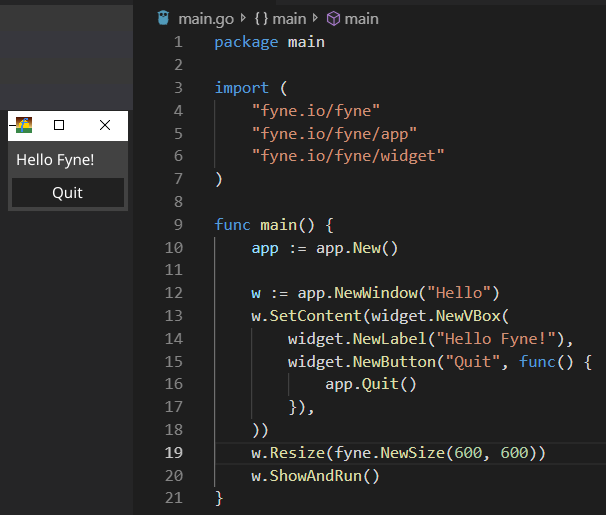
HeyDon-Lee
on 11 Jun 2019
OS:Windows 10 v1903
Go version:go1.12.5 windows/amd64
GCC version:6.2.0
HeyDon-Lee
on 11 Jun 2019
Ah, thank you. There is a known bug that means sometimes the window does not use the size requested. We are fixing it and will have the resolution public in the release next week.
andydotxyz
on 11 Jun 2019
Can the author get help from this code?
package main

import (
    "github.com/lxn/walk"
)

func main() {
    window, _ := walk.NewMainWindow()
    window.SetWidth(400)
    window.SetHeight(200)

    // Set position
    window.SetX(500)
    window.SetY(500)

    window.Show()
    window.Run()
}
Thanks but we do not use the walk backend. It's GLFW but the resize issues are partly due to internal Fyne code that we are working on right now for 1.1 release.
andydotxyz
on 12 Jun 2019
@andydotxyz I don't want all the platforms to support this feature, just macOS and windows10 are ok for me now.
So I need to export the github.com/go-gl/glfw/v3.2/glfw.Window, then GetPos and SetPos can be used by fyne.Window.
Now it works, I think it is not so ideal, but I don't have time to wait for your official release.
 sanguohot
on 11 Dec 2019
sanguohot
on 11 Dec 2019
Related issues
 Jacalz
·
4Comments
Jacalz
·
4Comments
 boussou
·
9Comments
andydotxyz
·
3Comments
boussou
·
9Comments
andydotxyz
·
3Comments
 Nigh
·
5Comments
Nigh
·
5Comments
 MarkRosemaker
·
5Comments
MarkRosemaker
·
5Comments