Fyne: Mac: Unable to input `@` from a German keyboard into `Widget.Entry`
Hi,
during testing of a small application it became clear it's not possible to enter an @ character from a German keyboard on Mac OS X.
The German keyboard layout does not have a dedicated key for the @ symbol but instead used Option + l (lower-case l).
It can be tested by adding the German layout as a keyboard layout and selecting it. In any input field you can then enter text (Shift+2 on German is now ") and when the entry for an @ is made (Option + l) it simply doesn't do anything.
It seems to wait for further input. On the American layout things like Option + u u produce ü correctly.
Additional info:
Updated today with go get, last log:
commit 8664941296690c67601c71712ec44b7beb091ead (HEAD -> develop, origin/develop, origin/HEAD)
Author: Andy Williams <[email protected]>
Date:   Wed May 1 22:29:17 2019 +0100

    Don't add a button bar if the form has no buttons
 terwey
All 13 comments
Resolved with c7f595b
 andydotxyz
on 4 May 2019
andydotxyz
on 4 May 2019
I just pulled the latest changes again, and I can see in the git log that this commit is present however the bug remains. I am still unable to enter that symbol using left option + l.
Is there some way I can send more information on how this is happening?
terwey
on 6 May 2019
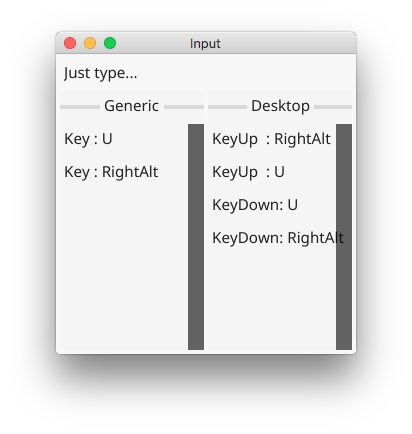
Please run fyne_demo and tap "Input" input the keyboard combination and send us a screenshot of what happens :). Thanks
andydotxyz
on 6 May 2019
Hi,
that seems to have found the problem. It registers the left-option as right-alt:
terwey
on 6 May 2019
Hi, I have the same problem with the '@' on italian keyboard and MacOS. Here a sample code:
package main

import (
    "fyne.io/fyne"
    "fyne.io/fyne/app"
    "fyne.io/fyne/theme"
    "fyne.io/fyne/widget"
)

func main() {
    app := app.New()
    app.Settings().SetTheme(theme.LightTheme())

    label := widget.NewLabel("")
    label.Alignment = fyne.TextAlignTrailing

    entry := widget.NewEntry()
    entry.SetPlaceHolder("Enter your text")
    entry.OnChanged = func(s string) {
        label.SetText(s)
    }

    multi := widget.NewMultiLineEntry()

    win := app.NewWindow("Hello World")
    win.SetContent(widget.NewVBox(
        entry,
        label,
        multi,
        widget.NewButton("Quit", func() {
            app.Quit()
        }),
    ))

    win.Resize(fyne.Size{Width: 500, Height: 200})
    win.ShowAndRun()
}
and the go.mod
module fynetutorial

go 1.12

require (
    fyne.io/fyne v1.0.1
    github.com/go-gl/gl v0.0.0-20190320180904-bf2b1f2f34d7 // indirect
    github.com/go-gl/glfw v0.0.0-20190409004039-e6da0acd62b1 // indirect
    github.com/josephspurrier/goversioninfo v0.0.0-20190209210621-63e6d1acd3dd // indirect
    github.com/spf13/afero v1.2.2 // indirect
    github.com/srwiley/oksvg v0.0.0-20190414003808-c520f0a6c5cc // indirect
    github.com/stretchr/objx v0.2.0 // indirect
    golang.org/x/crypto v0.0.0-20190506204251-e1dfcc566284 // indirect
    golang.org/x/image v0.0.0-20190507092727-e4e5bf290fec // indirect
    golang.org/x/net v0.0.0-20190503192946-f4e77d36d62c // indirect
    golang.org/x/sys v0.0.0-20190507053917-2953c62de483 // indirect
    golang.org/x/text v0.3.2 // indirect
    golang.org/x/tools v0.0.0-20190506145303-2d16b83fe98c // indirect
)
The same code on Ubuntu/Linux works fine: Italian Keyboard and the '@' is rendered while fail on MacOS.
By the way... I love fyne! great job thank you!
 lucasepe
on 7 May 2019
lucasepe
on 7 May 2019
@lucasepe the fix should be available into the develop branch.
It'd great if you have a chance to update your sample to use the develop branch and let us know if that fixes (testing both left and right option key).
@terwey I'm unable to replicate, see screenshot below:
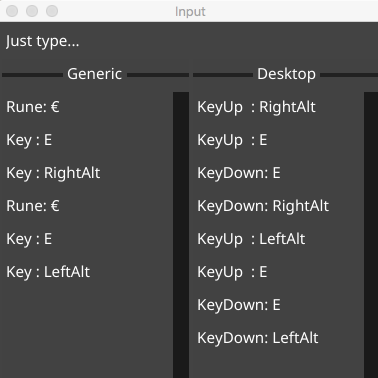 .
.
Is it possible to provide more information about your enviroment like OS version and go version ?
 lucor
on 7 May 2019
lucor
on 7 May 2019
@lucor tested with:
require fyne.io/fyne v1.0.2-0.20190505212842-942ba7ac04bf
and works great with both left and right option keys. Great job!
lucasepe
on 7 May 2019
@lucasepe Great, thanks!
lucor
on 7 May 2019
Hi,
I redid the test today. I suddenly realised that because I use an external keyboard... maybe just maybe it is because of that.
I did the test twice, once with the laptop keyboard, and once with the external.
The external is a Cherry USB keyboard _but_ I changed the keyboard modifier keys where cmd and alt are swapped. Maybe this confuses Fyne too.
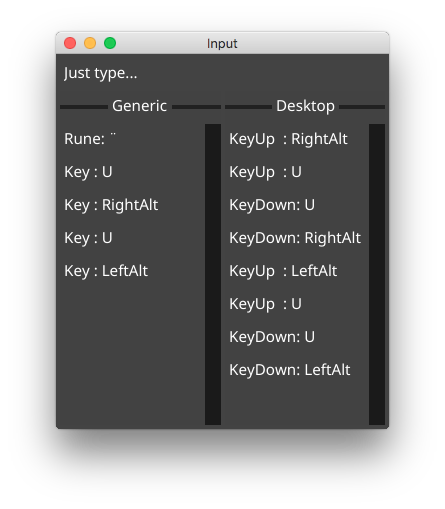
However, I just tested and even with the built-in keyboard set to German I am unable to make an @.
$ go version
go version go1.12.1 darwin/amd64
git commit 942ba7ac04bfb8f7e692a10a32ab847ccb839b6d for fyne
terwey
on 10 May 2019
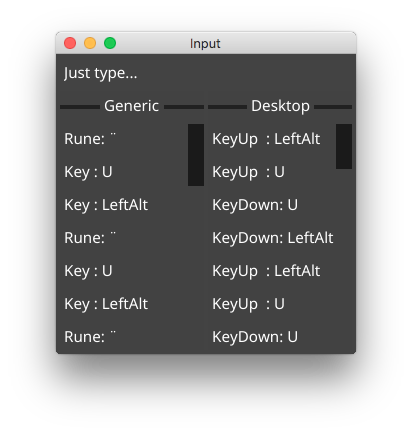
That commit is before the fix was applied. Execute:
go get -u fyne.io/fyne
and try again.
andydotxyz
on 10 May 2019
```commit 263a14d18b4bd12ab8644a61bd5b9de9840162f7 (HEAD -> develop, origin/develop, origin/HEAD)
Author: Andy Williams andy@andy.xyz
Date: Wed May 8 23:23:15 2019 +0100
Add a Select box widget

This offer a choice of options in a smaller space than the Radio widget.
Fixes #21
```
terwey
on 10 May 2019
Thanks. Is this the internal keyboard?
andydotxyz
on 10 May 2019
Yes, internal Macbook keyboard (US) using the German layout
On 10. May 2019, at 19:25, Andy Williams notifications@github.com wrote:
Thanks. Is this the internal keyboard?
—
You are receiving this because you were mentioned.
Reply to this email directly, view it on GitHub, or mute the thread.
terwey
on 10 May 2019
Related issues
 jiajunhuang
·
7Comments
jiajunhuang
·
7Comments
 Jacalz
·
4Comments
Jacalz
·
4Comments
 HeyDon-Lee
·
9Comments
andydotxyz
·
3Comments
andydotxyz
·
9Comments
HeyDon-Lee
·
9Comments
andydotxyz
·
3Comments
andydotxyz
·
9Comments