Describe your feature request
- Currently, there is no way to open an attachment with an external editor.
- ex) Open attached PDF file with external PDF reader.
- Suggested UI: double clicking attachment (both link and preview) to open it with external editor.
Additional context
- macOS version
 Pusnow
All 6 comments
Can you do QuickLook on it?
 gingerbeardman
on 1 Oct 2019
gingerbeardman
on 1 Oct 2019
QuickLook is not enough.
To modify (annotate) PDFs, I have to open with external editor (PDF Expert).
Also, there are many files does not have QuickLook extension.
BTW, QuickLook seems to be supported only for TextBundle.
Pusnow
on 1 Oct 2019
I understand the need to open/view attachments.
But I'm not sure what you mean regarding QuickLook on TextBundle. Is this in Finder or FSNotes? Does QuickLook window have an Open/Edit button or not?
These questions are to gauge how much work is needed to implement the feature.
gingerbeardman
on 1 Oct 2019
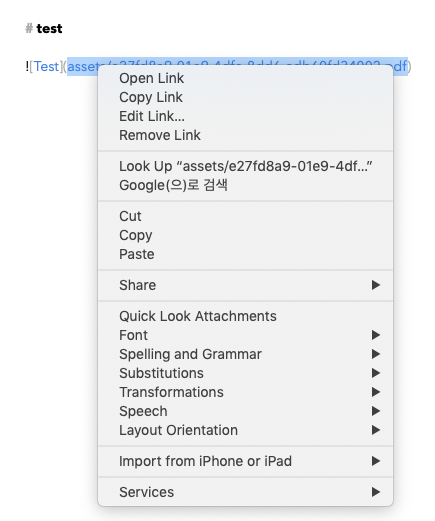
TextBundle's context menu:
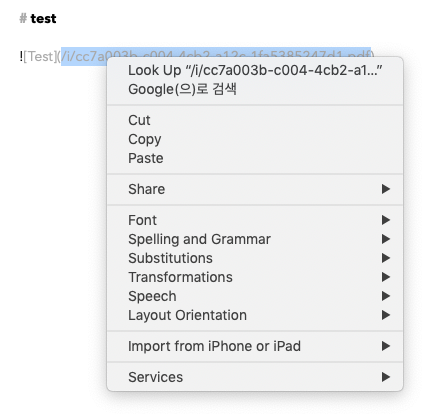
Pure markdown's context menu:
Pusnow
on 1 Oct 2019
If you choose "Quick Look Attachments", the top of the QuickLook window looks like this:

So you can choose to "Open with Preview" (default app for that file type) there.
Not ideal, but a temporary workaround.
gingerbeardman
on 1 Oct 2019
Nice catch, will be implemented in next release 👌 I think attachments should be more polished.
 glushchenko
on 1 Oct 2019
glushchenko
on 1 Oct 2019
Related issues
 erikrose
·
4Comments
erikrose
·
4Comments
 pvinis
·
4Comments
pvinis
·
4Comments
 shurain
·
3Comments
shurain
·
3Comments
 ulab
·
3Comments
ulab
·
3Comments
 gmenzel
·
3Comments
gmenzel
·
3Comments