I know the Cmd-R keyboard shortcut exists, but it would be nice to be able to click the title of a note in the sidebar and rename it (see nvALT for this behaviour).
 mikepqr
All 5 comments
Just click on title under edit area.
 glushchenko
on 30 Nov 2018
glushchenko
on 30 Nov 2018
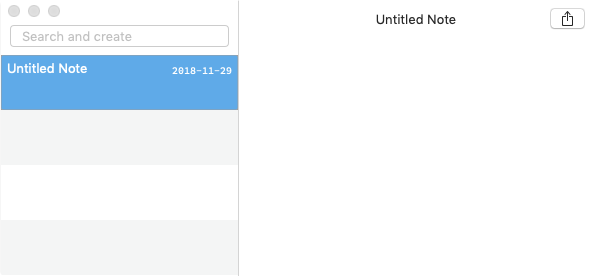
I'm sorry, I can't figure out what this means. Could you clarify? I've clicked pretty much everywhere in this UX, including both occurrences of the note title.
mikepqr
on 1 Dec 2018
On desktop, double-clicking the note title over the note itself (not the list) seems to work.
I agree that retitling directly in the list would also be nice.
 floodfish
on 1 Dec 2018
floodfish
on 1 Dec 2018
The note file name is shown at the top of the editor window. If you double-click on this file name, it should go into edit mode and allow you to change the file name. I do this on a regular basis and it works as expected. This was a feature introduced with FSNotes 2.5, so you should check the version you are using.
BTW, the file name shown at the top of the editor window is normally the same as the note title shown in the Notes List. This will not be the case if you have enabled the option to "use first line as title."
 peavine
on 1 Dec 2018
peavine
on 1 Dec 2018
Got it. Thanks.
mikepqr
on 2 Dec 2018
Related issues
 jakemkc
·
4Comments
jakemkc
·
3Comments
jakemkc
·
4Comments
jakemkc
·
3Comments
 tewe
·
3Comments
tewe
·
3Comments
 shurain
·
3Comments
shurain
·
3Comments
 sloria
·
3Comments
sloria
·
3Comments
Most helpful comment
The note file name is shown at the top of the editor window. If you double-click on this file name, it should go into edit mode and allow you to change the file name. I do this on a regular basis and it works as expected. This was a feature introduced with FSNotes 2.5, so you should check the version you are using.
BTW, the file name shown at the top of the editor window is normally the same as the note title shown in the Notes List. This will not be the case if you have enabled the option to "use first line as title."