Fsnotes: Search/create (command L) does not create a new note if the text is contained in another note
In nvalt
- If I type 'tuesday' notes CONTAINING the word 'tuesday' show up.
- If there is not already a note TITLED 'tuesday' pressing return creates a new note with the TITLE 'tuesday
In fsnotes
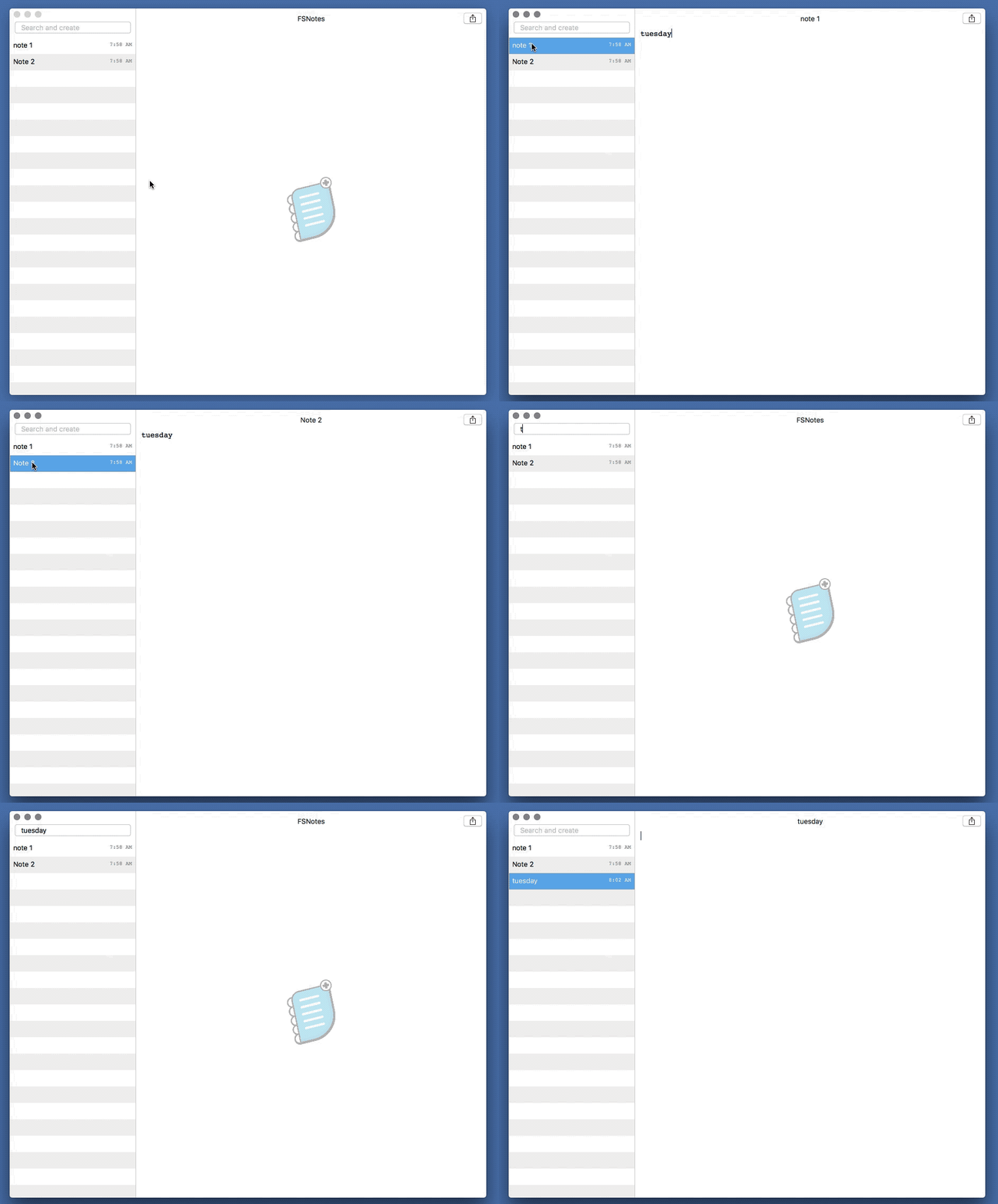
- If I type 'tuesday' notes CONTAINING the word 'tuesday' show up.
- PROBLEM: If there is not a note TITLED 'tuesday,' pressing return DOES NOT create a new note. Instead, it places the cursor inside the top search result.
 30thirteen
All 10 comments
FSNotes will work the way you want if you go to FSNotes preferences, then the User Interface tab, then remove the checkmark from "Note auto selection when body text matched".
 peavine
on 17 Aug 2018
peavine
on 17 Aug 2018
Thank you for replying.
That didn't work.
I quit and restarted the app after unchecking the box to see if that would
fix it, but it still doesn't work.
On the web:
jeffreylong.net http://www.jeffreylong.net
jeffreylongstudios.com http://www.jeffreylongstudios.com
30thirteen.com http://www.30thirteen.com
Social media:
Facebook.com/jeffreylong.net
Twitter @30thirteen
Pinterest.com/jeffreyclong
Linkedin: linkedin.com/in/jeffreylong3013
On Thu, Aug 16, 2018 at 5:30 PM, peavine notifications@github.com wrote:
FSNotes will work the way you want if you got to FSNotes preferences, then
the User Interface tab, then remove the checkmark from "Note auto selection
when body text matched".—
You are receiving this because you authored the thread.
Reply to this email directly, view it on GitHub
https://github.com/glushchenko/fsnotes/issues/337#issuecomment-413723172,
or mute the thread
https://github.com/notifications/unsubscribe-auth/ATGB7gWH9AdO5M2JRonVsANnfgmiRaDhks5uRg6dgaJpZM4WAwT9
.
30thirteen
on 17 Aug 2018
I see the same problem as @30thirteen. Assuming "Note auto selection when body text matched" is not checked, when the search does not match a substring of the name of any note, hitting enter creates a new note with the search text as its name. But when the search does match a substring of the name of a note, that note is selected, and hitting enter edits that note. This behavior can be recreated with the following steps:
- Create a new folder in FSNotes.
- Create a single note in that folder named "foo" with the note text "bar"
- Search for "ba" and hit enter. A new note named "ba" will be created.
- Search for "fo" and hit enter. Rather than the expected behavior of a new note name "fo" being created, we find that we are instead editing the note named "foo".
Using nvAlt as a guide, the "foo" note should only be selected if the search text is "foo", not if the search text is "fo". Note also that in step 4 nvAlt provides a completion suggestion which, if accepted, will complete the search text to "foo", at which point the "foo" note will be being edited.
There is perhaps a more general design issue at play here, which is that in nvAlt the contents of the search bar is always correlated with the title of the note being displayed and/or edited. This is not the case (yet) for FSNotes.
 gmenzel
on 17 Aug 2018
gmenzel
on 17 Aug 2018
@30thirteen. I repeated this several times with the same result. I don't know why we're seeing different behavior. I'll record a screen video later to demonstrate.
@gmenzel. I followed your four steps and I'm getting the same results. In earlier versions of FSNotes, in your step 4, autocomplete would change "fo" in the search and create bar to "foo", in which case hitting the enter key woulld place the cursor in the editor window for note "foo". With 2.0.8 autocomplete no longer appears to work or perhaps the search and create bar is not updating with the autocomplete match.
peavine
on 17 Aug 2018
@30thirteen. Are you and I doing something different?
peavine
on 17 Aug 2018
@30thirteen, this is a bug, will be fixed soon,
 glushchenko
on 17 Aug 2018
glushchenko
on 17 Aug 2018
@peavine autocomplete did not worked properly and was removed.
glushchenko
on 17 Aug 2018
@30thirteen @gmenzel fixed in 2.0.9
https://github.com/glushchenko/fsnotes/releases/download/2.0.9/FSNotes_2.0.9.zip
glushchenko
on 17 Aug 2018
Boom! Fixed!!!
On the web:
jeffreylong.net http://www.jeffreylong.net
jeffreylongstudios.com http://www.jeffreylongstudios.com
30thirteen.com http://www.30thirteen.com
Social media:
Facebook.com/jeffreylong.net
Twitter @30thirteen
Pinterest.com/jeffreyclong
Linkedin: linkedin.com/in/jeffreylong3013
On Fri, Aug 17, 2018 at 10:38 AM, Oleksandr notifications@github.com
wrote:
@30thirteen https://github.com/30thirteen @gmenzel
https://github.com/gmenzel fixed in 2.0.9
https://github.com/glushchenko/fsnotes/releases/
download/2.0.9/FSNotes_2.0.9.zip—
You are receiving this because you were mentioned.
Reply to this email directly, view it on GitHub
https://github.com/glushchenko/fsnotes/issues/337#issuecomment-413937849,
or mute the thread
https://github.com/notifications/unsubscribe-auth/ATGB7jquMQJ03gXShDI2GCih7bS-zq-Aks5uRv-UgaJpZM4WAwT9
.
30thirteen
on 18 Aug 2018
Wonderful work!
gmenzel
on 20 Aug 2018
Related issues
gmenzel
·
3Comments
 lowski
·
3Comments
lowski
·
3Comments
 floodfish
·
4Comments
floodfish
·
4Comments
 pvinis
·
4Comments
pvinis
·
4Comments
 ebsmv
·
4Comments
ebsmv
·
4Comments
Most helpful comment
@30thirteen @gmenzel fixed in 2.0.9
https://github.com/glushchenko/fsnotes/releases/download/2.0.9/FSNotes_2.0.9.zip