Fsnotes: Cursor positioning with the mouse
This is more a question than an issue.
I have a note with one or more paragraphs of text and each paragraph contains three or more lines. If I click with the mouse at the very beginning of a line (other then the first line), the cursor appears at the end of the previous line. Is there some reason for this behavior?
BTW, I can use the arrow keys to move the cursor to the start of a line of text. Also, FWIW, I tried this with TextEdit and it works exactly the same as FSNotes.
Thanks.
 peavine
All 13 comments
can you post sample note text? or an animation?
i think i am trying correctly to reproduce but i can’t see what you’re describing
 gingerbeardman
on 4 Jul 2018
gingerbeardman
on 4 Jul 2018
Thanks @gingerbeardman for the response.
To recreate the behavior, copy and paste the following paragraph of text into an FSNotes note:
This is a test note. This is a test. This is a test note. This is a test. This is a test note. This is a test. This is a test note. This is a test. This is a test note. This is a test. This is a test note. This is a test. This is a test note. This is a test. This is a test note. This is a test.
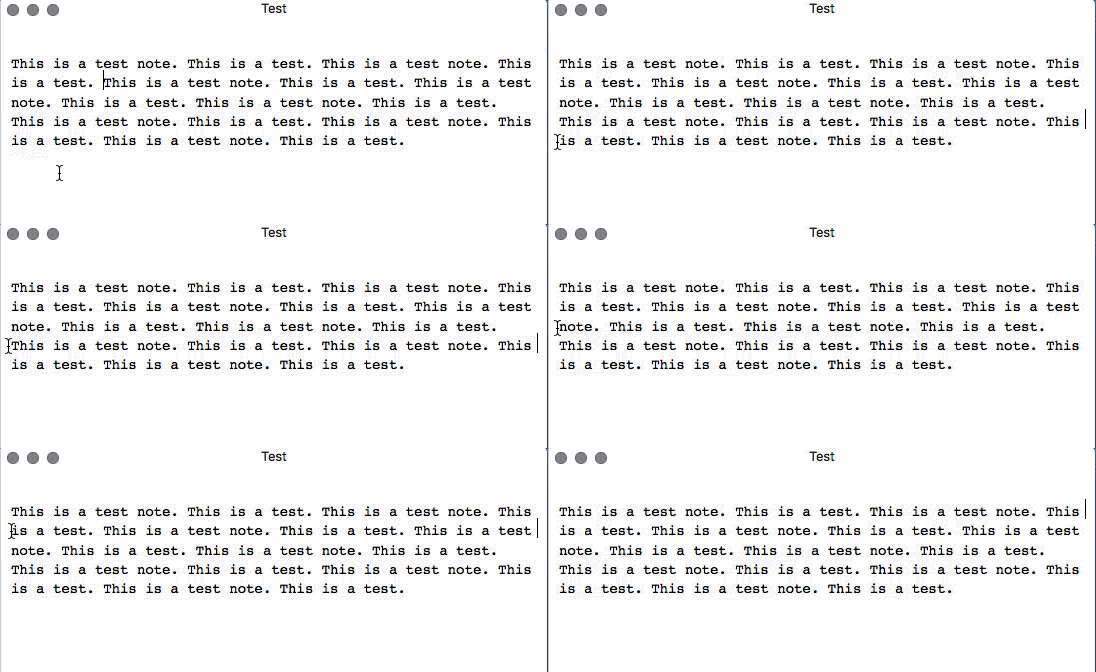
Then, with the mouse, click at the very beginning (position 1) of any line other than the first line. When I do this, the cursor appears at the end of the preceding line.
To illustrate where I click and where the cursor appears, I have inserted line feeds in the following paragraph (to maintain line length). I click at position [1] but the cursor appears at position [2].
This is a test note. This is a test. This is a test
note. This is a test. This is a test note. This is a [2]
[1]test. This is a test note. This is a test. This is
a test note. This is a test. This is a test
note.
I do not know how to do screen animations. Is there an app you would recommend?
Thanks.
peavine
on 4 Jul 2018
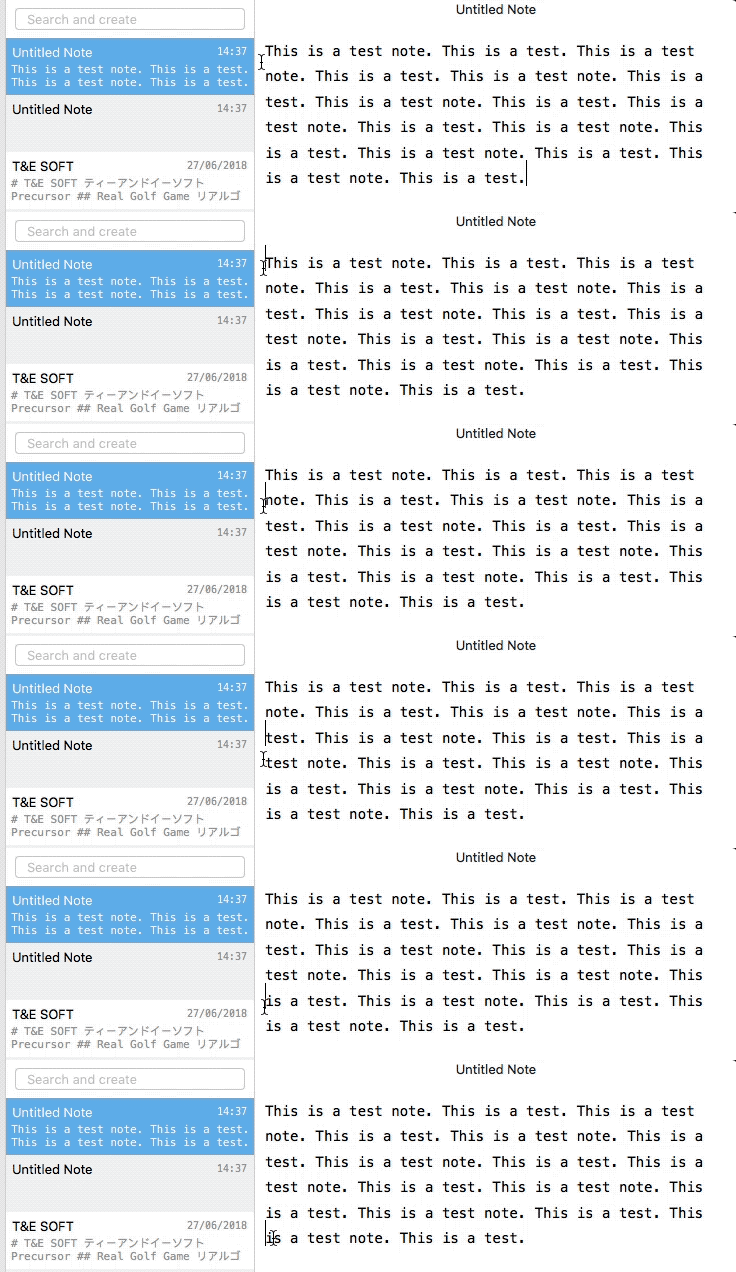 gingerbeardman
on 4 Jul 2018
gingerbeardman
on 4 Jul 2018
That's interesting--clearly something is different with my setup. I don't know what that could be, as I don't use any special mouse drivers or anything. I installed GIF Brewery and will post after learning the program.
peavine
on 4 Jul 2018
@peavine it’s not the mot straightforward, so:
- position capture window
- click record to begin
- perform
- click record to stop
- click thumbnail to see recording
- adjust start and end points
- adjust export settings (toolbar button)
- click create
- click save
- drag GIF file onto GitHub comment to upload
gingerbeardman
on 4 Jul 2018
I've included the GIF below. I enabled the option to show mouse clicks as circles.
I separately did normal trouble shooting--disabling startup programs and the like--and couldn't find anything that would cause this.
peavine
on 4 Jul 2018
Does it happen on a guest user account?
gingerbeardman
on 4 Jul 2018
I tried the guest user account and it made no difference. I also tried a different font in FSNotes and changed the FSNote focus-in-editor and restore-cursor-position prefernces. This behavior has been the case for quite some time, so it's not something recently changed in FSNotes.
peavine
on 4 Jul 2018
Ah, yes, I see you say it also happens in TextEdit.
It’s interesting that for a brief moment the cursor is where you click (mouse down?) but immediately afterwards (mouse up?) it moves “left one” and ends up at the end of the previous “line” of text.
You say you are using a mouse, is it by any chance a Magic Mouse? If so what surface do you use it on (stay with me, there’s a point to this)
gingerbeardman
on 4 Jul 2018
I use a wired Microsoft Optical Mouse with the built-in MacOS drivers on a regular fabric mouse pad. Just to be sure, I switched to a wired Logitech mouse and I experience the same issue.
BTW, this appears not to have anything to do with FSNotes, so I'm going to close this issue. Still, I appreciate any thoughts or suggestions you might have.
peavine
on 4 Jul 2018
Reason I asked is that I had similar issues, my pointer would move as I clicked which made precise artwork creation a futile task. I binned my worn fabric mouse pad and bought a new fabric mouse pad and my problem went away. Testing on various materials was enough to prove where the issue was. Probably nothing to do with your issue, but an interesting story…
gingerbeardman
on 4 Jul 2018
I did some additional google research on this but couldn't find anything. As things go, it's a pretty minor issue and I can easily live with it. Thanks @gingerbeardman for your help. At least I know it's not an FSNotes issue, and I have a neat new app in GIF Brewery.
peavine
on 5 Jul 2018
I just upgraded to Mohave and this issue is fixed. :)
peavine
on 24 Sep 2018
Related issues
 peanutputter
·
4Comments
peanutputter
·
4Comments
 iandol
·
4Comments
iandol
·
4Comments
 tewe
·
3Comments
tewe
·
3Comments
 pvinis
·
4Comments
pvinis
·
4Comments
 fi0
·
4Comments
fi0
·
4Comments