Fsnotes: [BUG] Context menu missing check marks
select "smart quotes" context menu:
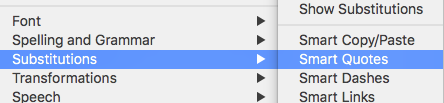
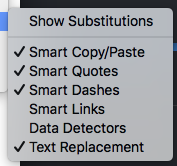
that menu should have check marks?
 gingerbeardman
All 7 comments
This doesn't seem to work for me. If I select the "Show Substitutions" menu item, the selections I make (remove check marks from Smart Links and Text Replacement) don't seem to stick after restarting FSNotes. Also, I don't see any check marks as shown in @gingerbeardman's graphic above.
EDIT:
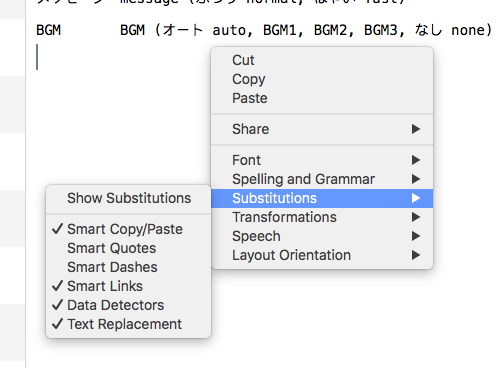
I missed @gingerbeardman's comment that his issue had to do with the context menu, which does now show check marks. Should the top-level menu also show check marks?
 peavine
on 9 Jul 2018
peavine
on 9 Jul 2018
Ah, I see what you mean in the FSNotes Edit menu.
It's only been corrected in the Context menu, where I see this:
gingerbeardman
on 9 Jul 2018
Deleted--see below.
peavine
on 10 Jul 2018
--
gingerbeardman
on 10 Jul 2018
My discussion of this issue is a bit jumbled, so I thought I would try to clarify.
From the top-level menu, when selecting Edit > Substitutions, no check marks are shown.
From the top-level menu, when selecting Edit > Substitutions, the selections I make do not stick after a restart of FSNotes.
From the context menu, when selecting substitutions, the selections I make do not stick after a restart of FSNotes.
I tried deleting the FSNote preference files to see if that might help, but it didn't.
Thanks.
FSNotes 1.9
peavine
on 10 Jul 2018
I installed FSNotes 2.0 and all three of the issues noted in my post above have been fixed. Thanks.
peavine
on 24 Jul 2018
Thanks!
gingerbeardman
on 15 Aug 2018
Related issues
 pvinis
·
4Comments
pvinis
·
4Comments
 floodfish
·
4Comments
floodfish
·
4Comments
 lowski
·
3Comments
lowski
·
3Comments
 iandol
·
4Comments
iandol
·
4Comments
 jakemkc
·
4Comments
jakemkc
·
4Comments
Most helpful comment
My discussion of this issue is a bit jumbled, so I thought I would try to clarify.
From the top-level menu, when selecting Edit > Substitutions, no check marks are shown.
From the top-level menu, when selecting Edit > Substitutions, the selections I make do not stick after a restart of FSNotes.
From the context menu, when selecting substitutions, the selections I make do not stick after a restart of FSNotes.
I tried deleting the FSNote preference files to see if that might help, but it didn't.
Thanks.
FSNotes 1.9