I think it's worth looking at the competition to see how they do things.
Quiver (free trial, $9.99 full)
_The Programmer's Notebook_
- Pros
- very polished
- very user friendly
- extremely capable
- mixed content types in the same note!
- has iPhone companion app (free)
- Cons
- stores notes in a proprietary format (package of JSON and media)
- closed source
- lots of outstanding issues
- slow release schedule
- iPhone companion app is read only
- iPhone companion app does not support iCloud
Thoughts
Closed source, semi-abandoned, iOS app not very useful
 gingerbeardman
All 19 comments
QOwnNotes (free full)
_Plain-text file notepad with markdown support and ownCloud integration_
- Pros
- very customisable
- cross platform
- scripting support
- open source
- Cons
- fugly
- not user friendly
- non-native UI
- a bit overwhelming with the amount of options
- no iOS companion app
Notes
Average.
gingerbeardman
on 27 Apr 2018
Ulysses (subscription)
_The Ultimate Writing App for Mac, iPad and iPhone_
- Pros
- fully featured
- App Design Award winner
- Universal iPhone and iPad companion app
- steady development
- Cons
- iCloud only
- subscription pricing
- closed source
Notes
Good, apart from subscription pricing.
gingerbeardman
on 27 Apr 2018
Agenda (free, paid features)
Agenda is a date-focused note taking app for both planning and documenting your projects.
gingerbeardman
on 27 Apr 2018
Mweb
Pro Markdown writing, note taking and static blog generator App
gingerbeardman
on 27 Apr 2018
Before FSNotes, I looked far and wide and couldn't find anything that supported my three essential features:
- individual files stored in the filesystem in a non-proprietary format
- support for RTF instead of just markdown (and ideally a limited RTF; I want bold, strikethrough etc but not multiple fonts or font sizes — as per nvALT and FSNotes)
- super fast search
Also I really dislike monthly/yearly subscription pricing.
In other words I wanted nvALT... except that I want it to actually run properly in 2018 😄 So as far as I have seen, FSNotes is absolutely unique and I am stoked it exists. Still, I agree, worth seeing what niceties could be "borrowed" from other apps.
 jeff-h
on 28 Apr 2018
jeff-h
on 28 Apr 2018
The note app that's included with macOS Sierra is actually quite nice, but it stores the notes in just a few files deep in the file system. Plus, it's a bit slow on my antique mac mini. FSNotes is perfect for me.
 peavine
on 28 Apr 2018
peavine
on 28 Apr 2018
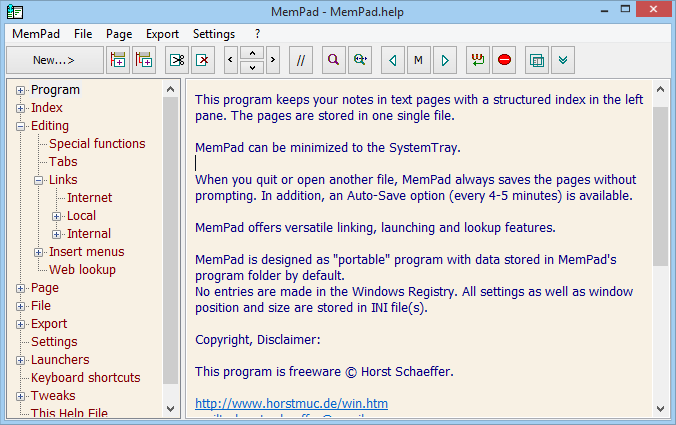
Came across this one tonight...
MemPad
http://www.horstmuc.de/wmem.htm
I really like the nested directory tree/list because I use nested folders in my notes
gingerbeardman
on 6 Jul 2018
Sorry, I'm struggling to see anything in that screenshot... 100% of my attention is on that fabulous Windows UI 🤣
jeff-h
on 8 Jul 2018
Keep It (free to try, various pricing options)
http://reinventedsoftware.com/keepit/
– macOS version is buy _or_ subscribe
- iOS version is subscription only
- saves as own file format unless you choose Markdown
Apparently this has been in development under a few different names for 14 years (Keep It Together, 2004–; Together, 2007–; Keep It, 2017–).

gingerbeardman
on 9 Aug 2018
These are some very nice similar editors that I've tried:
 bonny
on 10 Aug 2018
bonny
on 10 Aug 2018
I think FSNotes is, in many areas, ahead of all those functionally (I read each one's promo spiel but didn't download and try them all — and of course most have their own specific strengths).
However, IMO many of them do have a very nice, polished UI, which really I think they need, to set themselves apart. I think FSNotes' UI will continue to improve but primarily its features set it apart, for me.
jeff-h
on 11 Aug 2018
Caret, Typora - Electron apps, so no thanks
iA Writer - this indeed very nice
Letterspace - discontinued? at least not available in the UK App Store and developer absent since 2016
Falcon - quite nice
For me one of the main plus points of FSNote is the active and involved development. And also the easy access to the notes file storage. I'd like to see how easy that is in Falcon, and to a lesser degree Letterpress.
gingerbeardman
on 11 Aug 2018
I had never heard of Falcon, but it's a nice looking app. However, it was last updated in March 2017, which is not encouraging. I do like the app's use of the term Notebook, for what FSNotes calls a storage area.
peavine
on 16 Aug 2018
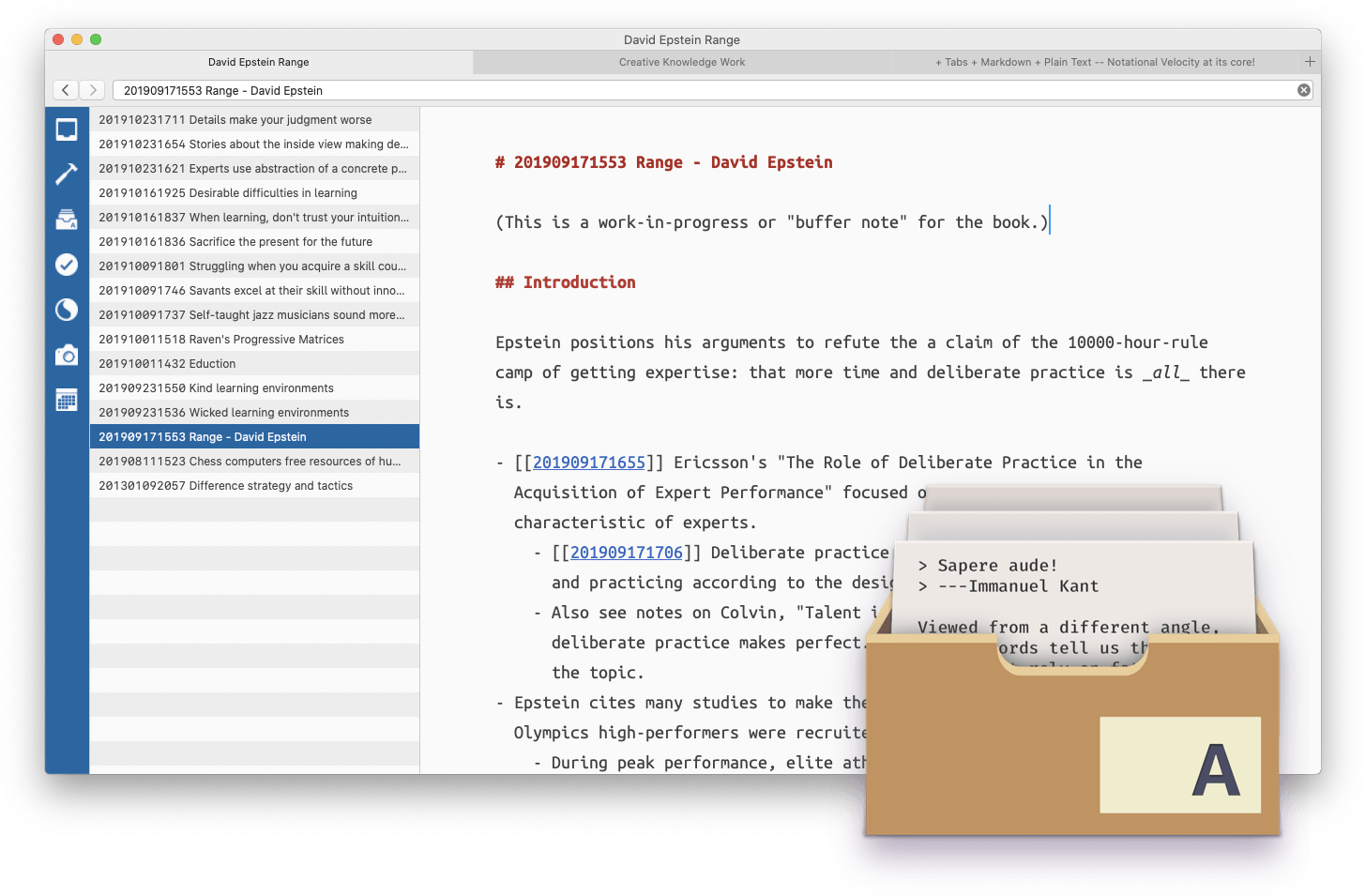
https://zettelkasten.de/the-archive/
support forum: http://forum.zettelkasten.de
I really like the use of a long reverse date string ("zettel ID", eg. 201802121037) to order/timestamp notes and make cross-reference easier.
gingerbeardman
on 17 Oct 2018
Drafts 5
https://getdrafts.com/gettingstarted/overview
Extensive feature set with a focus on sharing the text you write.
iOS for now, macOS in short term future.

gingerbeardman
on 5 Feb 2019
FoldingText
currently free, possibly abandoned?
Simple
- Plain text
- Outline formatting
- Fold and Focus to see
Surprisingly Adept
- Live formatting
- Scripts, themes, and plugins
- Plain text productivity platform
Let Me Add
- Very, very quick
- Rock solid text editing experience
Folding Text 3
Mooted as Electron app with database storage. Abandoned by developer.
gingerbeardman
on 6 May 2019
Here's another one: https://standardnotes.org
It's open source and often the default suggestion you'll get in privacy-conscious groups
Can't remember why I stopped using it but there must have been something basic that caused friction with me because even though it looks polished I deleted it after 5 minutes
I tried many of the apps suggested above, and loads more I can't all remember.
In the end I gave up and settled for a combination of:
- the default Apple notes app because their sync never causes conflicts / lost content
- txt files on dropbox which I access with sublime text - I'm no programmer but use sublime because it's fast and does not hiccup plus I like how CMD+C copies the entire line at once... it's the small things that make a big difference
So I'm really excited about FSNotes and hope this will finally allow me to combine things in a single place without getting locked in
 sven-gh
on 11 Jun 2019
sven-gh
on 11 Jun 2019
The successor to nvALT has been announced.
Codename: nvUltra
https://brettterpstra.com/2019/04/10/codename-nvultra/
This app works a lot like nvALT (and Notational Velocity, naturally). You pop it up and start typing. Search or create a note in seconds. It has blazing fast and accurate full-text search, the ability to find related notes based on content, and very complete Markdown editing tools (complete with syntax highlighting and theme editing). The biggest difference is that it works with multiple folders and sub-folders. You pick a folder, it indexes it, and you can use it just like nvALT. But then you can open another folder, or create a new one and start editing. It allows you to create folders anywhere, maybe one on Dropbox or iCloud Drive that’s shared, one on an encrypted disk that’s private, one for work, one for home, one for every writing project. You’re not limited to tags (though you can search by and sync with macOS tags within the app), and you can sort your notes into subfolders as well.
Interesting points:
- multi folder support
- sub folder support
- folders anywhere
- access to sub folders
gingerbeardman
on 30 Jul 2019
nvUltra: unlike nvALT, it has no RTF and no intention to support it. Just another markdown editor from my point of view.
jeff-h
on 30 Jul 2019
Related issues
 yene
·
3Comments
yene
·
3Comments
 jakemkc
·
3Comments
jakemkc
·
3Comments
 sloria
·
3Comments
jakemkc
·
4Comments
sloria
·
3Comments
jakemkc
·
4Comments
 erikrose
·
4Comments
erikrose
·
4Comments
Most helpful comment
Before FSNotes, I looked far and wide and couldn't find anything that supported my three essential features:
Also I really dislike monthly/yearly subscription pricing.
In other words I wanted nvALT... except that I want it to actually run properly in 2018 😄 So as far as I have seen, FSNotes is absolutely unique and I am stoked it exists. Still, I agree, worth seeing what niceties could be "borrowed" from other apps.