Frr: BMP Monitor mode using random system uptime in BMP timestamps instead of unix epoch
Hi. We believe we have found a timestamp bug in FRR Monitor mode (issue does not exist in Mirror mode, only affects Monitor mode).
In the initial BMP packet sent by FRR (containing Peer Up Notification) the timestamp shows the UNIX time correctly (with milliseconds as desired) on the OPEN message, but internal UPDATE messages in the same initial TCP packet show timestamp = '0'.
Then all subsequent BMP packets sent by FRR (containing additional UPDATE messages) show the timestamp as the system uptime. This makes it impossible to know what time the BGP messages were processed by FRR as uptime is random.
Tested using FRR Release 7.3.1 (compiled on Debian 10)
Running Config;
frr_c0# show run
Building configuration...

Current configuration:
!
frr version 7.3
frr defaults traditional
hostname frr_c0
log syslog
log facility local7
no ipv6 forwarding
!
ip route 0.0.0.0/0 198.51.100.1
!
interface eth0
 ip address 198.51.100.3/24
!
router bgp 65270
 bgp router-id 198.51.100.4
 bgp deterministic-med
 bgp max-med administrative
 bgp bestpath as-path multipath-relax
 neighbor internal-bfc peer-group
 neighbor internal-bfc remote-as internal
 neighbor internal-bfc update-source eth0
 neighbor internal-bfc timers 60 180
 bgp listen limit 5000
 bgp listen range 198.51.100.0/24 peer-group internal-bfc
 !
 address-family ipv4 unicast
  neighbor internal-bfc soft-reconfiguration inbound
  neighbor internal-bfc route-map RM_ALLOW_IN in
  neighbor internal-bfc route-map RM_DENY_ALL out
 exit-address-family
 !
 bmp mirror buffer-limit 512000000
 !
 bmp targets BOCS
  bmp monitor ipv4 unicast pre-policy
  bmp connect 198.51.100.2 port 5000 min-retry 100 max-retry 1000
!
route-map RM_ALLOW_IN permit 10
 description Permit all prefixes
!
route-map RM_DENY_ALL deny 10
 description Deny all prefixes
!
ip nht resolve-via-default
!
line vty
Describe the bug
MonitorMode.pcap (tcpdump of FRR’s BMP communication with OpenBMP server)
Packet 8) FRR notifying OpenBMP of first BGP peer UP;
Type “Peer Up Notification” message (with OPEN TLVs) in first packet has the correct UNIX epoch timestamp with msec resolution.
Type “Route Monitoring” messages (with UPDATE TLVs) in the same first packet have timestamp = 0 (subtypes should still contain timestamp?)

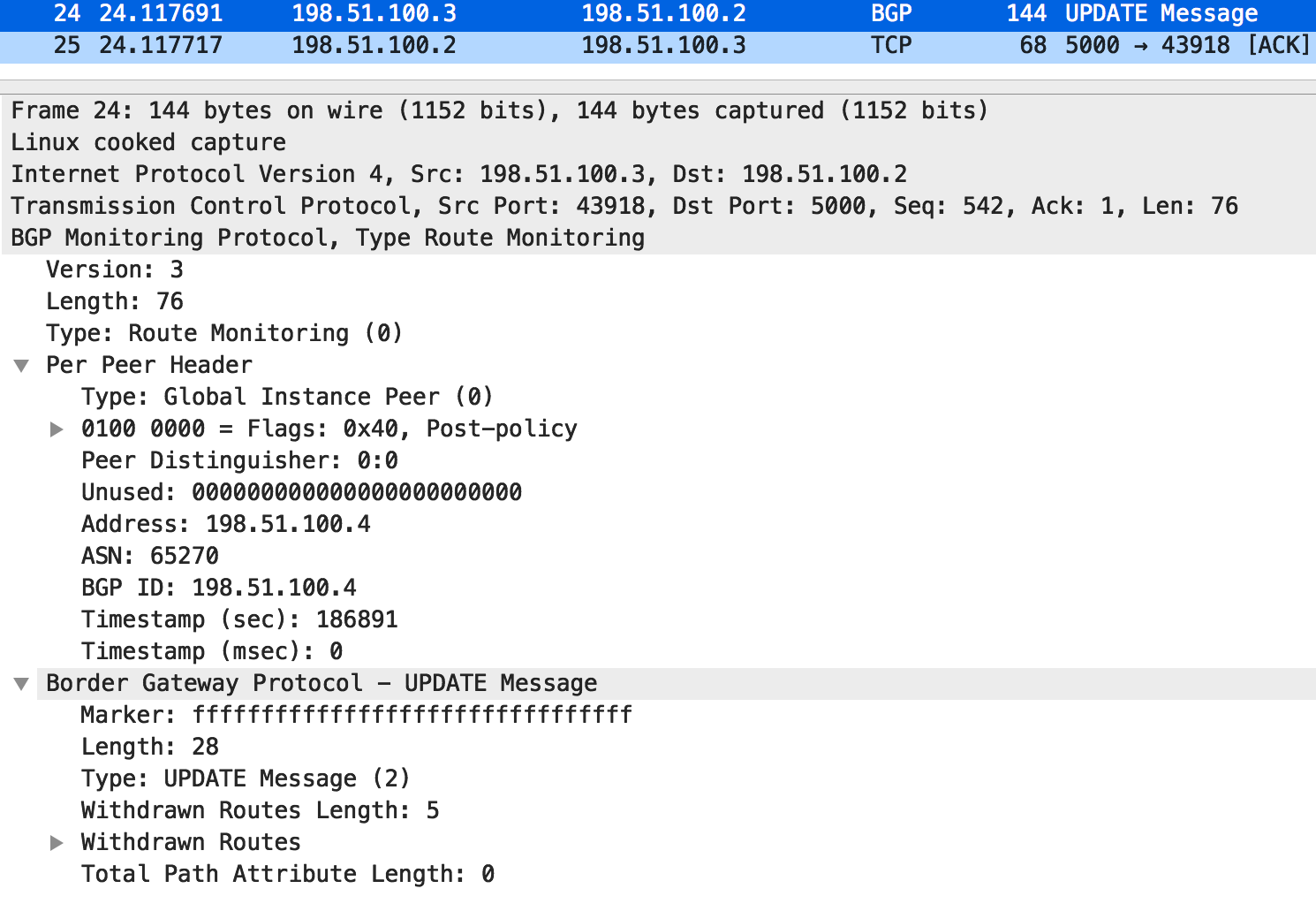
Packet 20) Contains only BGP Updates;
Type “Route Monitoring” message (with UPDATE TLVs) shows the host uptime, not the timestamp! The packet times show that this is not a time difference between the first UP, but that the timestamp just flips to the arbitrary host up time instead of unix time.

Packet 24 - and every subsequent message) Contains only BGP Updates;
Type “Route Monitoring” message (with UPDATE TLVs) shows the host uptime, not the timestamp! The timestamp difference between messages 8, 20 and 24 when compared with the pcap times shows this is host time, also confirmed on host.
(put "x" in "[ ]" if you already tried following)
[x] Did you check if this is a duplicate issue?
[x] Did you test it on the latest FRRouting/frr master branch?
To Reproduce
Steps to reproduce the behavior:
Packet capture any BMP message containing BGP Update.
Expected behavior
BMP packets should implement consistent use of the Timestamp fields, which should contain the unix timestamp.
Screenshots
Included above
Versions
- OS Kernel: Debian 10
- FRR Version 7.3.1 release
Thanks for your work! Love FRR :)
 andylemin
All 3 comments
NB; OpenBMP was used here just for reproducing the issue. Our BMP receiving system relies on the timestamps to measure BGP message propagation latency (timestamp deltas between messages).
andylemin
on 10 Jun 2020
I just noticed that those traces are from 7.2. have just tested again with 7.3.1, and the exact same incorrect timestamp issue persists. Thanks.
andylemin
on 10 Jun 2020
yeah... oops... forgot to convert from monotonic clock to unix :|
 eqvinox
on 10 Jun 2020
eqvinox
on 10 Jun 2020
Related issues
 ne-vlezay80
·
5Comments
ne-vlezay80
·
5Comments
 464d41
·
8Comments
464d41
·
8Comments
 shibumi
·
5Comments
shibumi
·
5Comments
 donaldsharp
·
7Comments
donaldsharp
·
7Comments
 mwinter-osr
·
9Comments
mwinter-osr
·
9Comments
Most helpful comment
yeah... oops... forgot to convert from monotonic clock to unix :|