Frontend: Different/new styling with Markdown (0.117) - messes up UI
Checklist
- [X] I have updated to the latest available Home Assistant version.
- [X] I have cleared the cache of my browser.
- [X] I have tried a different browser to see if it is related to my browser.
The problem
With HA 117 markdown cards are rendered/styled differently. I use card-mod to alter the height of the card which worked excellent. However, there is a new variable with HA 117, a constructed stylesheet. This is set to height: 100% by default and works globally I noticed. This overrides my ha-card styling, which totally messes up my UI. See screenshot below
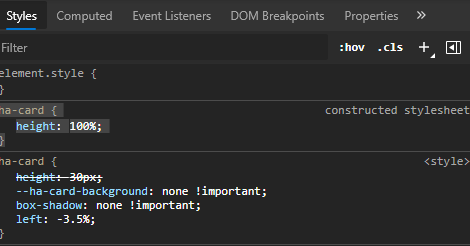
I have multiple markdown cards in a vertical stack underneath each other. They have templates in them for context aware text. Since the cards are way too high, I needed to alter the height with card mod. This is how it normally looked (I edited the borders in for visibility).

I use these styling options for the top markdown card and the bottom one:
Top
  .: |
    ha-card {
      height: 20px;
      --ha-card-background: none !important;
      box-shadow: none !important;
      left: -2.5%;
      width: 100vw;
    }
  ha-markdown:
    $: |
      h1 {
        font-size: 20px;
        font-weight: bold;
        font-family: Helvetica;
        letter-spacing: '-0.01em';
      }
Bottom
  .: |
    ha-card {
      height: 30px;
      --ha-card-background: none !important;
      --primary-text-color: var(--sensor-accent-color);
      box-shadow: none !important;
      left: -1.2%;

    }
  ha-markdown:
    $: |
      h1 {
        font-size: 15px;
        font-weight: thin;
        font-family: Helvetica;
        letter-spacing: '-0.01em';
      }
As you can see in the above screenshot of inspect element, the new constructed stylesheet cancels out the ha-card height I use myself.
Now on HA 117, the cards are back to their default height and mess up my entire UI, see screenshot below (I edited the borders in for visibility):

I tried using !important behind my height styling options with card mod. This does work (kinda) but is very hacky and the UI jumps after a reload. Also I need to alter each and every markdown card which creates a mess. When inspecting the element, I can uncheck the new constructed stylesheet variable and _all_ markdown cards work as before.
Expected behavior
Please revert this decision or at least allow the user to set their own height of the markdown card. There is no need to have such huge cards with markdown text in them. I tried the card_size option I saw in the docs. But this does nothing. The cards remain the same height. I get that I use a custom card to alter how cards work (card mod). But the core markdown card has changed, which the custom cards I use have nothing to do with.
Steps to reproduce
See above
Environment
- Issue on: HA 117.1 was the latest at the time of testing (I don't know if this new
constructed stylesheetwas also present on HA 117 and still is on 117.2) - Was fine on: HA 116.4 (all HA versions prior to HA 117)
- All browsers
- All operating systems
State of relevant entities
Not relevant
Problem-relevant configuration
Not relevant
Javascript errors shown in your browser console/inspector
Not relevant
Additional information
 ASNNetworks
All 12 comments
As reference, this is the PR that introduced that change: https://github.com/home-assistant/frontend/pull/7177
@zsarnett Can you chime in here?
 spacegaier
on 2 Nov 2020
spacegaier
on 2 Nov 2020
Post you yaml please
 zsarnett
on 2 Nov 2020
zsarnett
on 2 Nov 2020
Here is my yaml (I use YAML mode btw):
      - cards:
          - content: |
              # Entertainment
            style:
              .: |
                ha-card {
                  height: 20px;
                  --ha-card-background: none !important;
                  box-shadow: none !important;
                  left: -2.5%;
                  width: 100vw;
                }
              ha-markdown:
                $: |
                  h1 {
                    font-size: 20px;
                    font-weight: bold;
                    font-family: Helvetica;
                    letter-spacing: '-0.01em';
                  }
            type: markdown
          - content: >
              # {% if is_state('sensor.media_on', '0')%} Alle apparaten staan
              uit. {% elif is_state('sensor.media_on', '1')%} Er staat 1
              apparaat aan.  {% else %}  Er staan {{states('sensor.media_on')}}
              apparaten aan.  {% endif%}
            style:
              .: |
                ha-card {
                  height: 30px;
                  --ha-card-background: none !important;
                  box-shadow: none !important;
                  left: -2.2%;

                }
              ha-markdown:
                $: |
                  h1 {
                    font-size: 15px;
                    font-weight: thin;
                    font-family: Helvetica;
                    letter-spacing: '-0.01em';
                  }
            type: markdown
        type: vertical-stack
So in your image. You have a Title Set on the Markdown Card and then the content is the other text, right?
zsarnett
on 2 Nov 2020
No, I have no title set. I have two markdown cards inside a vertical-stack, one with 'Entertainment' as content and one (with smaller font) with templates as content. I do not use the title option, because I use this setup in more places and sometimes the markdown with bigger font does contain a template. Also I have one area where I have 6 markdown cards under eachother, with each templates as content: like below
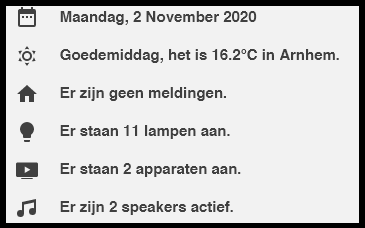
Same setup but then 6 markdown cards with same font sizes. This screenshot above is how it looks on HA 116.4 btw. On HA 117 they have huge gaps (because of the default height).
ASNNetworks
on 2 Nov 2020
Any updates, or solutions as a workaround?
ASNNetworks
on 4 Nov 2020
@zsarnett Hi, do you have any updates or a viable workaround?
I'm not trying to look impatient, but I just want to make sure this get's noticed since others are in the same boat and there hasn't been feedback in 10 days.
ASNNetworks
on 12 Nov 2020
@ASNNetworks If you use height: 30px!important; instead of just height: 30px; it will force the height you set to override the default. It works for me.
 gadgetchnnel
on 20 Nov 2020
gadgetchnnel
on 20 Nov 2020
@ASNNetworks If you use
height: 30px!important;instead of justheight: 30px;it will force the height you set to override the default. It works for me.
Hi, thanks but that's what I already explained. Yes it works, but it's not ideal because first the stylesheet is applied and then the card-mod css. This will result in a quick change between size after each reload of the tab. So you have the default height for a split second and then the css height of card-mod. The UI will jump every time you open a different lovelace view/tab or reload.
@zsarnett Hi Zach, do you have maybe an update or more info if there’s a way for me to revert this myself? Or maybe a PR?
ASNNetworks
on 20 Nov 2020
That should only happen when you reload the page (navigating to another tab and back to that tab doesn't cause it to happen). How often do you do reload the page? I only do it if I've added new custom Lovelace cards to my resources or if I need to reload to resolve issues (following an update, etc.).
gadgetchnnel
on 20 Nov 2020
That should only happen when you reload the page (navigating to another tab and back to that tab doesn't cause it to happen). How often do you do reload the page? I only do it if I've added new custom Lovelace cards to my resources or if I need to reload to resolve issues (following an update, etc.).
I use this setup on mobile with 7 tabs. Each tab is a category of devices or a room. So yes, I change tabs quite often... When closing the app and opening it after a while, all tabs are gone from memory and switchen to each tab reloads again. So sorry, as I mentioned this is not a solution. Not trying to be rude, but I have tried that way before and the reason I opened this ticket is because that solution does not work in practice.
ASNNetworks
on 20 Nov 2020
Just commenting again for visibility and hopefully a response.
ASNNetworks
on 27 Nov 2020
Related issues
![move[bot] picture](https://avatars1.githubusercontent.com/in/6673?v=4&s=40) move[bot]
·
3Comments
move[bot]
·
3Comments
 GauthamVarmaK
·
3Comments
GauthamVarmaK
·
3Comments
 Lopton
·
4Comments
Lopton
·
4Comments
 Depechie
·
3Comments
Depechie
·
3Comments
 casperklein
·
4Comments
casperklein
·
4Comments
Most helpful comment
@zsarnett Hi, do you have any updates or a viable workaround?
I'm not trying to look impatient, but I just want to make sure this get's noticed since others are in the same boat and there hasn't been feedback in 10 days.