Frontend: Jumping panel title + empty space
Checklist
- [X] I have updated to the latest available Home Assistant version.
- [X] I have cleared the cache of my browser.
- [X] I have tried a different browser to see if it is related to my browser.
The problem
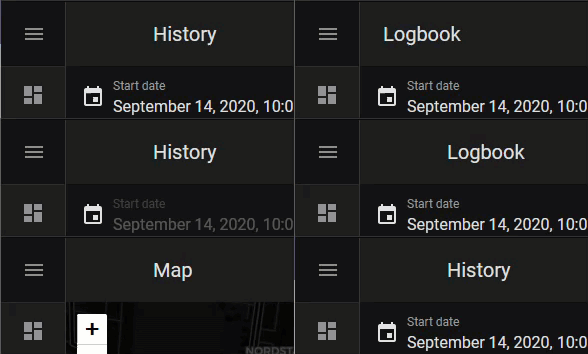
When switching to another panel, the title is jumping to the right since the hidden button space gets added.
Can't we get rid of the hidden empty icon space (<ha-menu-button>), if a separate side bar is shown, since then the drawer / burger icon is hidden anyway but still takes up space (which looks wrong independent of the jumping)? So perhaps some dynamic overlay CSS magic that if the screen is wide enough to display the sidebar, then ha-menu-button allows the title element to overlay it?
Expected behavior
- No jumping title
- No empty space in front of the title (or perhaps show the panel icon from the sidebar again, but I did not see an easy way to get access to the icon code other than hard-coding / duplicating it in the panel code itself which feels wrong)
Steps to reproduce
Environment
- Home Assistant release with the issue: latest dev (0.115)
- Last working Home Assistant release (if known):
- Browser and browser version: FF and Chrome
- Operating system: Win 10
State of relevant entities
Problem-relevant configuration
Javascript errors shown in your browser console/inspector
Additional information
 spacegaier
All 4 comments
@bramkragten This issue still persists even with the merged PR. I still see the jumping titles.
spacegaier
on 15 Oct 2020
I do notice the quick jumping of titles now, my apologies. Though the empty space should no longer be an issue.
 maykar
on 15 Oct 2020
maykar
on 15 Oct 2020
@maykar Yes, the empty space is gone 👍 , only the jumping is left from this issue.
spacegaier
on 15 Oct 2020
Looks like the menu button isn't the cause of the issue here then, I suspect app-header, but will look into it further.
maykar
on 15 Oct 2020
Related issues
 eliseomartelli
·
26Comments
eliseomartelli
·
26Comments
 TheJulianJES
·
28Comments
TheJulianJES
·
28Comments
 andriej
·
64Comments
andriej
·
64Comments
 jer78
·
29Comments
jer78
·
29Comments
 SeLLeRoNe
·
39Comments
SeLLeRoNe
·
39Comments