Frontend: Minor cosmetic issue in hovers within dialogs 0.112
Checklist
- [x] I have updated to the latest available Home Assistant version.
- [x] I have cleared the cache of my browser.
- [x] I have tried a different browser to see if it is related to my browser.
The problem
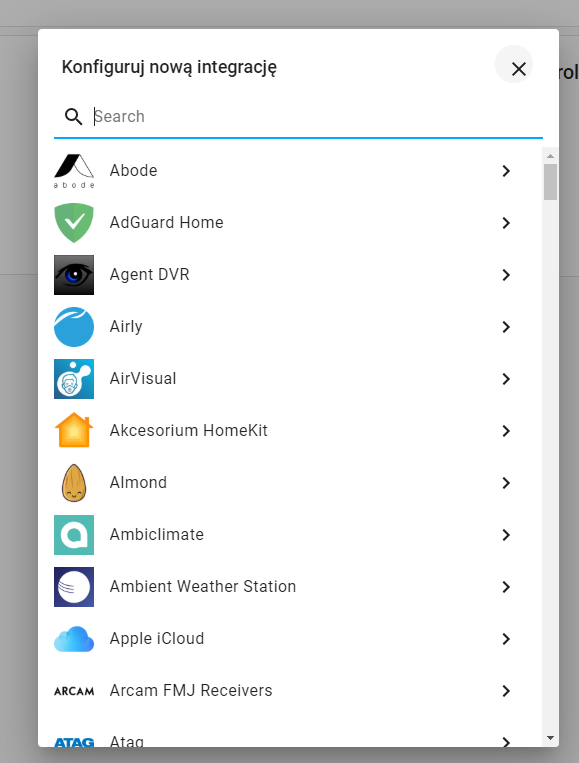
Tiny visual thing I noticed. When dialogs are first loaded, sometimes the close button has a weird hover at first.

It's not just the Users dialog, but others too like the "Lovelace Dashboards" one:

And the documentation icon in Lovelace card editors (screencap from demo):

Additionally the toggles have a similar problem

Might occur in other places, not sure.
Expected behavior
Steps to reproduce
1. Open a dialog (Configuration > Users, or Configuration > Persons, or Configuration > Lovelace Dashboards etc...)
2. Hover over the close button
Environment
- Home Assistant release with the issue: 0.112.0b3
- Last working Home Assistant release (if known):
- Browser and browser version: Chrome stable desktop
- Operating system: macOS
State of relevant entities
Problem-relevant configuration
Javascript errors shown in your browser console/inspector
Additional information
 SeanPM5
All 5 comments
Same with add integration dialog:
 Misiu
on 30 Jun 2020
Misiu
on 30 Jun 2020
Yes, I have noticed it... I think it is an upstream issue in mwc but have to look into it.
 bramkragten
on 30 Jun 2020
bramkragten
on 30 Jun 2020
https://github.com/material-components/material-components-web-components/issues/1054
https://github.com/material-components/material-components-web/issues/5443
bramkragten
on 30 Jun 2020
bramkragten
on 8 Jul 2020
Merged in mwc, waiting for the release now.
bramkragten
on 22 Jul 2020
Related issues
SeanPM5
·
3Comments
SeanPM5
·
4Comments
 wangyt123ng
·
3Comments
wangyt123ng
·
3Comments
 GauthamVarmaK
·
3Comments
GauthamVarmaK
·
3Comments
 infestdead
·
3Comments
infestdead
·
3Comments
Most helpful comment
Merged in mwc, waiting for the release now.