Frontend: Android App Unresponsive after updating to 110.1
Checklist
- [X] I have updated to the latest available Home Assistant version.
- [X] I have cleared the cache of my browser.
- [X] I have tried a different browser to see if it is related to my browser.
The Problem
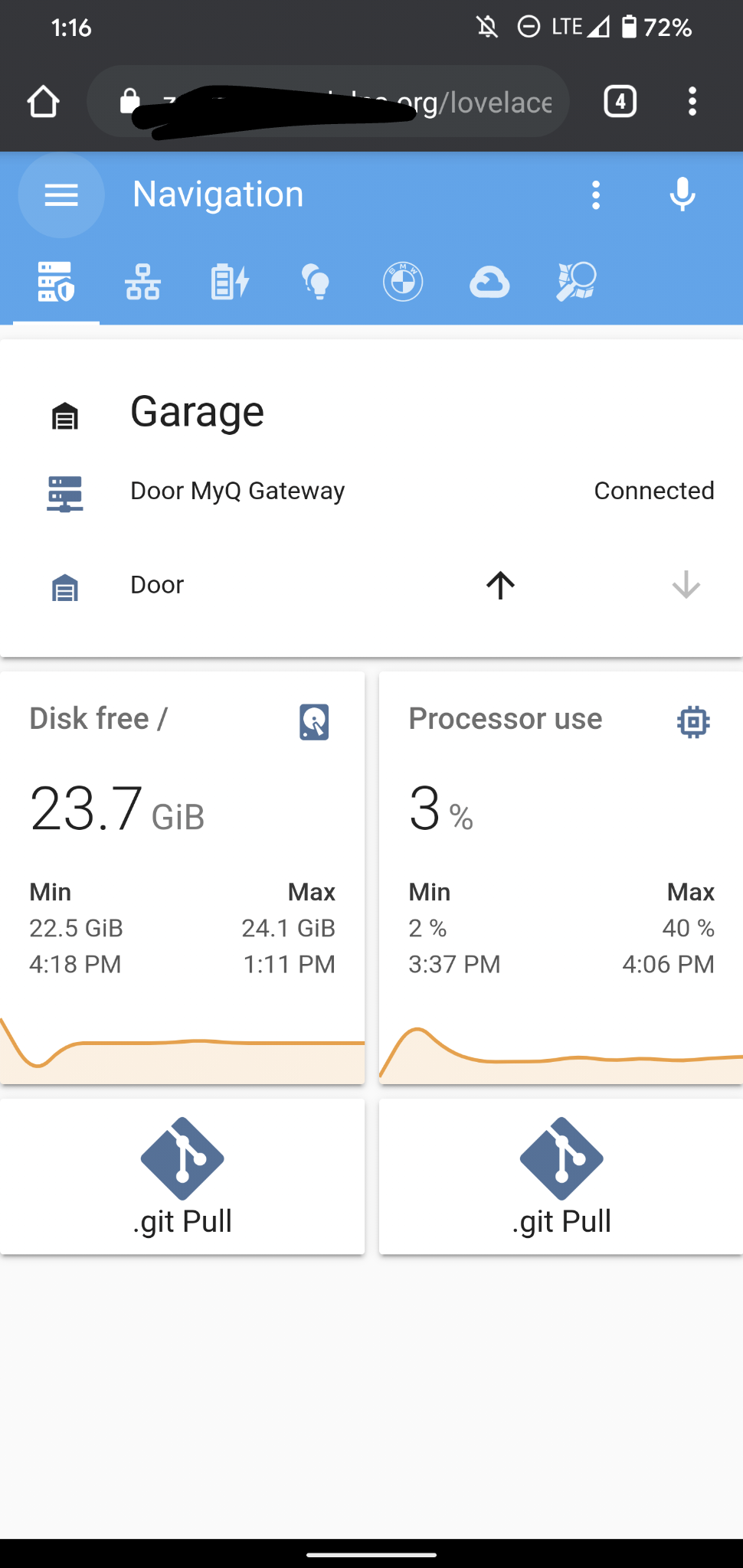
Since the latest update to HA 110.1, my Android App (v1.9.0-167) no longer can use the Navigation Hamburger Menu. I can log in, but I cannot navigate anywhere. Hitting the menu just does nothing. I also have a new Microphone icon that appeared, but I have no clue what it does, as it doesn't respond to any input, either. Browsing on my laptop w/Chrome works just fine, no issues. This is isolated to Android App for me, after I updated HA.
Expected Behavior
Hamburger Menu should pop out with Navigation options.
Steps to Reproduce
- I am not really certain when this began, other than a major 'change' being HA updating.
- There are no Notifications or System Errors displayed that I can see anywhere; logs appear normal. If there is a special log I should look for, please let me know and I will offer.
Troubleshooting Steps
I went into my App settings, cleared cache AND data, which forced me to login; exhibiting the same symptoms.
Edit: Also attempted a complete HA app uninstall and reinstall.
Environment
docker | true
hassio | true
host_os | HassOS 3.13
installation_type | Home Assistant
os_name | Linux
os_version | 4.19.114-v7
python_version | 3.7.7
supervisor | 222
timezone | America/New_York
version | 0.110.1
virtualenv | false
Problem Relevant Configuration
- Home Assistant release with the issue: 110.1
- Last working Home Assistant release (if known): 110.0
- Browser and browser version: N/A
- Operating system: Android v10
State of relevant entities
Not Relevant
Configuration Errors
Unsure if this is related to my configuration, as everything works and displays fine from a web browser. All my cards are great, automations still work.
Javascript Errors
No JS errors as far as I can see
 kyotodesertfox
All 5 comments
Is it just the app or also Chrome on Android?
 bramkragten
on 22 May 2020
bramkragten
on 22 May 2020
So apparently it seems to also be doing this with my Android Chrome browser
too - latest version.
Yet it doesn't happen on desktop browser; which is super strange.
Whether I access externally (https) or internally (http) seems to have no
effect.
As I test with this now, it seems that I have also lost my default user
config (unless it's session / cookie based?).
My theme has reverted to default, and I cannot change it since I cannot get
the Navigation menu to pop out to get to my user profile.
kyotodesertfox
on 22 May 2020
Can you narrow it down to a specific card?
bramkragten
on 22 May 2020
I am not sure that it is a specific card, as they all work (when I view them from my laptop browser); even custom cards.
I may close this issue, as I suspect that I have narrowed it down to something on MY device. Reason why I say that is I had someone else connect on their Android device, and all is well on their end.
So whatever it might be, it may be either tied to my phone, or a configuration specific to my profile; which I will need to spend time diagnosing.
I will leave this issue open for ~24 hours just in case. If I come up with a solution, I will reply with it; but otherwise will close it.
kyotodesertfox
on 22 May 2020
Solution: I noticed that HACS was no longer visible in my menu; then looking at it's Integration, saw that its device was 'Unavailable'. Uh Oh!
I removed, and reinstalled HACS - no idea why it failed / became unavailable - connected back up to Git with a new token, (old one disappeared?) and now all is well.
I am still unsure what happened to it, or what might have caused it to fail. But it seems stable now, after it reinstalled and updated all my custom cards.
kyotodesertfox
on 22 May 2020
Related issues
 emlove
·
30Comments
emlove
·
30Comments
 SeLLeRoNe
·
39Comments
SeLLeRoNe
·
39Comments
 TheJulianJES
·
28Comments
TheJulianJES
·
28Comments
![move[bot] picture](https://avatars1.githubusercontent.com/in/6673?v=4&s=40) move[bot]
·
25Comments
move[bot]
·
25Comments
 mrsnyds
·
42Comments
mrsnyds
·
42Comments