Frontend: input_number: does not show selector between box and slider
Checklist
- [X] I have updated to the latest available Home Assistant version.
- [X] I have cleared the cache of my browser.
- [X] I have tried a different browser to see if it is related to my browser.
The problem
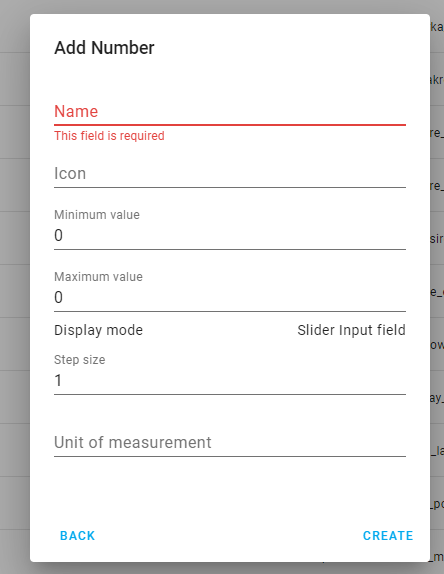
While adding helper input_number there's no possibility to choose between 'box' and 'slider' type of this input, which is available via YAML.
UI only shows names and options for slider.
Expected behavior
Allow to choose and show options for slider only when slider chosen.
Steps to reproduce
UI -> Helpers -> Add input number
Environment
arch | x86_64
-- | --
dev | false
docker | true
hassio | true
os_name | Linux
os_version | 4.19.0-8-amd64
python_version | 3.7.7
timezone | Europe/Warsaw
version | 0.108.3
virtualenv | false
- Home Assistant release with the issue: 0.108.3
- Last working Home Assistant release (if known): n/a
- Browser and browser version: Chrome latest
- Operating system: Windows
Problem-relevant configuration
n/a
Javascript errors shown in your browser console/inspector
none
Additional information
 andriej
All 9 comments
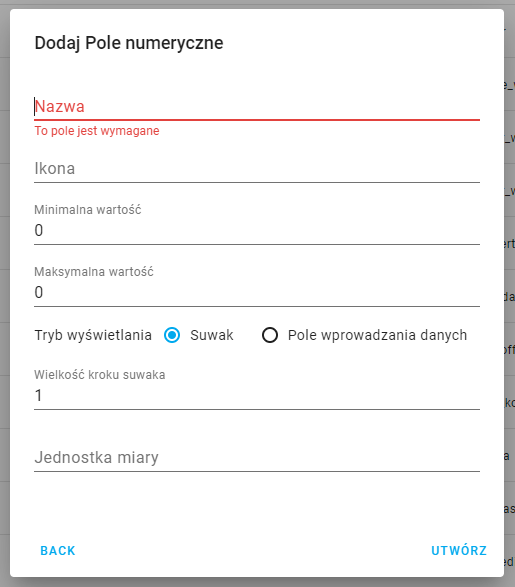
This is supported already and was working in 0.107.7 so it seems this is a fairly recent bug. The line that says "Display mode" is supposed to have radio buttons in front of the "Slider" and "Input field" options, but they are not showing for some reason.
The radio buttons are also missing on other Helpers dialogs too (Text and Date and/or time).
 SeanPM5
on 15 Apr 2020
SeanPM5
on 15 Apr 2020
This _may_ sound strange, but try to go to the "Automation" tab, then to "Helpers", and then try to add one.
 ludeeus
on 15 Apr 2020
ludeeus
on 15 Apr 2020
@ludeeus it is strange, cause it works from this perspective (path)
andriej
on 15 Apr 2020
The workaround doesn't work for the input_boolean
 oncleben31
on 15 Apr 2020
oncleben31
on 15 Apr 2020
input_boolean's does not have "radio" elements (the circles)
ludeeus
on 15 Apr 2020
OK but the field for the setting this type of helpers is not displayed. It seems related. Do you think I should open an other issue ?
oncleben31
on 15 Apr 2020
yes
ludeeus
on 15 Apr 2020
This _may_ sound strange, but try to go to the "Automation" tab, then to "Helpers", and then try to add one.
Oh wow, That did the trick!
 eddriesen
on 20 Apr 2020
eddriesen
on 20 Apr 2020
Don't ask question on old closed issues.
You should load those integrations.
 bramkragten
on 12 Jun 2020
bramkragten
on 12 Jun 2020
Related issues
 jer78
·
29Comments
jer78
·
29Comments
 emlove
·
30Comments
emlove
·
30Comments
![move[bot] picture](https://avatars1.githubusercontent.com/in/6673?v=4&s=40) move[bot]
·
29Comments
move[bot]
·
29Comments
 TheJulianJES
·
28Comments
TheJulianJES
·
28Comments
 mnoorenberghe
·
34Comments
mnoorenberghe
·
34Comments